
⚡ Quick Answer
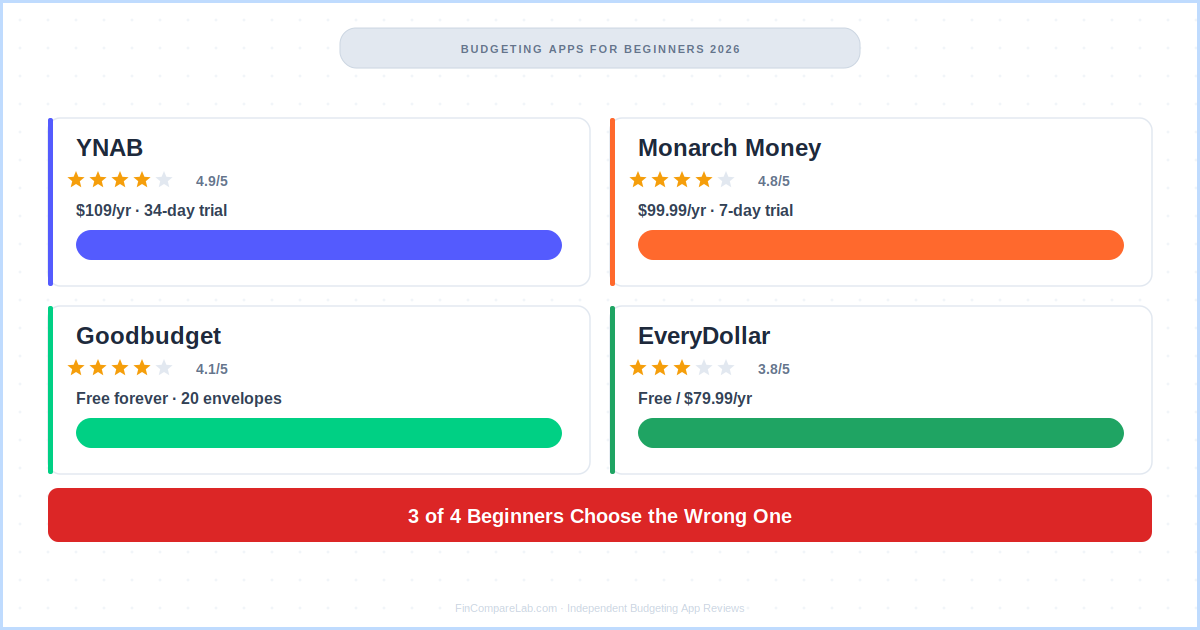
Most beginners default to whichever app they’ve heard of most — usually YNAB or Monarch Money — without checking if it actually matches their situation.
The right pick depends on three things: whether you need free forever, whether you want to change your habits or just see them, and whether you care most about debt payoff or your whole financial picture. Take the three-question guide below to find yours in under two minutes.
📋 What’s in this guide
- Why do most beginners pick the wrong budgeting app?
- What does Reddit actually say about budgeting apps for beginners?
- Which budgeting app is best for beginners?
- What are the key budgeting app requirements for first-timers?
- Is YNAB good for complete beginners?
- Is Goodbudget a good budgeting app for beginners?
- Is Monarch Money worth it for beginners?
- Is EveryDollar a good starting point for debt payoff?
- How do these budgeting tools for beginners compare side by side?
- How do you open a new budgeting app and actually make it stick?
- What do beginners most often ask about budgeting apps?
Here’s what actually works for budgeting apps for beginners, based on official app documentation, App Store and Google Play reviews, and years of Reddit community consensus — and why so many people end up with the wrong one.
Why Do Most Beginners Pick the Wrong Budgeting App?
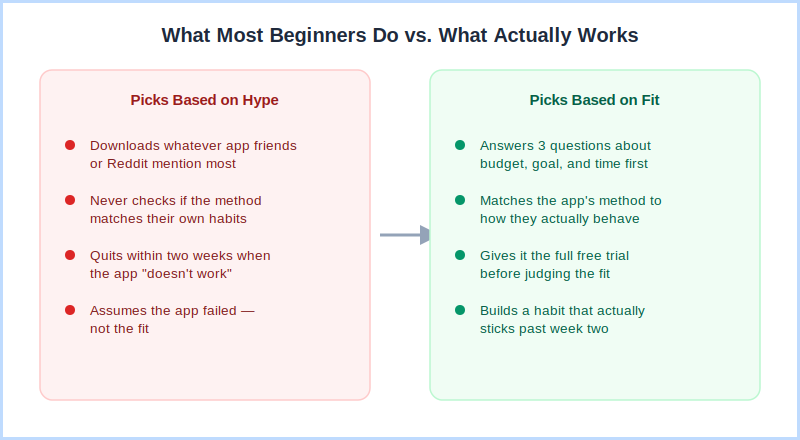
Most beginners pick a budgeting app because it’s the one they’ve heard of most — not because it matches how they actually want to manage money. That mismatch is the single biggest reason someone downloads a budgeting app for beginners, uses it for two weeks, and quietly deletes it.
YNAB gets recommended constantly because it’s genuinely the most effective app for changing spending behavior. But if you just want to see where your money’s going without doing daily work, YNAB’s learning curve can feel like the wrong fit — even though the app itself is excellent.
The reverse happens too: people who need real behavior change pick Monarch Money because the dashboard looks impressive, then wonder six months later why nothing about their actual spending changed.
The pattern repeats with free versus paid. Beginners assume “free” always means “good enough,” when free apps like Goodbudget and EveryDollar actually work brilliantly for manual, hands-on budgeters — but frustrate anyone who wanted automatic bank sync from day one.
That’s the gap the three-question guide below is built to close. Instead of picking whatever’s popular, you’ll land on the budgeting app for beginners that’s actually built for your situation.
What Does Reddit Actually Say About Budgeting Apps for Beginners?
The best budgeting app for beginners, according to years of r/personalfinance and r/ynab threads, is the one you’ll actually open every day — not the one with the most features. Community consensus is surprisingly consistent on this.
Before I break down each app, here’s the raw community sentiment from the subreddits that cover budgeting apps for beginners most actively:
Which Budgeting App Is Best for Beginners?
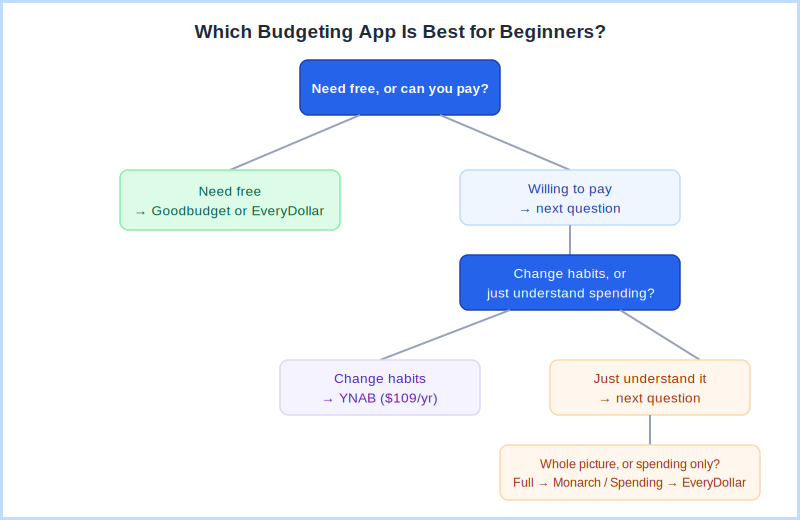
Which budgeting app is best for beginners depends on three things: your budget, your goal, and how much time you’ll realistically commit. Answer these three questions honestly and you’ll have your answer in two minutes.
Question 1 — Do you need completely free, or can you pay?
Question 2 — Do you want to change your spending, or just understand it?
Question 3 — Do you want just your spending, or your whole financial picture?
What Are the Key Budgeting App Requirements for First-Timers?
Among all the budgeting tools for beginners on the market, the budgeting app requirements that actually matter are different from what review sites usually emphasise. Most focus on feature lists. But when you’re just starting out, the only budgeting app requirements that count are these three.
1. Fast setup — under 30 minutes. If connecting your accounts and understanding the interface takes more than half an hour, most people won’t finish. Every app in this guide meets this threshold. YNAB takes longer to learn, but the initial setup is still under 30 minutes.
2. A clear daily action. The best budgeting tools for beginners give you something obvious to do every day — check a number, categorise a transaction, review your envelope balances. Apps without a clear daily action get opened less and less until you forget them entirely.
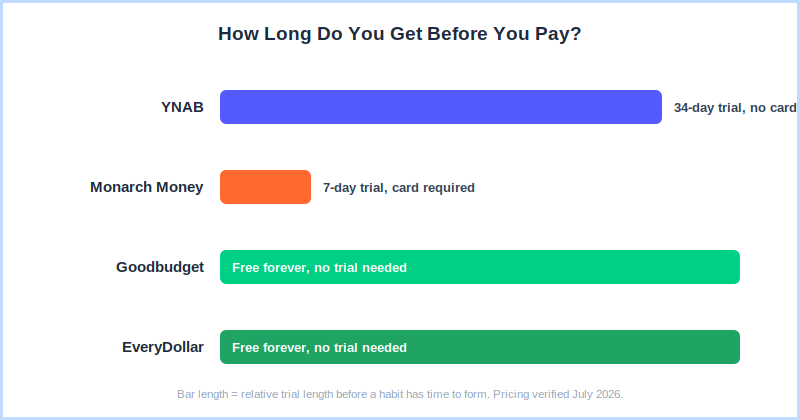
3. A free trial long enough to form a habit. Habits take two to four weeks to form. A 7-day trial (Monarch) is too short to know if an app is working. YNAB’s 34-day trial is the gold standard — it’s specifically designed to get you through the learning curve before you pay.
Is YNAB Good for Complete Beginners?
YNAB is the most effective budgeting app for beginners who are serious about changing their finances — but it is not the simplest to start. Here’s what you actually need to know before deciding.
The method is zero-based budgeting — every dollar you earn gets assigned a job before you spend it. When you get paid, you open YNAB and allocate that money across your spending categories: rent, groceries, fun money, savings goals, debt payments. When a category runs out, it’s gone — unless you deliberately move money from somewhere else.
That deliberate decision is what changes behaviour. It’s different from tracking what you already spent, which most budgeting apps for beginners do. YNAB changes the decision before it happens.
The first week is genuinely confusing. Week two starts to click. By week three, most people have a real sense of their finances for the first time. The 34-day trial is specifically engineered around this timeline — no credit card needed, so there’s no financial risk to finding out for yourself.
What makes YNAB worth it as a budgeting app for beginners?
- 34-day trial with no card required — enough time to get through the learning curve and see real results
- Free live workshops every week — real instructors walk you through setup and the four rules
- Works with irregular income — the method adapts to freelancers, hourly workers, anyone without a fixed paycheck
- Shared access for up to 6 people — couples can budget together on one subscription
- Students get 12 months free — verified at ynab.com/college with a .edu email
What Should Beginners Know Before Signing Up?
- Expect 2–4 weeks before it feels natural — give it the full trial before judging it
- Needs 5–10 minutes a few times a week — not fully passive
- No investment tracking — if you want net worth tracking, pair it with Empower (free)
- $109/year is the most expensive option here — but most users say it pays for itself within the first month
My take: If you’ve tried budgeting before and it didn’t last — YNAB is almost certainly the missing piece. Start the trial on a payday, attend the free new-user workshop, and check in daily for the first two weeks. → Full YNAB review · YNAB pricing breakdown · YNAB for beginners guide
Is Goodbudget a Good Budgeting App for Beginners?
Goodbudget is the best completely free budgeting app for beginners who want no expiry, no credit card, and no upsell pressure — just a working envelope budget forever.
Goodbudget doesn’t connect to your bank. You enter every transaction manually. That sounds like a drawback — and for some people it is — but for many beginners, the act of manually entering a $6 coffee creates an awareness that automatic tracking never achieves. You feel every purchase in a way that changes your behaviour.
The envelope method is simple to understand: allocate money into virtual envelopes at the start of each month. Rent envelope: $1,400. Groceries: $350. Dining out: $150. When an envelope runs out, that category is done until next month — no exceptions unless you deliberately move money from another envelope.
What makes Goodbudget work as a budgeting app for beginners?
- 20 envelopes free — forever — no expiry, no credit card, no prompts to upgrade
- Couples supported on free tier — syncs across two devices, both partners can enter transactions
- No bank credentials shared — good if you’re privacy-conscious about third-party access
- Simple concept — the envelope method is easy to explain and easy to teach a partner
What Should Beginners Know Before Signing Up?
- Manual entry requires daily discipline — if you fall behind for a week, catching up is tedious
- No bank sync on free tier — automatic transaction import requires the $80/yr Premium plan
- Android experience significantly worse than iOS — 3.4 stars vs 4.7 on iOS
My take: Among budgeting apps for beginners, Goodbudget is the right call if free is essential and you’re willing to enter transactions manually. Try it for 30 days. If you keep up with entries, you’ve found your long-term budgeting app for beginners. If you fall behind after two weeks, switch to something with automatic sync. → Full Goodbudget review
Is Monarch Money Worth It for Beginners?
Monarch Money is the best budgeting app for beginners who want to understand their complete financial picture — not just spending, but investments, net worth, and all accounts in one place.
Connect all your accounts — checking, savings, credit cards, investments, loans — and Monarch builds a complete financial dashboard automatically. Spending by category, net worth over time, income trends, savings rate. All synced in real time. For beginners who feel like their money is scattered across five different accounts, Monarch makes the full picture clear in about 20 minutes.
It was the top Mint replacement recommendation on Reddit when Mint shut down in 2024 — and for good reason. The layout is familiar, the setup is fast, and the shared access for couples is genuinely useful, with both partners included under one subscription.
What makes Monarch work for beginners?
- Full picture in one dashboard — bank, credit cards, investments, net worth all connected
- 20-minute setup — no method to learn, intuitive from day one
- Best budgeting app for couples who are new to budgeting together — real-time shared access, both partners included in one plan
- WELCOME discount code available — 30% off the first year of Core annual, confirmed directly on Monarch’s own promo page
What Should Beginners Know Before Signing Up?
- Only a 7-day trial — start on a weekend when you have time to evaluate it properly, and note the trial now requires a payment method upfront
- Shows what you spent, doesn’t prevent overspending — more analytics than active budget enforcement
- No free tier after the trial ends
My take: If you came from Mint, or if seeing everything in one clean dashboard is what will make budgeting feel manageable — Monarch is the right budgeting app for beginners with that priority. → Full Monarch Money review · Monarch Money pricing · Monarch Money discount codes
Is EveryDollar a Good Starting Point for Debt Payoff?
EveryDollar is the best budgeting app for beginners who are specifically following the Dave Ramsey Baby Steps framework — or who want to start tackling debt with zero-based budgeting and a structured snowball plan.
Pricing and features here are verified directly from Ramsey Solutions’ own EveryDollar page.
The free tier gives you a working zero-based budget with no expiry and no credit card required — the simplest way to try zero-based budgeting as a beginner without committing to anything. Recent updates added a debt-free date calculator, daily lessons, and live group coaching sessions on Premium.
The debt snowball calculator — where you list debts from smallest to largest balance and it shows exactly when you’ll be debt-free if you add extra payments — is genuinely motivating. Watching that date move earlier as you pay more is the kind of feedback that keeps beginners engaged.
What Should Beginners Know About EveryDollar?
- Free forever with manual entry — the lowest-friction entry point on this list
- Debt snowball built in — calculates your debt-free date, updates with every payment
- Debit card required for Premium — Ramsey Solutions doesn’t accept credit cards for subscription
- Apple Card cannot be linked, Amex connections frequently break — important if those are your main accounts
- Best fit if you follow Ramsey — less suited as a general budgeting app for beginners without that framework
My take: If you’re new to budgeting and carrying debt and open to the Ramsey approach — start with EveryDollar’s free tier. It’s the most coherent system for that specific situation. → Full EveryDollar review · EveryDollar vs YNAB · EveryDollar pricing guide
How Do These Budgeting Tools for Beginners Compare Side by Side?
Here’s how the four main budgeting tools for beginners stack up across the metrics that actually matter when you’re just starting out. If you’re still weighing which budgeting app is best for beginners at a glance, this table lays out the trade-offs side by side.
| YNAB | Monarch Money | Goodbudget | EveryDollar | |
|---|---|---|---|---|
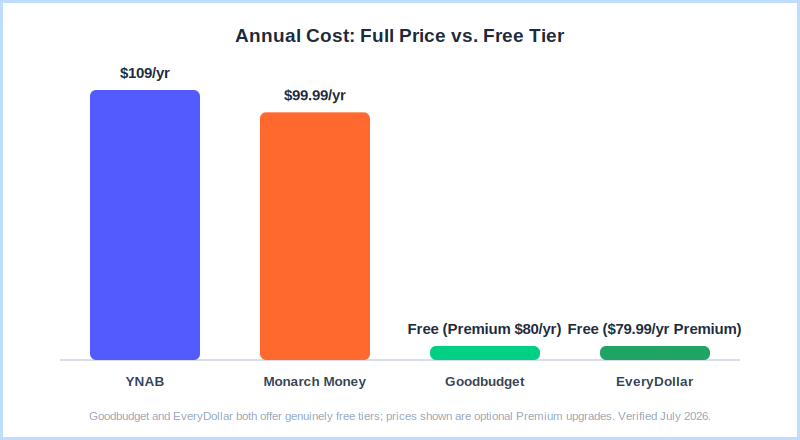
| Annual price | $109/yr | $99.99/yr | $80/yr or free | $79.99/yr or free |
| Free tier | 34-day trial (no card) | 7-day trial (card required) | ✅ Forever | ✅ Forever |
| Setup time | 30 min setup, 2–4 weeks to learn | 20 min, ready immediately | 30 min | 15 min |
| Bank sync | ✅ All plans | ✅ All plans | Premium only ($80/yr) | Premium only ($79.99/yr) |
| Investment tracking | ❌ | ✅ Best | ❌ | ❌ |
| Debt payoff tools | ✅ Best (avalanche + snowball) | ❌ | ✅ Basic | ✅ Snowball + date calculator |
| Couples | ✅ Up to 6 people | ✅ Best — real-time sync | ✅ Free (2 devices) | ✅ |
| Best for beginners | Habit change | Full financial picture | Free forever | Debt payoff / Ramsey |
Pricing verified from official websites — July 2026.
How Do You Open a New Budgeting App and Actually Make It Stick?
Knowing how to open a new budgeting app is only half the challenge — the bigger question is how to make the habit stick past the first two weeks, which is where most beginners drop off.
When you open a new budgeting app for the first time, do three things before you close it again: connect at least one bank account, set up at least three spending categories, and check back in within 24 hours. Those three steps are what separate people who stick with a budgeting app from people who sign up and forget it.
The two-week rule: Most people who open a new budgeting app and fail quit before the habit forms. Commit to 14 days of daily check-ins — even if that’s just opening the app for two minutes. After two weeks, the friction drops significantly and the habit usually sticks on its own.
If you’re carrying debt, use my free Debt Payoff Estimator alongside any budgeting app — it shows exactly when you’ll be debt-free and how much you’ll save by adding extra payments each month. And if you’re not sure which direction to grow from here, the YNAB for beginners guide walks through the four rules step by step, even if you haven’t signed up yet.
What are the budgeting app requirements to open a new budgeting app successfully?
The practical budgeting app requirements to have ready before you start: your bank login credentials for apps that use bank sync, a rough sense of your monthly income and fixed expenses like rent, utilities, and subscriptions, and about 20–30 minutes of uninterrupted time for the initial setup.
That’s it. You don’t need a spreadsheet, a financial plan, or any prior budgeting experience. The budgeting app for beginners you pick will walk you through the rest.
What Do Beginners Most Often Ask About Budgeting Apps?
Here are the questions I get asked most often about budgeting apps for beginners, answered directly — including the one I hear constantly: which budgeting app is best for beginners in a very specific situation, like irregular income or a shared household.
Which budgeting app is best for beginners with no budgeting experience?
The best budgeting app for beginners with zero experience is YNAB — it teaches a method alongside the app, provides free weekly workshops, and its 34-day trial with no credit card required gives enough time to actually learn it. If you want something with no learning curve at all, Monarch Money is ready in 20 minutes with nothing to configure.
- No experience, want to learn a method → YNAB (34-day free trial)
- No experience, want instant overview → Monarch Money (7-day trial)
- No experience, need free forever → Goodbudget (20 envelopes, no expiry)
What budgeting app requirements do I need before I can open a new budgeting app?
The minimum budgeting app requirements to open a new budgeting app are a smartphone, either iOS or Android, your bank login credentials for apps with automatic sync, and 20–30 minutes for initial setup. Apps that use manual entry, like Goodbudget and EveryDollar’s free tier, need no bank credentials at all — just your phone and a rough idea of your monthly income and fixed expenses.
- Apps needing bank login: YNAB, Monarch Money
- Apps with no bank login required: Goodbudget (free), EveryDollar (free)
- Setup time: 15–30 minutes for any app on this list
Are budgeting tools for beginners worth paying for?
Budgeting tools for beginners are worth paying for if the free tier doesn’t give you what you need. Both Goodbudget and EveryDollar have free tiers that work for manual budgeting. YNAB’s 34-day trial is free with no card, giving beginners the full experience before committing $109/year.
Most YNAB users report saving more than the annual cost within the first month — the real question is whether you’ll engage with the method seriously enough to get those results.
Why do so many beginners end up with the wrong budgeting app?
Most beginners end up with the wrong budgeting app because they pick based on what’s popular or most recommended, rather than matching the app to how they actually want to manage money. Someone who wants a passive dashboard ends up with YNAB’s active, hands-on method and quits within weeks; someone who needs real behavior change picks Monarch’s dashboard and never actually changes anything.
Answering the three-question guide above before downloading anything is the simplest way to avoid this.
📚 Read Next
- YNAB Review 2026 — Full Hands-On Test
- Monarch Money Review 2026 — Full Hands-On Test
- Goodbudget Review 2026 — Full Hands-On Test
- EveryDollar Review 2026 — Full Hands-On Test
- YNAB Pricing 2026 — Every Plan Explained
- YNAB for Beginners — Step-by-Step Setup Guide
- YNAB for Students — Free for 12 Months?
- Best Free Budgeting Apps 2026
- Best Budgeting Apps for Couples 2026
- Best Budgeting Apps for Debt Payoff 2026
- Free Debt Payoff Estimator
- How to Budget on Irregular Income 2026
