
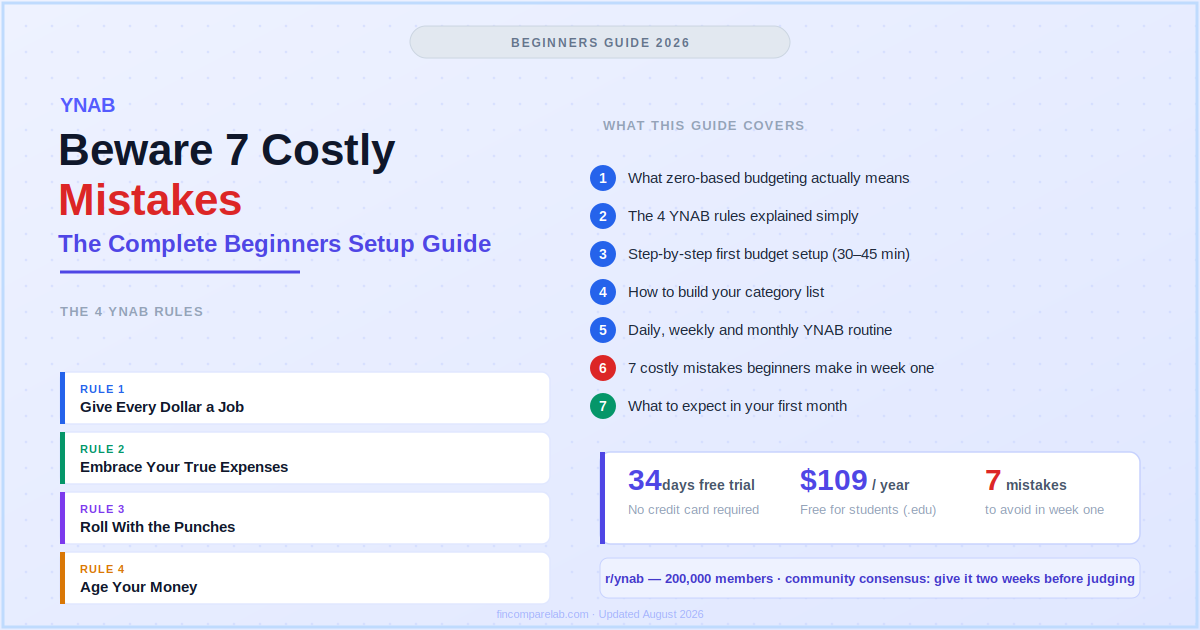
YNAB for beginners means learning one core habit — assigning every dollar a job before you spend it. This YNAB for beginners guide walks through the method, the YNAB 4 rules, a full YNAB setup guide, and the mistakes that trip up week one.
If you’re still asking what does YNAB stand for, or you just want a plain-English YNAB tutorial from your first login to your first full month, this guide covers both.
⚡ What this guide covers
YNAB uses a method called zero-based budgeting — you assign every dollar you earn to a category before spending it. This guide explains the method, YNAB’s four rules, how to set up your first budget, and the mistakes that trip up most beginners.
Time to read: 12 minutes · Time to set up your first YNAB budget: 30–45 minutes
YNAB has a reputation for being complicated. It isn’t — but it is different. It asks you to think about money in a way most people never have, which feels unfamiliar for the first week or two.
This guide cuts through that. By the end, you’ll understand exactly how the method works, how to set up your first budget, and what to do when things go wrong (they will, and that’s fine).
📋 What’s in this guide
- Why does zero-based budgeting matter for YNAB for beginners?
- What are the YNAB 4 rules?
- How does this YNAB setup guide get you started?
- How do you build your category list?
- How to use YNAB day to day?
- What mistakes do YNAB beginners make most often?
- What should you expect in your first month?
- What does Reddit say about YNAB for beginners?
- What do YNAB beginners ask most?
Why Does Zero-Based Budgeting Matter for YNAB for Beginners?
For this YNAB for beginners guide, zero-based budgeting means giving every dollar a destination before you spend it — income minus all allocations equals zero. That doesn’t mean spending everything you earn. It means no dollar sits unassigned. When you overspend one category, you move money from another to cover it.
Most people budget reactively. They spend through the month, check their bank balance occasionally, and review the damage at the end. Zero-based budgeting flips this completely. If you’re still working out what does YNAB stand for at this point, that’s normal — most people learn the acronym after they’ve already started using the method, not before.
Here’s a basic example of what a fully assigned budget looks like:
Monthly take-home income: $4,000
| Rent | $1,200 |
| Groceries | $400 |
| Transport | $200 |
| Utilities | $150 |
| Emergency fund | $300 |
| Dining out | $150 |
| Entertainment | $100 |
| Clothing | $100 |
| Car maintenance (sinking fund) | $50 |
| Holiday fund | $100 |
| Subscriptions | $50 |
| Debt payment | $200 |
| Miscellaneous | $1,000 |
| Total assigned | $4,000 |
| Remaining to assign | $0 ✓ |
Important: Zero doesn’t mean your bank account hits $0. It means $0 is left unassigned. Your savings categories count as assigned dollars — they’re doing a job.
What Are the YNAB 4 Rules?
The YNAB 4 rules are what everything in the app is built around. Learn these and the rest clicks into place — most beginners find the method starts making sense around week two once these rules become habit, and once setting up YNAB feels routine rather than new. This is also the point where a lot of YNAB for beginners content stops being confusing and starts being useful.
How Does This YNAB Setup Guide Get You Started?
Follow this YNAB setup guide in order. Don’t try to make it perfect — a working budget beats a perfect one you haven’t built yet. Most people complete this in 30–45 minutes. Think of the seven steps below as a hands-on YNAB tutorial rather than a checklist to rush through.
Step 1: What’s the First Step to Start Your Free YNAB Trial?
Go to ynab.com and start the 34-day free trial. No credit card needed. Download the mobile app too. Students with a .edu email get a full free year at ynab.com/college — skip the trial and go straight there if you’re eligible.
Step 2: How Do You Connect Your Accounts (or Enter Transactions Manually)?
YNAB connects to most US banks via direct import. Go to Accounts → Add Account and link your checking account, savings account, and any credit cards you use regularly. If you prefer not to link your bank, manual entry works just as well — many users prefer it because typing in each purchase increases spending awareness.
Pro tip: Start on payday — not on the 1st of the month. Budget from your actual current balance. Don’t try to reconstruct last month.
Start fresh from what you have right now. Setting up YNAB this way, from your real balance instead of a calendar date, is what most experienced users recommend.
Step 3: What Is Your “Ready to Assign” Balance?
After connecting your accounts, YNAB shows a “Ready to Assign” number at the top of your budget — this is the total money available across all your accounts. Before dividing this into spending categories, move out anything already spoken for: your current credit card balance (into its payment category) and any savings you’re not touching this month. What’s left is what you actually have to assign.
Step 4: How Do You Set Up Your Budget Categories?
YNAB gives you default categories to start. Keep what’s relevant, delete what isn’t, and add anything that’s missing from your actual life. Setting up YNAB categories that mirror your actual spending — not a generic template — is what makes the rest of this stick. See the full category guide in the next section.
Step 5: How Do You Assign Money to Every Category?
Work through each category and type in how much you want to allocate. Start with the non-negotiables: rent, utilities, minimum debt payments, groceries.
Then work through the rest until your “Ready to Assign” hits $0. If you don’t have enough to fill every category this month, prioritise essentials first. Don’t assign money you haven’t received yet.
Step 6: How Do You Record or Import Transactions as You Spend?
Every purchase needs to be entered in YNAB and matched to a category. If you have bank sync on, transactions import automatically and you approve and categorise them. If you’re doing manual entry, add each transaction when it happens or at the end of each day.
Step 7: What Do You Do When a Category Runs Low?
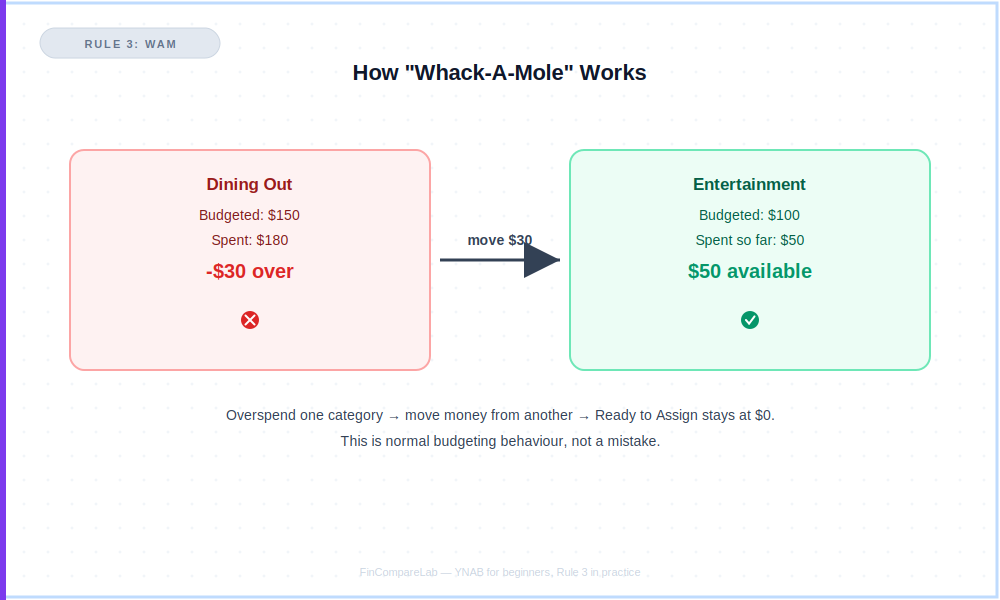
When a category is getting close to empty mid-month, you have two options: stop spending in that category, or move money from a less urgent category to cover it. Both are valid — this is the WAM habit from Rule 3 in practice. The key is that the movement is intentional — not invisible. That’s really the whole YNAB tutorial in miniature: assign, spend, adjust, repeat.
How Do You Build Your Category List?
The next step in this YNAB setup guide is your category list — it should reflect your real life, not a generic template. This is one area where YNAB for beginners tend to overthink things, so keep it simple to start.
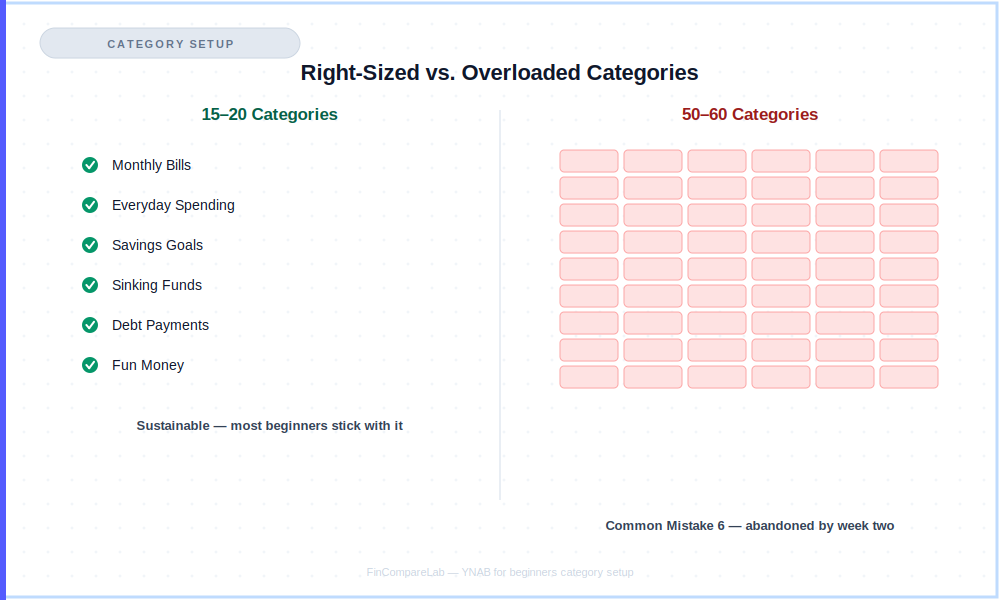
Here’s a solid starting structure. Delete what doesn’t apply and add what does. Start with 15–20 categories maximum — too many in month one creates confusion without adding value.
This is the single most common setup mistake: beginners who start with 50 or 60 categories tend to abandon the system by week two because tracking becomes a chore instead of a habit. Knowing how to use YNAB’s category groups well from the start prevents most of this.
| Category Group | Example Categories Inside |
|---|---|
| Monthly Bills | Rent/mortgage, electricity, water, internet, phone, insurance |
| Everyday Spending | Groceries, dining out, coffee, transport/fuel, personal care |
| Savings Goals | Emergency fund, holiday, house deposit, new car |
| Sinking Funds | Car maintenance, medical, home repairs, annual subscriptions, gifts |
| Debt Payments | Credit card minimum, student loan, personal loan, car loan |
| Fun Money | Entertainment, hobbies, clothing, subscriptions (Netflix, Spotify) |
Two category rules that matter:
1. Include fun money. If you assign $0 to fun, the budget feels like a punishment and you’ll abandon it within two weeks. Give yourself a realistic fun allocation and don’t feel guilty spending it.
2. Don’t over-complicate it early. Start with 15–20 categories maximum. Add more later once you know which categories you actually need.
For debt payoff categories specifically — if you’re using YNAB to pay off credit cards or loans, see the debt payoff guide for how to structure those categories alongside the rest of your budget, or run the numbers first with the debt payoff estimator.
How to Use YNAB Day to Day?
The setup is a one-time event, but for YNAB for beginners the daily habit is what actually makes the method work — this is the part most YNAB tutorial content skips over. Here’s the simple routine that works for most YNAB users:
What Does the Daily YNAB Routine Look Like (2–5 Minutes)?
- Open YNAB and check if any transactions have imported
- Approve and categorise any new transactions
- Glance at your category balances — are any running low?
What Does the Weekly YNAB Routine Look Like (10–15 Minutes)?
- Reconcile your accounts — match your YNAB balance to your actual bank balance
- Move money between categories if needed (this is the WAM habit — see Rule 3)
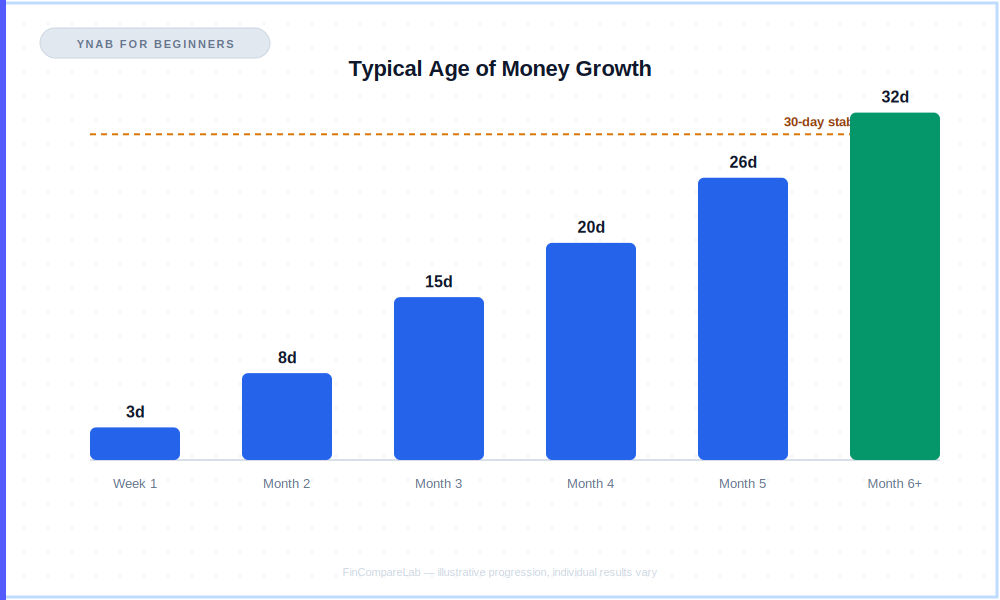
- Check your “Age of Money” to see if it’s trending upward
What Does the Monthly YNAB Routine Look Like (20–30 Minutes)?
- At the start of each month, allocate your new income to categories
- Review which categories consistently ran over or under last month
- Adjust your allocations for next month based on what you learned
- Check progress on your savings goals
The most important habit: Check YNAB before discretionary purchases, not after. “Do I have budget for this?” is the question that changes behaviour. The answer is right there in your category balance. Once this becomes automatic, you’ve genuinely learned how to use YNAB — the rest is just maintenance.
What Mistakes Do YNAB Beginners Make Most Often?
Most YNAB for beginners run into the same handful of mistakes in their first few weeks — often right around the point they think they’ve finally learned how to use YNAB properly — and every one of them is fixable once you know to watch for it.
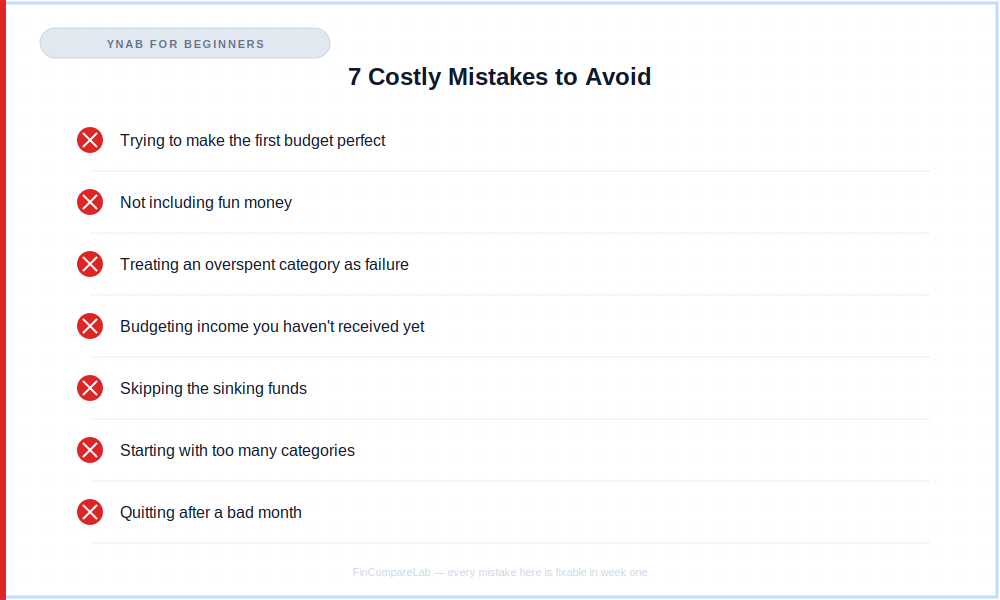
Mistake 1: Why Shouldn’t You Try to Make Your First Budget Perfect?
Your first budget will be wrong. That’s normal. You’ll underestimate groceries, forget a subscription, and leave out something obvious. Don’t wait until you have perfect numbers.
Build it with your best guesses and adjust as you go. A rough budget you use beats a perfect one you never finish — and setting up YNAB perfectly on day one was never really the goal.
Mistake 2: Why Is Skipping Fun Money a Mistake?
Budgets that have no room for enjoyment get abandoned. Allocate a real amount to entertainment, dining, hobbies, or whatever you actually spend money on for pleasure. The goal isn’t zero spending on fun — it’s intentional spending on fun.
Mistake 3: Why Isn’t an Overspent Category a Failure?
Moving money between categories isn’t cheating — it’s WAM, and it’s the system working as designed. Rule 3 exists because life doesn’t fit into perfect monthly boxes. When you overspend in one category and consciously move money from another to cover it, you’re making a decision — not breaking the budget.
Mistake 4: Why Shouldn’t You Budget Income You Haven’t Received Yet?
Only assign money that is already in your account. If you expect to be paid Friday, don’t assign that money Monday. This is especially important for freelancers and anyone with variable income — see the irregular income budgeting guide for how to handle this specifically.
Mistake 5: Why Shouldn’t You Skip Sinking Funds?
Most budget disasters come from irregular expenses — car repairs, medical bills, annual subscriptions, holiday travel — that weren’t planned for. Setting aside even $20–$50/month per sinking fund category transforms what used to feel like emergencies into routine expenses you were already prepared for.
Mistake 6: Why Is Starting With Too Many Categories a Mistake?
Beginners often try to account for every possible expense on day one and end up with 50 or 60 categories. It becomes unmanageable by week two, and the app starts to feel like a chore instead of a habit. Start with 15–20 categories maximum and add more only once real spending shows you a gap.
Mistake 7: Why Shouldn’t You Quit After a Bad Month?
Almost everyone has a month where the budget falls apart. That’s not a reason to quit. Reset at the start of the next month, adjust your categories based on what you learned, and keep going. The budget improves with every single month you use it.
What Should You Expect in Your First Month?
Setting up YNAB is a one-time task, but the first month is where the daily habit actually forms. Here’s an honest week-by-week picture of what YNAB for beginners typically experience:
| Week | What typically happens |
|---|---|
| Week 1 | Confusing. The interface makes sense but the method feels unfamiliar. You’ll probably move money between categories multiple times (WAM). That’s fine — it’s how you learn what your real spending patterns are. |
| Week 2 | Starts clicking. You’re checking balances before spending. You catch yourself about to overspend a category and make a different choice. This is the first real signal it’s working. |
| Week 3 | More comfortable. Daily check-ins take 2–3 minutes. You start seeing patterns — the categories that always run over, the ones that always have money left. This is the data you need to improve next month’s budget. |
| Week 4 | End-of-month review. Most people find two or three categories that need adjusting for next month, and one or two expenses they’d completely forgotten to plan for. Write them down and use them to improve month two. |
Real talk: By month three, budget setup takes 20 minutes instead of 45. By month six, most people can’t imagine managing money any other way. The payoff is real — but you have to get through the first two weeks of unfamiliarity to reach it.
What Does Reddit Say About YNAB for Beginners?
r/ynab has nearly 200,000 members and is one of the most active personal finance communities on Reddit. The beginner experience comes up constantly — including regular threads from people who joined without ever looking up what does YNAB stand for — and a few patterns show up so often across threads that they’re worth taking seriously.
The advice repeated most to new users is to attend one of YNAB’s free live workshops in the first day or two. They run daily, cover the four rules and setup, and regular commenters say it cuts the early confusion noticeably compared to figuring the app out alone.
The second pattern is almost a running joke in beginner threads: someone posts in week one saying the method doesn’t make sense, and the standard reply is to give it until week two before judging. People who come back to update their post afterward consistently say week two felt different — the four rules stop being abstract and start being habit.
Credit card handling is the single most cited source of early confusion. Because YNAB treats a card swipe as moving money into a payment category rather than subtracting it from your budget directly, it doesn’t behave the way most people expect coming from a debit-card mindset.
The community’s advice is consistent: don’t try to reason it out in the abstract, just follow the mechanical steps for a full billing cycle and it clicks. Learning how to use YNAB with credit cards this way is, by most accounts, the single biggest unlock for new users.
Longtime users also use their own shorthand for the habits above — “WAM” (Whack-A-Mole) for shuffling money between categories, and paying yourself “two buffer paychecks” a year if you’re on a biweekly schedule. Both are covered in the rules and setup sections above, and both come up often enough in r/ynab threads that they’re worth knowing before you start, so unfamiliar terms don’t slow you down in your first week.
On results: threads about paying off debt or finally breaking a paycheck-to-paycheck cycle show up regularly in r/ynab, and they tend to credit the method — the daily habit of assigning and re-assigning dollars — rather than any single feature of the app.
The common thread isn’t that these users found YNAB easy to learn. It’s that they kept using it through the confusing first two weeks. If you came to this YNAB tutorial straight from a Reddit thread, that pattern — stick with it past week two — is the single most repeated piece of advice you’ll find.
If you’re weighing YNAB against a more passive, auto-tracking option, the best budgeting apps for beginners roundup and the YNAB vs Monarch Money comparison both cover how the hands-on approach compares to hands-off alternatives.
What Do YNAB Beginners Ask Most?
These are the questions YNAB for beginners ask most often once they’ve read through this YNAB setup guide and this YNAB tutorial and started their first budget.
What Does YNAB Stand For?
YNAB stands for “You Need A Budget,” the name of both the company and the method. It’s built around zero-based budgeting — giving every dollar you earn a job before you spend it, rather than tracking spending after the fact.
Is This a Full YNAB Tutorial for Beginners?
Yes. This YNAB for beginners guide works as a complete tutorial — it covers the four rules, a full setup walkthrough, how to build your category list, the daily and weekly habits, and the mistakes to watch for in your first month.
How long does it take to learn YNAB as a beginner?
Most beginners feel uncomfortable for the first week and comfortable by week two or three. Attending one of YNAB’s free live workshops on day one cuts the learning curve significantly — they run daily and cover everything you need to start. Give it two full weeks before judging whether it works for you.
What are the YNAB 4 rules?
Rule 1 — Give every dollar a job (assign all your money to categories before spending). Rule 2 — Embrace your true expenses (plan for irregular costs by saving a little each month).
Rule 3 — Roll with the punches (adjust your budget when life changes — move money, no guilt). Rule 4 — Age your money (work toward spending money you earned weeks or months ago, not the same day you earn it).
What’s the Fastest Way to Start Setting Up YNAB?
Start the 34-day free trial at ynab.com, connect or manually add your accounts, and assign money to your top 15–20 categories until “Ready to Assign” hits $0. Most people finish this first pass in 30–45 minutes — see the full setup guide above for the step-by-step walkthrough.
Do I need to connect my bank account to use YNAB?
No. You can use YNAB with manual transaction entry if you prefer. Many users find manually entering transactions increases spending awareness. Bank sync is convenient and works with most major US banks — but the method works either way.
What if I get paid irregularly or have variable income?
YNAB’s method is actually better for variable income than most budgeting approaches. The rule is simple: only assign money already in your account. If you received $2,000 this week, assign $2,000.
When more comes in, assign that too. You never budget money you haven’t earned yet. See the irregular income budgeting guide for the full three-account system that works alongside YNAB.
What should my categories be in month one?
Start with YNAB’s defaults and customise from there. Must-haves: all fixed monthly bills, groceries, transport, a savings goal of some kind, and a fun money category. Start with 15–20 categories maximum — too many in month one creates confusion without adding value.
What does WAM mean in YNAB?
WAM stands for “Whack-A-Mole” — community shorthand for moving money between categories when one runs low and another has room. It’s the everyday version of Rule 3, Roll With the Punches, and it’s considered normal budgeting behaviour, not a mistake.
Is YNAB worth it for someone with very little money?
Yes — arguably more so than for someone with plenty of financial breathing room. When money is tight, knowing exactly where every dollar is going isn’t optional. The 34-day free trial with no credit card required means you can verify this yourself before spending anything. Students with a .edu email get a full free year at ynab.com/college.
Is this guide suitable for complete YNAB for beginners?
Yes. This YNAB for beginners guide assumes no prior budgeting experience. Follow the YNAB setup guide steps in order, keep your first category list to 15–20 items, and give yourself two full weeks before judging whether the method works for you.
How much does YNAB cost?
YNAB costs $109/year or $14.99/month. The 34-day free trial requires no credit card. Students get a free year with a .edu email. See the YNAB pricing guide for the full breakdown including the student offer and App Store pricing trap to avoid, or run your own numbers with the YNAB ROI calculator.
What Is the Fastest Way to Get Started With YNAB?
Zero-based budgeting means every dollar gets assigned a destination before you spend it. YNAB is the app built around that method. The YNAB 4 rules — give every dollar a job, plan for irregular expenses, move money when plans change, and spend older money — give you the framework.
The daily two-minute habit gives you the results. Setting up YNAB correctly once is what makes that daily habit sustainable instead of a chore.
That’s the fastest path through this YNAB for beginners guide: the first week is the hardest, and after that it gets easier every month. Once you know how to use YNAB without thinking about it, the daily habit takes minutes, not effort.
Start with the 34-day trial, attend the free live workshop on day one, and follow the YNAB setup guide steps above. Your first budget won’t be perfect. Build it anyway.
📚 Read Next
- YNAB Review 2026 — Is It Worth $109/Year?
- YNAB Pricing 2026 — Plans, Trial & Student Offer
- YNAB Free for Students — How to Claim Your Free Year
- YNAB vs Monarch Money 2026 — Full Comparison
- YNAB vs Simplifi 2026 — Zero-Based vs Auto-Track
- How to Get Out of Debt Fast — Using YNAB’s Loan Planner
- How to Budget on Irregular Income — Works With YNAB
- Best Budgeting Apps for Beginners 2026
