
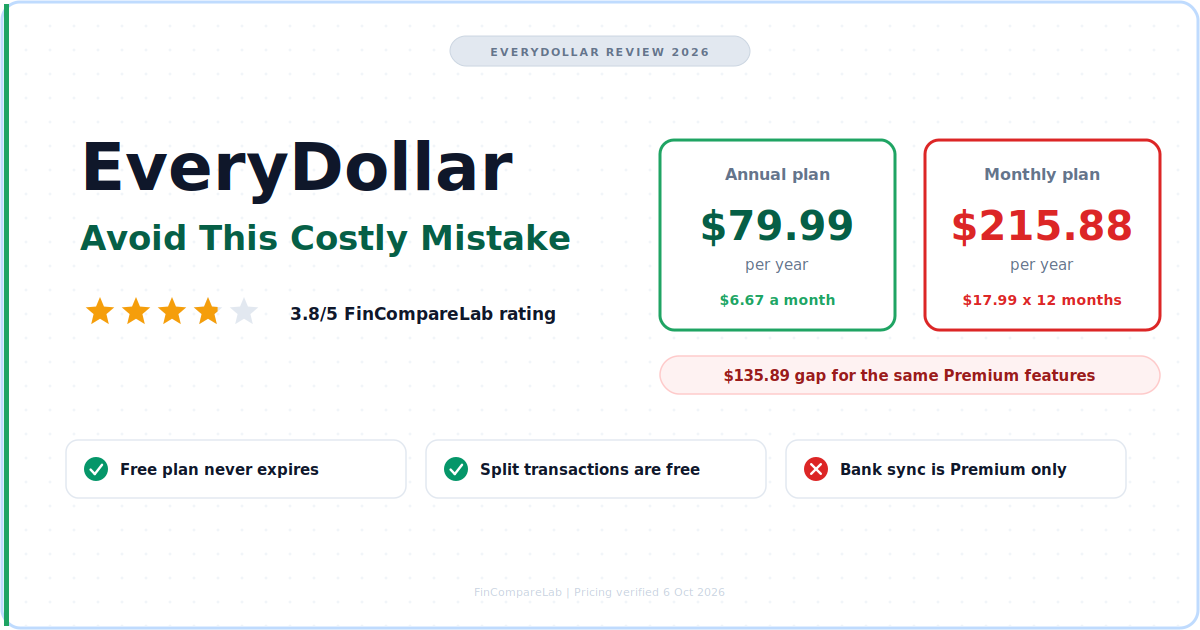
This EveryDollar review is about one costly mistake: paying for Premium on monthly billing, or through Apple or Google, before the free plan has had a full budget cycle to prove you need it.
⚡ Quick Verdict
My EveryDollar review verdict is simple. EveryDollar is a solid zero-based budget if you follow Dave Ramsey’s plan, spend with a debit card, and want to start free. Premium at $79.99 a year is fair when you buy it annually and directly from Ramsey. The monthly plan at $17.99 and App Store purchases are where people lose money or flexibility.
How We Review Apps, Pricing verified from ramseysolutions.com — 6 October 2026
📋 In This EveryDollar Review
- What is EveryDollar and who is it for?
- What does this EveryDollar review rest on?
- What is the costly mistake to avoid before you pay?
- Which billing channel should you pay through?
- Is EveryDollar free?
- What does Premium add, and is EveryDollar worth it?
- How does EveryDollar handle bank connections and credit cards?
- What do app store reviews say about EveryDollar?
- How does EveryDollar compare with YNAB?
- Which app fits better if EveryDollar doesn’t?
- Who should use EveryDollar, and who should skip it?
- What is the final verdict on EveryDollar?
- What else do people ask about EveryDollar?
What is EveryDollar and who is it for?
EveryDollar is a zero-based budgeting app that has you give every dollar of income a job before the month starts. It runs on iOS, Android and the web, with a permanent free plan and a Premium plan that adds bank connection and coaching. It is the Ramsey budget app built around Dave Ramsey’s Baby Steps.
EveryDollar comes from Ramsey Solutions and follows the Baby Steps: a starter emergency fund, the debt snowball, then investing and giving. People who type ramsey every dollar into Google want this app. So do people who type every dollar review as two words.
The Ramsey budget app fits Ramsey followers clearing debt, beginners who want a free zero-based start, and couples who share one budget from separate logins. It fits less well if you pay credit cards in full for rewards or want investments synced into one dashboard. If the method is new to you, read my zero-based budgeting guide first.
| Detail | EveryDollar |
|---|---|
| Free plan | ✅ Permanent, manual entry, unlimited categories |
| Premium price | $79.99/yr ($6.67/mo) or $17.99/mo |
| Trial | 14 days, new users only |
| Platforms | iOS, Android, web |
| Bank connection | Premium only, through Mastercard Connect and Plaid |
| App Store rating | 4.7 from about 84K ratings |
| Google Play rating | 4.3 from about 15.5K reviews |
| Credit card support | ⚠️ Unconfirmed on official pages as of 6 October 2026 |
Pricing verified from official websites, October 2026.
What does this EveryDollar review rest on?
This EveryDollar review rests on Ramsey’s official pages and help center, the App Store and Google Play listings as of 6 October 2026, and published reviews from NerdWallet, FinanceBuzz, LendEDU, Tom’s Guide and Marriage Kids and Money.
I ran a strict zero-based budget in YNAB for 15 years, and I haven’t used EveryDollar as my own budget. Anything below about daily use is the community’s report, labeled that way. Anything I couldn’t confirm on an official page says unconfirmed, with the date. My review process explains how I source claims.
What is the costly mistake to avoid before you pay?
The mistake in this EveryDollar review is paying for Premium month to month. At $17.99 a month it costs $215.88 over a year, against $79.99 on the annual plan, a $135.89 gap for identical features. A second version of the same mistake is buying through Apple or Google, where EveryDollar says it can’t cancel or refund for you.
Do the break-even math. $79.99 divided by $17.99 is about 4.4, so five months on the monthly plan ($89.95) already costs more than a full year paid upfront. If you’ll use bank sync past month five, annual wins. If you won’t, you probably didn’t need Premium.
Over three years the gap reaches $407.67, which is $239.97 on annual renewals against $647.64 on monthly. YNAB’s annual plan at $109 a year would cost $327 over the same stretch. Monthly EveryDollar ends up $320.64 above it, even though EveryDollar’s annual price is the lower one.
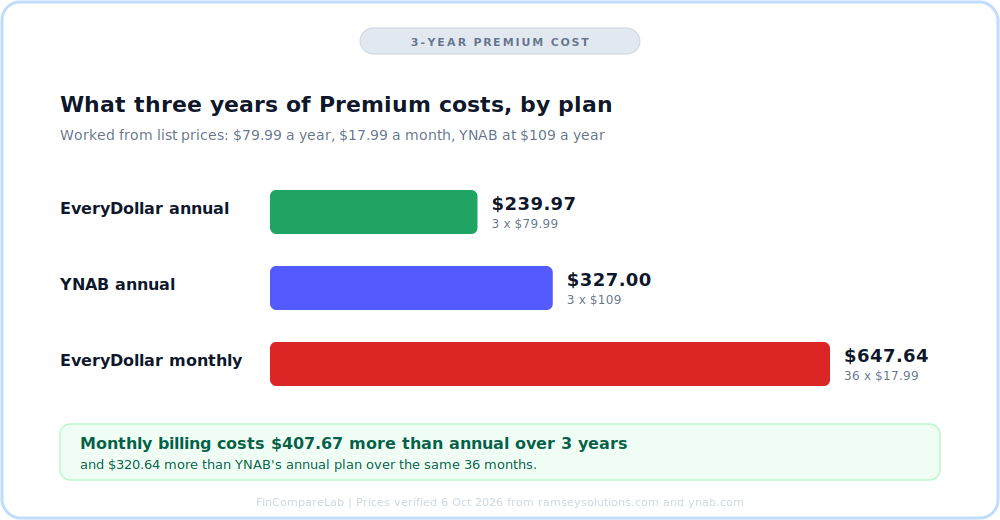
EveryDollar review chart: Premium cost over 36 months, from list prices verified 6 October 2026.
I keep the plan-by-plan numbers in my EveryDollar pricing guide, so this post stays on the decision. For the benchmark above, my YNAB pricing guide shows where the $109 comes from.
Which billing channel should you pay through?
Pay on Ramsey’s own website if you can. Ramsey’s FAQ says to cancel a directly billed subscription from your account page, while Apple and Google subscriptions must be canceled with Apple or Google, and EveryDollar can’t cancel or refund those purchases.
A Trustpilot reviewer who bought through the App Store describes being bounced between EveryDollar and Apple over a refund. The review is undated in the version I read, so I treat it as a pattern to watch. It matches Ramsey’s own wording about third-party purchases.
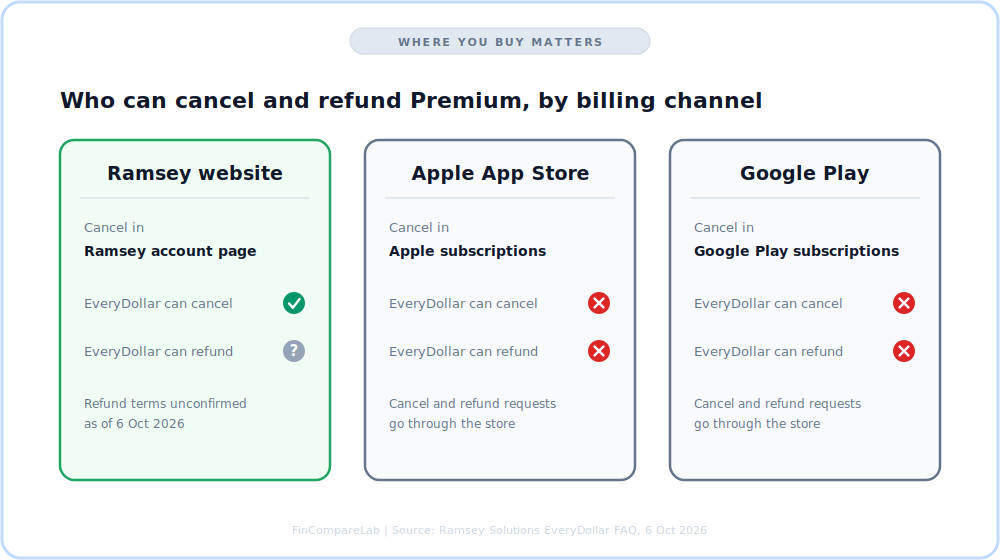
EveryDollar review check: where you buy Premium decides who can cancel and refund it.
Canceling Premium doesn’t delete your account. You keep access to the free plan, according to Ramsey’s FAQ.
If you searched ramsey every dollar to find the price, the checkout total is the number to trust. Tom’s Guide calls the paid tier part of Ramsey+, and Finny’s price page lists a $129.99 Ramsey+ bundle. Ramsey’s own page lists $79.99 a year, so whether the bundle is separate is unconfirmed as of 6 October 2026.
Is EveryDollar free?
Yes. EveryDollar has a free plan that doesn’t expire, and it includes unlimited categories, sinking funds, split transactions, bill due dates and live-person support. It doesn’t include bank connection, so you type in every transaction yourself.
Searching every dollar review as two words returns the same app, so this answer covers both spellings. Is EveryDollar free long term? Yes, because the plan has no expiry.
Manual entry is the real price of free. As an illustration, 40 transactions a month at about 20 seconds each is under 14 minutes. Premium has to beat that, plus the time you still spend placing each synced transaction into a budget line, which NerdWallet’s review says stays manual.
That habit pays off in a zero-based budget, because touching every purchase keeps the plan honest. If hand entry still sounds like a spreadsheet job, my sister site’s breakdown of a Google Sheets budget tracker against apps covers that trade-off.
Run one full month on the free plan and count your transactions. If month-end feels heavy, start the 14-day Premium trial, connect your main bank on day one, and pay annually on Ramsey’s site. If it doesn’t, stay free.
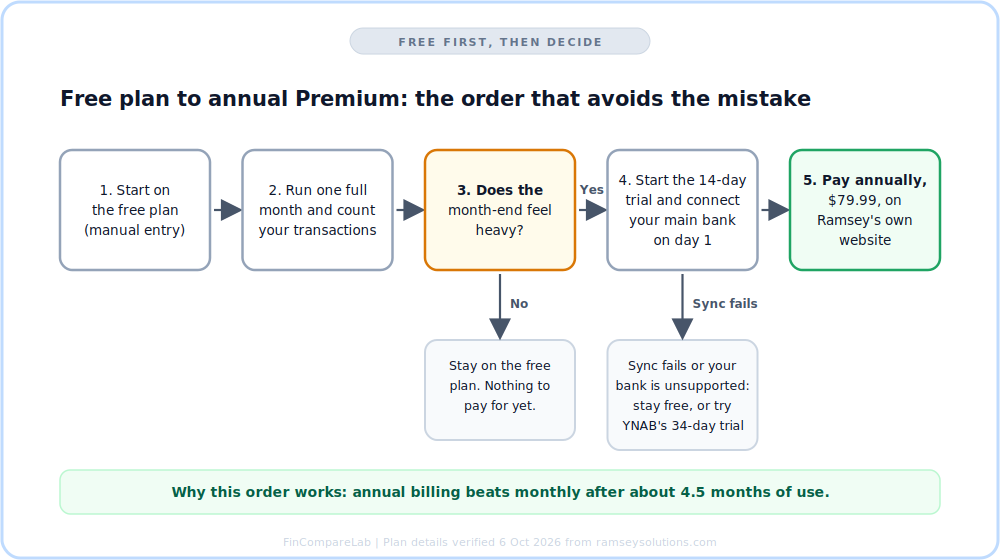
EveryDollar review decision path: free first, then annual Premium only if month-end feels heavy.
Ramsey’s FAQ says the household feature lets couples manage one budget from separate email logins. One third-party review lists it as free, but Ramsey’s plan lists don’t say, so that part is unconfirmed as of 6 October 2026. My guide to the best budgeting apps for couples covers what to check if your finances are more than one shared pot.
For other no-cost starts, compare the best free budgeting apps before you commit to Ramsey’s framework.
What does Premium add, and is EveryDollar worth it?
On the Ramsey budget app, Premium adds bank connection, paycheck planning, custom reports, CSV export, the financial roadmap with projected net worth, a debt payoff tracker, and group and one-on-one coaching. Whether that justifies $79.99 a year depends on how many transactions you enter and whether you’ll use the coaching.
| Feature | Free | Premium |
|---|---|---|
| Unlimited categories | ✅ | ✅ |
| Sinking funds | ✅ | ✅ |
| Split transactions | ✅ | ✅ |
| Bill due dates | ✅ | ✅ |
| Live-person support | ✅ | ✅ |
| Bank connection | ❌ | ✅ |
| Paycheck planning | ❌ | ✅ |
| Custom reports | ❌ | ✅ |
| CSV export | ❌ | ✅ |
| Financial roadmap and projected net worth | ❌ | ✅ |
| Debt payoff tracker | ❌ | ✅ |
| Group and one-on-one coaching | ❌ | ✅ |
Pricing verified from official websites, October 2026.
Is EveryDollar worth it?
It’s worth it if you follow the Baby Steps, are clearing debt with the snowball, and will pay annually. For most other people the free plan is the better deal, and a flexible app like YNAB suits credit card users better.
The net worth feature is a projection. Ramsey’s Financial Roadmap help article says you enter your age, income, retirement age and an estimate for each Baby Step, and that only one person’s info can be entered, so couples have to agree whose to use.
For synced balances across brokerage and retirement accounts, Monarch Money is built for that, and my best net worth tracking apps roundup compares the options. I moved from YNAB to Monarch for exactly that view, and my Monarch Money review covers the trade-off.
Ramsey’s primary EveryDollar page says users find $3,015 in their first 15 minutes, while its main page says $395 on average. The two official pages disagree, so I count neither as a benefit.
The debt payoff tracker is Premium only. If debt is the whole reason you’re here, run your numbers in my free debt payoff estimator first, and read how the debt snowball method compares with the avalanche before you commit to Ramsey’s order.
How does EveryDollar handle bank connections and credit cards?
Bank connection is Premium only, and Ramsey says it runs through Mastercard Connect and Plaid. Credit card support is the part the official pages leave unclear, so it’s unconfirmed as of 6 October 2026. My EveryDollar review score would be higher with that confirmed.
Does EveryDollar use Plaid?
Yes. Ramsey’s FAQ says EveryDollar connects banks through two partners, Mastercard Connect and Plaid.
Google Play reviewers describe two failure patterns: banks that aren’t supported, and accounts that disconnect and stop updating. One reviewer says support told them to upload transactions manually. Connect your main bank on day one of the trial, not day 13, so you know before the trial ends.
When sync fails, manual entry still works. That is the quiet advantage of a free plan that never expires.
Does EveryDollar connect to credit cards?
Ramsey’s official pages don’t say. FinanceBuzz calls EveryDollar rigid with credit cards, and Marriage Kids and Money says its credit card linking is weaker than other apps.
Ramsey’s debit card policy, dated 2020, says the company accepts debit cards and never credit cards for its own purchases. That matches Dave Ramsey’s stance on credit card debt. Apple Card and American Express sync are unconfirmed as of 6 October 2026, and so is whether the Premium checkout rejects credit cards.
If you pay a card in full each month for rewards, that gap is the main reason to look at YNAB or Monarch instead.
What do app store reviews say about EveryDollar?
iOS rates EveryDollar 4.7 from about 84K ratings, and Google Play rates it 4.3 from about 15.5K reviews. Android users are the harsher group. Ramsey’s own page claims 4.8 from more than 71,000 reviews, which matches neither store, so I use the store numbers. Store feedback is the closest thing this EveryDollar review has to daily-use evidence.
Praise is consistent across both stores: it’s simple, customizable, and daily categorizing turns into a morning routine. Complaints cluster around bank sync, a dashboard change that opens on goals instead of the budget, and billing. One App Store reviewer calls it bare bones but enough if you’re already fiscally responsible.
Read the newest reviews yourself before paying. The App Store listing and the Google Play listing both show recent ratings, and the Play listing shows an update on 5 October 2026.
How does EveryDollar compare with YNAB?
In this EveryDollar review, YNAB is the benchmark because I know it best. Both use zero-based budgeting, and EveryDollar is simpler and cheaper on annual billing, at $79.99 against YNAB’s $109, while YNAB has a 34-day no-card trial and was built to handle credit card spending. If you landed here from ramsey every dollar, YNAB is the fair outside comparison.
I ran a strict zero-based budget in YNAB for 15 years, so I know how the method feels when the tool bends around credit cards. In YNAB, a card purchase moves budgeted money into a payment category on its own, and I leaned on that every month. I couldn’t find an equivalent described on EveryDollar’s official pages.
| EveryDollar | YNAB | |
|---|---|---|
| Annual price | $79.99/yr | $109/yr |
| Monthly price | $17.99/mo | $14.99/mo |
| Free plan | ✅ Permanent, manual entry | ❌ 34-day trial only |
| Trial | 14 days, new users | 34 days, no card when signing up directly |
| Bank connection | Premium only | Included in the subscription |
| Credit cards | ⚠️ Unconfirmed officially | ✅ Payment categories built in |
| Coaching | Group and one-on-one in Premium | Free live and recorded workshops |
Pricing verified from official websites, October 2026.
For the full head-to-head, read my EveryDollar vs YNAB comparison. My YNAB review covers the method from the inside, and the YNAB 4 rules guide shows what it asks of you. New to the method? Start with my YNAB for beginners guide.
If you’re weighing other zero-based tools, my best zero-based budgeting apps roundup sorts true fits from close cousins.
Which app fits better if EveryDollar doesn’t?
Goodbudget fits envelope budgeters who want a free plan without Ramsey’s framework, and my Goodbudget review shows where its free plan runs out.
Monarch Money fits people who want net worth and investments in one synced dashboard. The trade-off I felt moving there is that it plans cash flow forward instead of giving every dollar a job. Compare the two in my EveryDollar vs Monarch comparison.
Rocket Money fits people who mostly want subscription cancellation and bill negotiation, which my Rocket Money vs EveryDollar comparison weighs against budgeting depth.
For a wider shortlist, start with the best budgeting apps for beginners or the best envelope budgeting apps. If the snowball is your priority, see the best budgeting apps for debt payoff.
Who should use EveryDollar, and who should skip it?
Use it when the Ramsey plan is your plan, because this is the Ramsey budget app. Skip it when credit cards or investments sit at the center of your money.
Is EveryDollar free enough for a beginner? Yes, if manual entry doesn’t bother you. If your pay swings month to month, read my guide to budgeting on irregular income before you pick any app.
The short version of this EveryDollar review fits in two lists. If you searched every dollar review with a space, the lists below still apply.
✅ Use EveryDollar if you
- follow Dave Ramsey’s Baby Steps
- are clearing debt with the snowball
- spend with a debit card
- want a free zero-based start
- will pay annually on Ramsey’s site
❌ Skip EveryDollar if you
- pay credit cards in full for rewards
- want synced net worth and investments
- would buy Premium monthly
- would buy through an app store
- prefer forward-looking cash flow planning
What is the final verdict on EveryDollar?
This EveryDollar review ends at 3.8 out of 5. The free plan is genuinely useful and the Ramsey budget app structure suits debt payoff. The score drops for unconfirmed credit card support, a net worth feature that is only a projection, bank-sync complaints, and a monthly plan that costs 2.7 times the annual one.
Start on the free plan this week and count your transactions for one month. If month-end feels heavy, take the 14-day trial, connect your bank on day one, and pay annually on Ramsey’s site. If you pay cards in full for rewards, run YNAB’s 34-day trial before you spend anything on EveryDollar.
Your first month’s transaction count settles this decision, so set up the free budget today and keep a tally.
What else do people ask about EveryDollar?
How much does EveryDollar Premium cost?
Premium costs $79.99 a year ($6.67 a month) or $17.99 a month, with a 14-day free trial for new users. Annual billing saves $135.89 a year. My EveryDollar pricing guide has the plan details.
Does EveryDollar have a desktop version?
Yes. Ramsey says you can open your budget from a computer, phone or tablet, and the mobile apps are on the App Store and Google Play.
Can you cancel EveryDollar Premium anytime?
Yes. If Ramsey bills you directly, cancel from your account page. If you bought through Apple or Google, cancel with them, because EveryDollar can’t cancel or refund those purchases.
Can couples share one EveryDollar budget?
Yes. The household feature lets two people manage one budget from separate email logins. Roadmap net worth projections accept only one person’s info, so couples have to pick whose numbers to use.
Is EveryDollar better than YNAB?
For Ramsey followers and debit card spenders, EveryDollar is simpler and $29.01 a year cheaper on annual billing. For credit card users, YNAB is the better fit and has a 34-day trial. That is the one-line answer from this EveryDollar review.
Is EveryDollar Premium the same as Ramsey+?
Unconfirmed as of 6 October 2026. Tom’s Guide describes the paid tier as part of Ramsey+, while Ramsey’s EveryDollar page lists Premium at $79.99 a year on its own. Check the checkout total before you pay, especially if you came from a ramsey every dollar search.
📚 Read Next
