
Copilot Money review searches keep climbing in 2026, and the reason is simple: after Mint shut down, iPhone users wanted a replacement that felt native to iOS instead of a spreadsheet with a login screen. This copilot money review also digs into a cost detail most competing reviews skip entirely, namely what happens to the price the moment a second person needs access.
⚡ Quick Verdict
Copilot Money is one of the best-designed budgeting apps on iOS, and the AI categorization earns its reputation. Solo, at $95 a year, it undercuts Monarch and YNAB. The catch is that Copilot charges per person, not per household, so two subscriptions run $190 a year. Solo iPhone users get real value here, but couples should run the math first.
Price: $95/yr or $13/mo
Trial: 1 month free
Platform: iOS, Mac, iPad, web
How We Review Apps · Pricing verified from copilot.money — 17 September 2026
📋 In This Review
- What Is Copilot Money?
- How Much Does Copilot Money Cost in 2026?
- What Features Does Copilot Money Offer?
- What Does Copilot’s AI Actually Do?
- What Does Copilot Do Well?
- What Are Copilot Money’s Biggest Downsides?
- Does Copilot Money Work for Couples?
- Is Copilot Money Safe?
- Who Should Use Copilot Money?
- Who Should Not Use Copilot Money?
- How Does Copilot Compare to Monarch and YNAB?
- So, Is Copilot Money Worth It in 2026?
- What Do People Ask About Copilot Money?
What Is Copilot Money?
Copilot Money is a subscription personal finance app for iPhone, iPad, Mac, and the web that pulls your bank, card, and investment accounts into one automatically categorized dashboard. Copilot Money, Inc. was founded in 2019 by Andrés Ugarte, and the app itself launched in 2020, a distinction worth making because most competing coverage collapses the two dates into one.
Anyone who wants a short answer to what is Copilot Money can stop right there. It is an automated tracker first, a budgeting tool second.
The app has direct integrations with Venmo, Apple Card, and Coinbase, plus broader bank connectivity through data aggregators. Copilot Money holds an Apple Design Award finalist nod (2024), Apple’s Editors’ Choice in Personal Finance, and a Webby Award. It has also been covered by The New York Times, TechCrunch, The Verge, and Forbes, and currently holds a 4.8/5 rating from 30,000+ App Store reviews.
Most people who search what is Copilot Money already know the app looks good in screenshots. What they actually want answered is whether $95 a year still makes sense once a partner, a subscription price bump, or an Android phone enters the picture.
| Details | |
|---|---|
| Company founded | 2019, by Andrés Ugarte (app launched 2020) |
| Annual price | $95/year ($7.92/month) |
| Monthly price | $13/month |
| Free trial | 1 month, no card required to demo, card required to start the trial |
| Platforms | iPhone, iPad, Mac, web (app.copilot.money) |
| Android | ❌ Not available |
| Bank connections | 10,000+ US institutions, direct integrations with Venmo, Apple Card, and Coinbase, plus Plaid and other aggregators |
| Investment tracking | Yes, with intra-day updates and market index benchmarking |
| Budgeting method | Adaptive category budgets with rollover, not zero-based or envelope |
| App Store rating | 4.8/5, 30,000+ ratings |
How Much Does Copilot Money Cost in 2026?
Copilot Money costs $95 a year, billed annually, or $13 a month on flexible billing. That is the entire pricing structure, one plan and two billing options. Copilot’s own site now states outright that the annual option saves 39% over paying monthly, and there is no free tier once the one-month trial ends.
Any copilot money review still quoting last year’s promo rate is working from stale numbers, so this section is worth re-checking against copilot.money directly rather than trusting a cached figure.
| Plan | Cost | Notes |
|---|---|---|
| Free trial | 1 month free | Demo mode needs no linked accounts, the trial itself needs a card on file |
| Annual | $95/year | $7.92/month, saves 39% vs. monthly per Copilot’s own pricing page |
| Monthly | $13/month | Cancel anytime, no annual commitment |
Pricing verified from copilot.money, 17 September 2026.
That table is also the direct answer to is Copilot Money free in any meaningful sense. It is free only for the first month, and only with a card already on file.
At $95 a year, Copilot undercuts Monarch Money’s $99.99/year Core plan and YNAB’s $109/year plan for a single user. That comparison flips the moment a second person needs their own login, which is the entire subject of a section further down this page. Any copilot money review that stops at the solo price without mentioning that flip is only telling half the story.
What Features Does Copilot Money Offer?
Copilot’s feature set leans toward automatic tracking and awareness rather than manual budget-building, and the table below breaks down exactly what that means in practice. A copilot app review that only covers price and design misses half the picture, so this section goes feature by feature rather than staying at the surface.
| Feature | Available | Notes |
|---|---|---|
| Copilot Intelligence (categorization) | ✅ | Learns from your corrections, improves over the first few weeks of use |
| Automatic bank sync | ✅ | 10,000+ institutions, direct links for Venmo, Apple Card, Coinbase |
| Adaptive budgets with rollover | ✅ | Suggested from your actual spending, not round numbers |
| Investment tracking | ✅ | Intra-day updates, benchmarked against market indexes |
| Net worth tracking | ✅ | Assets minus liabilities, manual real estate entry via address |
| Recurring charge detection | ✅ | Flags subscriptions before renewal, not after |
| Money Assistant (conversational AI) | ✅ Beta | Answers questions about your own data, does not take actions |
| Custom alerts | ✅ | Overdraft fees, unusual spending, paydays |
| Human support | ✅ | In-app chat with a small, responsive team |
| Zero-based budgeting | ❌ | Category tracking only, no dollar-by-dollar allocation |
| Household or couples plan | ❌ | Each person needs a separate paid account |
| Android app | ❌ | iOS, iPadOS, macOS, and web only |
That feature list is the real answer to what is Copilot Money beyond the marketing tagline: an automation-first tracker, not a manual budgeting tool.
What Does Copilot’s AI Actually Do?
Copilot Money uses AI in two distinct ways, and it is worth keeping them separate because a lot of general coverage blends them into one feature that does not actually exist, a mix-up any careful copilot app review should catch before it gets repeated.
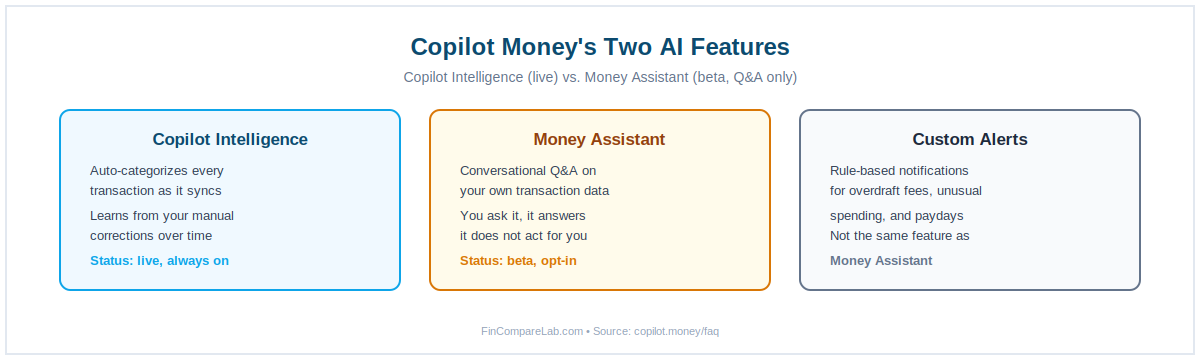
Copilot Intelligence (live, always on): When a transaction syncs, this model reads the merchant, the amount, and your past corrections to assign a category. App Store reviews consistently describe it as accurate after the first two or three weeks of daily use, with occasional manual fixes rather than constant re-sorting.
The one recurring friction point shows up with split payments. A group dinner followed by a Venmo repayment can post as income on one side and a full expense on the other, briefly inflating both numbers until you reconcile it.
A separate, verified App Store review from November 2025 describes a related bug: American Express transactions sometimes post to the wrong date and carry over notes from an unrelated transaction. The reviewer traced this to how Plaid links pending-to-posted transitions, not to Copilot’s own categorization logic.
Workaround: connect Venmo through email forwarding in Settings, and manually correct any Amex transaction that posts with a mismatched date before it throws off a month-end total.
Money Assistant (beta, conversational): This is a question-and-answer tool, not a proactive monitor. You ask it something specific, and it searches your own transaction history to answer. Copilot’s own FAQ is explicit that Money Assistant “only has access to your own data” and is built to give specific answers rather than generic advice.
Treat it as a faster way to query your dashboard, not as an autopilot that flags problems before you notice them yourself. That distinction matters, since it is the part of this feature most likely to get overstated.
Adaptive budgets: Copilot suggests category limits based on what you have actually spent, not arbitrary round numbers, and you can accept, adjust, or reject each suggestion individually. It is a small feature, but it is the kind of detail a thorough copilot app review has to mention rather than skip past.
What Does Copilot Do Well?
A few strengths come up repeatedly across App Store reviews, independent coverage, and nearly every serious copilot app review published this year, and they line up with what a close look at the app itself confirms. This is the section of any copilot money review that explains why Copilot still holds a 4.4/5 rating despite the pricing catch covered later on.
The design holds up under real daily use. Copilot is the only budgeting app with an Apple Design Award finalist nod, and the interface stays legible even with a dozen linked accounts, which matters more than a screenshot can show once your dashboard is not a clean demo anymore.
Categorization accuracy earns its reputation. Copilot Intelligence trains a separate model per user rather than one shared model for everyone, so corrections you make only improve your own categorization, not a global average.
In practice this means the app gets noticeably faster to trust somewhere around the third or fourth week of daily use, once it has seen your specific merchants enough times. It is the single feature that shows up most in any copilot app review worth reading.
Investment benchmarking is a genuine differentiator. Copilot shows portfolio performance against market indexes like the S&P 500 with intra-day updates, a feature most budgeting apps at this price skip entirely. It is one reason Copilot shows up in searches for a net worth tracking app as often as a budgeting one.
Recurring charge detection is proactive, not retroactive. Copilot treats a known recurring bill as already spent from the start of the month, so the available balance you see reflects what is actually left rather than a number that looks bigger than it really is until the fifteenth. This copilot money review counts it as one of the more underrated features on the list.
No ads, and no data sold. Copilot’s revenue comes entirely from subscriptions, confirmed directly in its own FAQ. That removes the incentive free, ad-supported apps have to monetize your spending patterns through targeted offers, and it is one of the quieter reasons this copilot money review keeps landing favorably on the trust side of the ledger.
What Are Copilot Money’s Biggest Downsides?
Marketing copy leaves out what daily use exposes, and for an app this polished, a fair copilot money review still has to cover the gaps honestly rather than skip past them. A copilot app review that only lists strengths is not a review at all, it is an ad.
No Android app, with no announced timeline. This rules Copilot out for a large share of US phone owners and for any household with even one Android user, a limitation any honest copilot app review has to lead with rather than bury. Workaround: Monarch Money ($99.99/year) covers iOS, Android, and web under one login.
The web app is real now, but parity is still unclear. Copilot’s own App Store listing lists web alongside iPhone, Mac, and iPad without any qualifier, which is new as of this year. Independent reviews published in the past few weeks still describe the web version as missing some iOS-only screens.
Treat full parity as unconfirmed until you have logged into app.copilot.money yourself and compared it to the phone app feature by feature.
Bank sync is less reliable at smaller institutions. Major banks stay connected without issue. Smaller banks, credit unions, and some fintech accounts disconnect periodically and need a manual reconnect, a pattern confirmed in multiple recent App Store reviews. Workaround: Settings → Accounts → tap the disconnected account → Reconnect, and if American Express transactions post with the wrong date, correct them manually rather than waiting for a sync fix.
Initial setup can feel like a lot at once. Connecting accounts pulls in months of transaction history immediately, and first-time users often describe the first session as overwhelming. Workaround: set aside 30 to 45 minutes specifically to review and correct categories in that first pass. Copilot Intelligence adapts fast once it has seen a few weeks of corrections, so the second session is noticeably lighter.
No zero-based budgeting or debt payoff tools. This is the gap most copilot app review coverage buries near the bottom, but it matters more than a passing mention for anyone actively paying down debt. Copilot shows you what happened and what is likely to happen next. It does not enforce a plan the way an envelope system does.
Workaround: pair Copilot with the free Debt Payoff Estimator, or use YNAB if structured, dollar-by-dollar discipline is the actual priority. No copilot money review can recommend Copilot here without naming that gap directly.
Does Copilot Money Work for Couples?
Only if both partners use Apple devices, and even then the pricing works against you. Copilot Money for couples was never really the design target here, and the plan structure shows that plainly rather than in anything the app itself does badly.
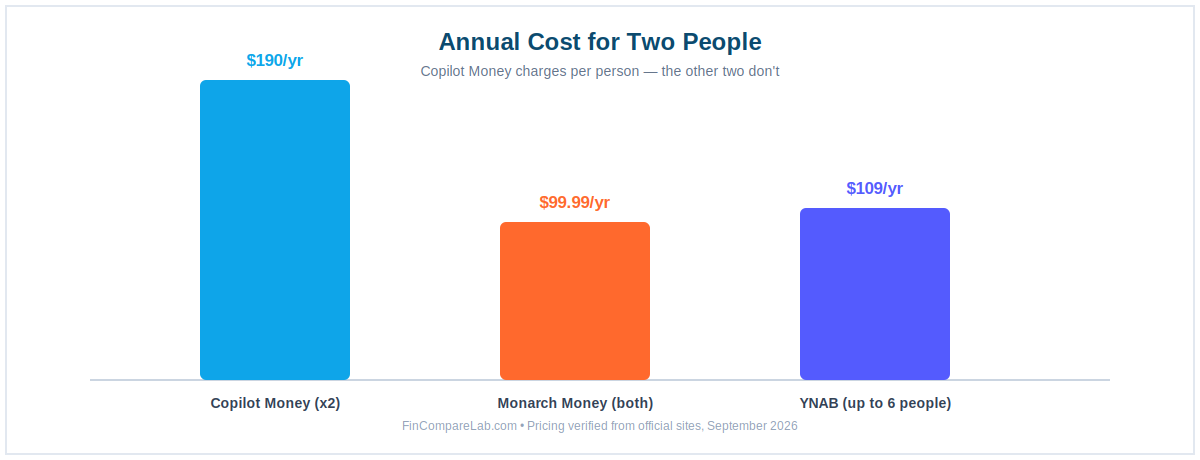
This is the single most searched question tied to any copilot money review, and it deserves a direct answer rather than a hedge. Copilot supports shared access so a partner can view the same linked accounts, but both people need an Apple device, and there is no cross-platform sharing for a mixed iPhone-and-Android household.
The bigger issue is that Copilot bills per person rather than per household. Two subscriptions run $190 a year combined, nearly double Monarch Money’s $99.99/year for both partners, and well above YNAB’s $109/year for up to six people.
If you are two people deciding between budgeting apps together, Copilot is the most expensive option of the three, not the cheapest, even though it looks cheapest on a solo price tag.
Anyone specifically comparing Copilot Money for couples against a shared-household app should run both totals side by side before choosing. For a side-by-side on how the two apps actually differ feature by feature, see the full Monarch Money vs. Copilot Money comparison.
Is Copilot Money Safe?
Copilot Money uses 256-bit encryption for stored data and transport layer security (TLS) for data in transit, and it does not store your bank login credentials directly. Anyone typing “is Copilot Money safe” into a search bar before linking a bank account wants a plain answer rather than marketing language, so here is the direct version.
Plaid, MX, Mastercard, and Akoya each verify your identity with your bank and pass approved transaction data to Copilot without exposing your actual login to Copilot’s servers. This is standard architecture across the budgeting app category, not a Copilot-specific advantage.
It does mean a Copilot data breach could not directly expose your bank password even in a worst case. That distinction is worth remembering the next time is Copilot Money safe comes up in a comment section full of half-informed answers. Anyone who reads this far already has the honest answer to is Copilot Money safe, and it is yes, with the same standard protections most fintech apps use.
Who Should Use Copilot Money?
The short version of this copilot money review is that solo iPhone users get the most out of this app, and everyone else should keep reading before subscribing.
- You use iPhone, iPad, or Mac as your primary devices, with no Android phone in the household
- You want the most polished, native iOS budgeting experience currently available
- You would rather have automatic tracking and AI categorization than build a manual budget from scratch
- You hold investments and want performance benchmarked against a market index in the same app
- You are switching from Mint and want a premium, design-forward replacement built for iPhone specifically
- You are budgeting solo, since the $95/year price only makes sense for one person
Match two or more of those points to your own situation, and this copilot money review would recommend subscribing without much hesitation.
Who Should Not Use Copilot Money?
If any of these describe your situation, this copilot money review would be doing you a disservice by staying quiet about it, and no copilot app review worth trusting should either.
Android users. No Android app exists, and Copilot has not announced a timeline for one.
Couples where even one partner uses Android, or any couple comparing prices carefully. Shared use requires both partners on Apple hardware, and separate subscriptions cost $190/year combined. Anyone weighing Copilot Money for couples against a shared plan should look at Monarch Money first, since it covers both partners for $99.99/year instead, and is worth reading about in the full Monarch Money review.
Anyone who needs zero-based budgeting to stay on track. Copilot shows you where money went. It does not stop you from overspending a category the way YNAB’s envelope-style system is built to.
Anyone actively paying off debt with a structured plan. There is no avalanche or snowball calculator built in. YNAB’s debt tools and PocketGuard’s payoff planner both go further here, and either is worth checking against the free Debt Payoff Estimator before you commit to a subscription just for this reason.
Anyone who wants to try before paying anything at all. Copilot’s demo mode works without a linked account, but starting the actual trial requires a card on file. That is the honest answer to is Copilot Money free in any lasting sense, and the answer is not really, past the first month.
If a no-cost, no-card option matters more than design polish, a free spreadsheet template like the one in this Google Sheets budget tracker comparison is worth a look before you subscribe to anything.
How Does Copilot Compare to Monarch and YNAB?
No copilot app review is complete without setting it next to the two apps it gets cross-shopped against most often, since almost nobody buys the first budgeting app they see without comparing at least one alternative.
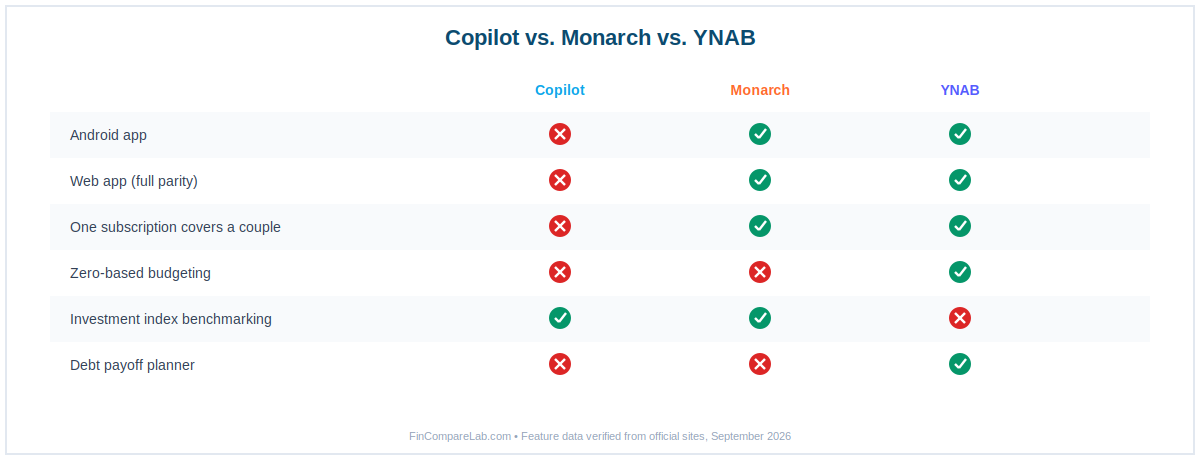
| Copilot | Monarch Money | YNAB | |
|---|---|---|---|
| Annual price | $95/yr | $99.99/yr | $109/yr |
| Android | ❌ | ✅ | ✅ |
| Covers a couple on one plan | ❌ $190/yr for two | ✅ Included | ✅ Up to 6 people |
| Design recognition | ✅ Apple Design Award finalist | Solid | Solid |
| Investment tracking | ✅ Intra-day, index-benchmarked | ✅ Full portfolio | ❌ |
| Zero-based budgeting | ❌ | Flex and category modes | ✅ Core method |
| Debt payoff tools | ❌ | ❌ | ✅ |
| Free trial | 1 month | 7 days | 34 days, no card |
→ YNAB vs. Monarch Money, full comparison
→ YNAB vs. Copilot Money, the $109 vs. $95 verdict
→ Best Monarch Money alternatives
Any copilot money review that skips this side-by-side is leaving out the two apps most people actually compare it against before subscribing.
So, Is Copilot Money Worth It in 2026?
Copilot Money earns its 4.4/5 rating, and the same $190 figure keeps attaching itself to nearly every mention of it for couples. This copilot money review keeps landing on the same split, so it is worth stating plainly rather than hedging. Every copilot money review worth reading in 2026 should say the same thing in roughly the same words.
Solo, this is one of the strongest budgeting apps on iOS. The categorization accuracy, the investment benchmarking, and the design quality are all genuinely ahead of most competitors, and $95 a year is a fair price for a single user who wants that experience.
The catch is that a solo iPhone user is a minority of everyone searching for a budgeting app. Missing Android support rules out a large slice of the market outright. The $190 combined cost for couples is a real number, not a marketing footnote.
There is still no zero-based budgeting or debt payoff tool for anyone who needs active structure rather than passive tracking. What is Copilot Money best at, in the end, is automation for one person, not budgeting for two.
If you are unsure which side of that line you are on, the one-month trial is the cheapest way to find out. If it clicks in the first two weeks, the annual plan is the better deal. If you find yourself wanting Android access, a shared household plan, or dollar-by-dollar budgeting discipline, Monarch Money or YNAB close those specific gaps.
iPhone, iPad, Mac, and web. See for yourself whether the $190 math works for your household before you subscribe.
What Do People Ask About Copilot Money?
These are the questions that come up most once someone has moved past the App Store screenshots, read a copilot app review or two, and started comparing real numbers.
Is Copilot Money available on Android?
No. Copilot Money runs on iPhone, iPad, Mac, and web only, with no Android app and no announced release timeline. Android households looking for a similar experience should check Monarch Money or YNAB, both of which run on iOS, Android, and web under one login.
Does Copilot Money have a web app?
Yes. Copilot added a web app in December 2025, and its App Store listing now lists web access alongside iPhone, Mac, and iPad without qualification. Independent reviews published in the past few weeks still describe some missing iOS-only screens, so treat full parity as unconfirmed until you have checked app.copilot.money yourself.
Why does Copilot Money keep disconnecting from my bank?
Disconnections are almost always a data-aggregator issue, not something Copilot’s own code controls. Major US banks stay connected reliably. Smaller banks, credit unions, and some fintech accounts disconnect every few weeks and need a manual reconnect.
Fix: Settings → Accounts → tap the disconnected account → Reconnect. If a specific transaction posts with the wrong date, correcting it manually is faster than waiting on a sync fix.
Does Copilot Money have a couples or family plan?
No. Each person needs a separate $95/year (or $13/month) subscription, so two people cost $190/year combined. Monarch Money covers both partners under one $99.99/year plan instead, which is the cheaper route for any two-person household, Apple-only or not.
Is Copilot Money free?
Copilot Money is free to demo without connecting any accounts, and new subscribers get one month free once they connect a card. Past that trial, there is no free tier. The subscription runs $95/year or $13/month, confirmed directly on copilot.money. Anyone still asking is Copilot Money free after the first month should expect a bill, not another grace period.
Is Copilot Money worth it?
For a solo iPhone user who wants automatic categorization and investment tracking in one app, yes, $95 a year is a fair price. For Android users, couples watching cost, or anyone who needs zero-based budgeting discipline, Monarch Money or YNAB are the stronger fit for the same or lower combined price. That is the short answer any copilot money review owes you before asking for a subscription.
What is the best alternative to Copilot Money?
It depends on the reason you are looking. For a cross-platform household, Monarch Money at $99.99/year covers everyone under one login. For zero-based budgeting and built-in debt payoff tools, YNAB at $109/year goes further than Copilot does today.
For couples specifically, either alternative beats Copilot’s $190/year combined cost. See the full best budgeting apps for couples roundup for more options built around shared access from the start. This copilot money review keeps coming back to the same two names because the data keeps pointing there.
📚 Read Next
