
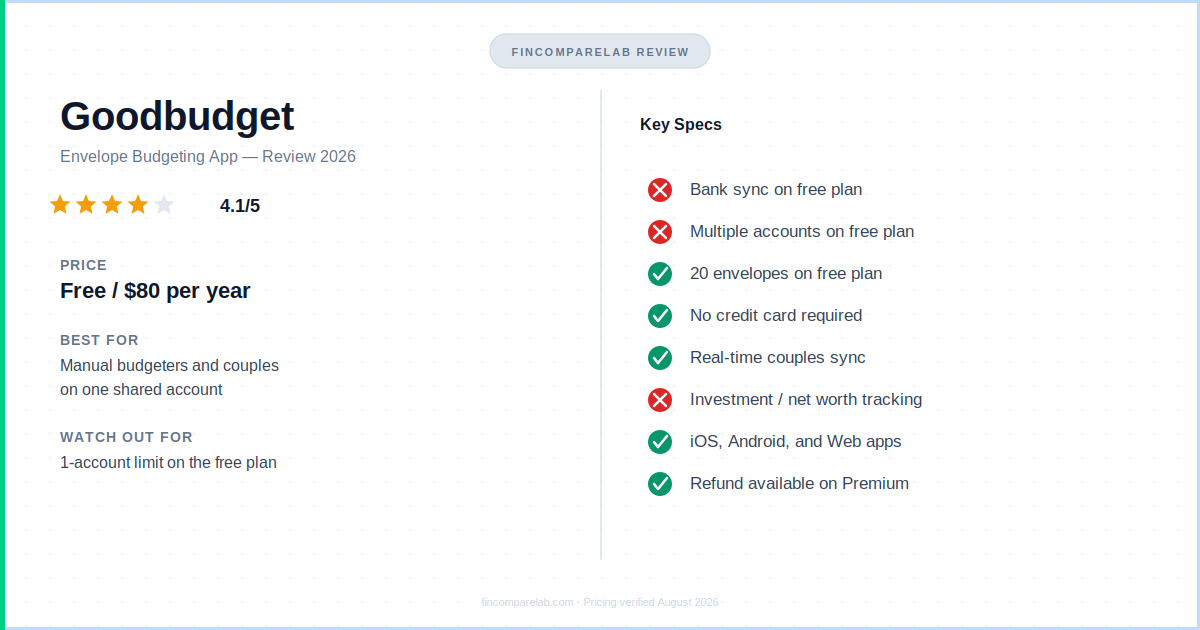
⚡ Quick Verdict
This app’s free plan really is free forever — no card, no expiry — and for a single account with 20 envelopes, it’s a smart pick. The regret only shows up if you outgrow it: multiple accounts, more than 2 devices, or wanting bank sync forces you into Premium at $80/year.
Whether that’s a smart $80 or a $80 regret depends entirely on which side of those limits you land on.
How We Review Apps · Pricing verified from goodbudget.com — 4 August 2026
What’s in this Goodbudget review
- What Is Goodbudget and How Does It Work?
- Is Goodbudget’s Free Plan Really Free Forever?
- Is Goodbudget a Smart Pick or an $80/Year Regret?
- Is Goodbudget Safe to Use?
- What Does Goodbudget Do Well?
- Where Does Goodbudget Fall Short?
- What Do Real Users Say About Goodbudget?
- Who Should Use Goodbudget?
- Who Should Skip Goodbudget?
- How Does Goodbudget Compare to Other Budgeting Apps?
- What Questions Do People Ask About Goodbudget?
- What’s the Goodbudget Review Verdict — Smart Pick or Regret?
What Is Goodbudget and How Does It Work?
Goodbudget is a digital envelope-budgeting app: no bank sync on the free plan, no automation, just categories you fund and spend from until they hit zero. It’s been around since 2009, and both Apple’s and Google’s own app listings describe it as downloaded well over a million times across iOS, Android, and the web.
Before I get into the rest of this Goodbudget review, it’s worth understanding the core idea, since it’s different from most budgeting apps I cover on this site — including YNAB, which uses a related but stricter zero-based method.
The envelope method predates every app on this list. You take your income, split it into labeled envelopes — rent, groceries, dining out — and once an envelope’s empty, you stop spending in that category. It just moves that system onto your phone. You allocate money to digital envelopes at the start of each pay period, then log every purchase against the right one as you spend.
What it deliberately doesn’t do, on the free plan, is connect to your bank. You type in every transaction yourself. That’s the entire personality of this Goodbudget app — some people find it tedious, others find it’s the only thing that’s ever made a budget stick.
Goodbudget at a glance
| Free plan | $0 forever — no card required |
| Premium (monthly) | $10/month |
| Premium (annual) | $80/year ($6.67/mo) — saves $40/yr vs. monthly |
| Free plan envelopes | 20 total (10 regular + 10 annual) |
| Free plan accounts / devices | 1 account, 2 devices |
| App Store rating | 4.6/5 (13K ratings) |
| Google Play rating | 3.2/5 (18.5K reviews) |
| Best for | Manual budgeters, privacy-conscious users, couples on one shared account |
Is Goodbudget’s Free Plan Really Free Forever?
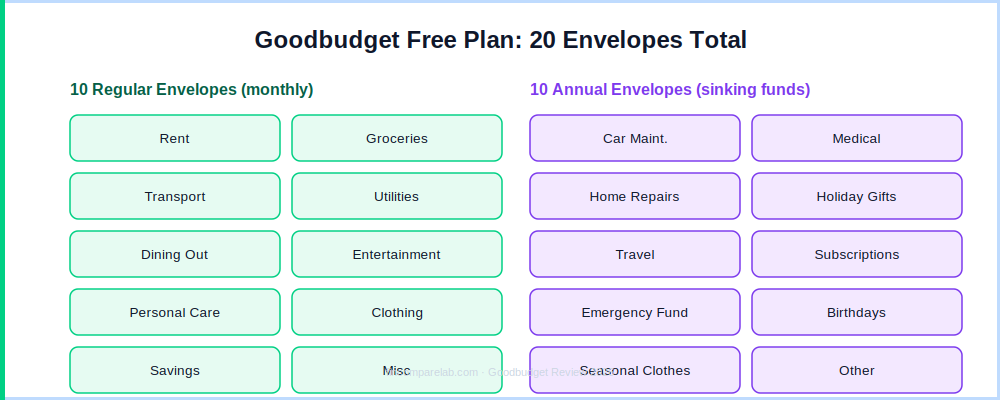
Yes — its free plan has no expiry date, no credit card requirement, and no forced upgrade prompts, which is genuinely rare among free budgeting apps. The trade-off is real limits: one financial account, two devices, and 20 total envelopes (10 regular + 10 annual), confirmed directly from its own App Store and Google Play listings.
For most single people or couples sharing one checking account, that’s a workable starting budget. Here’s what a typical free-tier setup looks like:
Rent · Groceries · Transport · Utilities · Dining Out · Entertainment · Personal Care · Clothing · Savings · Miscellaneous
10 annual envelopes (sinking funds):
Car Maintenance · Medical · Home Repairs · Holiday Gifts · Travel · Subscriptions · Emergency Fund · Birthdays · Seasonal Clothing · Other
The one-account limit is where most people hit a wall. If you’re splitting spending across a checking account and a credit card — which most people in their late 20s and early 30s do — the free plan gets tight fast. That’s the honest catch behind “free forever”: it’s a real budget, just a small one.
If you’re budgeting with a partner and want a deeper look at how it handles shared accounts specifically, I’ve covered that in more detail in my best budgeting apps for couples roundup.
Is Goodbudget a Smart Pick or an $80/Year Regret?
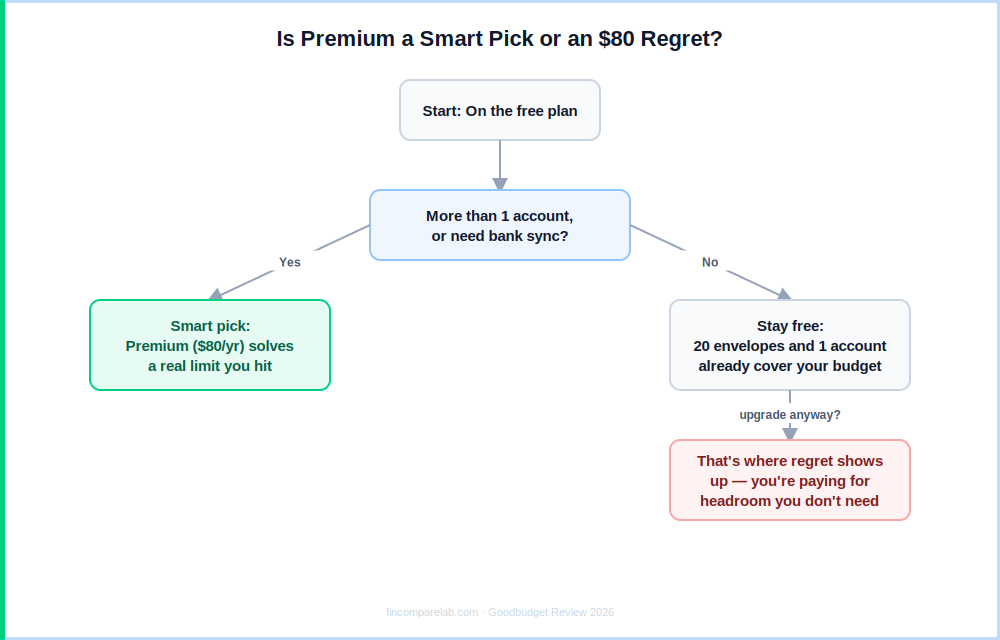
Whether Premium is a smart pick or an $80 regret comes down to one question: did you actually hit the free plan’s limits, or are you upgrading just because a subscription feels like the “real” version?
Premium costs $10/month or $80/year and adds unlimited envelopes and accounts, automatic bank sync, 5 devices instead of 2, 7 years of transaction history instead of 1, and email support instead of community-only support.
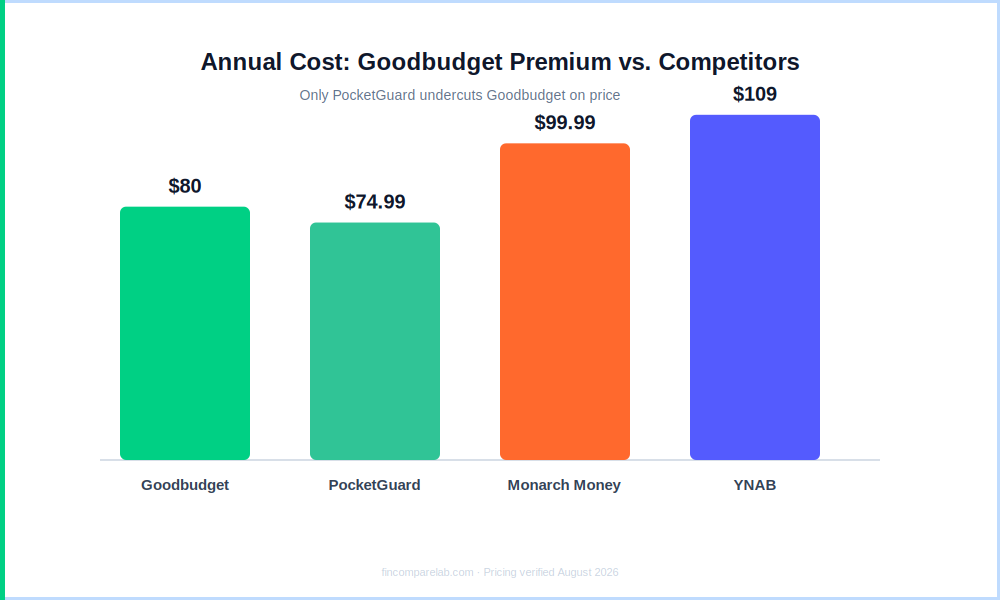
The smart-pick case is straightforward: if you track more than one account, want bank sync instead of manual entry, or need more than 20 envelopes, $80/year buys real functionality you were missing. At $6.67/month billed annually, it’s one of the cheaper paid budgeting subscriptions I cover — cheaper than YNAB’s $109/year and roughly in line with what most envelope budgeting apps charge for bank sync.
The regret case shows up when people upgrade without a clear reason. If your one account and 20 envelopes already cover your budget, paying $80/year mainly buys longer history and faster support — nice, but not $80 worth of nice for everyone.
One detail most reviews miss: Goodbudget’s older “Plus” plan — the tier before automatic bank sync existed — is closed to new signups but still honored for existing subscribers at their original price. If you see a $6.99–$8.99/month figure referenced anywhere, that’s legacy Plus pricing, not what a new signup pays today.
It doesn’t offer a free trial for Premium the way some competitors do. Instead, per its own refunds and cancellations policy, it allows a full refund if you request one shortly after subscribing — so you can test Premium’s bank sync and unlimited envelopes with a safety net rather than committing blind.
Since the free plan itself has no time limit, there’s also nothing stopping you from running the free tier for as long as you need before deciding whether Premium is worth the upgrade.
Is Goodbudget Safe to Use?
Yes. According to Goodbudget’s own privacy policy, all information submitted to this envelope budgeting app is secured with bank-grade 256-bit SSL encryption, and the company states it never sells or rents personal information to third parties. Your data can only be shared with named service providers it already discloses — including Plaid, which handles the financial data aggregation for Premium’s automatic bank sync.
On the free plan, this is largely academic anyway: since there’s no bank connection at all, there’s nothing to sync and nothing to share with Plaid in the first place. That’s the practical safety upside of manual entry — your bank login credentials never touch its servers unless you upgrade to Premium and choose to connect an account.
One eligibility note that’s easy to miss: its terms require users to be 18 or older, and the company states it does not knowingly collect data from anyone under 16. If you’re requesting account deletion, the privacy policy commits to removing personal data within 30 days, with full removal from backups within 12 months.
If you want a deeper look at how bank-sync safety compares across apps that do connect to your accounts by default, my is Monarch Money safe guide walks through the same Plaid-based model Premium uses here.
What Does Goodbudget Do Well?
After going through this envelope budgeting app’s documentation, App Store history, and real user feedback, five strengths stand out as the real reasons people stick with this free budgeting app long-term.
- The free tier isn’t a demo. No expiry, no nagging, no credit card on file. Twenty envelopes covers a real household budget, not just a taste of one.
- Annual envelopes solve the irregular-expense problem. Most budgets don’t fail from daily overspending — they fail from the $600 car repair or $400 dental bill that “came out of nowhere.” Setting aside money monthly turns those into planned expenses instead of emergencies.
- Real-time sync for couples. Both partners see the same envelope balances and can log transactions from their own phones — a genuinely strong shared-budget feature, even on the free plan’s two-device limit.
- No bank connection required. On the free plan, nothing is shared with a third-party data aggregator. Your bank credentials never leave your own devices — a real differentiator in a category where most apps require Plaid access by default.
- Flexible budget periods. Weekly, bi-weekly, semi-monthly, or monthly, starting on any day — useful if your paycheck doesn’t land on the 1st.
Where Does Goodbudget Fall Short?
No free budgeting app is perfect, and this envelope budgeting app’s limitations are worth knowing before you commit a household budget to it. Here’s what to weigh before you sign up.
- Manual entry only, on the free plan. If you fall behind for a week, your envelope balances stop reflecting reality. The system only works if you keep up with it.
- One account is genuinely limiting. Most people track at least a checking account and a credit card. The free plan’s single-account cap pushes a lot of otherwise-happy free users toward Premium.
- The interface hasn’t kept pace. Compared to Monarch Money or YNAB, Goodbudget’s design is functional rather than polished.
- No investment or net worth tracking. It’s spending and saving only — pair it with a free tool like Empower if you want a full financial picture. I’ve compared the two use cases directly in my best net worth tracking apps guide.
- Google Play reviews run noticeably lower than iOS. At 3.2/5 across 18.5K reviews, Android sentiment trails the App Store’s 4.6/5 by a wide margin — worth checking recent Play Store reviews before committing if you’re on Android.
What Do Real Users Say About Goodbudget?
For this Goodbudget review, I looked past the marketing copy and checked what real App Store and Google Play reviewers actually say about using this envelope budgeting app day to day.
On the App Store, where it holds a 4.6/5 across roughly 13,000 ratings, the most common praise is that it finally makes envelope budgeting stick for people who tried and abandoned other apps. Several long-time reviewers mention using it five or six years running, including one who described sharing 40 envelopes with a spouse after years on the platform.
The most frequent complaint on iOS is missing quality-of-life features, like an in-app reconcile or search tool for older transactions.
On Google Play, sentiment is more mixed at 3.2/5 across 18.5K reviews. Recent reviews mention app stability issues — including one reviewer frustrated that envelopes auto-refilled on the 1st of the month regardless of actual payday, throwing off manually-tracked balances — alongside the same core praise for the ad-free, no-bank-required design.
On Reddit, Goodbudget consistently comes up in r/personalfinance and r/ynab threads as the answer to “what’s a free alternative that doesn’t need my bank login” — it’s one of the few apps community consensus treats as a legitimate no-bank-connection option, alongside self-hosted tools like Actual Budget.
Who Should Use Goodbudget?
This free budgeting app fits a specific kind of budgeter. It’s likely a good match if:
- You’ve tried automatic-sync apps and found that watching the dashboard update didn’t actually change your spending
- You’re comfortable — or prefer — entering transactions by hand
- You don’t want to connect a bank account to a third-party app
- You and a partner share one account and want a real-time shared envelope system
- You want to start budgeting today with zero cost and no subscription
For example: if you and a partner share one checking account and want to split rent, groceries, and a debt payoff plan without linking that account to a third-party aggregator, Its free plan covers that exact scenario — two devices, one account, 20 envelopes, no bank credentials shared with anyone. For more structured debt-payoff planning specifically, see my best budgeting apps for debt payoff roundup.
Who Should Skip Goodbudget?
This free budgeting app isn’t the right fit for everyone. Skip it if any of the following describe your situation.
- You track more than one account. The free plan’s one-account limit will frustrate you fast — you’ll be looking at Premium or a different app entirely.
- You want automatic bank sync for free. PocketGuard’s free tier includes sync; Goodbudget’s doesn’t. See how the two stack up in my Goodbudget vs PocketGuard comparison.
- You want investment or net worth tracking. Monarch Money covers that; Goodbudget doesn’t, on any plan.
- You need deep budgeting structure. For aggressive debt payoff or breaking a paycheck-to-paycheck cycle, YNAB’s zero-based method and goal tracking go further than Goodbudget’s envelopes — I’ve laid out exactly where each one wins in my YNAB vs Goodbudget comparison.
- You want a Ramsey-style zero-based budget instead. EveryDollar follows the same manual-entry philosophy but with a different budgeting method.
How Does Goodbudget Compare to Other Budgeting Apps?
Here’s how this envelope budgeting app stacks up against the four apps people most often compare it to as a free budgeting app alternative, based on official pricing and feature pages.
| Best for | Price | vs. Goodbudget | |
|---|---|---|---|
| Goodbudget | Manual envelope budgeting | Free / $80/yr | — |
| YNAB | Zero-based budgeting with bank sync | $109/yr | ✅ Bank sync ⚠️ $29/yr more, steeper learning curve |
| Monarch Money | All-in-one dashboard + investments | $99.99/yr | ✅ Automated, tracks net worth ❌ Requires bank sync |
| PocketGuard | Automatic spending control | Free / $74.99/yr | ✅ Free bank sync ⚠️ Less intentional than manual entry |
| EveryDollar | Zero-based budgeting, debt payoff | Free / $79.99/yr | ✅ Also manual-friendly ❌ No annual/sinking-fund envelopes |
Pricing verified from official websites — August 2026.
👉 See how it stacks up head-to-head: YNAB vs Goodbudget →, Goodbudget vs PocketGuard →, or browse the best budgeting apps in the US (2026) →
What Questions Do People Ask About Goodbudget?
These are the questions that come up most often about this envelope budgeting app in reviews, forums, and search — I’ve answered each one directly below in this Goodbudget review.
Is Goodbudget really free forever?
Yes. The free plan has no time limit and no credit card requirement. It includes 20 total envelopes (10 regular, 10 annual), one financial account, two devices, and one year of transaction history. Premium, at $10/month or $80/year, adds unlimited envelopes and accounts, automatic bank sync, five devices, and seven years of history.
Is Goodbudget Free, or Are There Hidden Costs?
It’s genuinely free with no hidden costs on the free tier — there’s no trial clock counting down and no forced conversion to a paid plan. The only “cost” is functional: one account, two devices, and 20 envelopes. If you never need more than that, you can use it for free indefinitely.
Is the Goodbudget App Different From the Website?
No — the Goodbudget app on iOS and Android syncs with the same account as its website, and all three (iOS, Android, web) share the same envelope data in real time. The website adds a few extras not in the mobile apps, like CSV transaction export and bank statement file import (QFX/OFX).
Is This Goodbudget App Review Based on Real Testing?
This review is built from Goodbudget’s own official documentation, its App Store and Google Play listings, its published privacy policy and refund terms, and real, dated user reviews from both app stores — not first-hand day-count claims. I flag anywhere the community, App Store, and Google Play sentiment diverge so you can weigh the gap yourself.
Does Goodbudget connect to your bank account?
Only on Premium. The free plan is entirely manual — you enter every transaction yourself, which is why no bank credentials are ever shared on that tier. If you want free automatic sync instead, PocketGuard’s free plan includes it.
Is Goodbudget good for couples?
Yes, with one caveat: the free plan supports two devices syncing in real time, which works well if you and a partner share one account. If you keep separate accounts you want to track together, you’ll need Premium’s multi-account support.
How is Goodbudget different from YNAB?
Both use envelope-style budgeting, but YNAB includes bank sync at every tier, has more structured goal tracking, and runs free live workshops — for $109/year. It’s cheaper, works without any bank connection on its free tier, and is simpler to learn, but caps you at one account and 20 envelopes unless you upgrade.
What happens if I run out of money in an envelope mid-month?
You either stop spending in that category for the rest of the month, or manually transfer funds from another envelope. That transfer is a deliberate, visible action — not automatic — which is the friction the whole system is built around.
What happens to my data if I delete my Goodbudget account?
Per Goodbudget’s privacy policy, personal data is removed from its active database within 30 days of a verified deletion request, with full removal from backups and logs within 12 months. There’s also a minimum age requirement — Goodbudget’s terms require users to be 18 or older to sign up.
What’s the Goodbudget Review Verdict — Smart Pick or Regret?
To wrap up this Goodbudget review: whether it’s a smart pick or an $80 regret comes down to whether you actually need what Premium adds. The free plan checks out — no expiry, no card required, no bait-and-switch. The catch isn’t hidden, it’s just real: one account, two devices, 20 envelopes, and manual entry for everything.
For a single person or a couple sharing one account, the free plan is a legitimately complete budget at zero cost — a smart pick, full stop. Where $80/year turns into a smart pick rather than a regret is the moment you actually hit those limits: a second account, bank sync you’ll use, or more history than one year.
Where it becomes regret is upgrading before you’ve hit a real wall — paying for headroom you don’t need yet. If you’ve tried automatic trackers and found the dashboard never actually changed your spending, this envelope budgeting app’s manual friction might be exactly the thing that does.
That’s my honest take for this Goodbudget review — and why it still earns a place on my list of the best free budgeting apps.
FinCompareLab rating: ★★★★ 4.1/5
This app’s free plan is genuinely free forever — no card, no expiry — with real limits (1 account, 20 envelopes) rather than a hidden catch. Smart pick for single accounts and manual budgeters; Premium ($80/yr) is worth it once you actually need bank sync or a second account, and a regret if you upgrade before that.
📖 Read next:
- YNAB Review (2026) — the more powerful, pricier alternative
- Goodbudget Pricing (2026) — full plan breakdown and whether Premium is worth it
- YNAB vs Goodbudget (2026) — head-to-head on price, method, and who quits which app
- Best Budgeting Apps in the US (2026) — how Goodbudget stacks up against the field
