
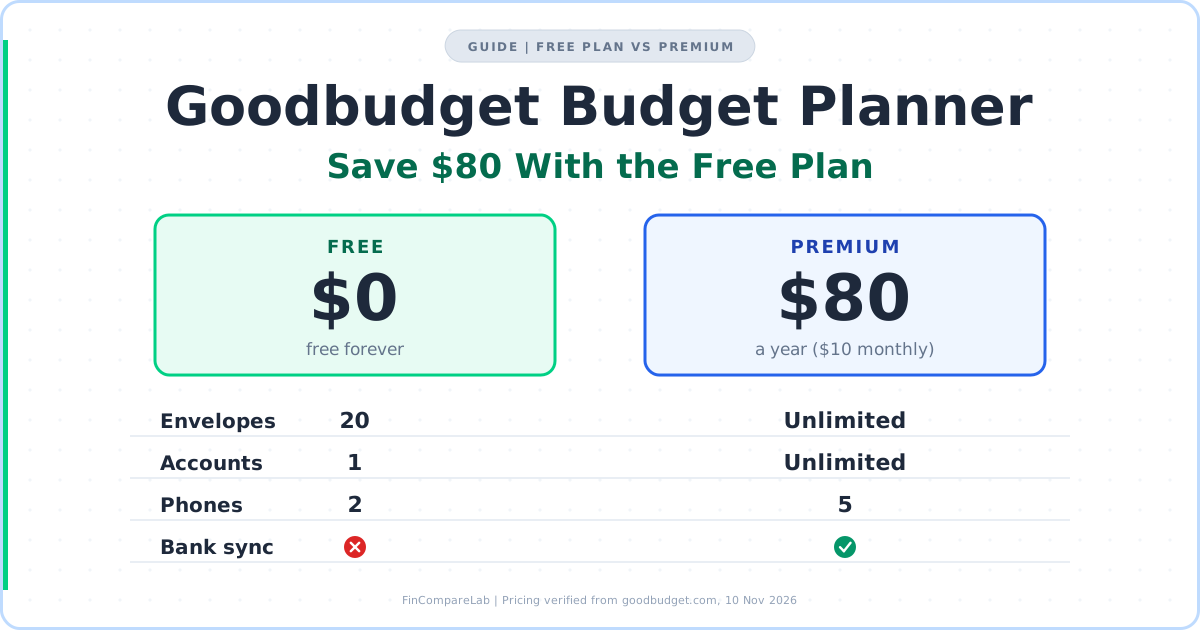
The Goodbudget budget planner costs $0 if your money fits in 20 envelopes, one account and two phones, and $80 a year the moment it doesn’t.
⚡ Quick Answer
The Goodbudget budget planner’s free plan covers the whole envelope method with 20 envelopes, 1 account and 2 phones, which saves $80 a year against Premium ($120 if you’d pay monthly). The limit most households hit first is the single account, not the envelope cap.
How We Review Apps, Pricing verified from goodbudget.com — 10 November 2026
In this guide:
- How Does the Goodbudget Budget Planner Fit on the Free Plan?
- Which Limit Does a Free Envelope Budgeting App Hit First?
- How Do You Set Up Goodbudget on the Free Plan Step by Step?
- How Does the Envelope Budgeting Method Fit Into 20 Envelopes?
- How Do Annual and Goal Envelopes Work?
- What Does Manual Entry Cost You in the Goodbudget App Each Week?
- Is a Spreadsheet Better Than an Envelope Budget System App?
- When Is Goodbudget Premium Worth $80 a Year?
- Can Two People Share One Free Goodbudget Budget?
- What Else Do People Ask About Goodbudget’s Free Plan?
How Does the Goodbudget Budget Planner Fit on the Free Plan?
The Goodbudget budget planner runs the full envelope method on its free plan, with 10 regular envelopes, 10 annual or goal envelopes, 1 account, 2 phones and 1 year of history. Nothing expires, but you type every transaction yourself. Premium adds bank sync, unlimited envelopes and accounts, and 5 devices for $80 a year.
Goodbudget’s pricing page and help center, both read on 10 November 2026, back every number in this guide. That matters because some third-party pages still show a 10-envelope cap or an older $70 price. The official figures are 20 envelopes and $80 a year.
| What you get | Free | Premium ($10/mo or $80/yr) |
|---|---|---|
| Envelopes | 10 regular + 10 annual/goal | Unlimited |
| Accounts | 1 (plus unlimited Debt Accounts) | Unlimited |
| Phones sharing the budget | 2 (website login doesn’t count) | 5 |
| Transaction history | 1 year | 7 years |
| Automatic bank sync | ❌ | ✅ (US banks only) |
| Support | Community |
Pricing verified from official websites, November 2026.
The Goodbudget budget planner keeps the same envelope budgeting method on Premium and lifts the ceilings, so the real question is which ceiling you’ll hit. The Goodbudget pricing guide covers every plan detail, and my Goodbudget review gives the verdict on the app itself.
Which Limit Does a Free Envelope Budgeting App Hit First?
In the Goodbudget budget planner, the single account hits first, well ahead of the 20-envelope cap. Goodbudget’s help center says Free includes one Account for all your spending money, and unlimited Accounts plus bank linking are Premium features.
A checking account plus a credit card is already two. Debt Accounts are the exception, since both plans allow unlimited ones, but they’re built to track debt payoff and not daily spending.
Count your accounts before you count categories. Checking, savings and one credit card make three accounts, so the free plan is two short on day one. A wallet of cash is one more place money sits, which is why the help center suggests a separate Cash account.
Bank sync comes second, and it’s about time rather than capacity. The Goodbudget budget planner is manual on Free, imports from US banks on Premium, and a March 2026 update added pending transactions for Premium users.
History comes third. The free Goodbudget budget planner keeps 1 year of transactions and Premium keeps 7, which stings in month 13, when you want to compare this year’s car insurance and holiday spending with last year’s.
Devices and envelopes come last. On Free, the Goodbudget budget planner allows 2 phones, and logging in on the website doesn’t count against that limit, so a laptop is free. Twenty envelopes is plenty once you consolidate, which the next two sections cover.
If a new phone hits “Device Limit Reached,” open the website, go to My Household, then Manage Devices, and revoke the old phone. If the error stays, Goodbudget’s device limit help page says to revoke every device on the list and log in again.
How Do You Set Up Goodbudget on the Free Plan Step by Step?
Set up the Goodbudget budget planner in five steps that follow the help center’s order. The free plan allows all of them, and the only real constraint is the 1 account and 20 envelopes you design around.
- Choose a monthly budget period that starts on the 1st. Goodbudget’s getting-started guide recommends monthly for most people, and a calendar month makes the annual envelope math easy to check.
- Create 8 regular envelopes from your last two months of bank statements, not from memory, and leave 2 of the 10 slots empty for the category you forgot.
- Add one Account, the checking account you actually spend from, with its real balance. If you’re unsure of today’s balance, enter the last statement balance and log everything since.
- Add your income as a transaction, then fill each envelope until Available reaches $0. Watch the total budgeted amount on the Edit Envelopes screen so the budget never exceeds your income.
- Record every expense against an envelope the day it happens. The envelope balance is only as accurate as your entry habit, and that habit is the real price of the free plan.
You can start with the free Goodbudget budget planner and leave Premium for later. Nothing you build in steps one to five needs a paid tier.
Add each paycheck on the day it lands, whether it’s weekly or irregular. If a deposit is bigger than the month’s plan, leave the extra in Available until you decide where it belongs.
Expect the first month to be wrong. Run it for 30 days before rewriting envelope amounts, because a blown envelope in week one usually points to a missing category rather than a bad plan.
The help center suggests a separate Cash account, but that tip assumes Premium’s multiple Accounts. On Free, you log cash purchases against your one Account like any other expense.
Debt Accounts sit outside the one-account limit, so a car loan or student loan can live in the Goodbudget budget planner for free. The accounts help page says the Android app can’t create them, but that page dates from February 2020, so build them on the website and check your app. My debt payoff guide and the free debt payoff estimator cover the payoff math.
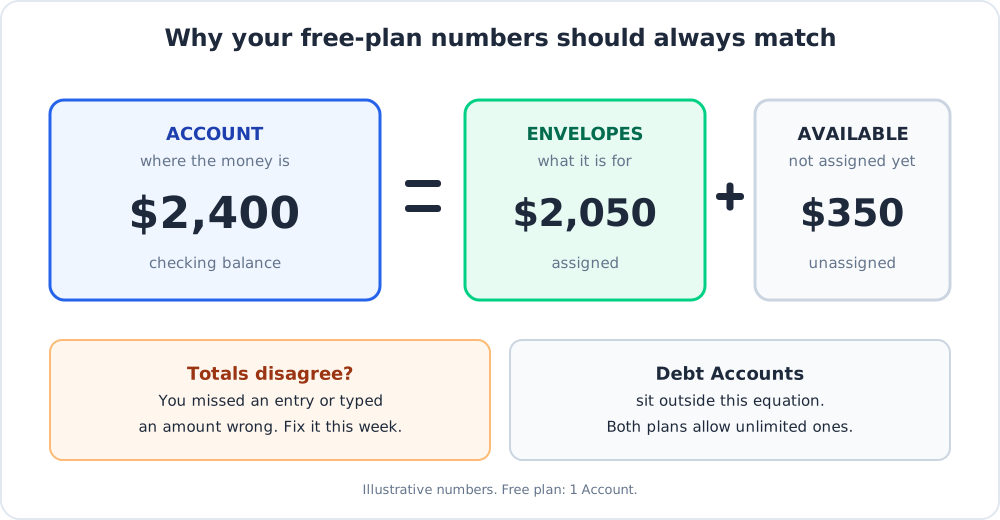
That diagram is the check I’d run weekly. The Goodbudget budget planner aims to keep your Account total equal to your Envelopes plus Available total, so a mismatch means a missed or mistyped entry.
How Does the Envelope Budgeting Method Fit Into 20 Envelopes?
Put monthly costs in the 10 regular slots and irregular costs in the 10 annual or goal slots. The renter example below uses 8 regular and 7 annual envelopes, which leaves 5 spare.
This Goodbudget budget planner setup assumes two earners, one car and one apartment. Rent, groceries, utilities and phone, gas and transit, dining out, fun, household and pharmacy, and a buffer take the regular slots. Car insurance, car maintenance, holidays and gifts, travel, annual subscriptions, medical and dental, and an emergency fund goal take the annual ones.
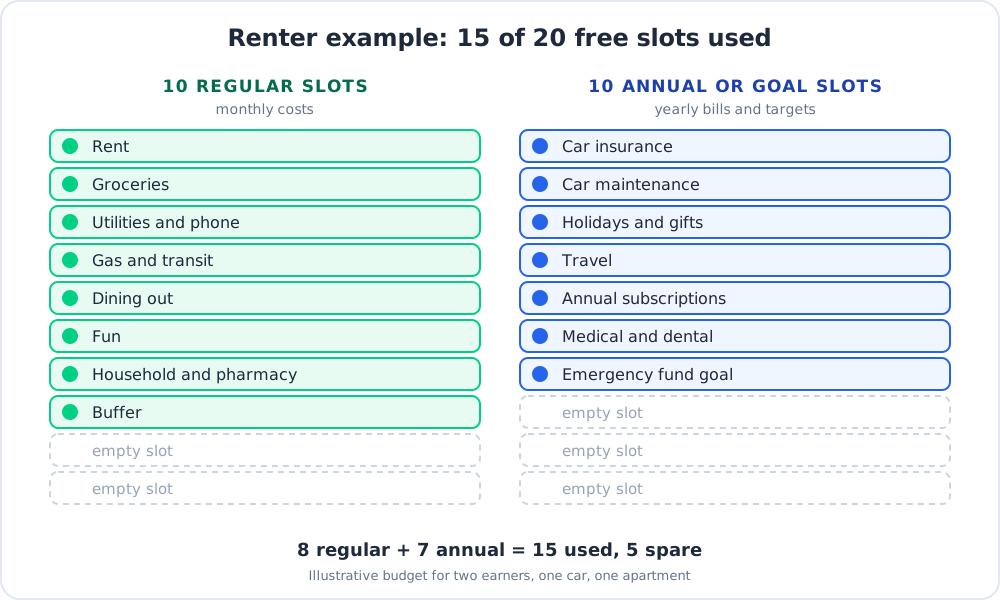
Consolidating costs visibility. Merge gas and transit and you can’t see which one ran over, so only combine categories you’d cut together.
I’d merge categories by the decision they trigger. Electric, water and internet share one envelope because you can’t flex them, while groceries and dining out stay apart because you can. That keeps every envelope in your Goodbudget budget planner useful and saves slots.
After 15 years of strict zero-based budgeting in YNAB, my view is that every extra category is a chore you’ve signed up for. A 20-envelope cap pushes you toward the version of the method that survives past March. My zero-based budgeting guide covers the logic of giving every dollar a job.
One edge case I can’t confirm from the help pages is whether an empty annual slot can hold a monthly category. Plan as if the 10 and 10 are separate pools, because the Goodbudget budget planner’s pricing page lists them that way.
If you still land above 20 after merging, that’s a legitimate reason to pay. Compare how other envelope budgeting apps handle caps, or see how YNAB, with no envelope limit, stacks up in Goodbudget vs YNAB.
How Do Annual and Goal Envelopes Work?
Annual envelopes spread a yearly cost across your budget periods, and goal envelopes save toward a one-time target with an optional due date. Goodbudget’s own example turns a $600 holiday budget into $50 a month on a monthly period.
Run the same logic on a bill you dread. A $1,260 car insurance renewal becomes $105 a month, and when the renewal hits, you record it as an expense against that envelope instead of raiding groceries. Yearly bills are where the envelope budgeting method earns its keep. That’s the Goodbudget budget planner doing what a spreadsheet makes you build by hand.
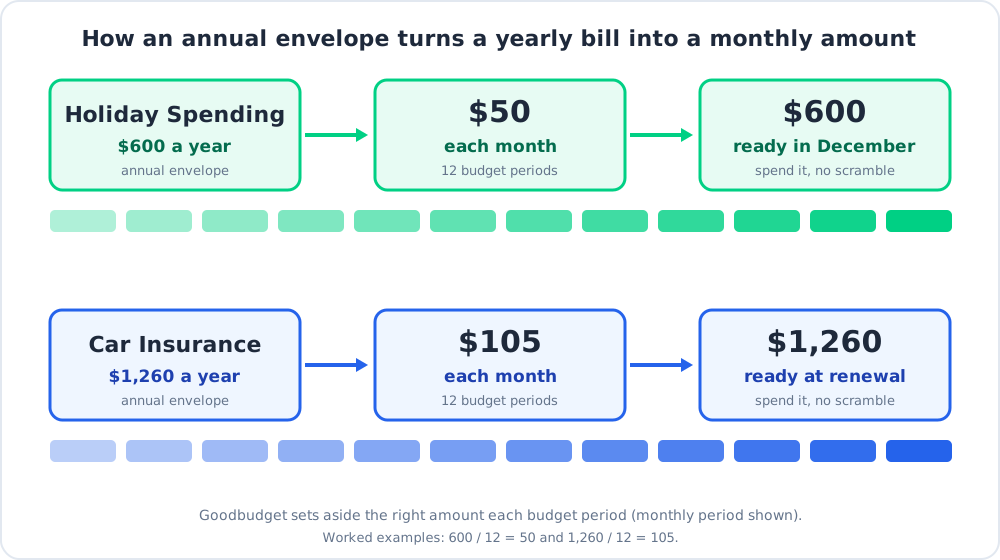
Goal envelopes suit one-off targets like a wedding or a new car. In the Goodbudget budget planner, they draw from the same 10-slot pool, so choose the two or three goals that matter this year and park the rest.
Goodbudget’s income step also covers irregular pay. My irregular income budgeting guide explains how to budget when paychecks vary, which is where annual envelopes earn their slots.
What Does Manual Entry Cost You in the Goodbudget App Each Week?
Manual entry costs one logged transaction per purchase and a short weekly check against your bank. In return, the envelope balance is current before your next purchase, which is the point of the envelope budgeting method.
Pick one day, open your bank app, and compare its balance with your Goodbudget Account. If the two differ by more than a few dollars, you missed an entry or typed an amount wrong, and it’s easier to fix this week than next month.
I’d call the Goodbudget budget planner a free envelope budgeting app that charges you in attention instead of cash. That’s a fair price if automated apps made you tune out, and a bad one if you skip entries for two weeks running.
Log purchases in the Goodbudget app in the checkout line if you can. When you can’t, set one daily reminder at the same hour and clear the list then. A cash purchase logged three days late is one you’ve already forgotten.
If typing is the dealbreaker, bank sync is the real reason to pay for Premium, and it’s a better reason than the envelope cap. The best free budgeting apps list compares alternatives if you’d rather not pay for it.
The iPhone listing is called Goodbudget Budget Planner, published by Dayspring Technologies. As an envelope budget system app, it shares one household budget with the website and the Android app, so the Goodbudget app on your partner’s phone stays in step with yours. If you’re new to budgeting altogether, my beginner budgeting apps guide shows where this one ranks.
Is a Spreadsheet Better Than an Envelope Budget System App?
A spreadsheet wins on flexibility and cost, and an envelope budget system app wins on speed and enforcement. If you already live in Google Sheets, you’ll never hit a cap, but nothing will stop you from overspending a category either.
The Goodbudget budget planner’s advantage is entering a purchase on your phone in the checkout line and seeing the envelope drop. Its disadvantage is the cap and the one account. A sheet has neither limit, and the trade-off is that you build every formula yourself.
My test is simple. If you’ve abandoned a budgeting spreadsheet twice, try the free plan for a month. If the envelope structure of the Goodbudget budget planner feels like friction instead of help, a sheet is a legitimate answer, and this Google Sheets budget tracker versus apps comparison lays out where each one breaks.
When Is Goodbudget Premium Worth $80 a Year?
Premium pays off if you need a second account, automatic bank import, or more than 20 envelopes after consolidating. If none of those fit, the free envelope budgeting app saves you $80 a year, or $120 if you’d otherwise pay monthly.
$80 a year is $6.67 a month, roughly two fancy coffees. Billed monthly, $10 adds up to $120, so the annual plan saves $40 and monthly billing only makes sense as a one-month test. Goodbudget refunds a new subscription in full within 30 days through [email protected], with no partial refunds after that.
Price the bank sync honestly. Ten minutes a week of typing is about 8.7 hours a year, so $80 buys back roughly $9 an hour of your time. If your time is worth more than that, sync wins, and if the daily check is the habit holding your budget together, it doesn’t.
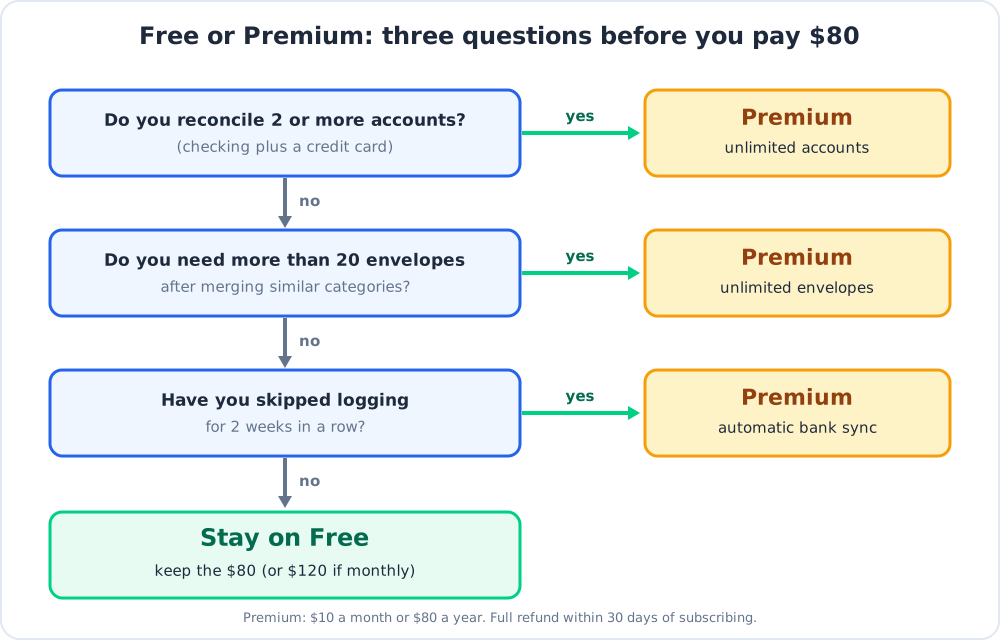
My rule is simple. A single-account budgeter who logs daily should stay on the free Goodbudget budget planner. A household with checking plus a credit card, or anyone who has skipped logging for two weeks, should pay.
If you’re weighing $80 against $109, YNAB’s pricing page lists $109 a year with a 34-day trial, no card required, and transaction import. That’s $29 more than Goodbudget Premium with no envelope caps. My YNAB pricing guide and YNAB review cover the rest.
Ramsey Solutions says EveryDollar’s free plan has no line limit and works on every device. That’s a competitor’s claim, so check it in the app, and read my EveryDollar review for the manual-entry catch.
To cancel, use the place you subscribed, because Goodbudget’s billing help says the steps depend on where the subscription was created. Paid features run to the end of the billing period, then the household reverts to Free.
Can Two People Share One Free Goodbudget Budget?
Yes. The free Goodbudget budget planner shares one household budget across two phones, and logging in on the website doesn’t count against that limit.
Two phones plus a laptop works fine in the Goodbudget budget planner. A third phone means revoking one under My Household, then Manage Devices. Goodbudget’s partner sharing guide walks through the invite.
The single account is the couple’s real problem. Two incomes feeding separate checking accounts means picking one account to track, or paying for Premium, and I’d pay.
If you share one joint account, a five-minute weekly check-in is enough to keep both phones honest. Agree on an owner for each envelope, with one person logging groceries and household and the other logging bills and subscriptions, because people remember their own categories better than shared ones. For couples comparing options, my best budgeting apps for couples roundup and Honeydue review cover free apps built for two.
What Else Do People Ask About Goodbudget’s Free Plan?
Is Goodbudget Really Free Forever?
Yes, the free Goodbudget budget planner has no time limit, and Goodbudget’s billing help says you’ll never be charged for it. If you cancel Premium, your household drops back to a Free household once the paid period ends.
The free plan still carries every limit in the table above. Goodbudget’s help pages don’t say what happens to envelopes beyond those limits after a downgrade (unconfirmed as of 10 November 2026), so trim to 20 before you cancel.
Can Goodbudget Help Me Track My Spending and Avoid Overspending?
Yes, because each envelope in the Goodbudget budget planner shows what’s left before you spend it. On the free plan, that balance is only as current as your last entry.
When an envelope runs dry, you either stop spending in that category or cover it from another envelope. Say Dining Out has $40 left and a $55 dinner is coming. You see the $15 gap before you order, which is what separates this from a tracker that reports the damage a month later.
Can Goodbudget Help Me Plan and Track Savings Goals?
Yes, the Goodbudget budget planner handles this through goal envelopes, which save toward a one-time target like a wedding or a new car and accept an optional due date. Annual envelopes handle yearly costs the same way and spread the amount across each budget period.
Every goal you track takes one of the 10 annual or goal slots. Pick the two or three that matter this year, and my debt payoff guide is the better home for payoff targets.
Next, count your real categories against the 8-and-7 example, decide if you’re a one-account budgeter, and start on the free Goodbudget budget planner if you are. When you hit a wall, the Goodbudget pricing guide shows exactly what Premium adds.
📚 Read Next
