
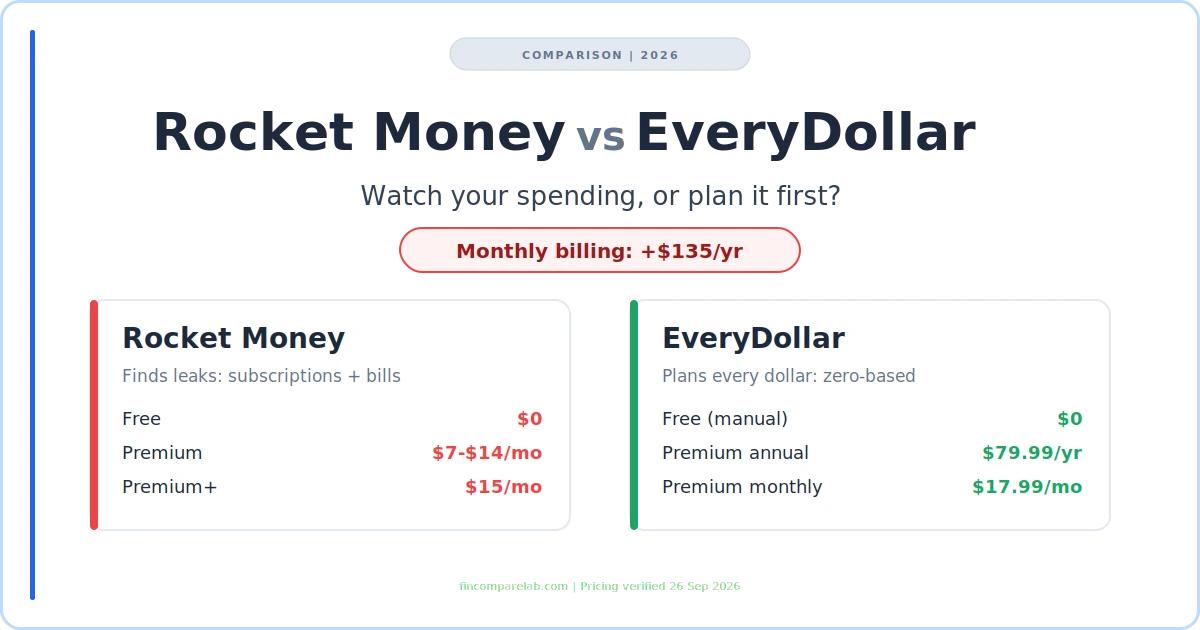
Rocket Money vs EveryDollar is a choice between two different jobs. Rocket Money watches money you’ve already spent and hunts for leaks like forgotten subscriptions. EveryDollar makes you plan every dollar before the month starts. And one billing choice on the EveryDollar side quietly costs $135 more a year for identical features.
⚡ Quick Verdict
Pick Rocket Money if you don’t know what’s leaving your accounts each month, or if a high internet or phone bill is the real problem. Pick EveryDollar if you already know your spending and need a plan to pay off debt. If you choose EveryDollar Premium, pay annually. The $17.99 monthly plan totals $215.88 a year versus $79.99.
How We Review Apps · Pricing verified from rocketmoney.com and ramseysolutions.com — 26 September 2026
What does this comparison cover?
- What’s the real difference between Rocket Money and EveryDollar?
- How much do Rocket Money and EveryDollar cost in 2026?
- What do the free plans actually leave out?
- When does the bill negotiation fee cost more than Premium+?
- Which app is better for paying off debt?
- How do bank sync and credit cards work on each app?
- Which app works better for couples?
- Should you trust Ramsey’s take on Rocket Money?
- What does Reddit say about Rocket Money vs EveryDollar?
- Which app wins each category?
- Can you use Rocket Money and EveryDollar together?
- Which app fits your situation?
- What else do people ask about Rocket Money vs EveryDollar?
- What’s the smartest first move?
What’s the Real Difference Between Rocket Money and EveryDollar?
Direct answer: Rocket Money is a passive money tracker that finds recurring charges, negotiates bills, and shows spending after it happens. EveryDollar is a zero-based budgeting app where you assign every dollar of income a job before the month begins. Choose Rocket Money for visibility and EveryDollar for a plan.
Deciding Rocket Money or Every Dollar starts there. That’s the whole Rocket Money vs EveryDollar decision in one line, and it matters more than any feature list. One app works backward from your bank statements. The other works forward from your paycheck.
Lots of people search this as Every Dollar vs Rocket Money, with the brand name split into two words. It’s the same app either way, built by Ramsey Solutions around Dave Ramsey’s Baby Steps. So if you typed Rocket Money vs Every Dollar into Google, you’re in the right place.
Here’s why the method gap is bigger than it looks. I ran a strict zero-based budgeting system in YNAB for 15 years before switching to Monarch Money this year. Zero-based budgeting works, but it asks for daily attention. Overspend in one category and you move money from another before the month closes.
EveryDollar runs on that same method, so it rewards people who like that loop. Rocket Money asks almost nothing of you after setup. That’s its strength and its limit, because nothing forces a spending decision before the money leaves.
Is Rocket Money a budgeting app or just a subscription tracker?
It’s both, according to Rocket Money’s own FAQ, which calls budgeting core to the app rather than an add-on. The catch is that serious budgeting sits behind Premium, since the free plan caps custom category budgets.
Budgets in Rocket Money are spending limits you watch, not a monthly plan you build from income. If you want the plan-first version, the best zero-based budgeting apps roundup covers the full field, from EveryDollar to YNAB.
How Much Do Rocket Money and EveryDollar Cost in 2026?
On price, Rocket Money vs EveryDollar starts level, since both apps have a permanent free plan. Then the pricing models split in opposite directions. Rocket Money only bills monthly and lets you choose your own Premium price. EveryDollar charges one fixed Premium price, with a big discount for paying yearly.
| Rocket Money | EveryDollar | |
|---|---|---|
| Free plan | ✅ $0 forever, mobile app only | ✅ $0 forever, manual entry |
| Paid, monthly | Premium $7–$14/mo (you pick) · Premium+ $15/mo | ⚠️ Premium $17.99/mo |
| Paid, annual | ❌ No annual plan | ✅ Premium $79.99/yr ($6.67/mo) |
| Free trial | 7 days of Premium | 14 days of Premium, new users only |
| Extra fees | ⚠️ Bill negotiation: 35–60% of first-year savings ($0 on Premium+) | None |
| How you pay | Card or app store billing | ⚠️ Debit card only |
Rocket Money vs EveryDollar pricing verified from rocketmoney.com, ramseysolutions.com and the EveryDollar Help Center on 26 September 2026. Rocket Money says its $7–$14 range is subject to change.
The Rocket Money vs Every Dollar pricing gap starts with how Premium is priced. Rocket Money calls its model pay what you think is fair, so two people can pay different prices for identical features. Premium+ is a separate $15 tier that adds Rowan, an AI assistant you text, and drops the bill negotiation fee. Full tier details live in my Rocket Money pricing guide.
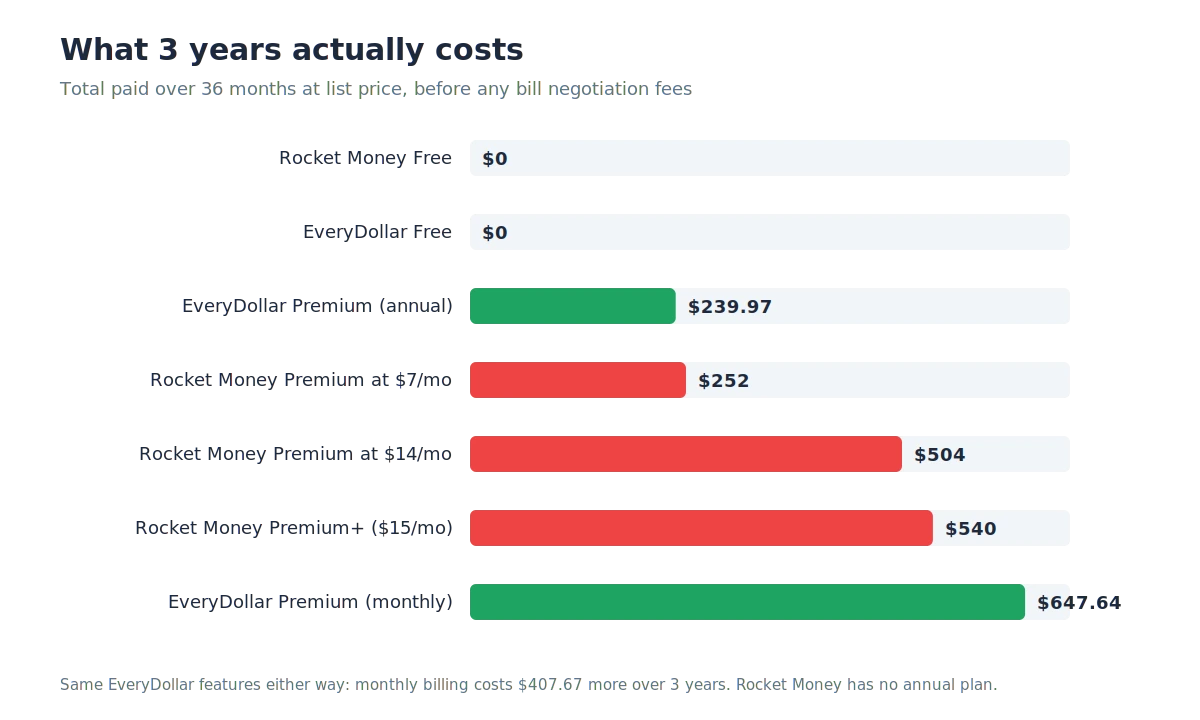
Rocket Money vs EveryDollar over 36 months at list price. Rocket Money vs Every Dollar only looks close if you pick the EveryDollar monthly plan.
Stretch the numbers over three years and the ranking flips depending on how you pay. EveryDollar annual comes out cheapest of the paid options at $239.97. EveryDollar monthly lands most expensive at $647.64, above even Rocket Money Premium+ at $540.
Why is EveryDollar’s monthly plan a $135 trap?
Because $17.99 a month adds up to $215.88 a year, while the annual plan costs $79.99 for exactly the same features. That’s a $135.89 yearly penalty for choosing the monthly button, confirmed by the prices on the EveryDollar Help Center.
The monthly plan makes sense in one narrow case. If you’re testing whether bank sync fixes your consistency problem, one or two months at $17.99 costs less than a year you might abandon. Past the second month, the math says switch to annual. My EveryDollar pricing breakdown walks through the Ramsey+ bundle as well.
Is EveryDollar free?
Yes. EveryDollar’s free plan is a real zero-based budget with unlimited categories, sinking funds, and split transactions, and it never expires.
The trade-off is typing every transaction yourself, since bank connect is a Premium feature. Rocket Money’s free plan is the reverse. It syncs your accounts automatically but gives you far less budgeting control.
What Do the Free Plans Actually Leave Out?
In the Rocket Money vs EveryDollar free-plan matchup, both plans are genuinely usable, which is rare in this category. They just fail in different places, so the question is which gap you can live with.
| Free plan feature | Rocket Money Free | EveryDollar Free |
|---|---|---|
| Bank sync | ✅ Linked accounts (no real-time sync) | ❌ Manual entry only |
| Category budgets | ⚠️ Two custom budgets in the FAQ, up to 3 in the pricing table | ✅ Unlimited |
| Web access | ❌ Mobile app only | ✅ Computer, phone, tablet |
| Subscription list | ✅ Every recurring charge | ❌ Not a feature |
| Split transactions | ❌ Premium only | ✅ Included |
| Savings goals | ❌ Premium only | ✅ Sinking funds |
| Bill negotiation | ✅ Available, success fee applies | ❌ Not a feature |
Rocket Money vs EveryDollar free-plan limits, from the Rocket Money pricing article and FAQ and the EveryDollar feature list on ramseysolutions.com, 26 September 2026.
Rocket Money’s own pages disagree on the free category count. The feature table says up to 3 category budgets, while the FAQ and pricing prose say two custom category budgets. Plan around two until Rocket Money cleans that up.
Rocket Money vs Every Dollar on free-plan price is a tie at $0, so EveryDollar Free’s real cost is time. Tap your card three times a day and that’s roughly 90 manual entries a month. That kind of daily upkeep is exactly what wore me down on strict zero-based budgeting, and it’s the main reason people upgrade to Premium’s bank connect.
If the free route is the priority, compare both against the wider field in my best free budgeting apps roundup. Goodbudget is the other strong free option if you prefer envelopes.
When Does Rocket Money’s Bill Negotiation Fee Cost More Than Premium+?
On Free and Premium, Rocket Money’s negotiators keep 35% to 60% of your first year’s savings when they lower a bill. Premium+ drops that fee to zero, so the real question is whether the fee you’d pay beats the extra subscription cost.
Start with Premium at the $7 floor. Premium+ costs $8 more a month, which is $96 a year. At a 60% fee, any negotiation that saves more than $160 in year one, about $13.33 a month, makes Premium+ the cheaper choice. At a 35% fee, the break-even rises to about $22.86 a month.
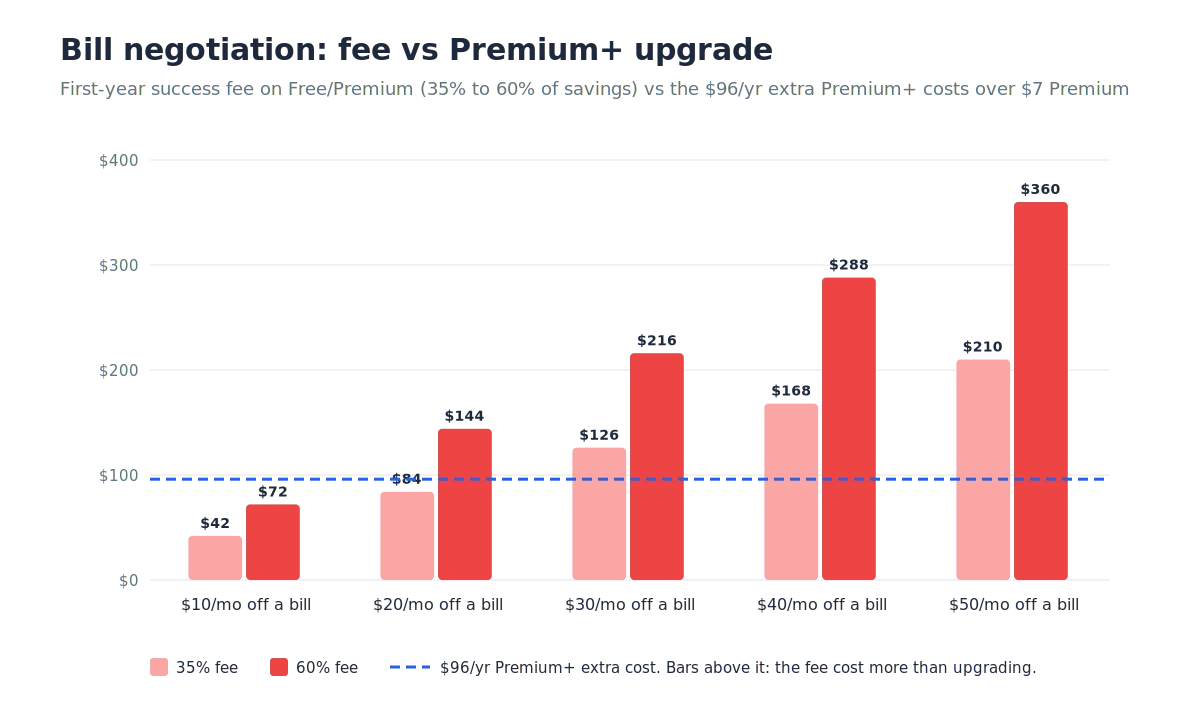
EveryDollar vs Rocket Money on bill negotiation: bars above the dashed line mean the fee cost more than upgrading that year.
Free users face steeper math. Premium+ costs $180 a year over Free, so it only wins once a negotiation saves roughly $25 to $43 a month. And if you’d pick $14 Premium anyway, Premium+ costs just $12 a year more. Nearly any successful negotiation covers that.
Three caveats before you act on this. You won’t know your exact fee percentage until a negotiation succeeds. The fee only applies to the first year, since Rocket Money says you keep 100% of the savings after that. And Premium+ rollout status is unconfirmed as of 26 September 2026, because the tier has been described as limited while Rocket Money’s own pages show no waitlist.
This is the one Rocket Money vs EveryDollar category where EveryDollar has no equivalent feature at all. You call your providers yourself, which costs nothing but a phone call. For the full Rocket Money fee picture, see the Rocket Money review or compare negotiation against a planning-first app in Monarch vs Rocket Money.
Which App Is Better for Paying Off Debt?
In the Rocket Money vs EveryDollar debt matchup, EveryDollar is the better pick, because its Premium plan includes a debt payoff tracker and the whole app is built around the Baby Steps. Rocket Money can free up cash for debt, but it doesn’t document a snowball or avalanche planner.
EveryDollar’s plan-first method fits debt payoff naturally. You set the extra payment before the month starts, so the money is gone to debt before it can drift into spending. Ramsey’s method behind it is the debt snowball, paying the smallest balance first. So the Every Dollar vs Rocket Money gap on debt is really a method gap, not a missing button.
One edge case to check during the 14-day trial. EveryDollar’s help center says connected bank accounts can’t be linked directly to a Debt item yet. That suggests payoff progress follows the payments you record, not a live synced loan balance.
Does Rocket Money have a debt snowball feature?
Not a documented one. Rocket Money tracks your debts inside net worth on Premium, but it doesn’t describe a snowball or avalanche payoff planner anywhere on its pricing page or FAQ.
Its pricing table does list a Debt paydown row under Financial Goals for Premium, with no explanation of what it does. Its help center still describes Financial Goals as automated savings transfers. What that row actually covers is unconfirmed as of 26 September 2026.
If you want a payoff plan without paying for either app, run your balances through the free debt payoff estimator. Then compare the free debt tracker apps for day-to-day tracking. Spreadsheet people can use this debt payoff calculator in Google Sheets, and the debt snowball vs avalanche guide explains which order saves more interest.
If debt is the reason you’re choosing Rocket Money or Every Dollar, start with the tracker. For a wider view of paid options, my best debt payoff apps roundup ranks EveryDollar alongside YNAB and others.
How Do Bank Sync and Credit Cards Work on Each App?
On bank sync, Rocket Money vs EveryDollar is closer than most reviews claim. Both apps now connect through Plaid, so the old Plaid-versus-Finicity argument no longer holds. The real differences are Apple Card, American Express, and how each app treats credit card spending.
EveryDollar’s help center lists Plaid as the default connection and Mastercard Connect as the backup, covering more than 13,000 institutions. Plenty of comparisons, including an earlier version of this one, still say EveryDollar skips Plaid. Its own setup guides show otherwise. Rocket Money uses Plaid too, which its FAQ says covers over 12,000 financial institutions.
The Every Dollar app vs Rocket Money gap shows up with specific cards. EveryDollar’s bank status page says it doesn’t support Apple Card at all. It also has a dedicated article for American Express, which admits some Amex accounts connect and stay connected while others don’t.
Credit cards are a philosophy question on EveryDollar as much as a technical one. Its help center recommends two workarounds. List the card balance as a debt and record only the payoff, or enter each card purchase and skip recording the payment.
Rocket Money treats a credit card like any other account, with no opinion attached. If you pay a rewards card in full every month, that neutrality is worth something. EveryDollar vs Rocket Money on this point comes down to whether you want an app that tolerates your card or one that nudges you away from it.
Why does EveryDollar only accept debit cards?
EveryDollar’s payment help article says its team only accepts debit cards for the subscription, citing security restrictions. So a Premium subscription can’t go on a points card.
That rule covers paying for EveryDollar, not which accounts you can link. You can still connect many credit card accounts through bank connect, Apple Card aside.
Which App Works Better for Couples?
For couples, Rocket Money vs EveryDollar comes down to the kind of sharing you want. EveryDollar suits couples who want to build one shared plan, while Rocket Money suits couples who mainly want shared visibility. Both lock their best sharing setup behind conditions worth checking first.
Rocket Money’s partner sharing is Premium-only. It creates a second login so a partner, spouse, or financial advisor can see the same accounts. On the free plan, there’s no sharing at all.
EveryDollar’s household feature lets couples manage one budget together, even with separate email logins. Its FAQ doesn’t say which tier includes it, so the tier is unconfirmed as of 26 September 2026. Check it during the trial before committing.
If you’re torn between Every Dollar or Rocket Money as a couple, test the sharing setup during each trial first. If shared finances are the main job, my best budgeting apps for couples guide covers apps built for two, including Honeydue and Monarch Money.
Should You Trust Ramsey’s Take on Rocket Money?
Read it with the source in mind. Ramsey Solutions owns EveryDollar, and its own Rocket Money review ranks well for this exact comparison while recommending EveryDollar instead.
In the Rocket Money vs Every Dollar debate, the Dave Ramsey Rocket Money critique makes a fair point about hands-off apps. Watching spending after the fact doesn’t change behavior on its own.
But the same review quotes Premium at $7 to $12 a month, while Rocket Money’s current pricing article says $7 to $14. Small gaps like that are why I verify prices at the source instead of trusting a competitor’s summary.
Does Dave Ramsey recommend Rocket Money?
No. Ramsey Solutions’ review argues that Rocket Money is too hands-off and steers readers to EveryDollar, its own product.
That doesn’t make the critique wrong, just interested. Any EveryDollar vs Rocket Money verdict from Ramsey comes from the company selling one side. The fairest reading is that Rocket Money and EveryDollar solve different problems, and Ramsey is selling the one that fits the Baby Steps.
What Does Reddit Say About Rocket Money vs EveryDollar?
Head-to-head threads on these two are thinner than you’d expect. Most Rocket Money vs EveryDollar Reddit discussion happens inside broader threads about which budgeting app to pick. People asking which is better Rocket Money or Every Dollar usually get the same answer, which is that it depends on the job.
In the Every Dollar vs Rocket Money threads that do exist, the pattern in r/personalfinance and r/budgeting recommendations is consistent with the feature split above. People working a debt snowball get pointed to EveryDollar or YNAB. People who want passive tracking, or just need to find subscriptions, get pointed to Rocket Money and similar trackers.
The most common EveryDollar friction points match what its own help center admits, like Apple Card and Amex connection problems. That’s a useful signal that the complaints are about real, documented limits rather than one-off bad luck.
Which App Wins Each Category?
Across the Rocket Money vs EveryDollar scorecard, Rocket Money wins on automation and finding money, while EveryDollar wins on planning and debt. This scorecard uses the verified details above, with no single weighted score, since the right winner depends on your job.
| Category | Winner | Why |
|---|---|---|
| Finding subscriptions | Rocket Money | Free plan lists every recurring charge |
| Cancelling for you | Rocket Money | Premium team cancels, usually within 2 to 10 days |
| Lowering bills | Rocket Money | Negotiation on every tier, fee-free on Premium+ |
| Planning before you spend | EveryDollar | Zero-based budget is the core of the app |
| Debt payoff | EveryDollar | Premium debt payoff tracker plus Baby Steps structure |
| Free-plan automation | Rocket Money | Free bank linking versus manual entry |
| Free-plan budgeting depth | EveryDollar | Unlimited categories, splits, sinking funds, web access |
| Cheapest paid year | EveryDollar | $79.99 annual versus $84 minimum for Rocket Money Premium |
| Cheapest paid month | Rocket Money | $7 to $14 versus $17.99 |
| Credit card users | Rocket Money | No Apple Card block, no anti-card workflow |
| Coaching | EveryDollar | Premium adds group and one-on-one coaching plus weekly live trainings |
Count the rows and it’s close to a tie, which is the point. The Rocket Money or Every Dollar choice gets easy once you rank the rows that matter to you and ignore the rest.
Can You Use Rocket Money and EveryDollar Together?
Yes, and for a lot of people it’s the smartest way to settle EveryDollar vs Rocket Money. Rocket Money’s free plan finds the leaks, and EveryDollar decides where the recovered money goes.
Decision box: the two-app setup, step by step
- Install Rocket Money Free and link checking plus every card. Its free plan shows more than three months of transaction history, so quarterly charges can surface right away.
- Work through the subscriptions list and cancel what you don’t use yourself. Premium’s cancellation team is optional and usually takes 2 to 10 days.
- Open EveryDollar and build this month’s budget from current balances only. Don’t try to rebuild history.
- Add a budget line for the freed-up subscription money and point it at debt or savings, so it doesn’t quietly turn into spending.
- After 30 days, decide whether Rocket Money stays as a free watchdog. Total cost can stay at $0, or $79.99 a year with EveryDollar Premium annual.
Start with Rocket Money Free → Build the plan in EveryDollar →
Most EveryDollar vs Rocket Money comparisons frame this as either-or, but the two-app setup avoids that.
Step 3 comes from my own migration. When I moved from YNAB to Monarch Money, I skipped importing years of old data and started from opening balances. Old transfers would have distorted the new app’s reports. There’s no direct import between Rocket Money and EveryDollar anyway, so a clean start costs you nothing.
If you’d rather run one app that does both jobs, EveryDollar vs Monarch and YNAB vs Rocket Money cover the closest trade-offs. The Rocket Money alternatives list goes wider.
Which App Fits Your Situation?
The best Rocket Money vs EveryDollar pick matches the problem you have this month, not the one you might have later. EveryDollar vs Rocket Money stops being a close call once you name that problem.
| Your situation | Better fit |
|---|---|
| You can’t say what subscriptions you pay for | Rocket Money Free |
| You’re paying off credit card or student loan debt | EveryDollar |
| An internet, phone, or cable bill feels too high | Rocket Money |
| You want a real budget and $0 cost | EveryDollar Free |
| Most spending runs through Apple Card | Rocket Money |
| You’re following the Baby Steps | EveryDollar |
| Your income changes month to month | Neither is ideal, see below |
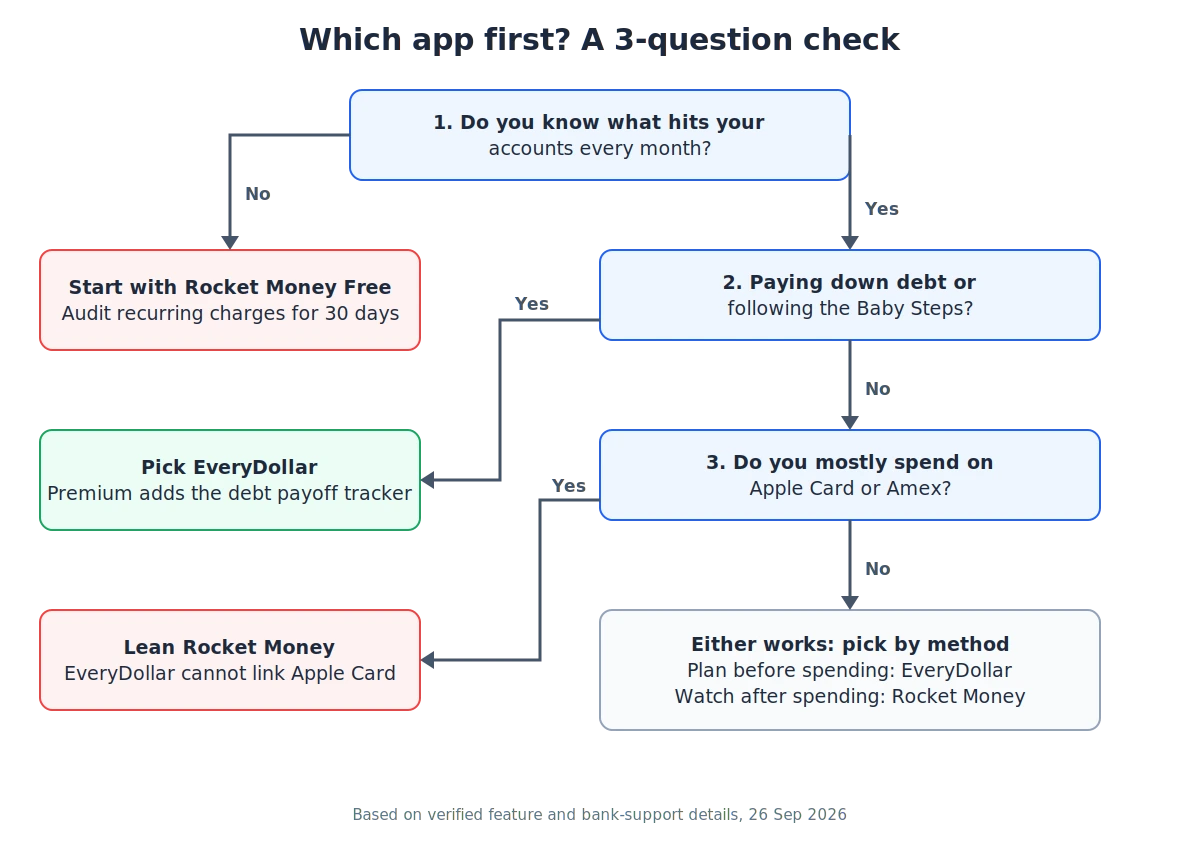
Every Dollar vs Rocket Money in three questions. Start at the top and stop at the first answer that fits.
For variable income, my budgeting on irregular income guide explains why a buffer-first method beats both apps’ monthly cycles. And if you’re still unsure, the two-minute Find My App quiz or the budget calculator can narrow it down.
What Else Do People Ask About Rocket Money vs EveryDollar?
These EveryDollar vs Rocket Money questions come straight from real search queries, covering which app is better, pricing, trials, and switching.
Is Rocket Money or Every Dollar better?
Rocket Money is better for finding forgotten subscriptions and lowering bills. EveryDollar is better for planning spending ahead and paying off debt.
Neither wins outright, because they do different jobs. Plenty of people get the best result using Rocket Money Free for cleanup and EveryDollar for the ongoing plan.
Is Rocket Money free?
Yes, Rocket Money has a free plan with no expiry. It includes linked accounts, subscription tracking, a basic credit score snapshot, and bill negotiation, which charges a success fee.
The free plan runs on mobile only and has no real-time sync. Rocket Money’s pages disagree on whether it allows two or three category budgets.
Which is cheaper, Rocket Money or EveryDollar?
Monthly, Rocket Money is cheaper at $7 to $14 versus EveryDollar’s $17.99. Yearly, EveryDollar is cheaper at $79.99, since Rocket Money has no annual plan and Premium costs at least $84 a year.
Rocket Money’s bill negotiation fee can add more on top if a negotiation succeeds on Free or Premium.
How long are the free trials?
Rocket Money offers a 7-day Premium trial before your chosen monthly price starts. EveryDollar offers a 14-day Premium trial for new users only.
On trials, Rocket Money vs Every Dollar favors EveryDollar with twice the time. It only accepts debit cards for the subscription, so have one ready first.
Can EveryDollar import Rocket Money data?
There’s no direct import between the two apps. You set up EveryDollar’s budget on its own, starting from your current month.
Rocket Money Premium can export transactions as a CSV file for your own records. Starting fresh is usually cleaner than rebuilding old history.
Which app is better for beginners?
EveryDollar is the better starting point for a first budget, because its free plan walks you through building a monthly plan with unlimited categories. Rocket Money is easier to set up but teaches less about planning.
For a first budget, Every Dollar vs Rocket Money favors EveryDollar’s structure. My best budgeting apps for beginners list compares more options.
Is Rocket Money or EveryDollar better for irregular income?
Neither is built for irregular income. Rocket Money adapts more easily because it doesn’t ask you to assign every dollar in advance, while EveryDollar assumes a monthly budget cycle.
If your paychecks swing a lot, compare EveryDollar vs YNAB before committing, since YNAB is the usual pick for variable income.
What’s the Smartest First Move?
The cheapest way to settle Rocket Money vs EveryDollar is to download Rocket Money Free this week and open the subscriptions list before you spend a cent on either app. If that list surprises you, the audit already paid off.
Choosing Rocket Money or Every Dollar gets easier after that. Give EveryDollar’s 14-day trial one full pay cycle. By the end of it, you’ll know if you enjoy planning every dollar or just needed to see where it went. If you pay for EveryDollar, click the annual plan.
📚 Read Next
