
⚡ Quick Verdict
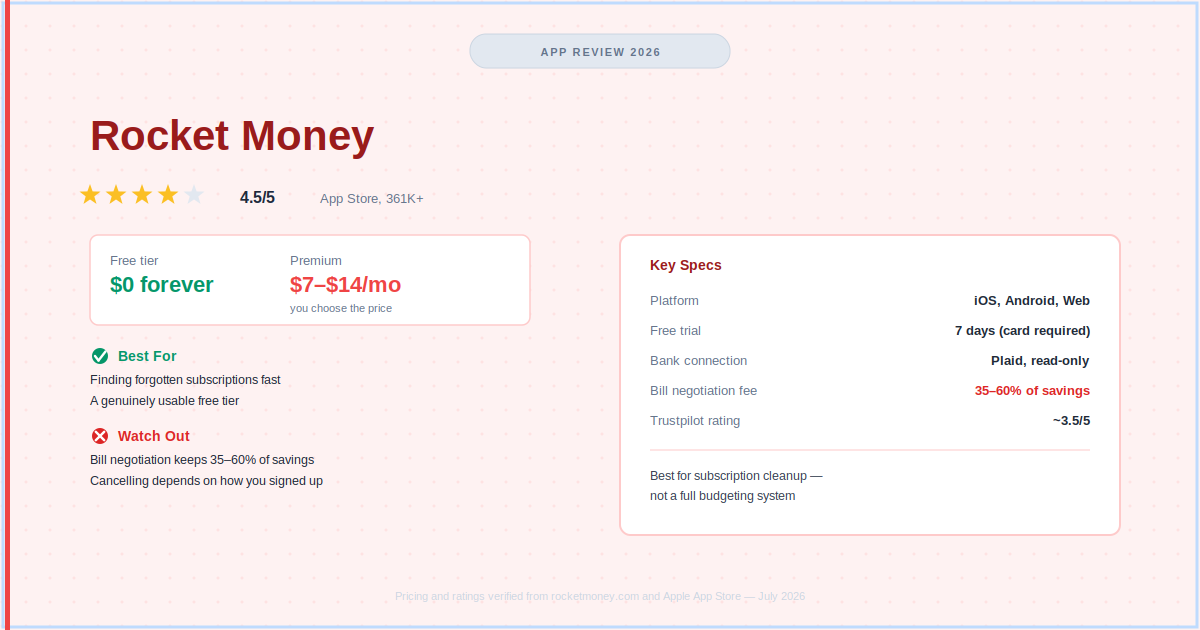
Rocket Money is the best app in the US for finding and cancelling forgotten subscriptions, and the free tier alone is worth using for that. The detail most reviews skip: the $7–$14 Premium slider unlocks identical features at every price, so picking anything above $7/month buys you nothing extra. Bill negotiation is a separate service that keeps 35–60% of your first year’s savings if you use it, and cancelling Premium later depends entirely on how you signed up.
How We Review Apps · Pricing verified from rocketmoney.com — 12 July 2026
📋 What’s in this review
- What is Rocket Money, and who is it really for?
- What features does Rocket Money include?
- How much does Rocket Money cost in 2026?
- How does Rocket Money bill negotiation work?
- How do I cancel Rocket Money before being charged again?
- Does Rocket Money actually cancel subscriptions for you?
- Is Rocket Money safe to use?
- Is Rocket Money worth it in 2026?
- Rocket Money review: what are the pros and cons?
- What do Reddit and other users really say?
- Who should (and shouldn’t) use Rocket Money?
- How does Rocket Money compare to the competition?
- What do people also ask about Rocket Money?
What Is Rocket Money, and Who Is It Really For?
Rocket Money is one of the most downloaded personal finance apps in the US, and one of the most misunderstood. This Rocket Money review exists to clear that up. Most people sign up expecting a full budgeting app. What they actually get is a subscription manager and bill negotiation service with budgeting features layered on top.
That distinction matters, and it’s the thing this Rocket Money review keeps coming back to. Rocket Money won’t change how you think about money the way YNAB does, and it won’t give you the complete financial dashboard Monarch Money does. What it will do is find the recurring charges you’ve forgotten about, in about ten minutes.
Rocket Money (formerly Truebill) is owned by Rocket Companies, the same parent company as Rocket Mortgage, and its own App Store listing states it has over 5 million members. It launched in 2016 as a subscription tracker and has since added budgeting, savings automation, net worth tracking, credit monitoring, and bill negotiation.
What Features Does Rocket Money Include?
Rocket Money’s core feature set covers subscription tracking, bill negotiation, category-based budgeting, automated savings, net worth tracking, and credit monitoring, with the free tier including more than most competitors offer at no cost. If you’re wondering is Rocket Money free enough to be worth downloading before you ever consider Premium, this section is where that gets answered feature by feature.
How does subscription tracking work?
Rocket Money scans your linked accounts for recurring charges and organizes them in a Subscription Control Center. Every subscription, recurring bill, and periodic charge shows up in one list, including ones you forgot you had.
This is genuinely the strongest implementation of subscription tracking among budgeting apps: it catches annual renewals, app store charges, and obscure recurring fees buried in transaction history. The free tier lets you view every detected subscription. Premium adds a cancellation concierge that requests cancellation on your behalf for a few taps, though not every provider supports this, and separately, Rocket Money bill negotiation can be requested on the same bills if you’d rather lower a charge than cancel it (more on that below).
How does bill negotiation work?
Rocket Money bill negotiation means its team contacts your service providers to try to lower recurring bills like internet, cable, and phone. It’s available on both free and Premium, and you pay nothing if negotiation fails.
If it succeeds, Rocket Money takes 35–60% of your first year’s savings, a percentage you choose within that range. Full breakdown in the bill negotiation section below.
What budgeting tools does Rocket Money offer?
Rocket Money’s budgeting is category-based: set spending limits per category, link accounts, and the app tracks actual spending against those limits. The free plan includes two custom categories; Premium unlocks unlimited categories. It’s functional but doesn’t match Monarch Money’s flex-budget system or YNAB’s zero-based method.
What is Smart Savings?
Premium users can set up automatic transfers to a Rocket Money Smart Savings account at an FDIC-insured partner bank. Set a goal, choose a frequency and amount, and Rocket Money moves money automatically. Genuinely useful for anyone who intends to save but never gets around to manual transfers.
What net worth and credit monitoring features are included?
Premium includes a net worth tracker (assets minus liabilities across linked accounts) and full credit report monitoring with score tracking over time via Experian’s FICO 8 model. The free tier shows your credit score but not the full report or monitoring alerts.
What spending insights and alerts does Rocket Money send?
Rocket Money sends alerts for bill increases, unusual charges, low balances, and potential bank fees. The bill-increase alert is particularly useful: if a subscription quietly raises its price by a few dollars a month, Rocket Money flags it. That kind of passive protection can pay for Premium on its own.
How Much Does Rocket Money Cost in 2026?
Rocket Money runs on two tiers: a genuinely useful free plan, and a Premium plan priced on a sliding scale, verified directly from rocketmoney.com. The exact Rocket Money Premium cost you land on depends entirely on what you drag the slider to, not on anything Rocket Money decides for you.
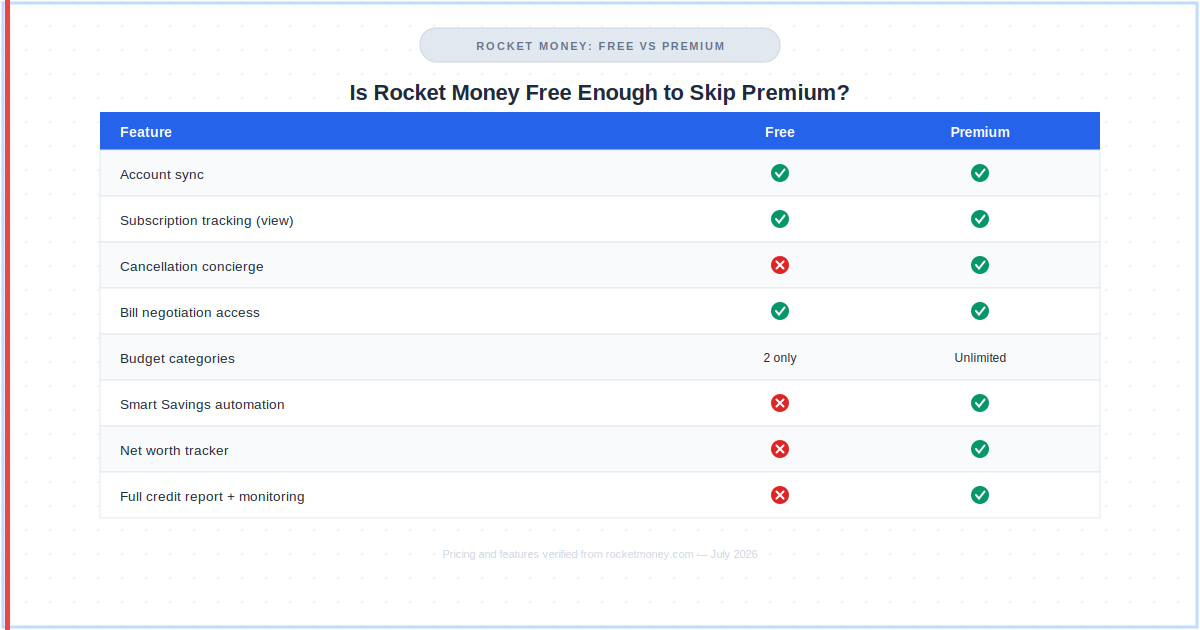
| Free | Premium | |
|---|---|---|
| Price | $0 — forever | $7–$14/mo (you choose) |
| Free trial | N/A | 7 days — card required |
| Account sync | ✅ | ✅ Real-time |
| Subscription tracking | ✅ View only | ✅ + cancellation concierge |
| Bill negotiation | ✅ (35–60% success fee) | ✅ (35–60% success fee) |
| Budget categories | 2 custom | ✅ Unlimited custom |
| Smart Savings | ❌ | ✅ Automated transfers |
| Net worth tracker | ❌ | ✅ |
| Credit score | ✅ Score only | ✅ Full report + monitoring |
| Web access | ❌ | ✅ |
Pricing verified from rocketmoney.com — 12 July 2026.
Is Rocket Money Free?
Yes. Anyone asking is Rocket Money free enough to be worth downloading should know the free plan includes account sync, subscription tracking, two custom budget categories, bill negotiation access, and basic credit score viewing, with no card required and no expiry. Rocket Money is genuinely usable at $0, which isn’t true of most competitors.
How Much Does Rocket Money Premium Cost?
Rocket Money Premium cost sits on a sliding scale between $7 and $14 per month, and every price point unlocks identical features. There’s no functional reason to pick more than the minimum. At $7/month ($84/year), Premium still comes in cheaper than YNAB ($109/year) or Monarch Core ($99.99/year), though both offer more budgeting depth for that price. One quirk worth knowing: Apple’s 30% App Store cut can occasionally push the effective floor higher if you sign up through iOS rather than the web.
How Does Rocket Money Bill Negotiation Work?
Rocket Money bill negotiation is the service’s most distinctive feature, and the one that generates the most Rocket Money review questions. Here’s exactly how it works, verified against Rocket Money’s own Help Center.
- Navigate to Bills, then select a bill you want negotiated
- Rocket Money’s team contacts your provider on your behalf
- If they lower your bill, they notify you of the new rate
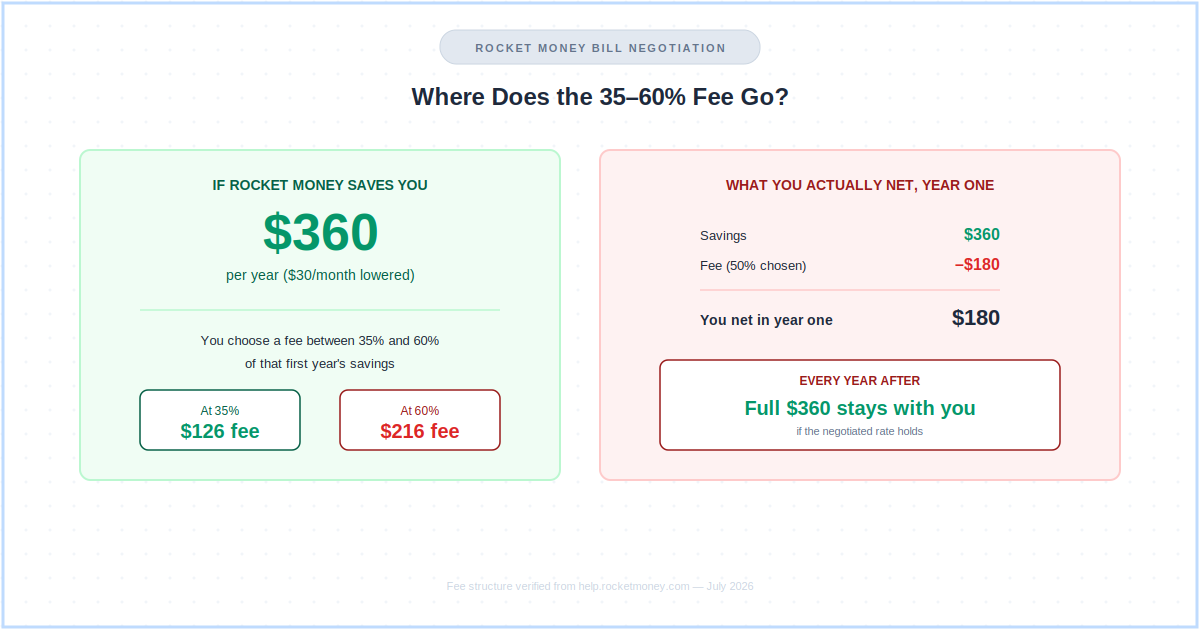
- You pay a one-time fee of 35–60% of your first year’s savings, a percentage you choose upfront
- If the negotiation fails, you pay nothing
Internet, cable, and phone bills are the sweet spot: providers have real room for retention discounts that Rocket Money’s team knows how to access. Rocket Money generally can’t negotiate utilities, most mobile plans, or streaming subscriptions.
Is the fee worth it? Do the math on your own bill before agreeing. If Rocket Money saves you $30/month ($360/year) and takes 50%, you net $180 in year one and keep the full $360 every year after that the deal holds. For small bills, calling your provider directly and keeping 100% of the savings often comes out ahead.
How Do I Cancel Rocket Money Before Being Charged Again?
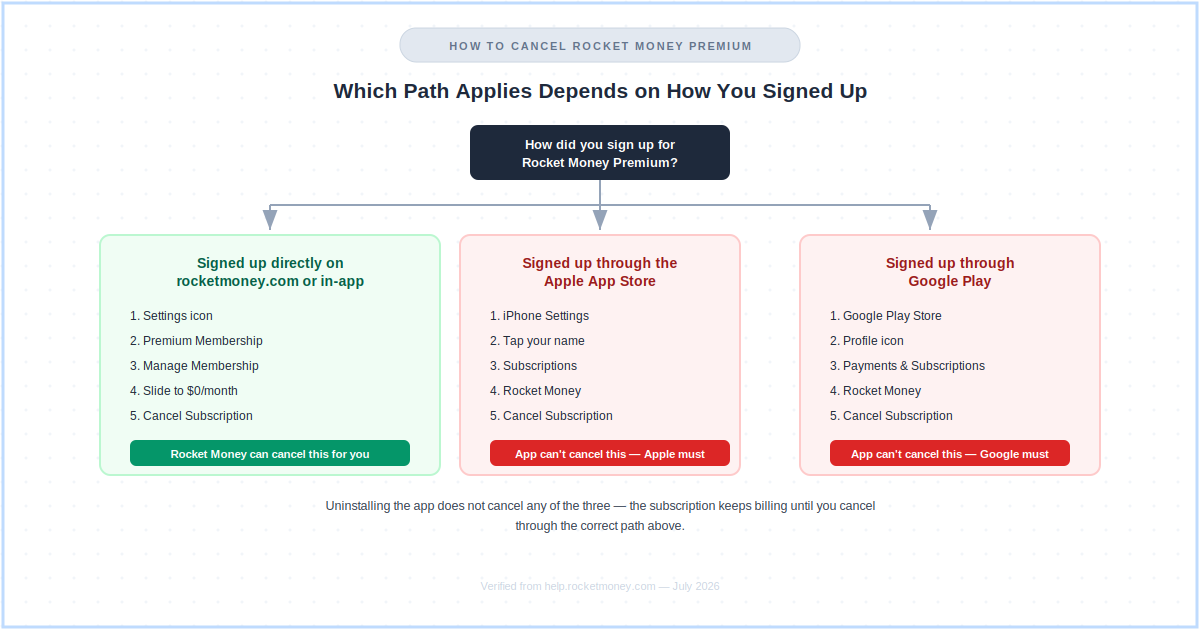
The correct way to cancel Rocket Money Premium depends on how you originally signed up, and this is the single most common source of “I couldn’t find the cancel button” complaints this Rocket Money review found in user feedback. Rocket Money’s own Help Center splits the process into three distinct paths, and getting this wrong is how people keep paying the Rocket Money Premium cost long after they meant to stop.
Did you sign up directly on rocketmoney.com or in the app?
If you subscribed directly through Rocket Money’s website or the in-app flow (not through Apple or Google’s payment system), you can cancel in-app: open Settings, select Premium Membership, tap Manage Membership, slide the price down to $0/month, then tap Cancel Subscription and confirm. Cancellation takes effect at the end of your current billing cycle, and your account itself is not deleted.
Did you sign up through the Apple App Store?
If Apple bills you (a common path on iPhone), Rocket Money cannot cancel that subscription on your behalf. Go to your iPhone’s Settings, tap your name, select Subscriptions, find Rocket Money, and tap Cancel Subscription.
Did you sign up through Google Play?
Rocket Money’s Help Center is explicit that it currently cannot cancel Google Play-billed subscriptions for you. Open the Google Play Store, tap your profile icon, go to Payments & Subscriptions, find Rocket Money, and tap Cancel Subscription. Uninstalling the app does not cancel the subscription.
Whichever path applies to you, cancel at least 24 hours before your next billing date, and keep in mind that cancelling Premium does not stop an already-in-progress bill negotiation, since that success fee is billed separately.
Does Rocket Money Actually Cancel Subscriptions for You?
On the Premium plan, yes, for most providers. Rocket Money’s concierge contacts subscription providers directly and requests cancellation on your behalf.
- Free tier: shows all detected subscriptions; you cancel them yourself
- Premium tier: submit a cancellation request and Rocket Money’s team follows up with the provider
- Caveat: if a subscription doesn’t show a cancel option in the app, Rocket Money isn’t yet able to cancel that specific provider on your behalf, and you’ll need to cancel it directly
Is Rocket Money Safe to Use?
Yes. Anyone asking is Rocket Money safe enough to link real bank accounts to should know it uses 256-bit AES encryption and connects to financial accounts through Plaid’s read-only infrastructure, the same connection method used by most major budgeting apps, including YNAB and Monarch Money.
- Read-only access: Rocket Money cannot move money or initiate transactions on your accounts
- Parent company: Rocket Companies (NYSE: RKT), a publicly traded US financial services corporation
- Data practices: Rocket Money’s own privacy policy discloses that account and financial data may be used for the developer’s own advertising and analytics, which is worth reading before you link accounts if that matters to you
Is Rocket Money Worth It in 2026?
The short answer from this Rocket Money review: Rocket Money is worth it if you have subscription clutter. The free tier alone regularly surfaces recurring charges people forgot they were paying for.
| User type | Verdict | Better option |
|---|---|---|
| Lots of subscriptions, unsure what you’re paying | Strong yes | Rocket Money free tier |
| Want someone to handle cancellations for you | Yes — Premium pays for itself | Rocket Money Premium ($7/mo) |
| Want zero-based budgeting discipline | No | YNAB ($109/yr) |
| Want investment tracking + couples access | No | Monarch Money ($99.99/yr) |
| Former Mint user wanting free tracking | Yes — strong Mint replacement | Rocket Money free tier |
Rocket Money Review: What Are the Pros and Cons?
Every honest Rocket Money review needs to weigh what the app does exceptionally well against where it genuinely falls short.
Subscription detection is genuinely best-in-class. Once accounts are connected, Rocket Money reliably surfaces recurring charges other budgeting apps miss, including annual renewals and small, easy-to-forget app store charges.
The free tier is legitimately useful. Unlike most apps where “free” means “barely functional,” anyone asking is Rocket Money free enough to skip Premium entirely will find account sync, spending categorization, subscription tracking, bill negotiation access, and basic credit score monitoring at zero cost.
Proactive alerts are a genuine strength. The bill-increase alert in particular catches quiet price hikes before they compound, often paying for Premium without any extra effort.
⚠️ Watch Out For
- Cancelling Premium isn’t the same process for everyone. It depends entirely on whether you signed up on the web, through Apple, or through Google Play. Know which one applies to you before you start a trial.
- Bill negotiation fees are steep for smaller bills. Taking 35–60% of first-year savings can outweigh the benefit on a $10–15/month reduction. Calling your provider directly and keeping 100% of the savings can beat it.
- Negotiated rates are often promotional. Bills can quietly revert to standard pricing after 6–24 months with no notification.
- Not a serious budgeting app. If your goal is zero-based discipline or a full investment dashboard, Rocket Money will leave you wanting more.
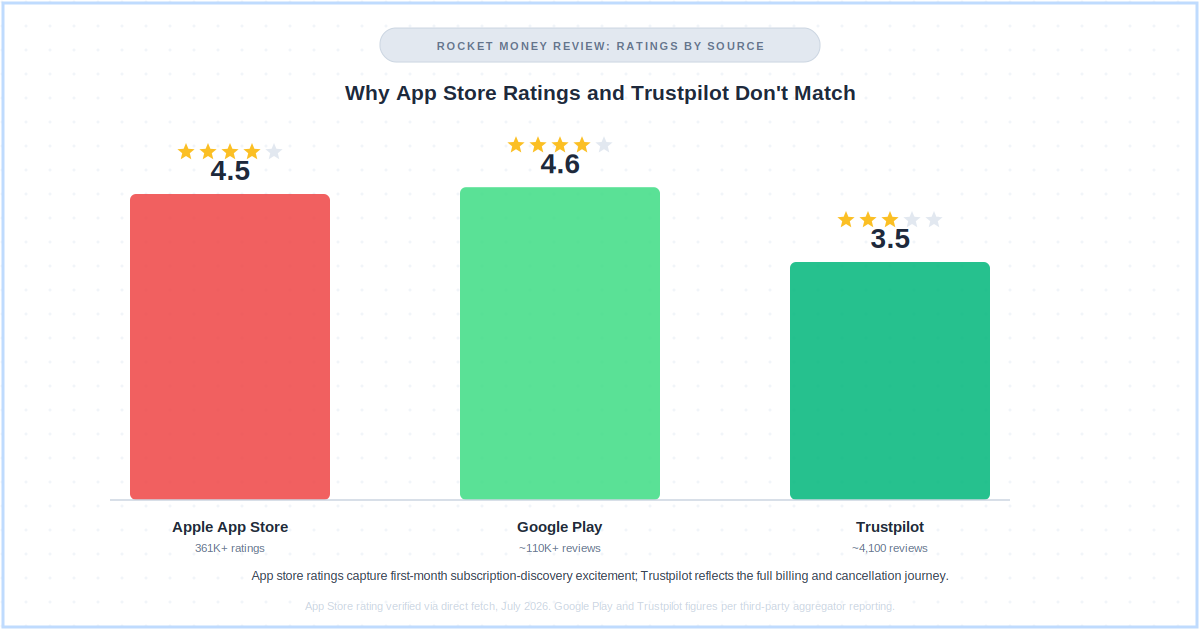
- App store ratings and long-term reviews diverge sharply. Rocket Money scores 4.5+ on app stores but closer to 3.5 on Trustpilot, a gap independent aggregators attribute to first-month enthusiasm fading once users hit billing or support friction.
What Do Reddit and Other Users Really Say About Rocket Money?
The recurring theme across r/personalfinance and similar communities, and one this Rocket Money review saw repeated almost verbatim across independent aggregators, is consistent: use Rocket Money to audit your subscriptions once, then decide whether continuing to pay for Premium makes sense for you.
The most common piece of community advice on the “pay what you think is fair” pricing model is to simply pick the $7 minimum, since every price point unlocks identical features and there’s no functional benefit to paying more. A second recurring theme treats Rocket Money and a dedicated budgeting app like YNAB as solving different problems entirely, worth using together rather than choosing between.
The cancellation-difficulty complaint shows up regularly as a heads-up to new users rather than an accusation of a scam. Independent aggregator CheckThat.ai, which synthesizes Trustpilot, BBB, and community feedback, documents a real split: app store reviews cluster around 4.5 stars while Trustpilot’s ~4,100 verified reviews average roughly 3.5 stars as of January 2026, a pattern the site attributes to app store reviews capturing first-month subscription-discovery excitement versus Trustpilot capturing the full billing and support journey.
Who Should (and Shouldn’t) Use Rocket Money?
Based on everything covered in this Rocket Money review, here’s the honest breakdown of who gets real value from the app and who should look elsewhere.
- You have multiple subscriptions and aren’t sure what you’re actually paying for each month
- You want someone else to handle the legwork of requesting cancellations
- You want a free tool with solid account sync and basic spending tracking
- You have high cable or internet bills and want help negotiating them down
- You want automated savings without managing transfers manually
- You’re a former Mint user who wants automatic tracking without paying $99–$109/year
Look elsewhere if:
- You want zero-based budgeting discipline. YNAB does this well and Rocket Money doesn’t
- You want investment tracking and net worth as the centerpiece. Monarch Money or Empower are stronger here
- You budget as a couple and want shared access under one subscription. Monarch Money is significantly better for that
- You’re outside the US. Rocket Money is US only
How Does Rocket Money Compare to the Competition?
No Rocket Money review is complete without a side-by-side against the main alternatives on price, free tier, and what actually sets each one apart.
| App | Best for | Annual price | Free tier | Key difference |
|---|---|---|---|---|
| Rocket Money | Subscription management | $84–$168/yr (Premium) | Yes — generous | Best subscription detection + bill negotiation |
| YNAB | Zero-based budgeting | $109/yr | 34-day trial only | Best for behavior change + debt payoff |
| Monarch Money | All-in-one dashboard | $99.99/yr | 7-day trial only | Best for couples + investments + net worth |
| Simplifi | Automatic tracking | $35.88/yr (promo) | 7-day trial only | Best value paid app — no subscription focus |
| Empower | Investment tracking | Free forever | Full — no expiry | Best free investment + net worth tracking |
| PocketGuard | Overspending control | $74.99/yr | Yes — limited | Best “how much can I spend today” answer |
Pricing verified from official websites — 12 July 2026.
What Do People Also Ask About Rocket Money?
The questions below come up again and again in this Rocket Money review’s research, covering everything from is Rocket Money free in practice to is Rocket Money safe enough to trust with real accounts.
Is Rocket Money free?
Yes. The free plan includes account sync, subscription tracking, two custom budget categories, bill negotiation access, and basic credit score viewing, with no card required.
Premium ($7–$14/month, you choose) adds a subscription cancellation concierge, Smart Savings, unlimited budget categories, full credit monitoring, net worth tracking, and web access. Pricing verified from rocketmoney.com — 12 July 2026.
How much does Rocket Money Premium cost?
Rocket Money Premium uses a sliding scale between $7 and $14 per month; you choose the price and get identical features regardless. There’s a 7-day free trial for new Premium members with a card required upfront. Pricing verified from rocketmoney.com — 12 July 2026.
Is Rocket Money safe?
Yes. Rocket Money uses 256-bit AES encryption and connects to accounts through Plaid’s read-only infrastructure, so it cannot move money or initiate transactions. It’s owned by Rocket Companies, a publicly traded US financial services corporation.
Does Rocket Money actually cancel subscriptions?
On the Premium plan, for most providers, yes. Rocket Money’s concierge submits cancellation requests to providers on your behalf. If a subscription doesn’t show a cancel option, Rocket Money isn’t yet able to cancel that specific provider, and you’ll need to cancel it directly.
How does Rocket Money’s bill negotiation work?
Submit a bill and Rocket Money’s team contacts your provider to request a lower rate. If successful, you pay a one-time fee of 35–60% of your first year’s savings, a percentage you choose. If unsuccessful, you pay nothing. Works best for internet, cable, and phone bills; doesn’t apply to utilities, most mobile plans, or streaming services.
How do I cancel Rocket Money Premium?
It depends on how you signed up. Direct web or in-app signups cancel through Settings → Premium Membership → Manage Membership → slide to $0 → Cancel Subscription. Apple App Store and Google Play subscriptions must be cancelled through that platform’s own subscription settings instead, since Rocket Money cannot cancel those on your behalf.
Is Rocket Money better than Mint?
Mint shut down in March 2024. Rocket Money is a commonly recommended replacement: it offers similar automatic transaction tracking, adds subscription management and bill negotiation that Mint never had, and keeps a genuinely usable free tier. For a complete financial dashboard with investment tracking and couples access, Monarch Money is the stronger choice.
Is Rocket Money worth it in 2026?
For users with subscription clutter, yes. The free tier alone is worth using regardless of whether you ever upgrade. For users who want a serious budgeting system, YNAB or Monarch Money are better investments than Rocket Money Premium.
The honest takeaway from this Rocket Money review: download the free tier this week, run the subscription scan, and cancel what you don’t need. Whether you keep paying for Premium afterward, and whether you ever ask is Rocket Money safe enough for bill negotiation too, is a decision worth making only once you’ve seen what the free scan turns up in your own accounts.
📚 Read Next
