
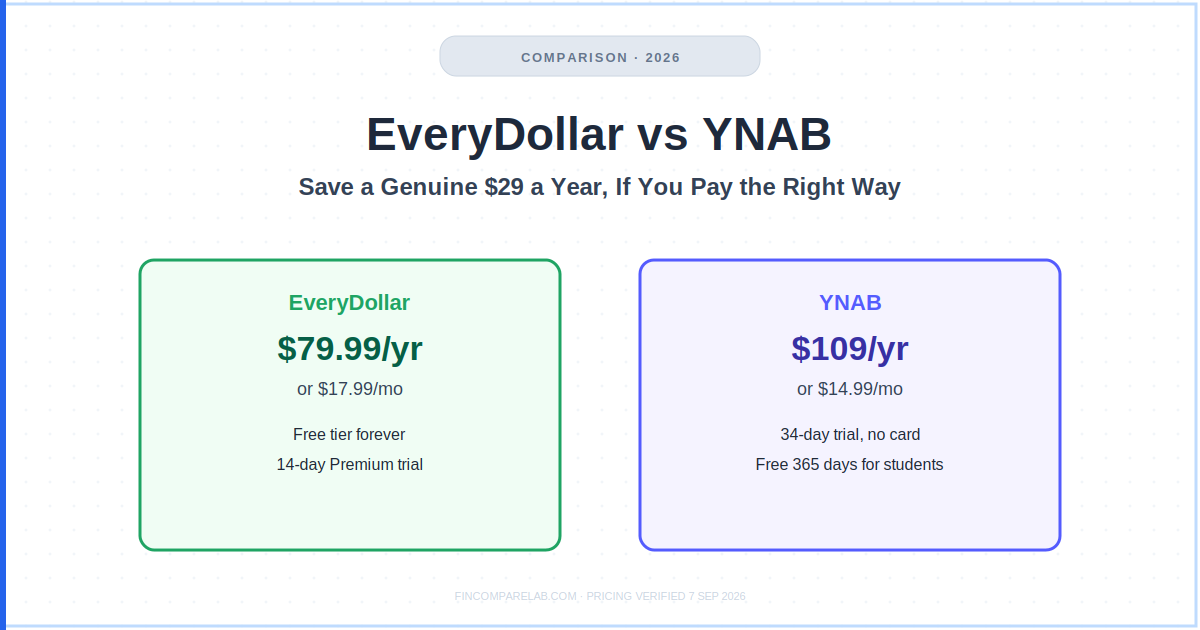
EveryDollar vs YNAB comes down to a $29.01 annual gap most comparisons state but never fully explain, and getting the direction of that gap wrong is the single most common mistake people make when picking between the two best-known zero-based budgeting apps in the US.
Search interest splits across several phrasings, everydollar vs ynab, ynab vs everydollar, every dollar vs ynab, and you need a budget vs everydollar, but they’re all asking the same underlying question: which app’s approach to zero-based budgeting actually fits your money.
⚡ Quick Verdict
EveryDollar ($79.99/yr or $17.99/mo)
Genuinely cheaper if you pay annually, has a real free tier forever, and gets you budgeting in about 15 minutes. Pay monthly instead and it quietly becomes the more expensive app in this whole comparison.
YNAB ($109/yr or $14.99/mo)
Costs more annually but less monthly, handles credit cards the way responsible users actually need, and gives students a full free year. A 34-day trial with no card required.
Both apps use the same core method (give every dollar a job before you spend it). The $29.01 gap only exists if you actually pay annually on both sides, and that detail decides who really saves you money.
How We Review Apps · Pricing verified from ramseysolutions.com and ynab.com, 7 September 2026
📋 In This Comparison
- What’s the core difference between EveryDollar and YNAB?
- How does EveryDollar vs YNAB pricing actually compare?
- How does each app actually work?
- Which app handles credit cards better?
- Which real-life scenario fits you?
- Can you use both EveryDollar and YNAB?
- What do you actually lose switching between them?
- Who wins each category?
- So, is EveryDollar or YNAB better for you?
- What else do people ask about EveryDollar vs YNAB?
What’s the Core Difference Between EveryDollar and YNAB?
EveryDollar vs YNAB, or ynab vs everydollar if you searched it the other way, comes down to whether you want an app built inside Dave Ramsey’s Baby Steps or a flexible zero-based method with no attached philosophy. EveryDollar plans your whole month upfront around Ramsey’s framework. YNAB budgets only the money you actually have right now, works with any debt-payoff or investing approach, and is built specifically around responsible credit card use rather than avoiding cards.
Both apps ask you to assign every dollar of income to a category before you spend it, and both run on iOS, Android, and web. But EveryDollar’s coaching, debt tracker, and default snowball payoff method all sit inside Ramsey’s Baby Steps (save $1,000, pay off debt smallest-balance-first, build a 3-6 month emergency fund, invest 15% for retirement).
If you’re already following that path, EveryDollar feels like the natural home for your budget. If you’re not, parts of it will feel like you’re arguing with the app.
YNAB, by contrast, is a method rather than a belief system. Its four rules (give every dollar a job, embrace your true expenses, roll with the punches, age your money) describe how to think about money in general, not which specific debt strategy or investing philosophy to follow.
That neutrality is also why YNAB’s four rules show up constantly in every zero-based budgeting roundup we’ve published, regardless of which other app is being discussed.
I’ve used YNAB myself for over a decade (2011 through earlier this year, before eventually switching to Monarch Money once my finances outgrew strict zero-based budgeting). I never personally ran EveryDollar during that stretch, so everything EveryDollar-specific in this piece is sourced from EveryDollar’s own official pages and paraphrased community consensus, not firsthand testing, and I’ve been careful to keep that distinction clear throughout.
How Does EveryDollar vs YNAB Pricing Actually Compare?
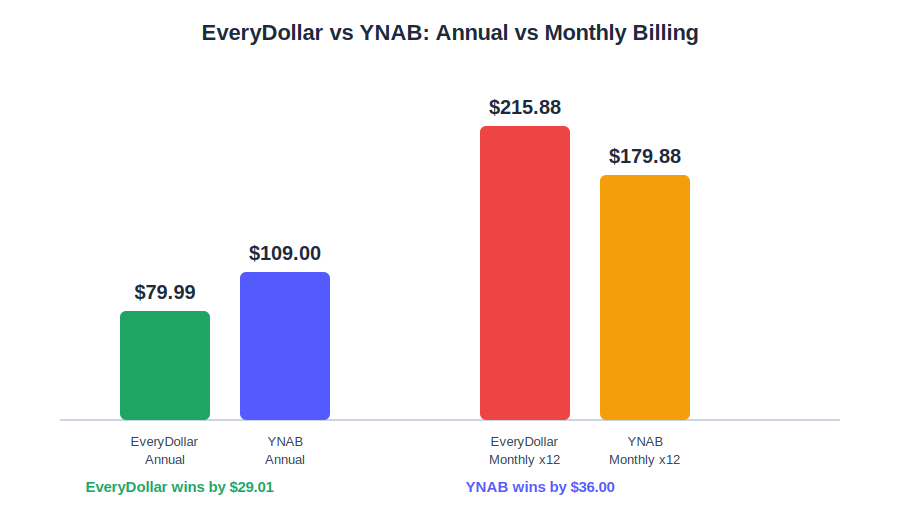
EveryDollar costs $79.99/year or $17.99/month. YNAB costs $109/year or $14.99/month. Annually, EveryDollar is $29.01 cheaper. Monthly, YNAB is $3 cheaper, and that flip is the exact detail most EveryDollar vs YNAB pricing breakdowns skip entirely.
| EveryDollar | YNAB | |
|---|---|---|
| Free tier | ✅ Forever, manual entry | ❌ Trial only |
| Annual price | $79.99/year ($6.67/mo) | $109/year ($9.08/mo) |
| Monthly price | $17.99/month | $14.99/month |
| Cost if paid monthly all year | $215.88/year | $179.88/year |
| Free trial | 14 days, new users only | 34 days, no card required |
| Student discount | ❌ None | ✅ 365 days free (College Program) |
| Payment method | Debit card only | Any payment method |
| Sharing | Household feature (2 people) | Up to 6 people, one subscription |
Pricing verified directly from official websites, 7 September 2026.
Which Is Cheaper: EveryDollar or YNAB?
It genuinely depends on your billing cycle, not on which app is “better.” EveryDollar is $29.01 cheaper annually, but YNAB is $3/month cheaper if you never switch off monthly billing, and staying on EveryDollar’s monthly plan for a full year actually costs $36 more than YNAB’s monthly plan over the same period.
Neither vendor’s savings claims are independently audited, so treat them as directional. EveryDollar’s own marketing cites users finding $395 of margin on average in early use (confirmed on EveryDollar’s current official page), while YNAB’s site claims users save $600 in month one and over $6,000 in year one. Both figures come straight from each company, not a third-party study, so weigh them as self-reported rather than guaranteed.
The billing-cycle gap is the number that actually decides the everydollar vs ynab pricing question, far more than either sticker price alone, and it holds whether you searched your way here through ynab vs everydollar or every dollar vs ynab.
How Does Each App Actually Work?
The day-to-day mechanics behind EveryDollar vs YNAB explain most of the friction (or ease) you’ll actually feel using either app, and this is the part most pricing-focused comparisons skip past too quickly. A lot of every dollar vs ynab searches land here looking for exactly this mechanical difference, not another pricing table.
How does EveryDollar’s budgeting method work?
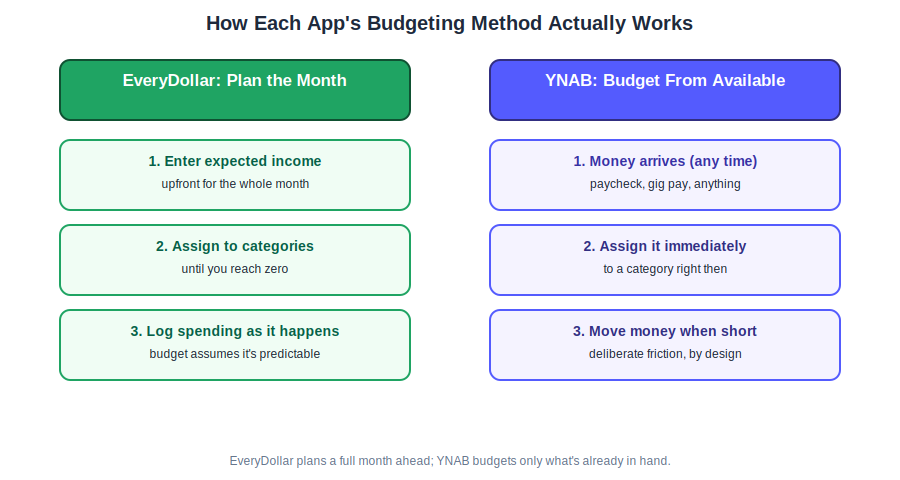
You enter your expected income at the start of the month and allocate it across categories until you hit zero. Categories are pre-populated, the drag-and-drop layout takes about 15 minutes to set up, and the budget carries forward as a template each month.
When you spend, you log the transaction (manually on the free tier, automatically via bank connect on Premium, which uses Mastercard Connect and Plaid) and assign it to a category. If a category runs dry, you move money from another one or accept the overspend, and Ramsey’s Baby Steps shape which categories the coaching content nudges you toward first.
How does YNAB’s budgeting method work?
YNAB flips the order: you budget money you actually have right now rather than planning a full month in advance. When money arrives, whether a paycheck or a freelance payment, you open the app and assign it to categories immediately. When a category runs out, you deliberately pull from another, and that friction is the actual mechanism that changes spending behavior over time.
Because EveryDollar plans a month upfront and YNAB works from available dollars, YNAB tends to hold up better for irregular income, since you’re never over-planning for money that hasn’t shown up yet.
Which App Handles Credit Cards Better?
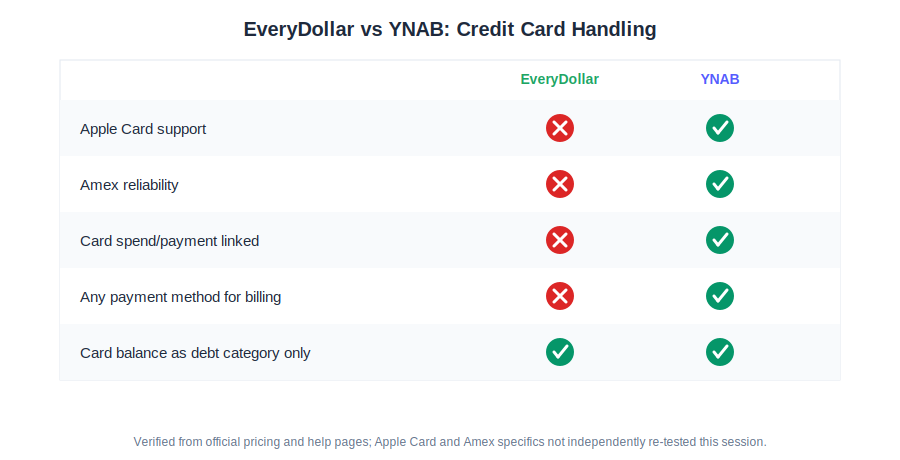
YNAB, clearly. It was purpose-built for responsible credit card users, while EveryDollar’s Ramsey-rooted philosophy actively discourages card use and its technical support for cards is genuinely weaker as a result.
When you spend on a card in YNAB, the app automatically moves money from your spending category into a linked credit card payment category, so the cash to cover the bill is already set aside before the statement arrives. Paying the bill then reduces both the card balance and the payment category with zero net effect on your budget.
This prevents the “wait, how much can I actually spend” confusion that trips up a lot of new budgeters. It takes a few weeks to click, but it works exactly as designed once it does.
EveryDollar’s card support is a real limitation worth naming plainly: it cannot link Apple Card at all, American Express connections reportedly break often enough to require manual reconnection, and its subscription billing itself only accepts debit cards, not credit.
You can work around this by treating a card balance as its own debt category, but it’s a clunky patch rather than a built-in feature, consistent with Ramsey’s broader anti-credit-card stance running through the coaching content. This is usually the deciding factor in most everydollar vs ynab credit card questions we hear from readers.
Which Real-Life Scenario Fits You?
Pricing tables only tell part of the EveryDollar vs YNAB story. Here’s how the decision actually plays out for the situations real budgeters bring to us most often, however you typed it to get here, ynab vs everydollar or everydollar vs ynab.
💳 “I pay off a credit card every month for the rewards.”
YNAB. It’s specifically designed for this, treating card spending and payments as one connected system rather than something to work around.
⛪ “I’m following Dave Ramsey’s Baby Steps and want a tool that reinforces it.”
EveryDollar. The Baby Steps integration, debt snowball tracker, and live coaching all reinforce a system you’re already committed to, and the $79.99/yr price is reasonable specifically inside that context.
💼 “My income changes every month (freelance, tips, commission).”
YNAB. Its budget-from-available approach and “age your money” tracking are built for exactly this, while EveryDollar’s plan-the-month-upfront style assumes income you can predict.
🆕 “I’ve never budgeted before and want to start today, free.”
EveryDollar’s free tier. Zero-based budgeting in its simplest form, no card needed, ready in about 15 minutes. Use it for a couple of months to see if the method clicks before deciding whether to upgrade or switch to YNAB.
Is EveryDollar or YNAB Better for Beginners?
EveryDollar is easier to start, with a 15-minute setup and a genuinely free tier that costs nothing to try. YNAB has a real 2-4 week learning curve, particularly around its credit card handling, but community consensus consistently points to stronger 6-12 month results for people who push through it.
Can You Use Both EveryDollar and YNAB?
Technically yes, but running both at once for the long term isn’t something I’d recommend. Double-entering every transaction, maintaining two category structures, and reconciling two different “true” numbers for what’s actually left to spend defeats the entire point of zero-based budgeting.
There’s one legitimate exception: a short trial-overlap window while you decide which one to keep. Run EveryDollar’s free tier alongside YNAB’s 34-day trial for a week or two using the same real transactions in both, then drop whichever felt like friction rather than support. Past that evaluation period, splitting attention between two zero-based systems tends to produce worse budgeting outcomes than fully committing to one.
What Do You Actually Lose Switching Between Them?
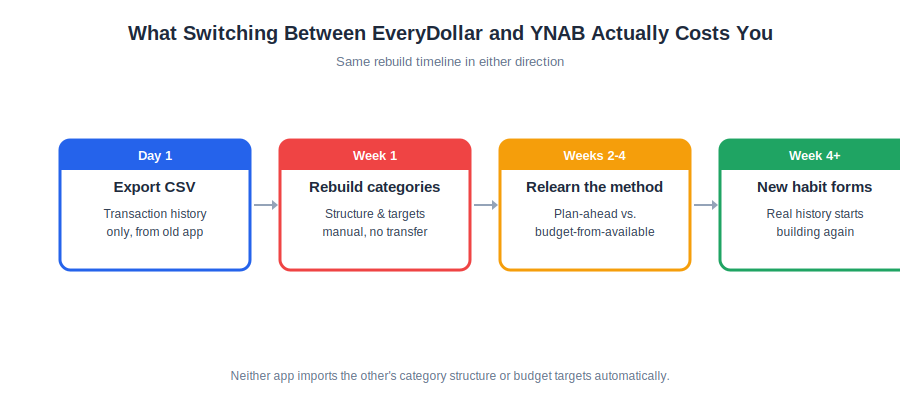
Budgeting apps get more valuable with time (six months of history shows real spending patterns, a year reveals seasonal ones), so switching either direction between EveryDollar and YNAB has a genuine cost: you restart that history from zero. You need a budget vs everydollar switchers and everydollar vs ynab switchers both face the same manual rebuild, just in opposite directions.
Can I Switch From EveryDollar to YNAB Without Losing My Budget History?
Not entirely. You can export your EveryDollar transaction history as a CSV and import it into YNAB for historical reference, but your category structure and budget targets don’t transfer and have to be rebuilt manually. Budget on the reallocation-friction system, not the plan-ahead one, expect roughly 2-4 weeks to adjust, and YNAB’s free live workshops are the fastest way through that curve.
Going the other direction (YNAB to EveryDollar) works the same way in reverse: transaction history via CSV, categories rebuilt by hand, and the philosophical shift runs from YNAB’s flexible approach into EveryDollar’s Ramsey-framed one. If price alone is driving the switch, it’s worth asking whether $29.01/year genuinely changes your budget; that’s roughly the cost of one dinner out.
Neither app imports directly from the other, and if you’re weighing a move away from either of them toward a net-worth-focused tool instead, our YNAB vs Monarch Money comparison or EveryDollar vs Monarch Money comparison covers that path specifically.
Who Wins Each Category?
Breaking the decision into categories makes it easier to see where each app actually earns its price, and why the everydollar vs ynab debate rarely has one universal answer.
EveryDollar wins at…
- Annual price ($79.99 vs $109)
- Free tier, forever, no expiry
- Setup simplicity, ~15 minutes
- Live coaching (group and one-on-one)
- Baby Steps integration
YNAB wins at…
- Monthly price ($14.99 vs $17.99)
- Credit card handling
- Irregular income support
- Free trial length (34 days, no card)
- Student discount (365 days free)
- Household sharing (6 people vs 2)
So, Is EveryDollar or YNAB Better for You?
The real $29.01 you can save in this comparison only shows up if you pay annually on whichever app you pick, and it only stays a genuine benefit if you follow through on that billing choice rather than drifting onto the pricier monthly plan.
If you’re following Dave Ramsey’s Baby Steps, or seriously considering them, EveryDollar is the better fit, provided you commit to annual billing from day one. The coaching and debt tracker reinforce a path you’re already on, and at $79.99/year the price is reasonable for what it delivers inside that specific ecosystem.
If you’re not following the Baby Steps, use credit cards responsibly, or have irregular income, YNAB is the stronger long-term pick. The $29.01/year premium buys meaningfully better credit card handling, a longer no-card trial, and a genuinely generous student offer. For most people outside the Ramsey world, that’s a fair trade.
New to budgeting entirely and unsure which philosophy fits? Start with EveryDollar’s free tier for 30 days; it costs nothing and teaches the mechanics of zero-based budgeting well enough to make an informed call about switching or upgrading afterward.
Whichever app you land on, the $29.01 only matters if you stick with the system long enough to see whether it changes your actual habits. That’s the honest everydollar or ynab answer for most households weighing this decision today.
Try EveryDollar Free
No card for the free tier. 14-day Premium trial for new users.
Try YNAB Free for 34 Days
No credit card. Students free for 365 days (College Program).
What Else Do People Ask About EveryDollar vs YNAB?
A few more questions come up once people have seen the pricing and feature breakdown above.
Do I have to follow Dave Ramsey to use EveryDollar?
No, you can use EveryDollar’s zero-based budgeting without following the Baby Steps or Financial Peace University. The free tier especially is a straightforward budgeting tool with light Ramsey framing; the Premium coaching and community lean harder into that philosophy, so if you disagree with core Ramsey positions like the anti-credit-card stance, some guidance will feel less useful.
Is EveryDollar or YNAB better for couples?
Both support shared budgeting, but the limits differ. EveryDollar’s household feature covers two people, while YNAB’s subscription sharing supports up to six people under one plan, which is more flexible if you need to include kids, parents, or roommates alongside a partner.
Which is better for paying off debt?
Both work, just differently. EveryDollar uses the debt snowball method exclusively (smallest balance first), built into the Baby Steps framework with live coaching support, while YNAB’s loan planner supports both snowball and avalanche (highest interest rate first) so you choose your own strategy.
Which is better for irregular income?
YNAB, clearly. Its budget-from-available approach means you never over-plan for income that hasn’t arrived yet, and the “age your money” metric specifically tracks whether you’re building a buffer between earning and spending, which is the real challenge for freelancers.
Is EveryDollar available outside the US?
Premium with bank sync is US-only, though the free web version at everydollar.com works internationally for manual budgeting. YNAB supports the US, Canada, UK, and EU with full features, making it the only option here for international users who want complete functionality including bank sync.
Is there a clear winner between EveryDollar and YNAB?
Not universally. EveryDollar wins for Ramsey followers and beginners who want a genuinely free option, while YNAB wins for credit card users, freelancers with irregular income, and anyone wanting deeper reporting without an attached financial philosophy. Neither is objectively superior; they’re built for different people.
YNAB vs EveryDollar: is the $29 price difference actually worth it?
For most non-Ramsey households, yes. It isn’t really a $29.01/year decision; it’s whether better credit card handling, a longer no-card trial, and a genuine student offer are worth about $2.50 a month more. For Ramsey followers specifically, the answer flips, since EveryDollar’s lower annual price and built-in coaching make it the better value inside that ecosystem.
📚 Read Next
Full disclosure →
