
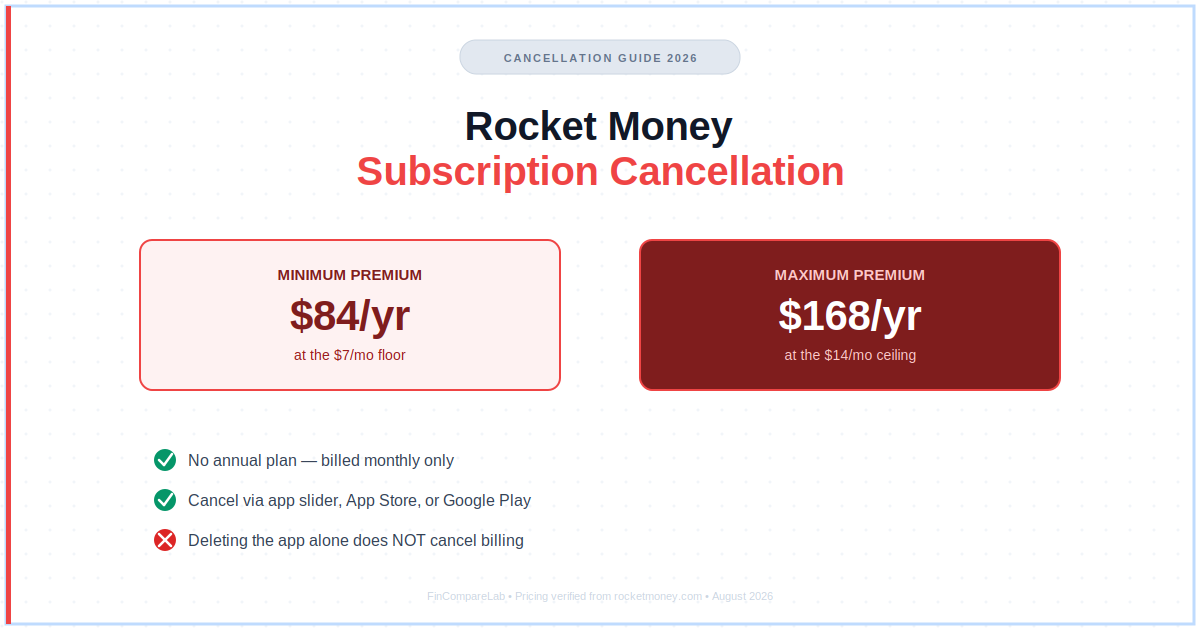
Knowing how to cancel Rocket Money subscription charges the right way can save you anywhere from $84 to $168 a year, depending on where your Premium slider was set — but only if you cancel through the right place.
Rocket Money, formerly known as Truebill before its 2022 rebrand, built its reputation on finding and canceling subscriptions other companies make hard to quit. It’s a little ironic that canceling Rocket Money itself trips up so many users.
The confusion usually comes down to one thing: where you originally signed up isn’t always where you need to go to cancel. The app’s own cancellation flow is also buried behind a pricing slider instead of a plain “Cancel” button.
⚡ Quick Answer
To cancel Rocket Money, open the app, tap Settings, select Premium Membership, and drag the price slider down to $0 to trigger the cancellation flow. If you signed up through the App Store or Google Play instead, you’ll need to cancel there — deleting the app alone won’t stop the charges.
How We Review Apps · Pricing verified from rocketmoney.com and the Rocket Money Help Center — 8 August 2026
On this page
- How do I cancel Rocket Money Subscription?
- Is canceling Premium the same as canceling a subscription Rocket Money tracks for me?
- How do I unsubscribe from Rocket Money on iPhone or Android?
- How do I cancel Rocket Money on the website?
- What happens to pending bill negotiations after I cancel?
- Will I still be charged after canceling Rocket Money?
- How do I delete my Rocket Money account, and is that different from canceling?
- Can I pause my Rocket Money subscription instead of canceling?
- How much could canceling Rocket Money actually save you?
- Rocket Money cancellation: common questions?
How To Cancel Rocket Money Subscription?
Open the Rocket Money app, tap the Settings gear in the upper-left corner of your dashboard, select Premium Membership, then Manage Membership. Drag the price slider all the way down to $0 — this swaps the button from “Update Subscription” to “Cancel Subscription,” and confirming there ends your Premium plan at the end of your current billing cycle.
That slider step trips people up because it isn’t labeled “cancel” until you’ve already dragged it to zero. If you’re just looking for a “Cancel” button on the main screen, you won’t find one — Rocket Money built the whole Premium cancellation flow around that pricing slider instead, since the plan itself works on a pay-what-you-want scale.
On the web version, the path is nearly identical: click the Settings icon, choose Premium, click Manage, and drag the same slider down to $0. Either way, canceling doesn’t delete your Rocket Money account or erase your linked accounts and budgeting history — it just turns off Premium features at the next billing date.
Rocket Money’s own Help Center article on managing Premium Membership walks through this same slider process if you want the source directly from the company.
If you’re racing a billing date, cancel at least a day or two ahead rather than the same morning — payment processing can lag by several hours. Once you’ve confirmed the switch to “Cancel Subscription,” you’re done; there’s no separate confirmation screen to miss.
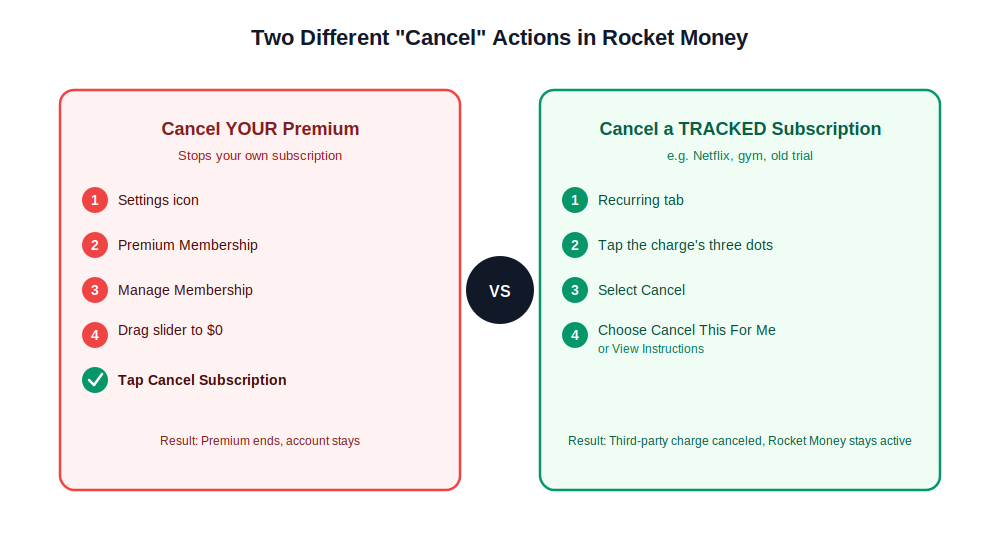
How to cancel Rocket Money subscription charges without mixing up the two different “cancel” flows.
That covers the standard way to cancel Rocket Money subscription charges, but there’s a wrinkle worth understanding before you start clicking through menus — the app uses the word “cancel” for two genuinely different things.
Rocket Money Subscription Cancel: Is Canceling Premium The Same As Canceling A Tracked Subscription?
No, and this is the single most confusing part of using Rocket Money. The app does two completely different things that both involve the word “cancel,” and mixing them up is how people end up still paying for Rocket Money Premium while thinking they’ve canceled something else entirely.
Canceling Rocket Money Premium stops your own subscription to Rocket Money itself — the slider-to-$0 process above. Canceling a subscription Rocket Money tracks for you (your Netflix, your gym, your old streaming trial) is a separate feature entirely.
For that second kind, go to the Recurring tab, tap the three dots next to that specific charge, and select “Cancel.” From there you can tap “Cancel This For Me” to let Rocket Money handle it on your behalf, or “View Instructions” to do it yourself.
If Rocket Money can’t cancel a particular subscription automatically — some providers make this deliberately hard — you’ll see step-by-step instructions for canceling that service directly instead. That’s a limitation of the third-party subscription’s own cancellation process, not something wrong with your Rocket Money account.
If subscription tracking was the main reason you signed up in the first place, it’s worth knowing you have options — my PocketGuard vs. Rocket Money comparison and Albert vs. Rocket Money comparison both cover apps that handle recurring-charge tracking a little differently.
Here’s a common scenario: someone searches for how to cancel Rocket Money because a gym membership keeps showing up as a flagged charge, when really they just want that gym membership canceled — not their own Rocket Money account. If that’s you, skip the Premium-cancellation steps and use the Recurring tab’s three-dot menu on the gym charge instead.
How To Unsubscribe From Rocket Money On iPhone Or Android?
Featured snippet: If you subscribed to Rocket Money Premium through Apple’s App Store or Google Play, you must cancel through your phone’s subscription settings — not inside the Rocket Money app. Deleting the app alone will not stop the recurring charge.
On iPhone, open Settings, tap your name at the very top, then tap Subscriptions. Scroll to find Rocket Money, tap it, and select Cancel Subscription in red text. Confirm when prompted — you’ll keep Premium access until the end of the billing period you already paid for.
On Android, open the Google Play Store app, tap your profile icon, then Payments & subscriptions, then Subscriptions. Find Rocket Money in the list, tap it, and tap Cancel subscription at the bottom. Google will ask for a quick reason before confirming — pick whichever applies and finish the flow.
If you originally signed up on Rocket Money’s own website rather than through an app store, this step doesn’t apply to you — go straight to the website cancellation steps below instead. Signing up via web vs. app store is exactly why so many people get stuck: the cancellation location always has to match the original sign-up location.
For the exact current screens on your device, Apple’s own guide to managing App Store subscriptions and Google’s guide to canceling Google Play subscriptions are kept more up to date than most third-party walkthroughs, including this one.
Knowing how to unsubscribe from Rocket Money through your phone’s own settings, rather than hunting for a cancel button inside the app itself, is the single most common fix for people who feel stuck.
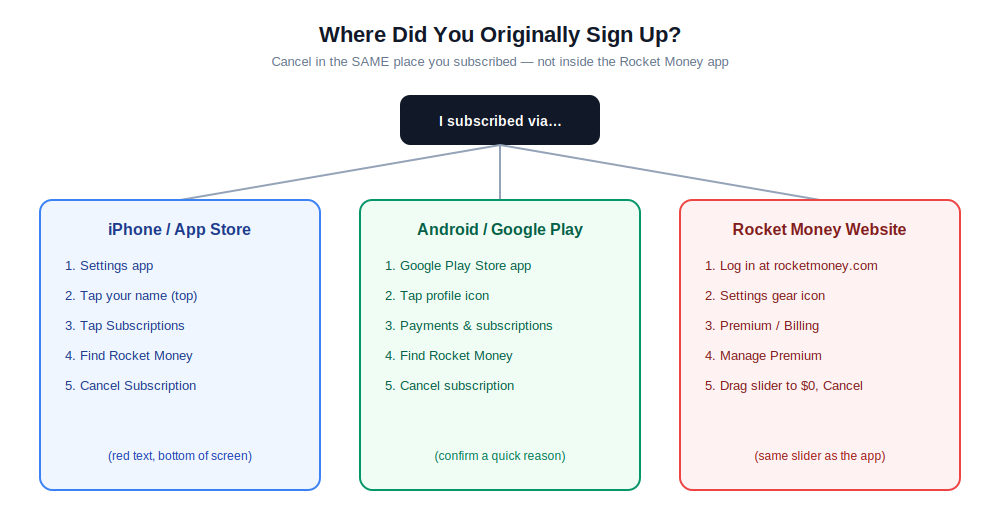
How to unsubscribe from Rocket Money depends entirely on where you originally signed up.
How To Cancel Rocket Money On The Website?
Log into your account at rocketmoney.com and click the Settings gear icon, usually in the sidebar or top of the dashboard. Look for the Premium or Billing section, click Manage Premium, scroll to the bottom of that page, and click Cancel.
You may see a retention offer here — a lower monthly price or a temporary pause — before the cancellation completes. That’s optional; keep clicking through if you’re set on canceling rather than downgrading. Once confirmed, Rocket Money sends a confirmation email, and you can double-check the status anytime under the Recurring tab in the app.
If you’re figuring out how to cancel Rocket Money from a shared or work computer where you’d rather not stay logged in afterward, the web flow works exactly the same as on your own device — just remember to log out once you’ve confirmed the cancellation.
What Happens To Pending Bill Negotiations After I Cancel?
Canceling Premium does not automatically cancel any bill negotiation Rocket Money already has in progress for you. If Rocket Money successfully lowers a bill you asked it to negotiate — your cable, internet, or insurance — it still collects its success fee (35% to 60% of the first year’s savings), even after your Premium membership has ended.
This catches people off guard because it feels like canceling should stop everything Rocket Money does on your behalf. It doesn’t. If you have an active negotiation request you want to withdraw, you’ll need to cancel that separately through the Bill Negotiation section before or after canceling Premium — check your email for any negotiation-in-progress notices before you close the door on your account entirely.
Worth flagging before you finalize your rocket money subscription cancel request: withdrawing a negotiation doesn’t refund any fee already collected on a deal that already closed. It only stops future negotiations from starting.
Will I Still Be Charged After Canceling Rocket Money?
You shouldn’t be, but real user reports on this are common enough to take seriously. Rocket Money’s own Help Center instructs anyone charged after a successful cancellation to contact support immediately through the in-app chat or by emailing [email protected], ideally by replying directly to the cancellation confirmation email.
Most of the “still charged” cases trace back to one of two things: canceling in the wrong place (app vs. App Store vs. Google Play), or deleting the Rocket Money app itself and assuming that counts as canceling — it doesn’t. Your subscription lives with whichever platform actually billed you, not with the app icon on your home screen.
This is exactly why the rocket money subscription cancel process depends so heavily on identifying your original sign-up method before you touch anything else.
Refunds are not guaranteed for a month you’ve already been billed for. Rocket Money generally doesn’t prorate refunds for partial months, so the safest move is canceling a few days before your next billing date rather than after it’s already charged.
If you’ve already worked through every step in this how to cancel Rocket Money subscription guide and you’re still seeing charges after your confirmation email arrived, that’s no longer a self-service issue — it’s time to escalate directly with support and, if needed, your bank or card issuer.
How To Delete Rocket Money Account: Is That Different From Canceling?
Yes — canceling and deleting are two entirely different actions, and only one of them is reversible. Canceling stops future Premium charges but keeps your account, your linked accounts, and your budgeting history intact. Deleting removes everything permanently.
| Cancel Subscription | Delete Account | |
|---|---|---|
| Stops Premium billing | ✅ Yes | ✅ Yes |
| Keeps your budgeting history | ✅ Yes | ❌ No — permanently erased |
| Reversible | ✅ Yes — resubscribe anytime | ❌ No |
| Removes linked bank accounts | ❌ No — stays linked on free plan | ✅ Yes |
To delete your account entirely, go to Settings, select Profile, scroll to the bottom of the page, and select Delete My Account. Before you do, make sure you’ve already canceled Premium Membership, Smart Savings, and any active Bill Negotiation requests — deleting your account doesn’t automatically settle those separately billed services first.
People searching for how to delete Rocket Money account instructions are often really just trying to stop the charges, which is why I’d point most readers back to the plain cancellation steps above instead. Reserve the delete option for when you’re genuinely done with the app and comfortable losing your budgeting history for good.
If you’re still unsure which one you actually need, the short version of how to delete Rocket Money account safely is: cancel first, confirm the email, then decide on deletion later — you can always come back and delete, but you can’t undo a deletion.
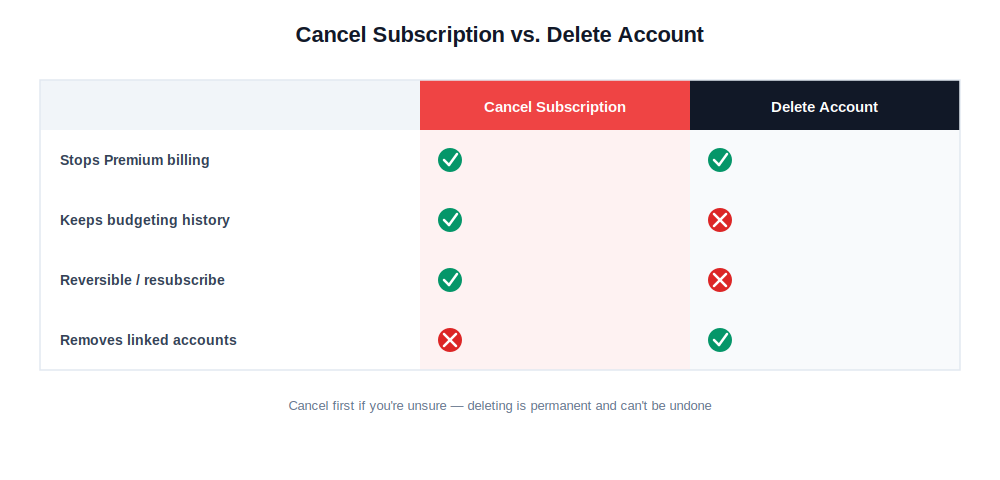
How to delete Rocket Money account versus simply canceling — the difference matters more than it looks.
Can I Pause My Rocket Money Subscription Instead Of Canceling?
Rocket Money doesn’t offer a formal pause feature the way some subscription apps do. Your realistic options are canceling outright (and resubscribing later with the same email and most of your settings intact) or accepting a retention discount if one is offered during checkout — some users report being offered a $3–$4/month rate to stay instead of the standard $7–$14 range.
If you’re canceling because of cost rather than because you’re done with the app entirely, it’s worth sitting through the cancellation flow just to see whether a lower-price offer shows up before you confirm.
There’s no dedicated “pause” toggle hiding in a settings menu somewhere, no matter how thoroughly you look — I checked the app and website settings directly, and the slider-to-$0 cancellation is genuinely the only built-in mechanism. If you cancel and later decide you want Premium back, resubscribing takes just a couple of taps, so treating cancellation as a temporary pause works fine in practice even without an official pause feature.
For most people asking how to cancel Rocket Money without losing their setup entirely, this pause-by-resubscribing approach beats hunting for a feature that doesn’t exist.
Once your rocket money subscription cancel request is confirmed, the next question is usually the same one that brought you here in the first place: how much does this actually put back in your pocket?
How To Cancel Rocket Money And How Much Could It Save You A Year?
Rocket Money Premium runs on a sliding scale, so what canceling actually saves you depends entirely on where your price was set. At the $7/month floor, that’s $84 a year back in your pocket. At the $14/month ceiling, it’s the full $168/year the title of this guide promised.
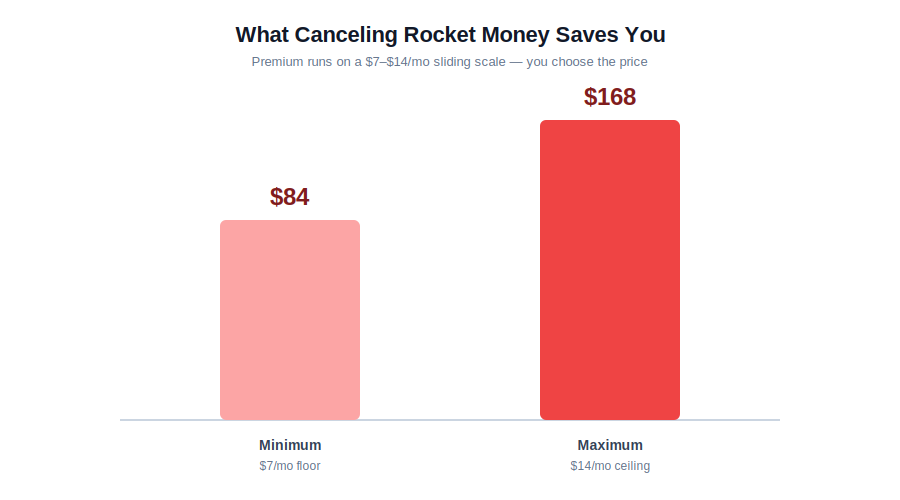
Every rocket money subscription cancel request saves somewhere between $84 and $168 a year.
That’s before factoring in any bill negotiation fees, which are billed separately and apply whether or not you’re a Premium subscriber. If you’re mainly paying for the subscription-cancellation concierge feature, it’s worth asking yourself honestly how many subscriptions you’re actually canceling per month — if the answer is “just this one,” the free plan’s manual tracking might cover what you need going forward.
Not ready to give up on paid subscription management entirely? My Rocket Money alternatives roundup covers apps with similar cancellation-concierge features at different price points. If you’re leaving budgeting apps behind altogether for now, my best free budgeting apps guide and YNAB vs. Rocket Money comparison are both good next stops.
If cost is the whole reason you’re leaving, my Rocket Money review breaks down whether the Premium features are worth it for a typical budgeter, and my full Rocket Money pricing guide covers the slider mechanics and bill negotiation fees in more depth than fits here.
Whichever path brought you here — whether you needed the standard how to cancel Rocket Money subscription steps, wanted to know how to cancel Rocket Money through your phone’s own settings instead of the app, or were timing a rocket money subscription cancel request around a billing date — the core process is the same.
If instead you needed how to delete Rocket Money account instructions rather than just pausing billing, or were simply looking for how to unsubscribe from Rocket Money as fast as possible, a few more specific questions come up often enough to answer directly.

The full how to cancel Rocket Money subscription process, condensed into five steps.
Rocket Money Cancellation: Common Questions?
How Do I Know My Rocket Money Cancellation Went Through?
You’ll get a confirmation email at the address linked to your account. If you don’t see it within a few minutes, check your spam folder, or log back into the app and check the Recurring tab — your subscription status shows there in real time. Knowing how to cancel Rocket Money is only half the job; confirming it actually stuck is the other half.
Can I Resubscribe To Rocket Money After Canceling?
Yes. Canceling doesn’t delete your account, so you can resubscribe anytime using the same login. Most of your linked accounts, categories, and budgeting history will still be there when you come back.
Does Rocket Money Offer Refunds After Cancellation?
Generally, no — Rocket Money doesn’t prorate refunds for the current billing period. If you were charged unexpectedly right after canceling, contact support directly rather than assuming a refund is automatic.
Why Can’t Rocket Money Cancel A Subscription For Me?
Every third-party provider sets its own cancellation rules, and some make the process deliberately difficult. When Rocket Money can’t cancel something automatically, it shows you manual instructions for that specific provider instead. This applies to third-party subscriptions only — it has no bearing on how to cancel Rocket Money itself, which always works the same way regardless of how stubborn other companies are.
Rocket Money Subscription Cancel: What If The Button Is Missing Entirely?
If you don’t see a Cancel option next to a tracked subscription, Rocket Money isn’t yet able to cancel that provider on your behalf — that’s a limitation on the provider’s end, not a bug in your account. Use the manual instructions Rocket Money provides instead.
What’s The Fastest Way To Cancel Rocket Money?
The app’s slider method is fastest if you already know your login — it takes under a minute. If you’re locked out of your account, the website flow is just as quick and doesn’t require re-downloading anything. Either path completes a rocket money subscription cancel request in well under two minutes total.
How Do I Unsubscribe From Rocket Money If I Forgot My Password?
Use the “Forgot Password” link on the login screen to reset it first, then follow the same cancellation steps once you’re back in. If you subscribed through the App Store or Google Play, you don’t need your Rocket Money login at all — cancel directly through your phone’s subscription settings instead. Either way, how to unsubscribe from Rocket Money never actually depends on remembering that password.
Do I Still Owe Rocket Money’s Bill Negotiation Fee After I Cancel Premium?
Yes, if a negotiation Rocket Money started on your behalf succeeds — the success fee applies regardless of your Premium status, since bill negotiation is billed and available separately from the subscription itself.
Is Rocket Money The Same Company As Truebill?
Yes — Rocket Money is Truebill’s 2022 rebrand under new ownership. If you see “Truebill” on an old bank statement or App Store receipt, that’s the same subscription you’re trying to cancel now; the underlying billing account didn’t change with the name.
Anyone searching how to cancel Rocket Money subscription charges tied to an old “Truebill” line item should follow the exact same steps in this guide. How to unsubscribe from Rocket Money works identically regardless of which name shows up on your statement.
Should I Delete My Rocket Money Account Instead Of Just Canceling?
Only if you want your linked accounts and budgeting history gone permanently. For most people who just want to stop paying, canceling Premium is enough — deleting the account is a separate, irreversible step worth saving for when you’re certain you won’t come back. Knowing how to delete Rocket Money account data safely mostly comes down to canceling everything billed first.
How Long Does It Take For A Rocket Money Cancellation To Take Effect?
Canceling Premium takes effect at the end of your current billing cycle, not immediately — you keep access to Premium features until then. Canceling a tracked third-party subscription can take longer, since it depends on that provider’s own processing time.
Once you’ve freed up that $84–$168 a year, it’s worth putting it toward something specific rather than letting it disappear into everyday spending. If you’re just starting to build a budgeting habit, my best budgeting apps for beginners guide is a good next stop, and my debt payoff estimator can show you exactly how much faster that freed-up cash could close out a balance.
Once you’ve worked through how to cancel Rocket Money subscription charges and confirmed that email, the real win is deciding what happens to that freed-up $84–$168 next — whether that’s a different budgeting tool, a debt payoff plan, or just letting your checking account breathe a little easier this month.
That’s really the whole how to cancel Rocket Money subscription process from start to finish — no hidden steps, just the right menu in the right place.
📚 Read Next
