
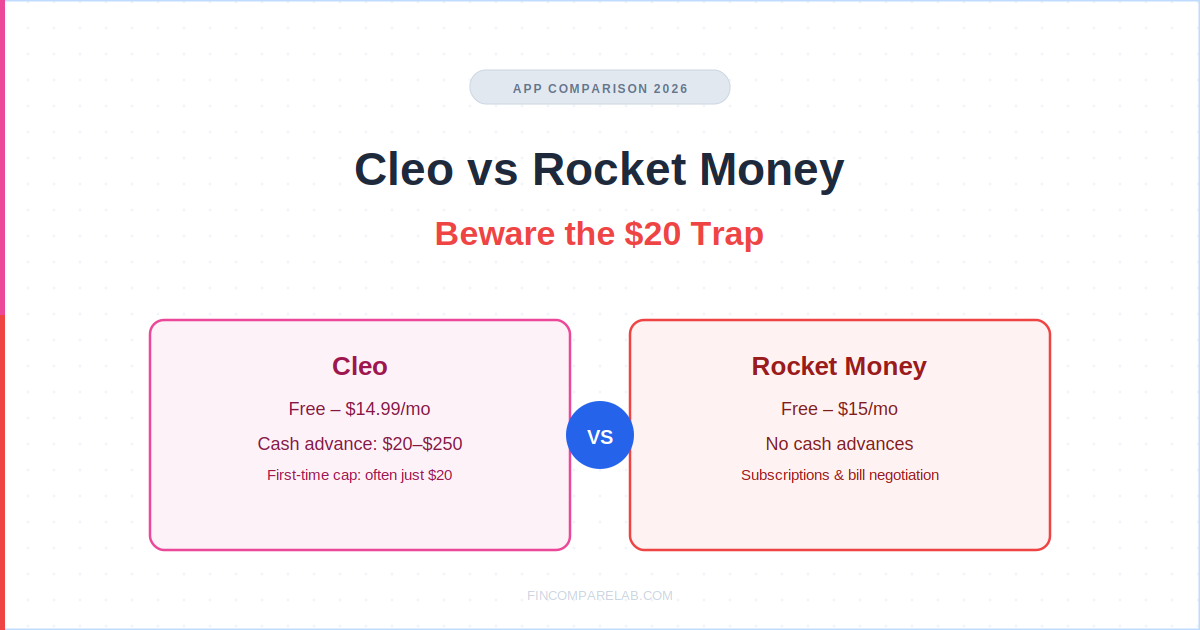
Cleo vs Rocket Money isn’t really a fair comparison once you look past the ads, because one app hands out cash advances and the other one doesn’t hand out cash at all. Anyone comparing cleo vs rocket money on price alone is missing the bigger gap between what each app is actually built to do.
⚡ Quick Verdict
Cleo’s cash advance sounds like $250, but most first-time Plus or Pro users only qualify for $20 to $100. Rocket Money doesn’t do cash advances at all. Its entire pitch is finding subscriptions you forgot about and negotiating your bills down, free to start.
If a cash advance is why you’re comparing these two, Cleo is the only one that actually offers one. If you want your bank account audited for waste, Rocket Money wins by default.
Rocket Money: Free–$15/mo
Best for: two different jobs
How We Review Apps · Pricing verified from meetcleo.com and rocketmoney.com — 6 September 2026
Table of Contents
- What’s the Real Difference Between Cleo and Rocket Money?
- Does Rocket Money Actually Offer Cash Advances?
- How Much Can You Actually Get From a Cleo Cash Advance?
- How Much Do Cleo and Rocket Money Really Cost?
- Which App Actually Cancels Subscriptions and Lowers Bills?
- Can You Use Cleo and Rocket Money at the Same Time?
- Cleo vs Rocket Money: Which One Should You Actually Pick?
- What Else Do People Ask About Cleo vs Rocket Money?
What’s the Real Difference Between Cleo and Rocket Money?
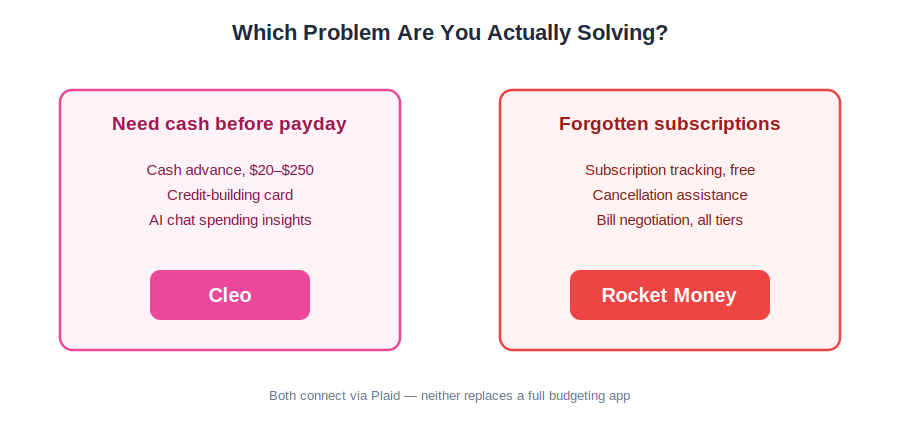
Cleo is a chat-based app built around cash advances, credit-building, and AI spending commentary. Rocket Money is a subscription tracker and bill negotiator with no cash advance feature at all. Neither one is a full zero-based budgeting tool, so if that’s genuinely what you need, an app like YNAB or EveryDollar will serve you better than either of these.
I get a version of this comparison a lot from readers who saw both apps advertised on the same social feed and assumed Cleo vs Rocket Money was a head-to-head budgeting matchup. It isn’t.
Cleo’s entire business model runs on cash advances, an express-fee same-day transfer option, and a secured credit-builder card. Rocket Money’s business model runs on finding money you’re already leaking through forgotten subscriptions and creeping bills, then either helping you cancel them or negotiating them down for a cut of the savings.
That distinction is worth sitting with before you download either one. If you’re weighing Cleo or Rocket Money hoping one of them is simply the “better” budgeting app, the honest answer is neither one was built to be that.
They were built to solve two specific, narrow problems, and most people asking about a rocket money vs cleo comparison are actually describing two different problems in the same sentence: one wants quick cash, the other wants their bank statement to stop surprising them.
Community discussion tends to split along that exact line too. People searching “cleo vs rocket money” in budgeting forums are almost always sorting between those two goals rather than comparing feature-for-feature. Once you separate “I need cash before payday” from “I think I’m bleeding money on subscriptions,” the rocket money vs cleo debate mostly resolves itself before you even open either app.
Anyone still typing does rocket money do cash advances into a search bar at this point has their answer: no, and the rest of this cleo vs rocket money breakdown explains what each app does instead.
Does Rocket Money Actually Offer Cash Advances?
No. Rocket Money doesn’t offer cash advances in any form, and there’s no hidden menu or upgrade path that unlocks one. If you landed on this page searching “does rocket money do cash advances,” the direct answer is no. Cleo is the app in this comparison that actually provides one, and Rocket Money’s value comes from subscription tracking and bill negotiation instead.
This confusion is common enough that it’s worth addressing head-on rather than burying it in a feature table. A meaningful share of people searching “does Rocket Money give cash advances” appear to be conflating Rocket Money with Cleo, Dave, Earnin, or similar cash-advance-first apps, possibly because all of them get served in the same short-form video ad slots.
Rocket Money’s own marketing never claims a cash advance feature, and its help center doesn’t mention one anywhere. Type “rocket money cash advance” into any search bar and most of what comes back is third-party speculation about a feature that was never actually built, not anything sourced from Rocket Money itself.
What Rocket Money’s linked-card feature does sometimes get confused with is a traditional credit-card cash advance, where you pull cash against a linked credit card’s own cash-advance limit, through your card issuer, not through Rocket Money itself.
That’s a completely different mechanism with its own interest rate and cash-advance fee set by your card issuer, and it has nothing to do with any feature Rocket Money built or controls. A genuine rocket money cash advance, in the Cleo or Dave sense of an app-issued advance against your paycheck, simply doesn’t exist at any tier, free or paid.
Is Rocket Money Better for a First-Time Budgeter Than Cleo?
Rocket Money’s free plan is the easier entry point for most first-time budgeters, since it requires no subscription to see real value: it links your accounts, finds every recurring charge, and shows you a spending breakdown with zero setup beyond connecting your bank. Cleo makes more sense once you already know you’ll occasionally want a small cash advance layered on top of light budgeting.
If you’re a first-time budgeter specifically because you’re trying to break a paycheck-to-paycheck cycle, a recurring theme in r/personalfinance threads is that the subscription-audit step Rocket Money leads with tends to surface real, immediate savings faster than any AI chat interface can, simply because forgotten subscriptions are a concrete, fixable line item.
Cleo’s chat format is genuinely useful for quick spending questions, but it doesn’t replace the discipline of a real budgeting app built for beginners. First-time budgeters who keep typing does rocket money do cash advances into a search bar are usually looking for the cleo salary advance feature without realizing it belongs to a different app entirely.
How Much Can You Actually Get From a Cleo Cash Advance?
The cleo salary advance feature is the real reason most people land on this comparison in the first place, since it’s the one thing Rocket Money simply doesn’t offer.
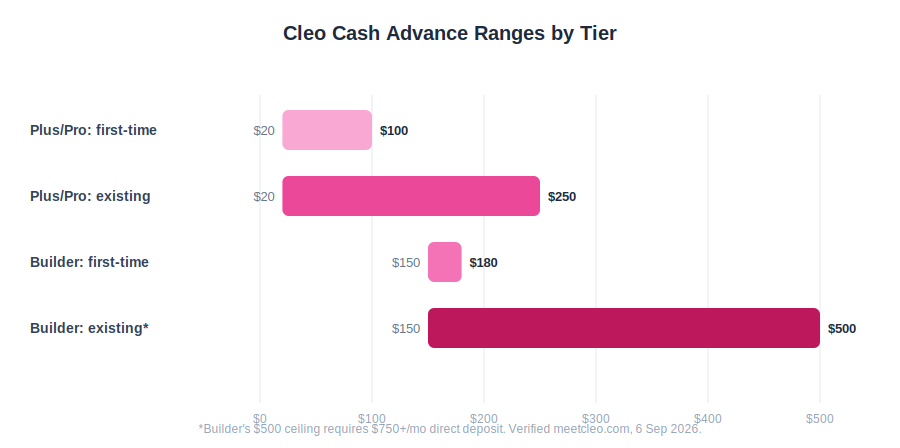
Cleo’s headline number is $250, but the real amount you’re approved for depends on which tier you’re on, whether you’re a first-time user, and how much accrued, unpaid income Cleo can see in your linked accounts. The gap between the advertised ceiling and the real first-time number is exactly why “beware the $20 trap” isn’t an exaggerated hook. It’s what Cleo’s own terms describe.
On Plus ($5.99/mo) and Pro ($8.99/mo), cash advances run $20 to $250 for existing users, but Cleo’s own pricing page caps first-time users at $20 to $100, with a $170 daily disbursement limit regardless of your total approved amount. That means a brand-new Cleo Plus subscriber requesting their very first advance could easily land at the $20 floor, not anywhere near the $250 headline figure.
⚠️ Watch Out
Run the math on a rough first experience: you pay $5.99/mo for Plus, get approved for $20 on your first request, then pay a $4.49 express fee to get it same-day instead of waiting the standard 3-4 business days.
That’s $10.48 to access $20 for roughly two weeks, a cost that’s easy to miss when you’re focused on the “up to $250” number in the ad. There’s no equivalent rocket money cash advance math to run, since the fee and the feature it would apply to simply don’t exist on that app.
Cleo’s 2025 FTC settlement of $17 million centered on exactly this gap between advertised and actual advance amounts, along with underdisclosed express fees. That’s worth knowing before you subscribe expecting the full ceiling on day one.
It’s also the single biggest reason the cleo salary advance conversation, not any rocket money cash advance myth, keeps resurfacing in community threads: people sign up expecting one number and get a smaller one on their first request.
Does Cleo Give You a Cash Advance Without a Subscription?
Yes. Cleo’s own disclosures confirm you can request a Cash Advance without subscribing to Plus, Pro, or Builder at all. This isn’t heavily advertised anywhere on the pricing page, but it’s stated directly in the fine print under the advance terms, and it means the $20-to-$100 first-time range technically applies whether or not you’re paying a monthly fee.
In practice, this doesn’t make the free route obviously better. Without a subscription you still go through the same eligibility check based on accrued income, you still face the $170 daily disbursement cap, and you still pay the express fee if you want the money same-day.
What you skip is the $5.99 to $14.99 monthly charge, which matters most if you only need an advance once or twice a year rather than as a recurring habit.
The cleo salary advance ceiling changes entirely on Builder ($14.99/mo), which works on a separate scale: $150 to $500 for existing users and $150 to $180 for first-time users, with the full $500 ceiling requiring at least $750 a month in direct deposit.
That’s a meaningfully higher floor than Plus or Pro, but it’s also a $9-a-month jump in subscription cost just to access it, on top of the Cleo Card and early income access that Builder is really marketed around.
How Much Do Cleo and Rocket Money Really Cost?
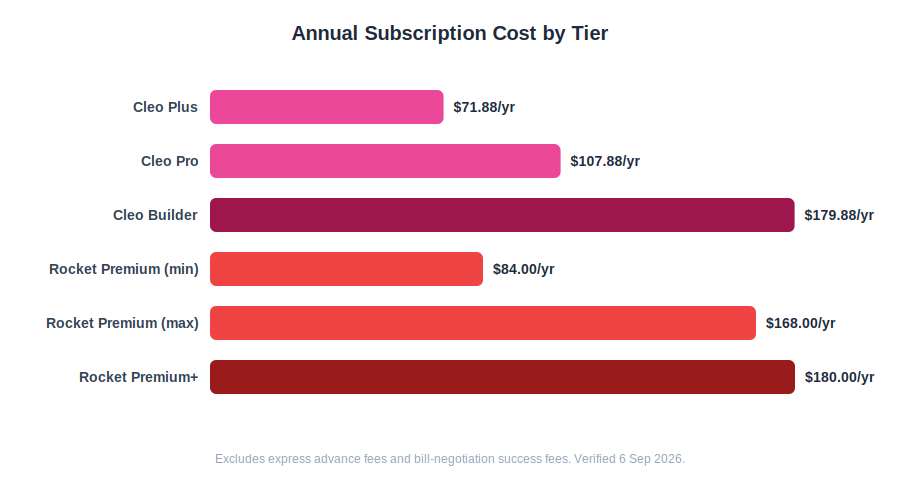
Cleo runs three paid tiers: Plus at $5.99/mo, Pro at $8.99/mo, and Builder at $14.99/mo, with no confirmed annual pricing on the current official pricing page. Rocket Money has a genuinely free plan, a pay-what-you-choose Premium tier from $7 to $14/mo, and a new $15/mo Premium+ tier still in limited rollout.
Both charge extra fees on top: Cleo’s express advance fee and Rocket Money’s bill-negotiation success fee. Neither company makes the cleo vs rocket money pricing comparison especially easy at a glance, so here’s the full breakdown.
| Cleo | Rocket Money | |
|---|---|---|
| Free plan | ✅ Chat, budgeting, spend tracking | ✅ Full account linking, up to 3 category budgets* |
| Entry paid tier | Plus: $5.99/mo | Premium: $7 to $14/mo, you choose |
| Mid tier | Pro: $8.99/mo | Premium+: $15/mo (limited rollout) |
| Top tier | Builder: $14.99/mo | No higher paid plan beyond Premium+ |
| Trial | Free plan always available | 7-day Premium trial |
| Extra fees | $4.49–$14.99 express advance fee** | 35–60% of first-year bill-negotiation savings*** |
Pricing verified from meetcleo.com and rocketmoney.com, 6 September 2026. *Rocket Money’s own pricing table lists “up to 3” free category budgets, while its FAQ text elsewhere says “two custom categories.” The two disagree, and I’m noting both rather than picking one silently.
**Cleo’s official pricing page says $4.49–$14.99; App Store and Google Play listings still show $3.99–$14.99, so confirm the fee shown at checkout before you rely on either figure. ***Waived entirely on Premium+.
Rocket Money’s Premium+ tier deserves a specific callout, because it’s easy to assume it’s simply “the next tier up” the way Cleo’s Builder is. It isn’t quite that yet.
Premium+ launched in late August 2026 with Rowan, an AI agent that texts you about spending, flags forgotten subscriptions, and can start cancellations or bill negotiations on your behalf, with no success fee taken out of whatever it saves you, according to Rocket Money’s own pricing breakdown.
But it’s rolling out to a limited group of subscribers first, with a public waitlist for everyone else, so don’t be surprised if it isn’t available on your account yet. None of this changes the core answer to does rocket money do cash advances: no tier, including Premium+, adds one.
Is There a Waitlist for Rocket Money’s $15 Premium+ Plan?
Yes. Rocket Money has confirmed Premium+ launched to a limited group of subscribers in August 2026, with broader access coming later in the year and no public date attached. If you sign up for Rocket Money today expecting to immediately access Premium+ and Rowan, you may land on a waitlist instead of a checkout screen.
This matters for anyone comparing prices on paper: the $15/mo figure is real and confirmed directly from Rocket Money’s pricing page, but it isn’t a plan every new user can simply select on day one the way Cleo’s three tiers are. If Rowan and fee-free bill negotiation are the actual reason you’re considering Rocket Money over Cleo, budget for the possibility of waiting rather than assuming instant access.
Cleo’s own pricing has a smaller but related gap worth flagging honestly: the site used to list a fourth tier called “Grow” at $2.99/mo, and you’ll still see it referenced in older reviews and even in some of Cleo’s own Google Play boilerplate text.
That tier no longer exists as a live pricing option. Its savings features were folded into Pro at some point, and the current official pricing page shows only Plus, Pro, and Builder. If you’re pricing this out against an older Cleo pricing breakdown, check the publish date before trusting a “Grow” mention.
Which App Actually Cancels Subscriptions and Lowers Bills?
On this specific slice of the cleo vs rocket money question, there’s no real contest. Rocket Money is built specifically for this, and Cleo doesn’t attempt it at all, so if forgotten subscriptions or a creeping cable bill are your actual problem, Rocket Money is the correct half of this comparison to focus on rather than splitting attention between both apps.
On this specific question, rocket money vs cleo isn’t a close call either way.
The free plan already scans linked accounts, flags every recurring charge it finds, and shows a full subscription list with zero upgrade required to see what you’re paying for. Where Premium adds real value is the cancellation itself: instead of hunting down a cancel button buried in a settings menu or sitting on hold with a retention agent, Rocket Money’s team handles the cancellation call or chat directly.
Bill negotiation is the feature most competing reviews gloss over, and it’s available to every user, free or paid, on an app that still has no rocket money cash advance feature to fall back on for the same job. Rocket Money’s negotiators contact your providers directly (think cable, internet, or phone plans), and you only pay if the negotiation actually succeeds.
When it does, the fee runs 35% to 60% of your first year’s savings, charged as a lump sum rather than spread out. Save $300 on your internet bill and you could owe $105 to $180 immediately, even though the lower rate itself might only hold for one promotional cycle before resetting.
That’s not a hidden cost exactly. Rocket Money discloses the fee structure clearly in its help center, but it’s the kind of number that’s easy to skip past when an ad promises “save up to $740 a year” without mentioning what the negotiation itself costs you upfront.
Premium+ subscribers skip this fee entirely, which is the strongest single argument for that $15/mo tier if bill negotiation is a feature you’d actually use more than once.
Can You Use Cleo and Rocket Money at the Same Time?
Yes, and there’s no real conflict in running both, since they solve different problems. Some readers keep Rocket Money for the subscription audit and bill negotiation, and the cleo salary advance feature for the occasional cash-advance safety net. The main downside is cost stacking, not functionality. Paying for both apps’ paid tiers at once adds up faster than most people expect.
Stack Cleo Plus with Rocket Money Premium at its lowest sliding-scale price and you’re at roughly $12.99 to $19.99 a month combined, before either app’s per-use fees. If you only need one function (subscription cleanup, say), it’s worth trying that app’s free tier alone first before adding a second subscription on top of it.
Running both isn’t really “Cleo or Rocket Money” as an either/or decision; it’s using each app for the one specific thing it does well. Framed as rocket money vs cleo, the two aren’t even competing for the same subscription dollar.
Bank connectivity is one place both apps genuinely overlap, and it’s rarely mentioned in a rocket money vs cleo search: both connect through Plaid, so underlying reliability tends to trace back to Plaid’s connection with your specific bank rather than either app’s own infrastructure.
If your bank has given you sync trouble on one Plaid-based app before, expect similar behavior on the other, and don’t assume switching apps alone fixes a connection issue.
Cleo vs Rocket Money: Which One Should You Actually Pick?
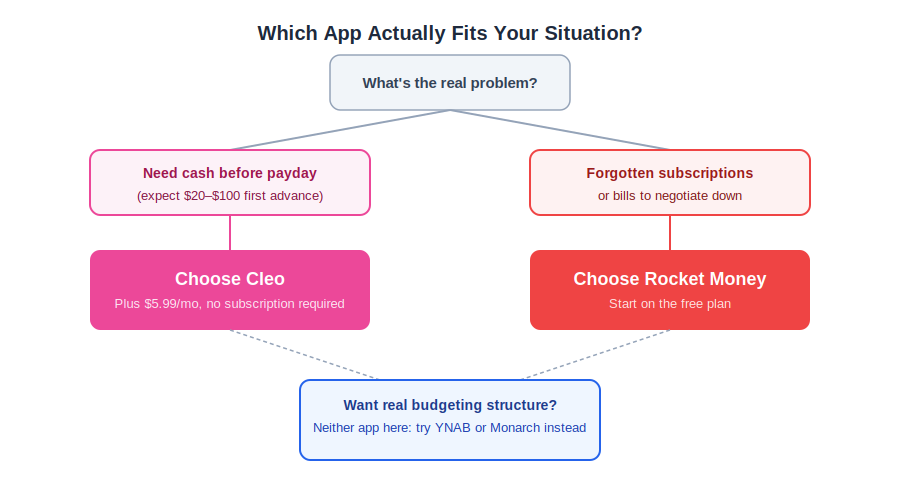
The decision mostly comes down to which specific problem you’re solving this month, not which app has the flashier ad or the higher star rating. Here’s how I’d sort the cleo vs rocket money choice by real scenario rather than by feature-count. Reframed as rocket money vs cleo, the same logic just runs in the opposite direction: start from the problem, not the app name.
Decision Box
Need cash before your next paycheck: the cleo salary advance feature, but budget for a $20-to-$100 first advance if you’re new, not the $250 headline figure. On the rocket money vs cleo question specifically, there’s no rocket money cash advance option to compare it against.
Suspect you’re paying for forgotten subscriptions: Rocket Money’s free plan first, no upgrade needed to see the full list.
Want a bill negotiated down without losing a chunk of the savings: negotiate it yourself directly with the provider, or wait for Rocket Money Premium+ access if you can get it.
Want real budgeting structure, not a chatbot or a subscription list: neither app here. See YNAB vs Monarch Money for something built around actual budget categories.
Looking at base subscription cost alone, Cleo Plus runs $71.88 a year and Rocket Money’s minimum Premium price runs roughly $84 a year, close enough that price alone shouldn’t decide the cleo vs rocket money question for most people.
The real cost gap shows up in the extra fees, not the sticker price: Cleo’s express advance fees and Rocket Money’s bill-negotiation cut can each add more than the subscription itself, depending on how often you actually use those specific features.
If cash flow timing is your actual issue rather than a one-time need, it’s worth comparing Cleo against other cash-advance-adjacent apps before committing, since a rocket money cash advance was never an option to begin with. My Albert vs Cleo comparison covers a similar advance structure with different eligibility rules, and it’s a useful second data point beyond this single cleo vs rocket money breakdown.
And if Rocket Money’s subscription-and-bill focus is the real draw, my Albert vs Rocket Money comparison and PocketGuard vs Rocket Money comparison both look at how it stacks up against other automated-savings-first apps.
For deeper single-app breakdowns, my full Cleo review and full Rocket Money review both go further than this comparison has room for, and my Cleo pricing guide and Rocket Money pricing guide cover every tier breakdown in more detail than fits in a head-to-head post.
If investment tracking or a full net-worth view is actually what you’re after, neither app replaces something like Empower’s free dashboard, and couples specifically should see my best budgeting apps for couples roundup since only Rocket Money Premium supports real account sharing between partners.
What Else Do People Ask About Cleo vs Rocket Money?
A few questions come up often enough in reader messages and search data that they’re worth answering directly, even though I’ve touched on most of them above. If your real question is does rocket money do cash advances, the short version is no, and the cleo salary advance feature below is the one actually built for that need.
Does Rocket Money have cash advances?
No. Rocket Money is a subscription tracker and bill negotiator, not a cash advance app, so does rocket money do cash advances is a question with a flat no as the answer. If you searched rocket money vs cleo because you saw both apps advertised together, Cleo is the one that actually offers cash advances.
Is Cleo or Rocket Money better for a first-time budgeter?
Rocket Money’s free plan is the easier starting point since it needs no subscription to show you where your money goes. Cleo makes more sense once you already know you’ll want the cleo salary advance feature alongside the budgeting.
Can you get a Cleo cash advance without paying for a subscription?
Yes. Cleo’s own terms confirm you can request a Cash Advance without subscribing, though eligibility and amounts are more limited than on a paid plan.
Why is Cleo’s first cash advance often only $20?
Cleo’s advance amounts are based on your accrued, unpaid income, and first-time Plus or Pro users are capped between $20 and $100 regardless of the $250 ceiling advertised elsewhere on the site.
What is Rocket Money’s Premium+ plan?
Premium+ is Rocket Money’s newest tier at $15 a month, launched in August 2026. It adds Rowan, an AI assistant that texts you about your spending, and removes the success fee on bill negotiation. It’s still in limited rollout, so not every user can sign up yet.
Can you use Cleo and Rocket Money at the same time?
Yes, and plenty of people do, since the two apps solve different problems. The only real downside is cost: stacking a paid Cleo tier with Rocket Money Premium adds up fast if you don’t need both feature sets.
Does Rocket Money’s free plan really let you cancel subscriptions?
No. The free plan will show you every subscription it finds, but actually cancelling them through Rocket Money’s team requires Premium. Free users can still cancel manually once they know what to cancel. That’s a separate question from does rocket money do cash advances, which stays no regardless of tier.
Is Cleo’s express cash advance fee $3.99 or $4.49?
Both figures appear on Cleo’s own materials. The official pricing page lists $4.49 to $14.99, while App Store and Google Play listings still show $3.99 to $14.99. Check the fee screen in-app before confirming a same-day transfer.
Whichever app fits your situation, matching the tool to the actual problem, a cash-flow gap versus forgotten subscriptions, matters more than chasing whichever one has the flashier ad this month.
Start with the free option that matches your real need, and only add a paid tier once you’ve confirmed it solves something the free version genuinely can’t. If you came here chasing a rocket money cash advance that doesn’t exist, the cleo salary advance feature covers that need instead, just not at the size the ads imply.
📚 Read Next
Full disclosure →
