
⚡ Quick Verdict
YNAB and EveryDollar are still the only two apps built around zero-based budgeting from day one. Actual Budget gets you the identical discipline for free. Everything else on this list, Goodbudget, Monarch, Quicken Simplifi, and Quicken Classic, gets close with real trade-offs I’ll walk through honestly, since paying $99 or more a year only makes sense if a free option genuinely can’t do the job.
🎯 Best For (Quick Answer)
How We Review Apps · Pricing verified from official app websites — 13 September 2026
On this page
- What makes a budgeting app actually zero based?
- Which apps are built for zero based budgeting from the ground up?
- Which apps come close enough to count?
- Is zero based budgeting the same as the envelope system?
- What if you want the discipline without doing it all by hand?
- Free vs. paid: which zero based budgeting app should you pick?
- Which zero based budgeting app is best for your situation?
- Can zero based budgeting work with irregular income?
- What mistakes do people make switching to zero based budgeting?
- What is the zero based budgeting method, exactly?
- What questions do people ask about zero based budgeting apps?
What Makes a Budgeting App Actually Zero Based?
A true zero based budgeting app requires income minus every assigned dollar to equal exactly zero, with nothing left unassigned, including savings and debt. That’s different from apps that categorize spending after the fact. Only three apps here, YNAB, EveryDollar, and Actual Budget, enforce that rule by design; the rest approximate it closely enough to belong on this list.
Most roundups throw ten apps into a list and call half of them zero based because the term sounds good in a headline. I’m not doing that. These apps for zero based budgeting either enforce the give-every-dollar-a-job rule directly, or get close enough in practice that the distinction stops mattering for most people. I’ll tell you exactly which is which and why the difference matters for your specific situation.
That’s the bar every zero based budgeting app on this page has to clear before I recommend it.
Some people search for zero based budgeting software instead of a zero based budgeting app, expecting something different. In practice the two terms mean the same thing today; nobody outside a small niche of spreadsheet purists is running desktop-only budgeting software anymore, and every zero based budgeting app on this list works on a phone.
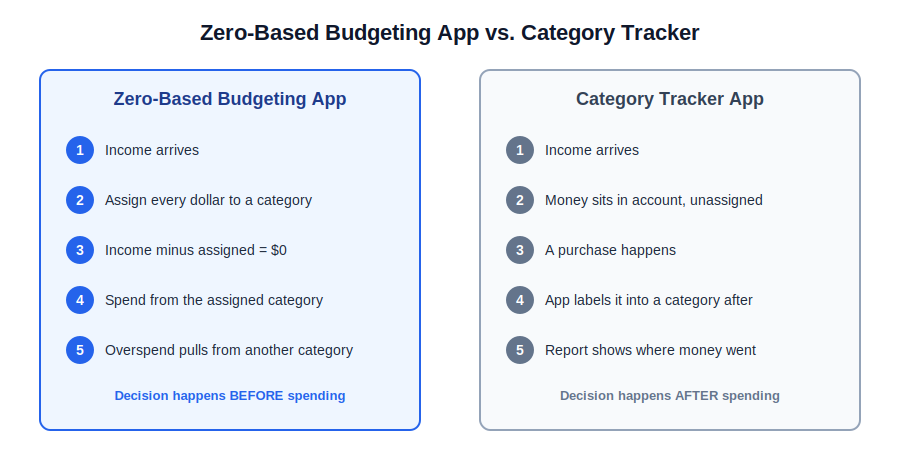
If you’ve never budgeted this way, read what YNAB’s four rules actually mean in day-to-day practice before picking an app. The method is what changes your spending; the app is just the tool that enforces it.
Want the app most people mean when they say “zero based budgeting”?
Try YNAB Free for 34 Days →No card required to start the trial.
Which Apps Are Built for Zero Based Budgeting From the Ground Up?
Three apps treat zero based budgeting as their core mechanic instead of a bolted-on feature: YNAB, EveryDollar, and Actual Budget. Each forces you to assign every dollar before you spend it, and each will make you move money between categories the moment you overspend one. They differ mainly on price, automation, and how much manual entry you’re willing to tolerate.
YNAB: The Best Zero Based Budgeting App for Strict Discipline
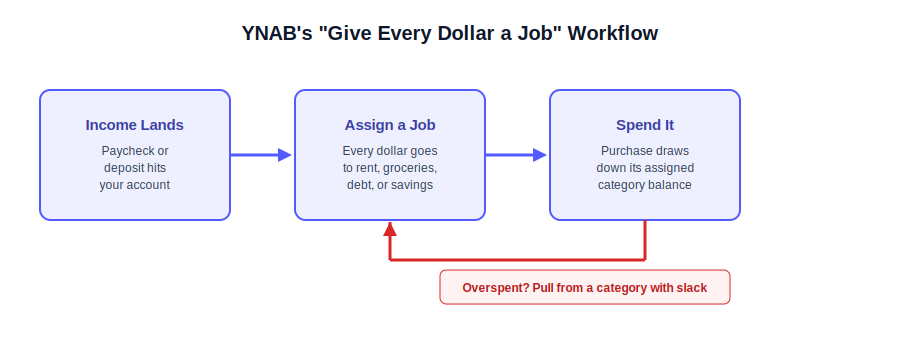
YNAB is the app most personal finance communities point to first, and the reason is structural: its entire product is built around “give every dollar a job.” Income gets assigned to categories the moment it lands, and overspending in one category forces you to pull from another rather than letting the number quietly go negative.
I used YNAB for 15 years, from 2011 until earlier this year, relying entirely on its strict zero-based method to build financial discipline from scratch. What eventually wore on me wasn’t the method itself, it was the daily reconciliation and the month-end “YNAB dance” of covering small overspends category by category.
That friction is exactly what makes YNAB effective for someone starting out, and exactly what makes long-time users eventually look at Monarch’s more automated approach once their finances stabilize.
Price: $109/yr or $14.99/mo, with a 34-day trial that doesn’t require a card. Students get a free year through SheerID at ynab.com/college. One subscription covers up to six people, which meaningfully improves the per-person cost for couples and families. For most people starting fresh with debt or overspending habits, this is still the best zero based budgeting app available, even at the price.
I’ve covered the full pricing breakdown, including why the old “$179 App Store trap” claim floating around the internet doesn’t hold up, in my complete YNAB review, and broken down the SheerID student process in my YNAB pricing guide.
YNAB remains the reference point every other zero based budgeting app on this list gets measured against.
EveryDollar
EveryDollar is Dave Ramsey’s version of the same idea, built specifically around his Baby Steps debt-payoff framework. The free tier handles manual zero based budgeting completely, no bank connection required. The paid tier ($79.99/yr or $17.99/mo) adds bank syncing so you’re not typing in every transaction by hand.
Community sentiment on r/personalfinance and Ramsey-adjacent forums consistently frames EveryDollar as the cleanest on-ramp for anyone already following the Baby Steps, since the categories map directly onto debt snowball priorities instead of generic spending buckets. The recurring complaint is the reverse of that strength: outside the Ramsey ecosystem, the rigid category structure feels restrictive for people who don’t want debt payoff to be the organizing principle of their whole budget.
If you’re already debt-focused, this is the most natural entry point into zero based budgeting, since the app is oriented around every dollar having a job, and a lot of those jobs are debt payments. My full EveryDollar pricing breakdown covers the free vs. paid tiers in detail, and I’ve compared it directly against YNAB in my EveryDollar vs YNAB comparison.
If debt payoff is the actual goal rather than the budgeting method itself, my guide to getting out of debt fast and the debt payoff estimator are worth running before you commit to either app.
That trade-off is fairly typical among apps for zero based budgeting built around one specific philosophy instead of a blank slate.
Actual Budget
Actual Budget is the one I recommend most often to people who want YNAB’s method without YNAB’s price tag. It’s free, open source under the MIT license, and built around the same give-every-dollar-a-job mechanics: assign every dollar, roll over what’s left, stay accountable to categories instead of a vague “spending” total.
If you want a zero based budgeting app that’s free forever with no subscription at all, Actual Budget is the strongest pick here. The real catch, and I’d rather tell you this upfront than let you find out after setup: there’s no polished official mobile app anymore, since the developers deprecated it in favor of a browser-based PWA.
Cloud sync isn’t free either; hosting it yourself through a service like PikaPods runs roughly $39/yr, still dramatically cheaper than any subscription app, but not zero-effort.
As far as free zero based budgeting apps go, my full Actual Budget review walks through the setup and self-hosting costs in detail, and I’ve compared it head-to-head with YNAB in Actual Budget vs YNAB for anyone weighing the switch.
Few zero based budgeting apps free of any subscription manage to stay this actively maintained years later.
Between these three, you’ve got every genuine flavor of apps for zero based budgeting that don’t compromise on the give-every-dollar-a-job rule: strict and polished (YNAB), strict and debt-focused (EveryDollar), or strict and free (Actual Budget).
My take: if money’s tight, start with Actual Budget or EveryDollar’s free tier before paying for anything. Don’t upgrade to YNAB until you’ve actually opened the app for a few weeks straight, since the method only works if you use it daily, not because the free tools are missing something YNAB has.
Which Apps Come Close Enough to Count?
Goodbudget and Monarch Money aren’t strictly zero based by the textbook definition, but both get close enough in daily use to belong on this list. Goodbudget uses digital envelopes instead of unassigned categories, which is functionally the same discipline. Monarch’s Category Budgeting mode, not its default Flex mode, requires a spending limit on every category, approximating zero based structure with far more automation than YNAB or EveryDollar offer.
Neither app is shy about calling itself one of the better apps for zero based budgeting, and the comparison sites that lump them in aren’t wrong.
Goodbudget
Goodbudget digitizes the classic envelope budgeting method: income gets split into virtual envelopes for rent, groceries, fun money, and so on, and once an envelope’s empty, spending from it stops.
It isn’t technically zero based in the strict give-every-dollar-a-job sense, but the practical result, every dollar assigned somewhere before it’s spent, is close enough that most comparison sites lump it in with zero based apps anyway. Its free tier alone makes Goodbudget one of the stronger picks for anyone who wants a zero based budgeting app free of charge.
The free tier covers 20 envelopes total (10 regular, 10 annual or goal), which genuinely covers most households’ core categories. Premium, which adds automatic bank sync for US accounts, runs $10/mo or $80/yr, confirmed live at goodbudget.com as of this writing. (Try Goodbudget free →)
The honest limitation: bank sync is US-only, and the free tier’s 1-year transaction history means you’ll lose your oldest data after 12 months if you never upgrade. Full pricing breakdown is in my Goodbudget pricing guide, and my complete Goodbudget review covers the day-to-day experience, including how it compares for couples sharing one household budget.
Goodbudget is proof that a genuinely free zero based budgeting app doesn’t have to feel like a stripped-down demo.
Monarch Money (Category Budgeting Mode)
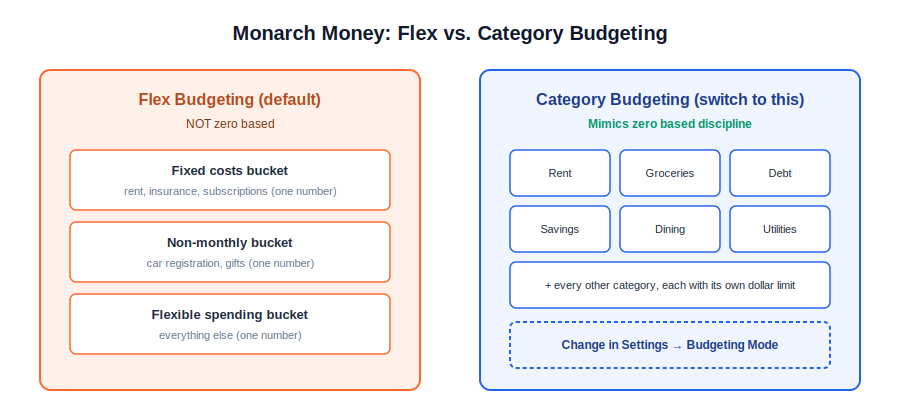
Monarch offers two budgeting modes, and this distinction matters more than most reviews mention. Flex Budgeting, the default, groups spending into three loose buckets and isn’t zero based at all. Category Budgeting requires a dollar limit on every individual spending category, which functions much closer to zero based budgeting, with Monarch’s automatic transaction categorization doing the work YNAB and EveryDollar make you do by hand.
I switched from YNAB to Monarch this year after 15 years on strict zero-based budgeting, specifically because I wanted a macro-level net worth and cash flow view alongside the category-level discipline.
The one setting I’d tell anyone making the same move to check immediately: Monarch defaults new users to Flex, not Category Budgeting, so if the zero based method is the whole reason you’re considering Monarch, switch modes in settings on day one. Staying on Flex defeats the purpose entirely.
Price is $99.99/yr (Core) or $14.99/mo, with a 7-day trial that requires a card upfront, confirmed live at monarch.com. (Try Monarch free for 7 days →) Plus tier runs $199.99/yr and adds retirement forecasting and business-income tracking, features most people using Monarch purely for zero based budgeting won’t need.
See my Monarch Money security and safety guide and full Monarch Money pricing breakdown for the complete tier comparison, and YNAB vs Monarch if you’re weighing the exact switch I made.
Monarch is the closest thing on this list to a fully automated zero based budgeting app, provided Category mode stays switched on.
Is Zero Based Budgeting the Same as the Envelope System?
No, they’re closely related but not identical. The envelope system, which Goodbudget digitizes, splits money into spending buckets and stops you once an envelope is empty. Zero based budgeting requires every dollar, including savings and debt payments, to be assigned until income minus allocations equals exactly zero. Envelope budgeting is really a subset of the broader zero based approach, not a separate philosophy.
For a deeper look at pure envelope budgeting specifically, my roundup of the best envelope budgeting apps is worth reading alongside this one if you’re deciding between the two structures.
What if You Want the Discipline Without Doing It All by Hand?
Quicken Simplifi and Quicken Classic aren’t zero based budgeting apps by design. Simplifi uses a dynamic spending plan that forecasts what’s left after bills, and Quicken Classic is desktop software built for broader financial planning across three tiers. Both can approximate zero based discipline for people who want automation over manual dollar-by-dollar assignment.
I want to be direct about these last two: if you search for a zero based budgeting app expecting Quicken Simplifi to work like YNAB, you’ll be disappointed. Neither Simplifi nor Quicken Classic markets itself as zero based, and that’s accurate, not a knock against either product.
Simplifi’s entire design philosophy runs opposite to manual envelope-style assignment: it watches your accounts and tells you what’s safe to spend after obligations, which is genuinely useful, just a different mechanic.
If a zero based budgeting software mindset is what you actually want, Simplifi’s forecast comes closest without the manual categorization YNAB requires.
Simplifi runs $3.99/mo billed annually as a first-year promo ($47.88/yr) or $6.99/mo standard ($83.88/yr), with a 30-day money-back guarantee instead of a free trial, confirmed live at quicken.com.
Quicken Classic is a different product entirely, now genuinely three desktop tiers rather than four: Deluxe at $6.99/mo (about $83.88/yr, billed annually, no current promo), Premier at $7.99/mo (about $95.88/yr, an 11% promo off the standard $8.99), and Business & Personal at $10.99/mo (about $131.88/yr, a 12% promo off $12.49).
All three are billed annually only, and Quicken’s promotional discounts shift often enough that the exact percentage on any given day isn’t worth memorizing, only the range.
Read my Quicken Simplifi review and Quicken Classic review before choosing either over a dedicated zero based app, since the feature depth (investment tracking, tax schedules, rental property management) only pays off if you actually need it.
Neither Quicken product is trying to be the best zero based budgeting app on paper, and that’s fine, since automation was always the point. Compare that to a genuine zero based budgeting app and the gap in manual control becomes obvious fast.
Do Zero Based Budgeting Apps Require Bank Syncing?
No. Manual entry is core to how Actual Budget and EveryDollar’s free tier work, and plenty of long-time YNAB users deliberately skip bank sync because manually entering transactions forces more awareness of spending. Bank syncing is a convenience layer on top of the method, not a requirement of it; you’re trading a few minutes of daily effort for automation, nothing more.
Free vs. Paid: Which Zero Based Budgeting App Should You Actually Pick?
Start free if you’re new to zero based budgeting: Actual Budget or EveryDollar’s free tier cost nothing and teach you the method properly. Upgrade to a paid app like YNAB only once you know you’ll actually stick with it. YNAB’s $109/yr works out to about $9/month, roughly two coffees, once the habit has already proven itself.
A zero based budgeting app that’s free of charge is genuinely enough for most people in the first few months. Only upgrade once the free version’s real limits, not your motivation, are what’s holding you back. If you’re not sure which category is eating your budget, running the numbers through the free budget calculator first will tell you more than any app comparison will.
Every zero based budgeting software option on this page, free or paid, gets audited against that same $0-left-over standard before it earns a spot here. Price alone rarely decides which zero based budgeting app sticks; the deciding factor is almost always whether you’ll actually open it daily.
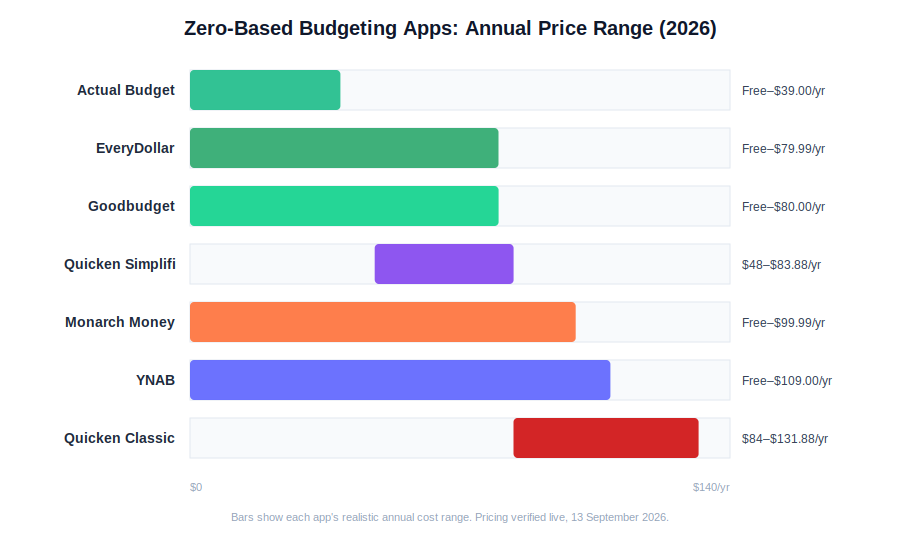
| App | Free Tier? | Paid Price | Best For |
|---|---|---|---|
| YNAB | No (34-day trial) | $109/yr or $14.99/mo | Households wanting the strictest, most established system |
| EveryDollar | Yes (manual) | $79.99/yr or $17.99/mo | Debt payoff, Ramsey Baby Steps followers |
| Actual Budget | Yes, fully free | ~$39/yr self-hosted sync | Privacy-conscious users comfortable with setup |
| Goodbudget | Yes (20 envelopes) | $80/yr ($10/mo) | Couples who like the classic envelope visual |
| Monarch Money | No (7-day trial, card required) | $99.99/yr or $14.99/mo | Automated net worth tracking with zero based structure |
| Quicken Simplifi | No (money-back guarantee) | $47.88–$83.88/yr | Automated spending plans over manual assignment |
| Quicken Classic | No | $83.88–$131.88/yr (3 tiers) | Investing and tax reporting alongside budgeting |
Pricing verified live from official websites, 13 September 2026. Promotional rates on Quicken products change frequently; the ranges above reflect current live pricing, not a fixed guarantee.
Can Two People Share a Zero Based Budget?
Yes, on every app in this list except some free tiers. YNAB supports up to six people on one subscription, Monarch and Goodbudget both support shared or partner access, and Actual Budget’s self-hosted setup syncs across devices for a household. If sharing a budget as a couple is the main goal, my best budgeting apps for couples roundup goes deeper on that specific use case than this page can.
Which Zero Based Budgeting App Is Best for Your Situation?
There’s no single best zero based budgeting app for everyone; the right pick depends on how much manual entry you’ll actually tolerate and whether you’re solving for discipline, automation, or cost. The quick-answer box above this section names one app per situation. Here’s the reasoning behind each pick, since the “why” matters more than the label.
If you’re rebuilding financial discipline from a real overspending problem, YNAB’s strictness is the point, not a downside. The friction of manually assigning every dollar is what breaks the habit of spending first and figuring it out later. Anything more automated will let you coast past the exact behavior you’re trying to change.
If debt payoff is the actual goal, rather than budgeting as a general practice, EveryDollar’s categories are already organized around Ramsey’s debt snowball order, so you’re not retrofitting a generic app to a debt plan. Run the debt payoff estimator first to see how much faster a structured payoff order actually gets you out, since the number is often more motivating than the app choice itself.
If cost is the deciding factor and you’re comfortable with a slightly rougher interface, Actual Budget removes the price barrier completely. The trade-off is real: no polished mobile app, and self-hosting sync takes an afternoon of setup most other apps handle for you.
If you and a partner want a shared, visual system without linking bank accounts, Goodbudget’s envelope metaphor is easier to explain to someone who’s never budgeted before than any category-based app, YNAB included.
If your finances have already stabilized and you want net worth, investments, and cash flow in one dashboard instead of just spending categories, Monarch’s Category Budgeting mode keeps the zero based discipline while adding the macro view that strict envelope apps don’t show you.
If you just want to know what’s safe to spend without assigning every dollar by hand, Quicken Simplifi’s forecasted spending plan gets you most of the practical benefit with a fraction of the manual setup.
If you’re managing investments, rental property, or detailed tax reporting alongside your budget, Quicken Classic’s Premier or Business & Personal tier covers ground none of the other six apps attempt, at the cost of a much steeper price and a desktop-first interface.
Whichever zero based budgeting app you land on from this list, the quick-answer box above captures the trade-off in one line. That’s the short version of how I’d match a zero based budgeting app to a real situation, not just a spec sheet.
Can Zero Based Budgeting Work With Irregular Income?
Yes, and it arguably works better than percentage-based budgeting for irregular income, since you assign real dollars as they arrive instead of guessing at a monthly average. YNAB and Actual Budget both handle this well through rolling category balances that carry forward instead of resetting every month.
Freelancers and gig workers are actually where zero based budgeting shines, because the method never assumes a fixed paycheck. It just asks you to assign whatever comes in, whenever it arrives.
Say a freelancer brings in $2,800 one month and $4,600 the next: a percentage-based system (50% needs, 30% wants, 20% savings) recalculates awkwardly every time the top-line number changes, while a zero based system just assigns that specific month’s dollars to that month’s categories and rolls unspent balances forward.
Any app on this list can technically handle irregular income, but YNAB and Actual Budget do it most gracefully thanks to rolling categories that don’t force a reset.
I’ve written a full guide on budgeting on irregular income using zero based methods if that’s your specific situation, since it changes how you’ll want to set up categories from day one.
This is exactly why freelancers searching for a zero based budgeting app free of monthly-average guesswork end up on this page.
What Mistakes Do People Make Switching to Zero Based Budgeting?
The most common mistake is treating a category balance like a strict monthly allowance instead of a rolling pool of money. New users also tend to create far too many categories in the first week, which turns a simple system into something that feels like a part-time job. Both mistakes usually resolve within a month or two of actual use, not through a better app.
Here’s a concrete zero based budgeting example of the first mistake: someone sets up a “Groceries” category at $500/month, spends $520 in week three, and panics, treating the $20 overage as proof the system failed.
In a real zero based budget, that $20 gets pulled from a category with slack, say “Dining Out,” which drops to $180 from its original $200 that month. Nothing failed. That’s the system working exactly as designed. People who quit zero based budgeting in the first month usually quit at this exact moment, mistaking a normal rebalancing step for proof the method doesn’t work.
The second mistake, over-categorizing, is just as common. I’ve seen the pattern repeatedly in community discussions: someone sets up 35 to 40 categories on day one, gets overwhelmed by the sheer number of daily decisions, and abandons the app within two weeks.
Start with 10 to 15 broad categories, housing, groceries, transportation, debt, savings, fun money, and only split one further once it consistently causes friction. YNAB and Actual Budget both let you merge or split categories later without losing transaction history, so there’s no real cost to starting simple and refining later.
Dave Ramsey’s zero based budgeting approach in EveryDollar sidesteps the over-categorizing mistake somewhat, since the app’s default categories are already built around a specific debt-payoff order rather than letting you invent 40 of your own from scratch. That’s a legitimate reason to pick it over a blank-slate app like YNAB if you know debt payoff is your priority.
None of this is unique to one zero based budgeting app; the same rebalancing logic applies whether you’re using YNAB, EveryDollar, or Actual Budget. That’s a normal part of using any zero based budgeting app, not a sign the method failed.
What Is the Zero Based Budgeting Method, Exactly?
The zero based budgeting method means every dollar of income gets assigned to a specific category, including savings and debt, until income minus allocations equals exactly zero. It’s not a spending limit; it’s a planning system where “zero” means fully assigned, not fully spent.
Here’s a sample zero based budget worked through with real numbers, since vague descriptions of the method rarely make it click.
Take a $4,200/month take-home income: $1,400 to rent, $150 to electricity and internet, $500 to groceries, $300 to a car payment, $250 to a minimum debt payment, $400 to an emergency fund, $300 to retirement savings, $200 to a sinking fund for annual expenses like car registration, and $700 split across dining out, entertainment, and miscellaneous spending.
Add that up: $1,400 + $150 + $500 + $300 + $250 + $400 + $300 + $200 + $700 = $4,200. That’s the zero based budget system in practice: not a single dollar left unassigned, and no guessing about where the last few hundred dollars of the month went.
The historical origin matters less than the mechanics, but it’s worth a sentence: zero based budgeting started as a corporate accounting technique in the 1970s, popularized by Peter Pyhrr, where departments justified every expense from zero instead of just adjusting last year’s budget upward. Personal finance borrowed the “start from zero” logic, not the corporate approval process, which is why modern apps look nothing like accounting software.
Every zero based budgeting method ultimately reduces to that same equation, regardless of which app enforces it. Whether you call it a zero based budgeting method or just “give every dollar a job,” the mechanics described above are identical.
What Questions Do People Ask About Zero Based Budgeting Apps?
A few questions about zero based budgeting apps come up often enough that they’re worth answering directly, without burying the answer under three paragraphs of setup.
How Does Zero Based Budgeting Work Day to Day?
Income gets assigned to categories as soon as it arrives, not at the end of the month. Every purchase gets logged against its category in near real time, and when a category runs low, you either stop spending from it or pull funds from a category with slack, rather than letting the account balance quietly absorb the overage.
What Happens if You Overspend in a Zero Based Budget?
You pull the overage from another category rather than letting your account go negative unnoticed. This is the entire mechanical point of the method: overspending forces an immediate trade-off decision instead of surfacing as a surprise at the end of the month, when it’s too late to adjust anything.
Is There a Zero Based Budgeting Software Option for Desktop Use?
Yes. Actual Budget runs as self-hosted zero based budgeting software on Mac, Windows, and Linux, and Quicken Classic offers traditional desktop software too, though it isn’t built around zero based mechanics the way Actual Budget is. Most people today still end up using a mobile-first app instead of dedicated desktop software, simply because that’s where they actually log purchases.
Is YNAB Worth It Compared to Free Options Like Actual Budget?
For most people just starting out, no, try free first. YNAB earns its price through interface polish, mobile app quality, and a more forgiving learning curve, all of which matter more once you already know you’ll stick with the method long-term. Run your own numbers through the YNAB ROI calculator before deciding either way.
That calculation only matters once you already trust the zero based budgeting method enough to stick with it long-term.
Does Zero Based Budgeting Work if My Income Changes Every Month?
Yes, see the irregular income section above for a worked example. It’s actually one of the stronger use cases for the method rather than a weakness, since you’re always working with real dollars already in hand instead of a projected average that may not show up.
Can I Do Zero Based Budgeting With a Spreadsheet Instead of an App?
Yes, plenty of people do, though you lose automated transaction tracking and rollover math that an app calculates for you.
If you want to test the method for a month before committing to any app, a Google Sheets zero based budget template is a reasonable free starting point, and our sister site’s comparison of spreadsheets versus apps is worth a look if you’re still deciding which format fits how you actually work.
What’s the Difference Between Monarch’s Flex and Category Budgeting?
Flex groups spending into three broad buckets, fixed, non-monthly, and flexible, and isn’t zero based at all. Category Budgeting requires a dollar limit on every individual category, which is the mode you want if zero based discipline, not just spending visibility, is your actual goal.
📚 Read Next
