
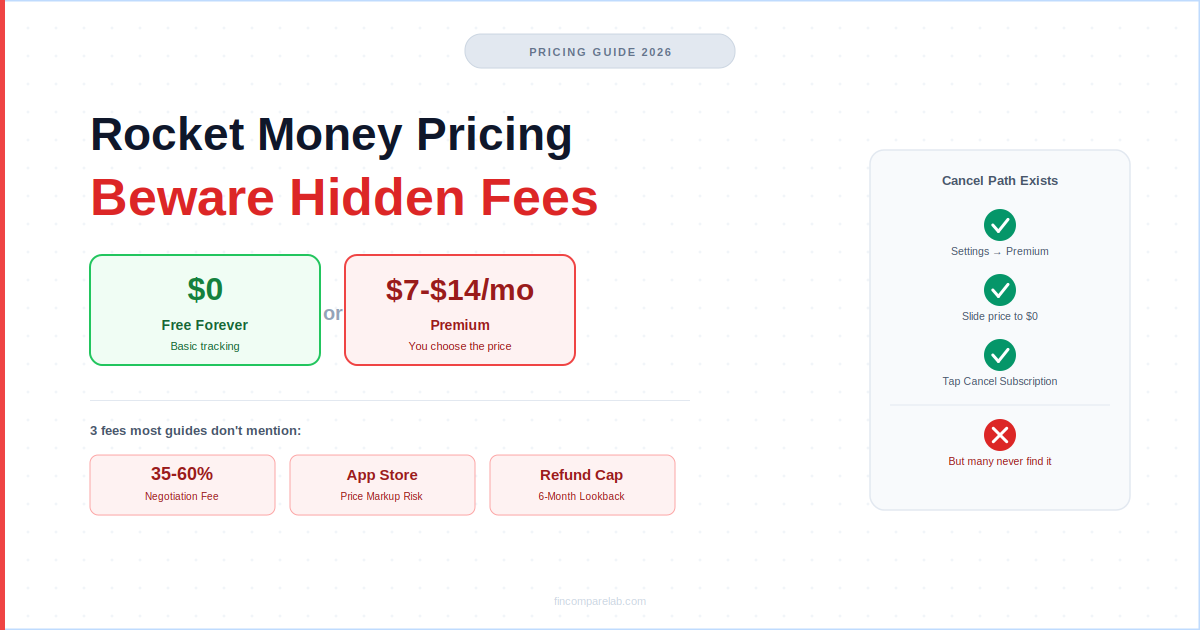
Rocket Money pricing looks simple on the surface — free forever, or Premium at $7–$14/month — but the real cost only shows up once you factor in the fees most competitor guides skip past. This Rocket Money pricing guide covers what’s actually free, what Premium unlocks, and the specific fees that catch people off guard after they’ve already signed up.
⚡ Quick Answer
Rocket Money pricing has two tiers: free forever for basic tracking, or Premium at $7–$14/month (you pick the price — same features either way, that’s $84–$168/year). The fees people don’t expect: a 35–60% bill-negotiation success fee, a pricing floor that can creep higher if you sign up through the App Store, and a refund policy that doesn’t always cover long-forgotten charges.
How We Review Apps · Pricing verified from rocketmoney.com — 25 July 2026
Table of Contents
- How much does Rocket Money cost in 2026?
- What do you get free vs. Premium?
- How does the pay-what-you-want slider actually work?
- What’s the hidden fee in Rocket Money’s bill negotiation?
- Does Rocket Money charge more if you sign up through the App Store?
- Why do so many people say cancelling Rocket Money Premium is hard?
- Is the Rocket Money free plan enough for most people?
- How does Rocket Money pricing compare to competitors?
- Is Rocket Money Premium worth it in 2026?
- What does Reddit say about Rocket Money’s fees?
- What questions do people ask most about Rocket Money pricing?
How much does Rocket Money cost in 2026?
Rocket Money pricing is simple at a glance: free forever, or Premium starting at $7/month. There’s no annual plan — Rocket Money cost is billed month-to-month at whatever price you choose on a sliding scale, and you can change or cancel it anytime.
The free plan never expires and never requires a card. But most of the app’s real functionality — the parts people actually download it for — sits behind Premium.
Here’s the Rocket Money pricing breakdown at a glance:
| Plan | Cost | Annual Equivalent | Trial |
|---|---|---|---|
| Free | $0 — forever | $0 | N/A |
| Premium | $7–$14/month (you choose) | $84–$168 | 7 days (card required) |
| Bill Negotiation | 35–60% of first-year savings (success fee only) | Varies by bill | Free to attempt |
Rocket Money pricing verified from rocketmoney.com and the Rocket Money Help Center — 25 July 2026.
One detail in the Rocket Money pricing model surprises a lot of first-time users: bill negotiation isn’t Premium-exclusive. Free users can request it too. The success fee applies either way, only if it actually works.
Does Rocket Money pricing include an annual plan?
No. Per Rocket Money’s own Help Center, cost is monthly-only — there’s no discounted annual option, despite what some older third-party roundups claim. You choose your price on the slider, get billed month-to-month, and can change or cancel anytime. At the $7/month floor, that works out to $84/year; at the $14/month ceiling, $168/year.
What do you get free vs. Premium on Rocket Money?
The free vs. Premium split comes down to one core distinction: the free plan lets you see your subscriptions. Premium lets you cancel them through the app, plus a handful of budgeting features that go beyond basic tracking.
| Feature | Free | Premium |
|---|---|---|
| Account linking & transaction history | ✅ | ✅ |
| Subscription tracking (view only) | ✅ | ✅ |
| Subscription cancellation (concierge) | ❌ | ✅ |
| Basic budget (2 custom categories max) | ✅ | ✅ |
| Unlimited custom budget categories | ❌ | ✅ |
| Credit score monitoring | ✅ | ✅ |
| Full credit report (Experian, FICO 2) | ❌ | ✅ |
| Net worth tracking | ❌ | ✅ |
| Financial Goals (automated savings) | ❌ | ✅ |
| Real-time account syncing | ❌ | ✅ |
| Bill negotiation | ✅ (success fee applies) | ✅ (success fee applies) |
Free vs. Premium feature breakdown — Rocket Money Help Center, 25 July 2026.
Is the Rocket Money free plan worth using at all?
Yes, if your goal is a passive spending dashboard. Two custom budget categories isn’t a real budgeting system, but the free plan works well as a Mint-style replacement — you get account aggregation, a spending snapshot, and full subscription visibility.
Where it falls short: you can see a forgotten $15/month subscription, but you can’t tap a button and have Rocket Money cancel it for you. That single gap is what pushes most free users to eventually upgrade.
Is Rocket Money free forever, with no catch? Yes — there’s no expiration date, no trial clock counting down, and no card required to keep using it. The Rocket Money free plan stays exactly as capable a year from now as it is today.
How does Rocket Money’s pay-what-you-want slider actually work?
This is the most unusual part of Rocket Money pricing. When you sign up for Premium, you’re shown a slider running from $7 to $14/month. Every price on that slider unlocks identical features — there’s no tier difference, no bonus unlocked at $14, nothing extra for paying more.
The psychology behind it is straightforward: the $14 ceiling anchors your perception of what’s “normal,” which makes $7 feel like a bargain rather than simply the floor. Rocket Money frames this as accessibility — letting people on tighter budgets pay less. In practice, it also nudges people who feel a sense of fairness toward paying above the minimum for no functional benefit.
My take: set it to $7/month. You get the full Premium feature set either way, so there’s no reason to pay more unless you specifically want to support the company beyond what’s required.
You can change your price anytime: open Settings, tap Premium Membership, select Manage Membership, then Change Monthly Fee, and drag the slider to your new amount.
Does Rocket Money charge different prices on iOS vs. Android?
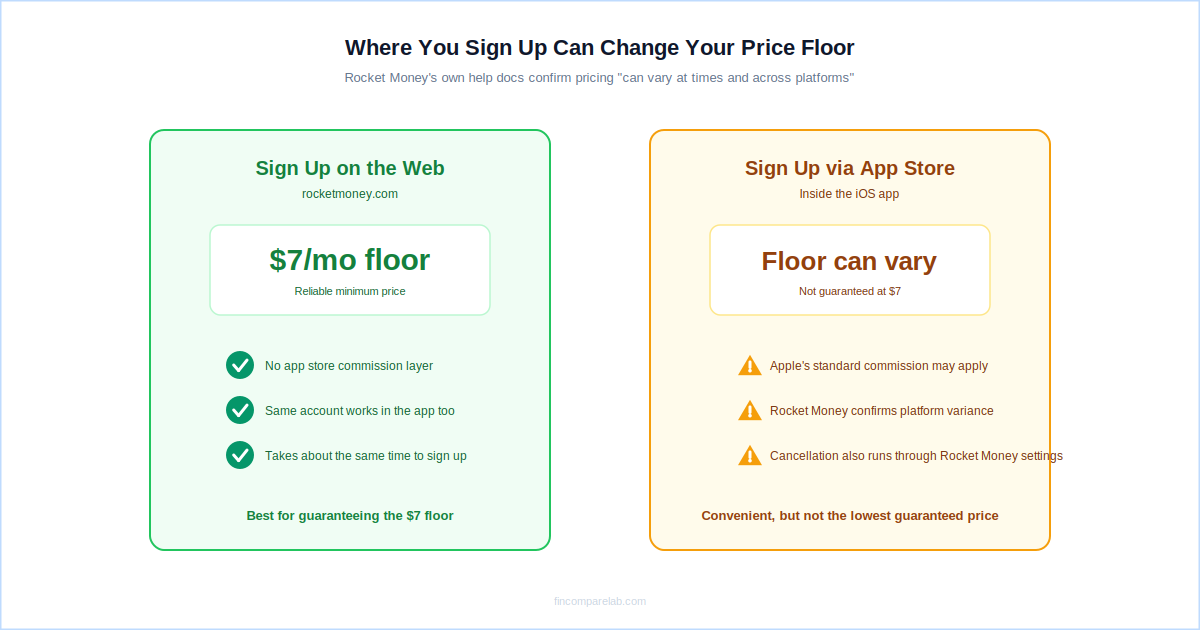
Rocket Money’s own help documentation confirms the $7–$14 range “can vary at times and across platforms.” That’s a meaningful admission — pricing isn’t guaranteed to be identical everywhere.
Apple’s standard 30% cut on App Store subscription purchases is the most likely reason a platform-specific floor could sit above web pricing, though Rocket Money doesn’t spell out the exact mechanism. If a consistent $7 floor matters to you, signing up through rocketmoney.com on the web rather than through the App Store is the safer bet.
What’s the hidden fee in Rocket Money’s bill negotiation?
Bill negotiation is available to free and Premium users alike — no upgrade required to request it. Rocket Money’s team contacts your service providers (phone, cable, internet, insurance) and attempts to lower your bill. You pay nothing upfront, ever.
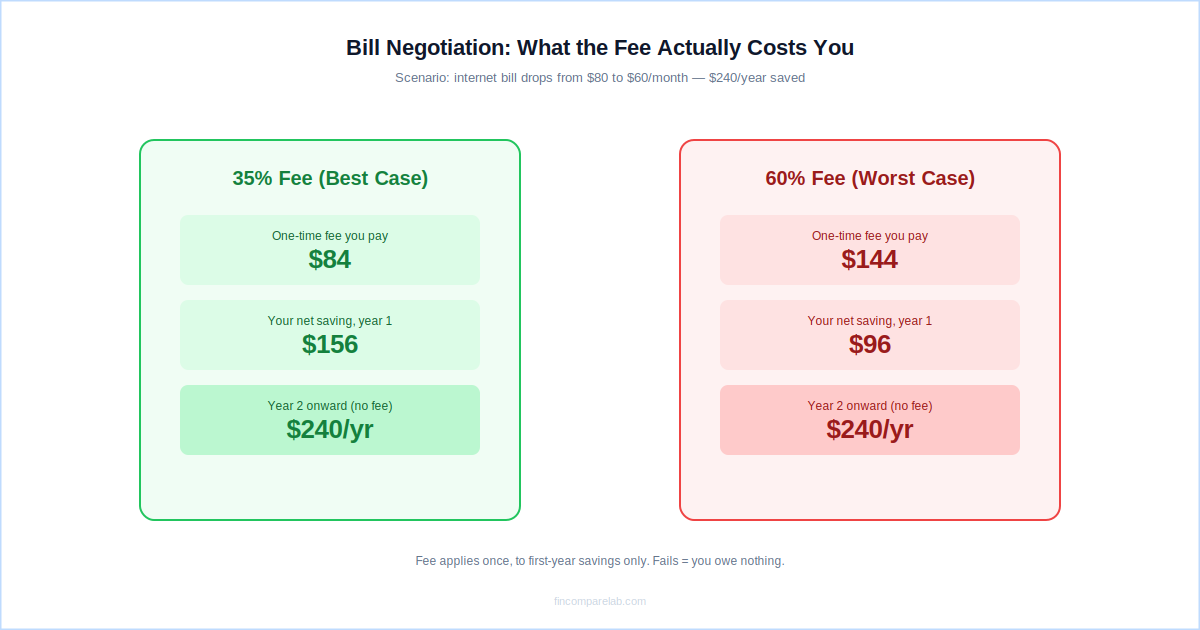
If negotiation succeeds, you owe 35–60% of your first year’s savings. You choose the exact percentage on a slider when you submit the request — a lower percentage generally means Rocket Money keeps a larger share, since the fee only applies to savings actually delivered. After year one, 100% of the ongoing savings are yours, indefinitely, at no further cost.
Here’s the real math on a common scenario:
- Scenario: your internet bill drops from $80 to $60/month, saving $240/year.
- At a 35% fee: you pay $84 upfront. Net year-one saving: $156.
- At a 60% fee: you pay $144 upfront. Net year-one saving: $96.
- Year 2 onward: the full $240/year is yours, with no further charge.
If negotiation fails, you owe nothing — that’s confirmed directly in Rocket Money’s own documentation. This no-risk structure is why negotiation gets recommended even by people who skip Premium entirely.
⚠️ Watch Out
Third-party review aggregators and BBB complaint records both document a recurring theme: users who authorized negotiation without fully registering the fee percentage, then were surprised by the resulting charge. The fee slider and the authorization happen in the same screen flow, so read it carefully before confirming. If you’re disputing an unexpected charge, contact Rocket Money support through the in-app chat or email [email protected], or dispute directly with your bank.
Is Rocket Money’s bill negotiation fee worth paying?
For most people, yes — the break-even math favors you by month four to six of the reduced rate, then it’s pure savings from there. One honest caveat: some negotiated rates only hold for 12 months before providers quietly raise them back up, which can mean negotiating again down the line.
Worth noting too — one Rocket Money reviewer’s real complaint involved a negotiated saving so small ($20/month) that the fee barely felt worth the hassle. It’s a reminder to check the projected savings amount before authorizing, not just the percentage.
Does Rocket Money charge more if you sign up through the App Store?
This is the least-discussed hidden cost in Rocket Money pricing, and most competitor guides don’t mention it at all. Rocket Money’s own help documentation acknowledges pricing “can vary at times and across platforms.”
That means signing up directly through Apple’s App Store carries a real risk of landing on a higher starting price than the advertised $7 floor — largely due to how Apple’s in-app purchase system and its standard revenue cut interact with subscription pricing.
The safest way to guarantee the lowest available Rocket Money cost is to create your account and upgrade to Premium through the website at rocketmoney.com, rather than tapping “Start Free Trial” inside the iOS app.
It takes the same amount of time and avoids any platform-specific markup — a small habit that keeps your Rocket Money cost predictable instead of leaving it up to whichever storefront you happened to sign up through.
Why do so many people say cancelling Rocket Money Premium is hard?
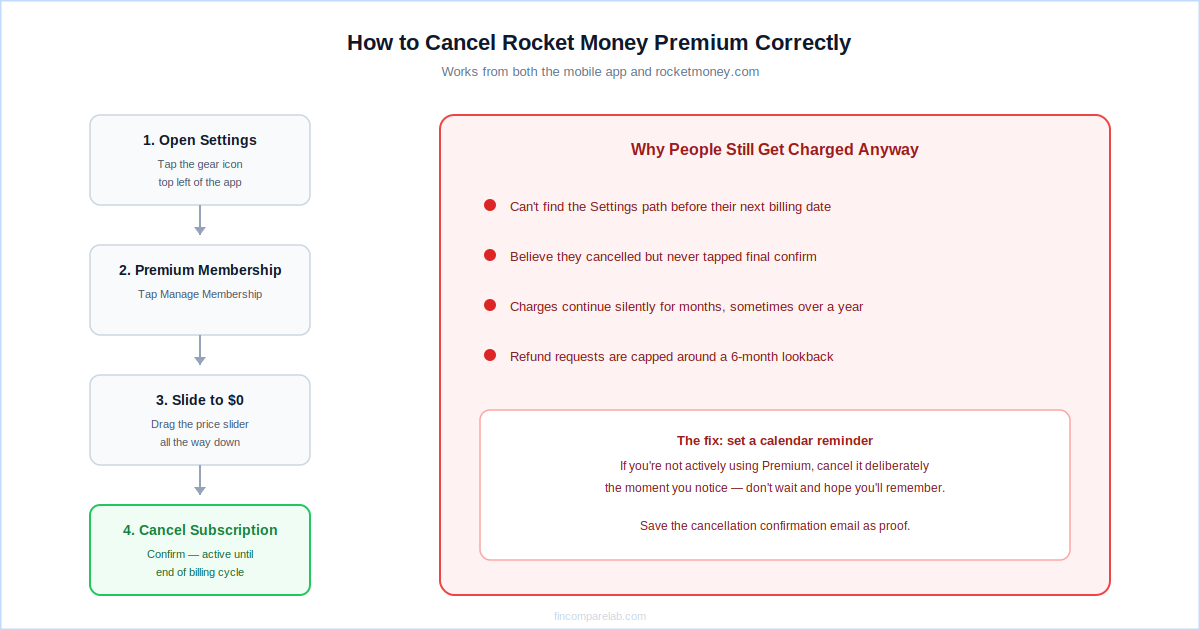
This is the most consistent negative theme in Rocket Money reviews, even though it’s more nuanced than it first appears. Rocket Money does provide an official in-app and website cancellation path: open Settings, tap Premium Membership, select Manage Membership, drag the price slider all the way to $0, then tap Cancel Subscription. Cancellation takes effect at the end of your current billing cycle, and you keep Premium access until then.
So the option exists — but real complaint patterns across the Better Business Bureau, App Store reviews, and third-party aggregators consistently describe the same friction: people don’t find that Settings path easily, and some report the subscription continuing to charge after they believed they’d cancelled.
Refund requests for long-forgotten charges aren’t always honored in full, either. One documented BBB pattern involved a user billed monthly for over a year without actively using the app, only to be told the refund policy covers roughly six months of lookback — not the entire unnoticed billing period.
The practical lesson: don’t rely on simply forgetting about Rocket Money Premium to make it go away. If you’re not using it, cancel it deliberately through the Settings path above, and confirm the cancellation email you receive.
✅ How to cancel correctly
- Settings → Premium Membership → Manage Membership
- Slide the price all the way to $0
- Tap Cancel Subscription and confirm
- Save the confirmation email as proof
❌ What goes wrong in practice
- Users can’t locate the Settings path and give up
- Charges continue after a believed cancellation
- Refunds are capped around a 6-month lookback
- Long-forgotten subscriptions rack up unnoticed charges
Is the Rocket Money free plan enough for most people?
For someone with no existing budgeting system, the free plan is a genuinely useful starting point. You’ll see where your money goes, spot subscription clutter, and track balances in one place — all without the Rocket Money cost of a Premium upgrade.
Is Rocket Money free enough for a beginner who just wants visibility? Almost always, yes. It’s once you want to act on what you see — cancelling, budgeting deeper, tracking net worth — that the free plan stops being enough.
But most people download Rocket Money specifically to act on subscription clutter, not just observe it. Actually cancelling subscriptions through the app’s concierge service requires Premium. If that’s your use case, the free plan will feel incomplete within the first session.
How does Rocket Money pricing compare to competitors?
At the $7/month floor, Rocket Money pricing is one of the cheapest paid tiers in the budgeting category. But it’s not solving quite the same problem as a full budgeting app — how much Rocket Money costs relative to alternatives depends heavily on what job you actually need done.
| App | Annual Cost | Monthly | Free Tier | Best For |
|---|---|---|---|---|
| Rocket Money | $84–$168/yr | $7–$14 | ✅ Forever | Subscription cleanup |
| YNAB | $109/yr | $14.99 | 34-day trial | Zero-based budgeting |
| Monarch Money | $99.99/yr | $14.99 | 7-day trial | Full financial dashboard |
| PocketGuard | $74.99/yr | $12.99 | ✅ Limited | Spending limits + debt payoff |
| EveryDollar | $79.99/yr | $17.99 | ✅ Manual only | Dave Ramsey Baby Steps |
| Empower | Free | Free | ✅ Forever | Investment tracking |
Rocket Money pricing vs. competitors — official websites, 25 July 2026. Annual cost shown at the $7/month minimum where a range applies.
The distinction that matters: Rocket Money pricing is competitive for what it does, but it isn’t a full budgeting app in the way YNAB or Monarch Money are. It’s a subscription manager and spending tracker with budgeting bolted on.
If you want envelope systems, zero-based allocations, or detailed goal planning, that’s not where Rocket Money Premium is strongest, regardless of price. If you’re weighing it directly against a similar app, see the full PocketGuard vs. Rocket Money breakdown or the wider Rocket Money alternatives roundup.
Is Rocket Money worth it compared to PocketGuard?
Both apps overlap on subscription tracking but diverge quickly from there. PocketGuard leads with a “how much can I safely spend” dashboard and a dedicated debt payoff planner. At $74.99/year, PocketGuard undercuts Rocket Money Premium at the $14/month ceiling ($168/year), but roughly matches it at the $7 floor ($84/year). If debt payoff is your priority, my PocketGuard pricing guide has the full side-by-side.
Is Rocket Money Premium worth it in 2026?
For one specific profile, yes, almost certainly. If you’ve never audited your recurring subscriptions and have been coasting on auto-renewals for years, Rocket Money Premium at $7/month can pay for itself in the first week — cancel two forgotten $10/month subscriptions and you’ve already covered the annual minimum twice over.
For active budgeters, less so. Rocket Money shows you the past — what you spent, what renewed — but it doesn’t help you plan ahead the way YNAB or EveryDollar do. If you already run a budgeting system, adding Premium probably won’t move your financial needle much.
One honest edge case worth flagging: the bill-negotiation success fee can occasionally rival the cost of Premium itself. If Rocket Money saves you $300 on a bill and charges 40%, that’s $120 in fees on top of whatever you’re already paying for Premium. Always run the numbers on your specific bill before authorizing a negotiation.
What does Reddit say about Rocket Money’s fees?
Across r/personalfinance and r/budgeting, community sentiment on Rocket Money pricing splits into two fairly consistent camps.
The first camp is enthusiastic about the subscription-hunting value: people who ran the free trial, found forgotten subscriptions worth more than the monthly Premium price, and felt the app paid for itself before they ever hit a paywall.
It’s common to see people say the Rocket Money free plan alone surfaced $30–$50 a month in subscriptions they’d forgotten about, before they’d even considered upgrading. Several threads describe setting the slider to the $7 minimum specifically because there’s no functional benefit to paying more.
The second camp — usually people who already track their finances actively elsewhere — is far less impressed. The recurring complaint is that the free plan feels thin, and that Premium’s actual budgeting tools remain shallow next to dedicated apps like YNAB.
The cancellation friction discussed earlier also comes up repeatedly in these threads — people who eventually stopped using the app but kept getting charged because they never found the Settings path to cancel it properly.
Both camps agree on one thing: the bill-negotiation fee needs to be understood clearly before authorizing it, since the percentage and the agreement happen in the same screen and it’s easy to click through without registering the number.
What questions do people ask most about Rocket Money pricing?
Here are the specific Rocket Money pricing questions that come up most often, answered directly.
Does Rocket Money charge a fee if bill negotiation fails?
No. Bill negotiation is purely performance-based, and if Rocket Money’s team can’t get your bill lowered, you pay nothing.
The 35–60% success fee only applies when negotiation actually saves you money, calculated on your first year of savings. After year one, all ongoing savings are yours indefinitely, at no additional charge.
Is Rocket Money free, or is it just a free trial?
The free plan is genuinely free — no expiry date, no credit card required to access it. You keep account linking, subscription tracking (view only), a basic 2-category budget, and credit score monitoring for as long as you use the app. The 7-day trial only kicks in when you actively opt into Premium; if you never enter payment details, you’re never charged.
Why does Rocket Money use pay-what-you-want pricing instead of a fixed cost?
The company frames it as accessibility, letting budget-conscious users pay less. In practice, it’s also an anchoring strategy — the $14 ceiling makes $7 feel generous rather than the minimum. Every Premium subscriber gets identical features regardless of the price they choose, so there’s no functional reason to pay above $7/month.
Does Rocket Money charge more if you sign up through the App Store?
It can. Rocket Money’s own help documentation confirms pricing “can vary at times and across platforms.” Signing up on the web at rocketmoney.com is the more reliable way to land on the advertised $7 floor rather than a platform-specific starting price.
How do you cancel Rocket Money Premium without getting charged again?
Open Settings, tap Premium Membership, select Manage Membership, slide the price to $0, then tap Cancel Subscription. This works from both the mobile app and the website. Cancellation takes effect at the end of your current billing cycle, so save the confirmation email as proof in case a charge lands afterward.
Is Rocket Money safe to connect to my bank account?
Yes. The app connects via Plaid — the same infrastructure behind Monarch Money, YNAB, and most major budgeting apps — and the connection is read-only, meaning Rocket Money can see transactions but can’t move money. It’s owned by Rocket Companies, a publicly traded US company (NYSE: RKT), and carries a 4.5/5 rating on the Apple App Store from over 373,000 ratings.
Whichever way you land on Rocket Money’s pricing, the smartest move is deciding upfront whether you want the free plan or Premium — and if you go Premium, setting a calendar reminder to review the charge every few months so it never becomes one of those forgotten subscriptions you downloaded this app to catch in the first place.
📖 Read Next
