
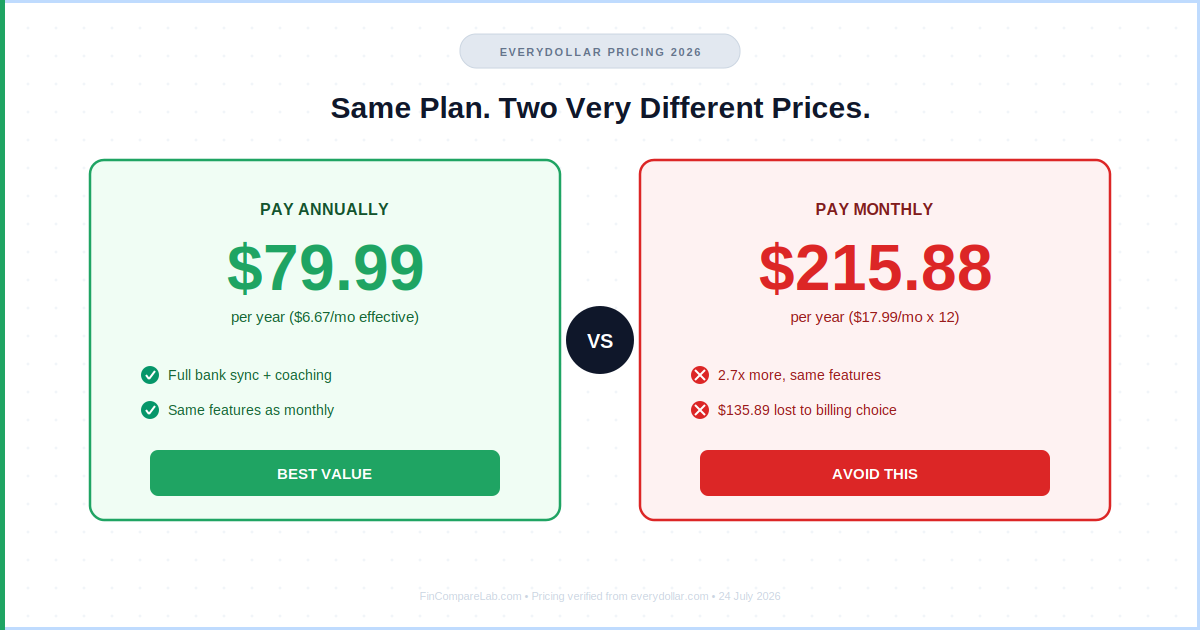
EveryDollar pricing in 2026 comes down to one choice: stay free forever with manual entry, or pay for Premium — and how you pay for Premium changes the real number a lot. Annual billing is $79.99 a year. Monthly billing is $17.99 a month, which adds up to $215.88 a year for the exact same features.
That’s not a discount code you’re missing. It’s just which button you click at checkout.
⚡ Quick Answer — EveryDollar Pricing 2026
EveryDollar pricing: free forever with manual entry, or Premium at $79.99/year if you pay annually. Pay monthly instead and the same plan costs $215.88/year — 2.7x more for nothing extra. Go annual, or stay free.
How We Review Apps · Pricing verified from everydollar.com — 24 July 2026
Table of Contents
- How much does EveryDollar cost in 2026?
- What does the free EveryDollar plan include?
- What does EveryDollar Premium include?
- Is EveryDollar Premium worth $79.99 a year?
- EveryDollar free vs Premium: what’s the real difference?
- What is Ramsey+, and is it a better deal than Premium alone?
- Does EveryDollar work with credit cards?
- How does EveryDollar pricing compare to YNAB, Monarch, and other apps?
- What do verified user reviews say about EveryDollar’s cost?
- Who should pay for EveryDollar Premium — and who shouldn’t?
- EveryDollar pricing FAQ
How much does EveryDollar cost in 2026?
EveryDollar pricing splits into two paths: permanently free, or Premium. The number that matters most isn’t the $79.99 headline figure — it’s the gap between annual and monthly billing, which is the widest of any budgeting app I cover on this site.
Here’s the full breakdown:
| EveryDollar Plan | Monthly Cost | Annual Cost | Bank Sync | Free Trial |
|---|---|---|---|---|
| Free | $0 | $0 — permanent | ❌ | N/A |
| Premium annual ✅ Best value | $6.67/mo effective | $79.99/yr | ✅ | 14 days |
| Premium monthly ⚠️ Poor value | $17.99/mo | $215.88/yr | ✅ | 14 days |
| Ramsey+ Annual (bundle) | $10.83/mo effective | $129.99/yr | ✅ (yr 1 only) | Varies |
EveryDollar pricing verified from everydollar.com and the App Store listing — 24 July 2026.
Paying monthly costs $135.89 more per year than paying annually — for the identical Premium tier. No feature changes based on billing frequency. This is the single most important thing to check before you enter a card number.
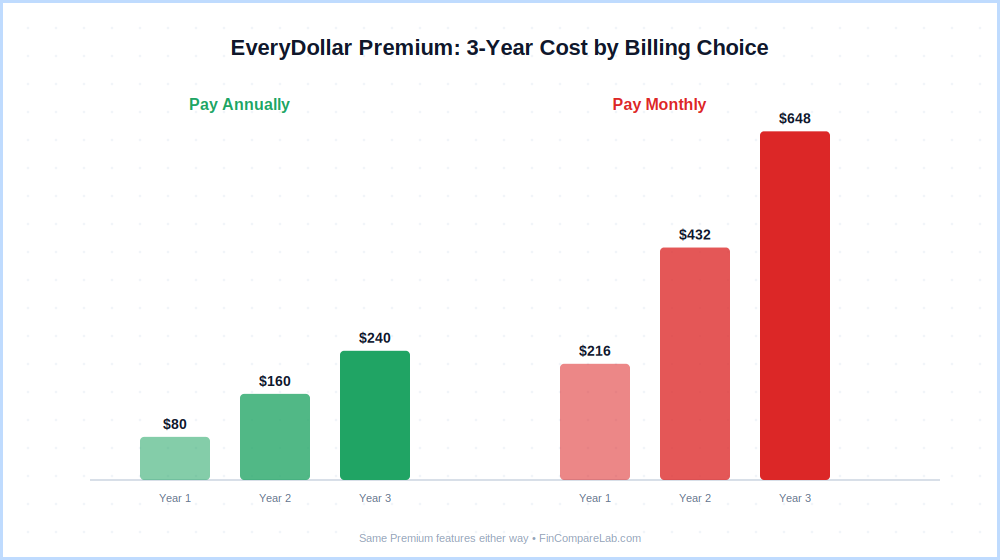
One detail most review sites skip: EveryDollar only accepts debit cards for subscription payment. Ramsey Solutions doesn’t take credit cards for its own subscriptions, consistent with Dave Ramsey’s anti-credit-card philosophy. If your default payment method is a Visa or Amex credit card, you’ll hit a wall at checkout.
Does EveryDollar offer any discount codes or promo deals?
No public promo codes apply to everydollar cost as of July 2026 — and no, searching for an everydollar plus cost discount won’t turn one up either, since “Plus” was retired as a product name years ago. Three legitimate ways to reduce what you pay — none require a coupon code:
- Annual billing — the only real discount, saves $135.89 vs monthly
- Ramsey+ bundle ($129.99/yr) — adds Financial Peace University and SmartTax on top of Premium (first year only); better value if you’d buy FPU separately anyway
- Book bundles — Ramsey Solutions occasionally includes a few months of Premium free with book purchases; check ramseysolutions.com for current offers
What does the free EveryDollar plan include?
The free plan is more capable than most competitors’ free tiers. You get a complete zero-based budgeting system — the same framework Dave Ramsey teaches — with no expiration and no credit card required. The one firm limit: every transaction is entered manually.
Free plan includes:
- Custom monthly zero-based budget — assign every dollar of income to a category before the month starts
- Unlimited budget categories — groceries, rent, fun money, debt payoff, emergency fund
- Savings goals — set targets and track progress toward specific goals
- Bill due date reminders — calendar view of upcoming expenses
- Multi-device sync — iOS, Android, and web stay in sync automatically
- Shared household budget — invite a partner to share the same budget
- Manual transaction entry — you log every expense yourself
What the free plan doesn’t include: bank sync, automatic transaction imports, paycheck planning, budget reports, Margin Finder, or live group coaching. All of those sit behind Premium.
Is manual entry a dealbreaker? For some people, no. Being forced to type in every purchase creates a kind of friction that keeps you engaged with your spending in a way passive tracking doesn’t.
Where people tend to quit is around month six, once logging 30–50 transactions a month starts feeling like a chore. That’s the honest signal to check whether everydollar premium cost is worth it for you specifically.
What does EveryDollar Premium include?
EveryDollar Premium buys you a connected budgeting app instead of a manual ledger. The January 2026 relaunch added real features — Margin Finder and live group coaching in particular — that make the upgrade more defensible than it was a year ago.
Everything in free, plus:
- Bank Connect (Plaid and Mastercard Connect) — automatic transaction import from most major US banks; transactions stream in, but you still categorize each one manually
- Paycheck Planning — organize your budget around actual pay dates instead of the calendar month; helps biweekly earners avoid mid-cycle overdrafts
- Margin Finder (new Jan 2026) — a guided questionnaire that scans spending patterns to surface forgotten subscriptions and overlooked costs; Ramsey Solutions cites an average of $3,015 found per new user
- Financial Roadmap — visual Baby Steps tracker from the $1,000 starter emergency fund through building wealth
- Budget Reports & Insights — month-over-month spending trends by category
- Live Group Coaching (new Jan 2026) — scheduled sessions with Ramsey-certified coaches at no extra charge
- Excel Export — download your transaction data for your own analysis
The detail that consistently surprises people switching from Monarch or YNAB: bank sync doesn’t auto-categorize transactions. EveryDollar imports the transaction into an inbox, then you drag it to a budget line yourself. Every coffee, every grocery run, every Amazon charge. That’s intentional — it keeps you engaged — but if you expect hands-off categorization at this everydollar cost, it’ll frustrate you.
Does the EveryDollar Premium Cost Cover Every Bank?
Not automatically. EveryDollar connects to banks through two providers — Plaid and Mastercard Connect — confirmed directly from Ramsey Solutions’ own bank-connection security documentation. Apple Card currently isn’t supported through either provider, and Cash App isn’t supported either. Before paying the everydollar premium cost upfront, check that your specific bank shows up as connectable — the annual everydollar pricing only pays off if bank sync actually works for you.
Is EveryDollar Premium worth $79.99 a year?
Is EveryDollar Premium worth it? At $79.99 a year, yes — with one condition: you need to be genuinely committed to the Ramsey zero-based method. At $6.67 a month effective, the annual everydollar pricing is competitive for what it delivers: bank sync, paycheck-level planning, Margin Finder, and coaching access. For Ramsey followers, this is a purpose-built ecosystem and the price is fair.
For everyone else, the math changes. YNAB at $109/year adds real auto-categorization, stronger credit card handling, and a 34-day trial with no card required — see the YNAB pricing guide for the full breakdown. Monarch Money at $99.99/year adds full investment tracking, a net worth dashboard, and genuinely hands-off categorization — covered in the Monarch Money pricing guide. You’re paying a similar rate for fewer features.
Here’s the counter-intuitive take most reviews skip: the free plan might genuinely be the better product for most people. Passive tracking, where transactions auto-populate and you scan them weekly, tends to change spending behavior less durably than active entry where you log each transaction yourself.
If your real goal is to shift habits rather than just observe them, the friction of the free plan can outperform the bank sync you’re paying $79.99 for.
⚠️ Watch Out Before Paying
- Monthly billing costs $215.88/year — 2.7x the annual rate for the exact same plan
- 14-day trial is short — you won’t complete a full budget cycle; YNAB’s 34-day trial gives more room to test
- Bank sync ≠ auto-categorization — every transaction still needs manual placement into its category
- Debit card only — no credit cards accepted for the subscription itself
- Apple Card and Cash App aren’t supported through either bank-sync provider
- US accounts only — no international bank support
EveryDollar free vs Premium: what’s the real difference?
The gap between free and Premium is less about raw features and more about how much manual work you’re willing to do. Here’s exactly what changes with everydollar free vs premium.
| Feature | Free ($0) | Premium ($79.99/yr) |
|---|---|---|
| Monthly zero-based budget | ✅ | ✅ |
| Unlimited budget categories | ✅ | ✅ |
| Savings goals | ✅ | ✅ |
| Multi-device sync | ✅ | ✅ |
| Shared household budget | ✅ | ✅ |
| Bank Connect (automatic imports) | ❌ | ✅ |
| Paycheck planning | ❌ | ✅ |
| Margin Finder (2026) | ❌ | ✅ |
| Financial Roadmap / Baby Steps | ❌ | ✅ |
| Budget reports & spending insights | ❌ | ✅ |
| Live group coaching (2026) | ❌ | ✅ |
| Excel export | ❌ | ✅ |
| Auto-categorization | ❌ | ❌ Still manual |
EveryDollar free vs Premium features — verified July 2026.
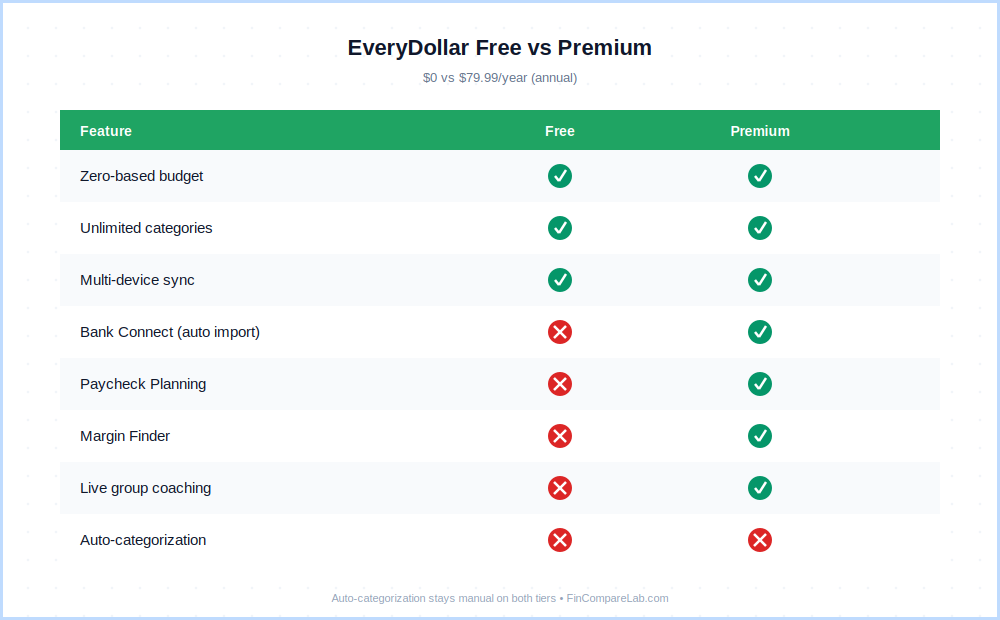
The pattern in everydollar free vs premium is consistent: Premium buys you automation of data entry, not automation of decisions. You’ll still touch every transaction. What changes is whether you type it in or drag it into place.
What is Ramsey+, and is it a better deal than Premium alone?
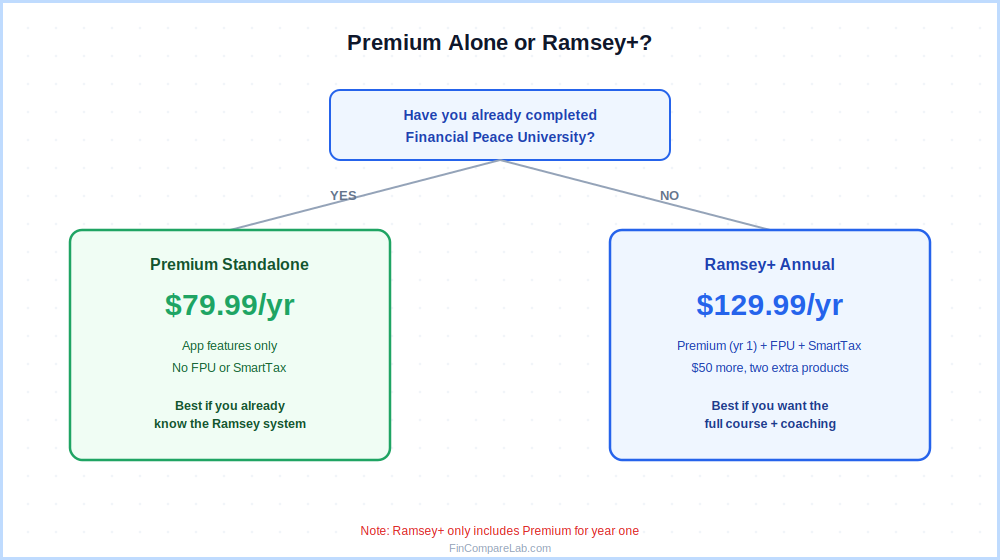
Ramsey+ is a broader membership that bundles EveryDollar Premium with Financial Peace University (FPU) and SmartTax filing for $129.99 a year. Standalone Premium costs $79.99 — so Ramsey+ charges $50 more and adds two extra products.
That $50 premium buys you FPU, which sells separately for roughly $80. If you haven’t gone through it, the bundle is the better deal — you’re effectively getting FPU free and paying standard everydollar pricing for the app itself. If you’ve already completed FPU, stick with the $79.99 standalone plan.
The critical caveat: Ramsey+ only includes EveryDollar Premium for your first year. Renewing Ramsey+ for a second year doesn’t automatically continue EveryDollar access — you’d need to buy standalone Premium separately after year one.
| Option | Cost | What’s Included | Best For |
|---|---|---|---|
| Premium standalone | $79.99/yr | App features only | Already know the Ramsey system |
| Ramsey+ Annual | $129.99/yr | Premium (yr 1) + FPU + SmartTax | New to Ramsey, want the full course |
| Ramsey+ 3-Month | $59.99 | Short-term access to the bundle | Testing before an annual commitment |
Ramsey+ pricing verified from the App Store listing — 24 July 2026.
Does EveryDollar work with credit cards?
EveryDollar can track credit card purchases inside budget categories, but the app isn’t built around credit card use. Dave Ramsey’s philosophy is anti-credit-card, and the product reflects that throughout — worth checking before you commit to any everydollar pricing tier.
Specific limitations:
- No credit card accepted for payment — the everydollar cost itself must be paid by debit card
- Apple Card cannot be linked via either bank-sync provider, confirmed directly from EveryDollar’s help center
- Cash App isn’t supported for the same reason
- No dedicated credit card payoff tracker or float-management system — EveryDollar assumes you’re spending cash or debit
If credit cards are central to your money system — travel rewards, sign-up bonuses, float management — EveryDollar is the wrong tool at any pricing tier. YNAB handles credit cards significantly better with its dedicated card-payment system. See the full EveryDollar vs YNAB comparison for the breakdown.
How does EveryDollar pricing compare to YNAB, Monarch, and other apps?
How does everydollar pricing stack up against every serious alternative? The table below covers annual cost, monthly cost, free plans, trial length, and the two features where EveryDollar’s price tag buys the least.
| App | Annual Price | Monthly Price | Free Plan | Trial | Auto-Categorize | Investments |
|---|---|---|---|---|---|---|
| EveryDollar | $79.99 | $17.99 | ✅ Manual | 14 days | ❌ | ❌ |
| YNAB | $109 | $14.99 | ❌ | 34 days (no card) | ✅ | ❌ |
| Monarch Money | $99.99 | $14.99 | ❌ | 7 days | ✅ | ✅ |
| PocketGuard | $74.99 | $12.99 | ✅ Limited | 7 days | ✅ | ❌ |
| Goodbudget | $80/yr | N/A | ✅ 20 envelopes | 30-day refund | ❌ | ❌ |
| Empower | Free | Free | ✅ Full | N/A | ✅ | ✅ |
All pricing verified from official app websites and app store listings — 24 July 2026.
The pattern in everydollar pricing versus the field: cheapest annual rate among zero-based apps, but the most expensive monthly rate in the whole category. On an annual basis you’re paying less than YNAB ($109) and roughly in line with Monarch ($99.99) — but getting fewer features at that price. That’s the real trade-off: you’re paying for simplicity and Ramsey-ecosystem fit, not raw feature depth.
For deeper head-to-head comparisons, see EveryDollar vs YNAB, EveryDollar vs Monarch Money, and the best budgeting apps for debt payoff roundup, where EveryDollar’s Baby Steps focus earns a strong spot. If you want the free-tier comparison specifically, the best free budgeting apps roundup covers that angle too.
What do verified user reviews say about EveryDollar’s cost?
Real, dated reviews on Google Play and the App Store break along a predictable line: people frustrated by rigid formatting and irregular-income handling, versus people who genuinely like the manual-entry free tier. Both patterns show up repeatedly enough to matter for anyone deciding whether everydollar cost is worth paying.
One recent, verified Google Play review described trying to move a budget category between sections and having the app delete prior months’ transactions in the process — a frustration echoed by other reviewers around the same formatting rigidity.
A separate verified review from a two-year free-tier user praised the manual system for keeping them engaged, while noting the annoyance of not being able to search transactions across multiple months at once. Ramsey Solutions responded directly to both, pointing to workarounds and existing search tools on the web version.
Another commonly reported frustration, confirmed in a real Google Play review: EveryDollar’s Paycheck Planning feature is built for predictable income, and users with genuinely irregular pay find it harder to calculate expenses without extra manual workarounds. Ramsey Solutions has pointed to Paycheck Planning and a dedicated coaching topic as its answer to that gap.
The most consistent advice across these reviews: try the free plan for at least a full budgeting cycle before paying anything. If manual entry doesn’t break your habit, you likely don’t need Premium. If the friction stops you from budgeting at all, bank sync at the annual everydollar pricing tier is worth it.
Who should pay for EveryDollar Premium — and who shouldn’t?
The everydollar pricing decision really comes down to one question: are you following Dave Ramsey’s system, or just looking for a budgeting app? Here’s how that splits in practice.
✅ Pay for Premium ($79.99/yr) if you…
- Actively follow Dave Ramsey’s Baby Steps
- Have 3+ bank accounts and hate manual logging
- Get paid biweekly and need paycheck-level planning
- Want live coaching included in the price
- Are paying the annual rate — never monthly
❌ Skip — free plan or different app — if you…
- Don’t follow the Ramsey system
- Use credit cards heavily for rewards or travel
- Want auto-categorization from day one
- Need investment tracking or a net worth view
- Are considering the $17.99/month plan
- Are budgeting outside the US
Choose EveryDollar free if you’re new to budgeting and willing to log transactions manually — the discipline it builds is real, and the everydollar cost is zero.
Choose EveryDollar Premium ($79.99/yr, annual only) if you’re deep in the Ramsey ecosystem and want bank sync plus coaching supporting your Baby Steps progress.
Choose YNAB ($109/yr) if you want zero-based budgeting with real auto-categorization, a longer trial, and much better credit card handling — see the YNAB pricing guide.
Choose Monarch Money ($99.99/yr) if you want passive tracking, investment monitoring, and couples budgeting — details in the Monarch Money pricing guide. For a full side-by-side of everydollar pricing against every alternative, the comparison table above covers the major options for 2026.
EveryDollar pricing FAQ
Quick answers to the questions I see most often about everydollar pricing, gathered from search patterns and reader questions.
Is EveryDollar really free forever?
Yes. The free tier is permanent — no expiration, no credit card required to start. You get full zero-based budgeting with unlimited categories, savings goals, and multi-device sync at zero cost. The 14-day Premium trial shown at signup is a separate offer for the paid tier only, and it does require a payment method on file.
Is EveryDollar Premium worth $79.99 a year?
For committed Ramsey followers: yes. At $6.67/month effective, the annual everydollar pricing includes bank sync, paycheck planning, Margin Finder, and group coaching — a competitive bundle. For users outside the Ramsey ecosystem, YNAB and Monarch Money both deliver more features at comparable or slightly higher annual prices. The free plan is also more capable than people realize, which makes the upgrade optional until manual entry genuinely becomes your bottleneck.
Why does EveryDollar cost $215.88 a year if I pay monthly instead of $79.99 annually?
The gap is intentional — the same pricing psychology most subscription apps use to push people toward annual billing. At $17.99/month you pay $215.88/year: 2.7x the annual plan, and more expensive than YNAB ($14.99/mo) and Monarch ($14.99/mo) charge monthly. There’s no middle-ground tier. If you need to test the app first, use the 14-day trial, then decide — but commit to annual billing the moment you know you’re staying.
Is the EveryDollar Plus Cost the Same as EveryDollar Premium?
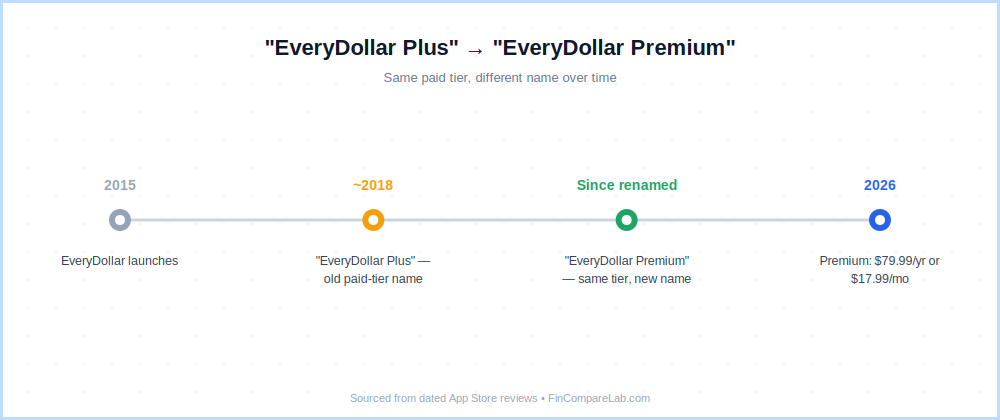
Yes — “EveryDollar Plus” was the app’s older name for its paid tier, referenced in App Store reviews going back to 2018, before Ramsey Solutions rebranded it as “EveryDollar Premium.” Anyone still searching for the everydollar plus cost is really asking about today’s Premium pricing — $79.99/year or $17.99/month — not a separate, additional tier.
Does EveryDollar have a student discount?
No — everydollar pricing doesn’t include a student discount as of July 2026. Students looking for a free app should check ynab.com/college (a free year with verified enrollment) or Goodbudget’s free plan (20 envelopes, no expiry, no card needed) — see the Goodbudget pricing guide.
Can you pay for EveryDollar with a credit card?
No. Ramsey Solutions only accepts debit cards for Premium payment, consistent with the anti-credit-card philosophy behind the whole product. This applies to the everydollar cost at both monthly and annual billing. If you only have a credit card on file, you’ll hit that wall at the payment step.
What happens to my budget data if I cancel EveryDollar Premium?
Your account reverts to the free plan. All budget history, categories, and manually-entered transactions stay intact — nothing is deleted. You lose access to Premium features immediately (bank sync, paycheck planning, Margin Finder, reports), but your underlying data stays put unless you delete your account entirely through app settings.
Is EveryDollar available outside the US?
No — both the app and Premium everydollar pricing are US-only. Bank sync runs on Plaid and Mastercard Connect, both largely US-centric, and Ramsey Solutions hasn’t announced international expansion. If you’re budgeting outside the US, Monarch Money and YNAB both offer more international bank connectivity.
📚 Read Next
- EveryDollar Review 2026: Full Honest Verdict
- EveryDollar vs Monarch Money 2026: Free vs $99.99
- EveryDollar vs YNAB 2026: Which Zero-Based App Wins?
- YNAB Review 2026: Is It Worth $109/Year?
- YNAB Pricing 2026: Every Plan, Trial & Discount Explained
- Monarch Money Pricing 2026: Core vs Plus Breakdown
- Goodbudget Pricing 2026: Free vs $80 Premium
- Best Free Budgeting Apps 2026 — Ranked
- Best Budgeting Apps for Debt Payoff 2026
