

YNAB vs Goodbudget comes down to one question most comparisons skip entirely: does going free actually save you money if you quit before it does you any good? This ynab vs goodbudget breakdown covers real 2026 pricing, the quit-rate pattern nobody publishes, and exactly how to save $109 a year safely, whichever app you end up picking.
⚡ Quick Verdict
YNAB vs Goodbudget really comes down to automation versus friction, not price. YNAB ($109/year) automates bank syncing and forces the deliberate decisions. Goodbudget (free, or $80/year for Premium) skips automation on purpose, and that manual friction is either the whole point or the reason people quit within a month.
Free isn’t automatically the cheaper option in this ynab vs goodbudget matchup once you factor in the apps people actually stick with. Below, I’ll walk through how to make either one worth what you’re putting into it, money or time.
How We Review Apps · Pricing verified from ynab.com and goodbudget.com — 11 September 2026
📋 In This Comparison
- How Do YNAB and Goodbudget Compare at a Glance?
- What’s the Real Difference Between YNAB and Goodbudget?
- What Is YNAB Actually Like to Use, Day to Day?
- What Is Goodbudget Actually Like to Use, Day to Day?
- Why Does Goodbudget’s Free Plan Have a Quit-Rate Problem?
- Which App Wins on Price, Sync, and Mobile UX?
- Can You Use Both YNAB and Goodbudget?
- Which One Is Actually Right for You?
- What Else Do People Ask About YNAB vs Goodbudget?
- So, Which Should You Actually Pick?
How Do YNAB and Goodbudget Compare at a Glance?
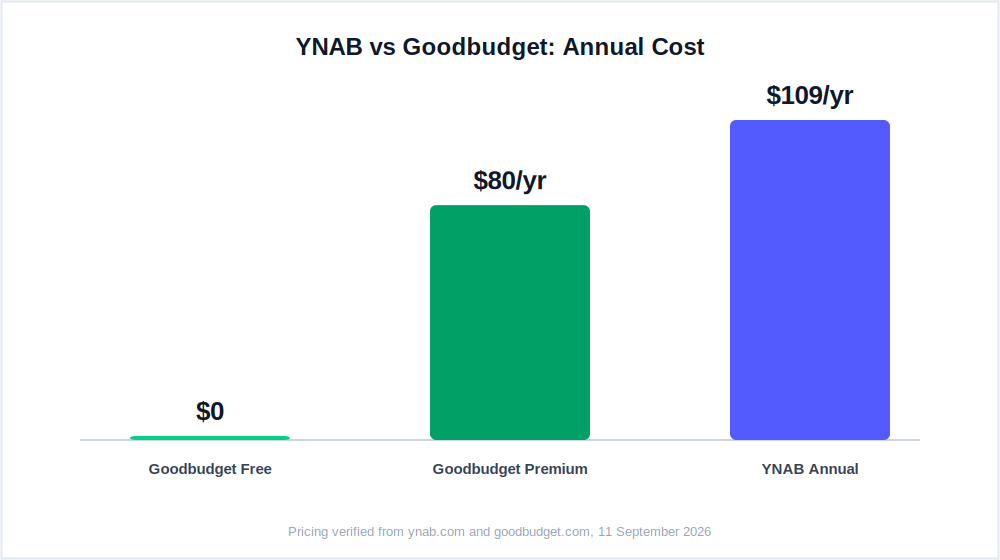
YNAB costs $109/year and automates bank syncing; Goodbudget is free (or $80/year for Premium) and requires manual entry for every transaction. Both use proactive, assign-before-you-spend budgeting, but the day-to-day experience and the reasons people quit each one are almost opposite.
Here’s the side-by-side, pulled straight from each app’s live pricing page as of this week.
| YNAB | Goodbudget | |
|---|---|---|
| Price | $14.99/mo or $109/yr | Free / $10/mo or $80/yr Premium |
| Free tier | 34-day trial, no card | Free forever: 20 envelopes, 1 account, 2 devices |
| Bank sync | Yes, automatic, via Plaid | Premium only, US banks only |
| Transaction entry | Automatic import + manual review | Manual, every transaction, by hand |
| Budgeting method | Zero-based budgeting | Envelope budgeting |
| Couples/sharing | Up to 6 people, one subscription | 2 devices free / 5 on Premium |
| Mobile UX | Strong on iOS and Android | Good on iOS, weaker on Android |
| FinCompareLab rating | 4.9/5 | 4.1/5 |
Pricing verified from ynab.com/pricing and goodbudget.com/signup, 11 September 2026.
That table is the surface-level ynab vs goodbudget picture. What it can’t show is which app you’ll still be opening in month six, which is the part that actually decides whether either one was worth it. Anyone comparing goodbudget vs ynab purely on the price row is looking at the wrong row.
What’s the Real Difference Between YNAB and Goodbudget?
People frame goodbudget vs ynab as a free-vs-paid decision, and that’s the wrong lens for anyone actually trying to choose between the two. It skips the part that decides whether you keep using either app past week three.
Both apps are built around proactive budgeting: you assign money to categories before you spend it, not after. That puts them in the same family, and firmly apart from passive trackers like Monarch or Empower. But how each one gets you to that decision could not be more different, and that’s the real goodbudget vs ynab story.
I’ve used YNAB myself for over a decade, since 2011 through earlier this year, so I can tell you exactly where its friction lives: not in the data entry, but in the decision. Your bank feeds transactions in automatically. You decide where an overspend gets absorbed from.
That deliberate reallocation, moving $60 out of dining because groceries ran over, is the entire mechanism. It works because the app removes every excuse not to look at your money, then makes you look at it anyway. That’s the part most quick ynab vs goodbudget writeups skip entirely.
Goodbudget inverts that completely. There’s no automation to remove the excuse, so the app builds the friction into the data entry itself: you type in the coffee, the grocery run, the impulse buy, by hand, every single time. That extra ten seconds forces conscious acknowledgment of every dollar, because you’re the one entering it. Nothing slips past unnoticed, but nothing gets caught automatically either.
Neither approach is wrong. They suit different people, and often the same person at different points in their financial life. The real goodbudget vs ynab divide isn’t free versus paid, it’s automation-for-accountability versus friction-for-accountability, and only one of those methods keeps working when your motivation dips for a few weeks.
What Is YNAB Actually Like to Use, Day to Day?
YNAB asks you to assign every dollar a job the moment you’re paid, then adjusts in real time as your bank feed brings in transactions. The learning curve is real, roughly one to two weeks, but the automation means the method survives even the weeks you don’t feel like engaging with it.
Zero-Based Budgeting 4.9/5 $109/yr 34-day trial, no card
You get paid, open YNAB, and assign every dollar to a category until the ready-to-assign number hits zero: rent gets $1,400, groceries get $450, dining gets $200. That’s zero-based budgeting: every dollar has a job before you spend it, and there’s no ambiguity about what’s left over because nothing is left over by design.
Then life happens. You go $60 over on groceries because the good olive oil was on sale. YNAB doesn’t penalize you, it just asks where that $60 is coming from.
You move it out of dining or fun money, and that specific, deliberate decision is where the actual behavior change happens. It’s a small moment, repeated weekly, and after a decade of making that exact call I can tell you it’s the entire method in miniature.
Bank sync via Plaid works well for most major US banks, one of the clearer wins in the ynab vs goodbudget automation comparison. Transactions import automatically, you review and categorize them, and the budget updates in real time. Connections do occasionally drop, usually after a bank-side security update, but reconnecting takes about two minutes and YNAB flags the break rather than silently falling behind.
Is YNAB Worth It If Goodbudget Is Completely Free?
Is ynab worth it when the alternative costs nothing? For people who check in several times a week, yes: YNAB’s own pricing page cites new users saving an average of $600 in the first month and over $6,000 in the first year, a figure YNAB publishes directly rather than a third-party estimate.
That’s a self-reported number, not an audited one, and it depends entirely on how actively you engage with the categories, but even a fraction of it clears the $109 annual cost within weeks.
The more useful way to frame the is ynab worth it question isn’t which app is cheaper on paper, it’s which one you’ll actually open in month six. A free app you’ve abandoned by week three costs you more in lost momentum than a $109 app you use consistently ever will.
Who Should Not Use YNAB?
If you won’t check in at least three or four times a week, YNAB will frustrate you fast, and this is the single most common reason people abandon it in any ynab vs goodbudget switch attempt. Unapproved transactions pile up, the budget goes stale, and catching up after two weeks feels like homework. People often say it stopped working when what actually stopped was their engagement with it.
YNAB also has no investment tracking. If you want your brokerage balance and net worth sitting next to your budget, you’ll need a separate tool for that; Empower covers net worth tracking for free and pairs well alongside either app here. That gap alone settles the ynab vs goodbudget question for some households before price even enters the conversation.
Worth knowing: YNAB’s marketing claims are real numbers pulled from its own pricing page, not fabricated, but they’re also not independently audited. Treat the $600-in-month-one figure as a plausible ceiling if you engage fully, not a guarantee. Full YNAB review →
What Is Goodbudget Actually Like to Use, Day to Day?
Goodbudget is the digital version of the cash-envelope system: you create envelopes, fund each one at the start of the month, then manually log every purchase against the right envelope. There’s no bank connection on the free tier at all, which is also its biggest built-in privacy advantage.
Envelope Budgeting 4.1/5 Free forever / $80/yr Premium No card needed
You create envelopes (Groceries, Rent, Dining, Savings), fill each with a budgeted amount at the start of the month, then manually record every transaction against the right one. Ten regular envelopes plus ten annual envelopes covers most starter budgets: rent, groceries, dining, transport, utilities, subscriptions, clothing, fun money, and savings is already nine of the twenty.
There’s no bank connection or automatic import on the free tier, which is the simplest possible answer to is goodbudget safe on that tier: there’s nothing bank-related to compromise in the first place. Is goodbudget free of that risk entirely? Yes, by design, not by accident.
You open the app, tap the envelope, enter the amount, hit save; about fifteen seconds. Multiply that by every transaction in a month and you can see why some people quit within two weeks, and why others find the manual entry becomes almost meditative.
Does Goodbudget’s Free Plan Actually Sync With Your Bank?
No, and that’s true across every tier of the current pricing page: bank sync is a Premium-only feature, and even on Premium it’s limited to US banks. The free tier is entirely manual by design, not a stripped-down teaser waiting for you to upgrade.
For anyone specifically uncomfortable with how apps like YNAB or Monarch access bank data, that’s a genuine structural advantage rather than just a missing feature: no shared credentials, no Plaid connection, no third-party access to your accounts at all on the free plan.
Why Do So Many Goodbudget Users Quit Within a Month?
Volume, not difficulty. A month starts well, diligently logging every coffee and parking meter, and then gradually falls behind once a busy week hits. Community threads on r/goodbudget and r/personalfinance describe the same pattern repeatedly: a few skipped transactions turn into a week of guessing from bank statements, which is demoralizing enough that most people just stop rather than catch up.
Neither Goodbudget nor YNAB publishes actual retention or quit-rate statistics, so this is a pattern pulled from community consensus, not an audited figure.
The second common quitter is the Android user who finds the app just awkward enough that the habit never fully forms; Goodbudget sits at roughly 3.4 stars on Google Play across close to 20,000 reviews, against 4.7 on the App Store, and that gap alone predicts a chunk of the abandonment.
Worth knowing: Goodbudget suits a specific kind of person: someone who wants control, doesn’t mind the friction, and knows they won’t pay attention unless they’re forced to type every purchase in. If that’s not you, the manual entry turns into a chore within two weeks. Full Goodbudget review →

Why Does Goodbudget’s Free Plan Have a Quit-Rate Problem?
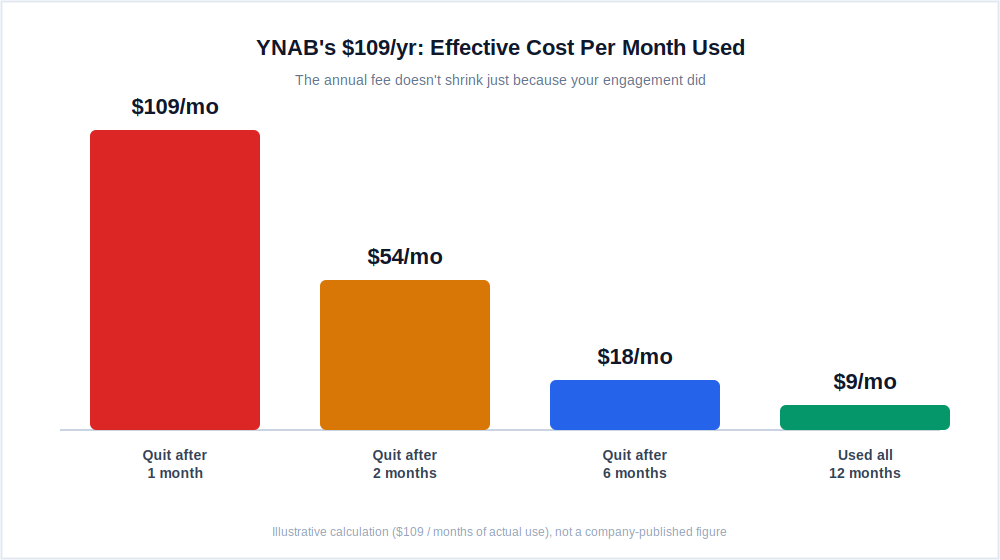
A $0 app that you quit after three weeks has still cost you something: the momentum, the half-built habit, and the time spent setting envelopes up in the first place. Neither app publishes quit-rate data, so treat the framing below as a cost lens to reason with, not an audited statistic.
Here’s the calculation most ynab vs goodbudget comparisons skip. If you pay $109 for YNAB and use it consistently for all twelve months, your effective cost is about $9.08 a month. If you pay $109 and quit after two months, your effective cost for those two months of use was actually $54.50 a month, more than five times higher, because the annual fee doesn’t shrink just because your engagement did.
Goodbudget’s free tier flips that math in an unusual way: if you quit after three weeks, your dollar cost is still $0. But you’ve spent real setup time building envelopes, importing a mental model of your spending, and getting your household on the same page, and none of that carries forward if you abandon it.
The real cost isn’t cash, it’s the compounding habit you didn’t finish building, which is exactly the sense in which a free plan can still function like a $0 habit trap.
The way to avoid both versions of this trap is the same: decide before you sign up for either app whether you can realistically commit to checking in weekly for at least six to eight weeks. That’s roughly the window both YNAB’s own onboarding cadence and community reports on Goodbudget point to as the stretch past which the habit either sticks or doesn’t.
If you’re not confident you’ll clear that window, Goodbudget’s free tier is the lower-risk test: you’re not out $109 if the habit doesn’t take, only the setup time.
Which App Wins on Price, Sync, and Mobile UX?
Here’s where the ynab vs goodbudget decision actually gets settled, in the details rather than the headline price. Every goodbudget vs ynab searcher eventually lands on these same four questions.
Does YNAB’s Price Beat Goodbudget’s Free Tier?
Goodbudget wins on paper, free forever versus $109 a year. This is usually the first thing people search when comparing ynab vs goodbudget, but it ignores context: YNAB’s own published figures show new users saving an average of $600 in the first two months, and if even a fraction of that holds for you, the $109 pays for itself before your first bill cycle ends.
The better question in any goodbudget vs ynab price comparison isn’t which is cheaper on paper, it’s which one you’ll actually still be using long enough to see results.
Which Has Better Sync Reliability?
This is one of the clearest goodbudget vs ynab gaps, and it cuts differently for each app. YNAB’s bank sync works well most of the time but occasionally drops a connection, usually after your bank pushes a security update; it’s fixable in about two minutes, but it can break your habit loop if it happens during a busy week and goes unnoticed for a few days.
Goodbudget sidesteps bank sync entirely on the free tier, so there are zero sync failures to worry about. The tradeoff: accuracy depends entirely on you entering transactions consistently, and missing a few days makes your envelopes unreliable in a different way, a real tradeoff worth weighing in any ynab vs goodbudget decision.
Which Has the Better Mobile App?
YNAB wins on both platforms. Its iOS and Android apps are well maintained, load quickly, and the transaction-approval flow is smooth. Goodbudget’s iOS app is solid; the Android app is meaningfully weaker.
The roughly 3.4-star Google Play rating across close to 20,000 reviews isn’t a fluke. On mobile specifically this goodbudget vs ynab comparison isn’t close, and if you’re on Android and paying $80/year for Goodbudget Premium, that gap is worth weighing before you subscribe.
Which Is Better for Couples?
Both support shared budgeting, but differently. YNAB gives up to six people full access on one subscription, one shared budget, everyone sees the same numbers, anyone can approve transactions or move money. It’s genuinely collaborative. Goodbudget syncs across two devices on the free plan and five on Premium, but gives visibility into the same envelopes without a shared transaction-review flow or a way to leave notes on specific entries.
For couples exploring the best budgeting apps for couples, Goodbudget’s low friction to start makes it accessible early on; couples serious about actively managing money together tend to get more out of YNAB’s real-time shared budget, a real point in favor of YNAB in any goodbudget vs ynab couples comparison.
Which Is More Private?
Goodbudget’s free tier wins outright: no bank data shared, no Plaid connection, nothing leaves your phone except what you type. YNAB’s Plaid connection is read-only and genuinely secure, but secure and private aren’t the same thing; your transaction data still lives on YNAB’s servers. For most people that’s a non-issue. For some households specifically weighing how to budget on irregular income without linking a business account, it isn’t.
Can You Use Both YNAB and Goodbudget?
Technically nothing stops you from running both apps side by side. Practically, it’s a bad idea for the same reason this whole ynab vs goodbudget comparison exists: they’re solving the identical problem, giving every dollar a job before you spend it, through two different mechanisms.
Doubling up just means double-entering every transaction or letting one of them quietly go stale. It’s the same conclusion most goodbudget vs ynab threads land on eventually.
The one real exception is a short, deliberate overlap while you’re actively switching from one to the other. Keeping both running for a week or two during a transition lets you compare category structures side by side before you commit and cancel the one you’re leaving. Beyond that narrow window, pick one methodology and commit to it, that’s really the only sane answer to a goodbudget vs ynab dual-app setup.
Switching from YNAB to Goodbudget means losing your transaction history and category structure; YNAB allows a CSV export, but Goodbudget won’t import it meaningfully, so you’re starting from scratch and now entering everything by hand instead of syncing it.
Switching from Goodbudget to YNAB is easier, since there’s little manual history worth migrating, but you’ll trade a month of adjustment time for the zero-based method’s steeper learning curve. Either direction, plan to lose your history rather than discover the loss after you’ve already switched.
Which One Is Actually Right for You?
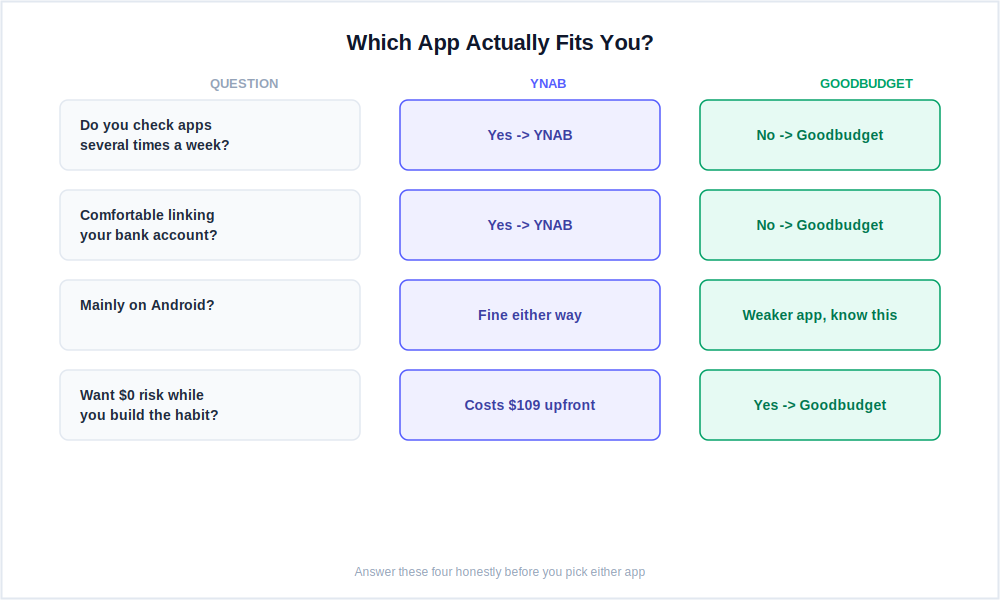
Every ynab vs goodbudget comparison eventually reaches this same fork. If you’ve read this far, you probably already know which camp you’re in; here’s the decision laid out plainly, whether you arrived searching ynab vs goodbudget or the reverse goodbudget vs ynab.
Choose YNAB if…
- You want to change spending habits, not just observe them
- You’ll realistically check in several times a week
- You’re working through a serious debt payoff plan
- You have irregular or freelance income
- You manage finances jointly with a partner
- You’ve tried passive trackers and nothing changed
Choose Goodbudget if…
- Free is non-negotiable right now
- You don’t want to link your bank accounts at all
- You’re mainly on iPhone, not Android
- You want the discipline of typing every purchase
- You make relatively few transactions per week
- You’re just starting out and want zero setup risk
Can’t decide? Start with Goodbudget’s free tier for three weeks; it costs nothing, and you’ll find out fast whether manual entry actually fits how you live. Keep up with it past that window, and you’ve likely found your app.
Fall behind before the three weeks are up, that’s the signal to try YNAB’s 34-day trial instead. Automation removes the exact friction that broke the Goodbudget habit, and you still haven’t spent a dollar either way.
What Else Do People Ask About YNAB vs Goodbudget?
A few questions come up again and again in searches and reviews for both apps; here’s the direct answer to each one that matters most.
Is YNAB or Goodbudget Better for Beginners?
Goodbudget is the lower-friction starting point: free, no setup complexity, budgeting the same day you download it. YNAB is more powerful but asks for a one-to-two-week investment before the method clicks.
If you’ve never tried structured budgeting before, Goodbudget lets you test the envelope concept with zero commitment. If you’ve tried passive tracking before and nothing changed, skip ahead to YNAB’s 34-day trial instead.
Is Goodbudget Really Free?
Yes, the free tier never expires and needs no credit card. You get ten regular envelopes, ten annual envelopes, two devices, and one year of history. Bank sync isn’t included on the free plan; that’s the $80/year Premium tier, and it’s US-banks-only even then.
For most people starting out, the free tier is genuinely complete rather than a stripped-down trial, and is goodbudget free in any meaningful sense that would surprise you later? No, there’s no bait-and-switch here; the limits are stated upfront, which is more than some nominally free competitors can say.
Good Budget vs YNAB: Is Good Budget the Same App as Goodbudget?
Yes, it’s the same app; good budget (as two words) and Goodbudget (as one word, the app’s actual name) both refer to the same envelope-budgeting tool at goodbudget.com. If you’ve searched good budget vs ynab specifically, you’re looking at exactly the comparison covered in this article, not a different product.
People typing good budget vs ynab into a search bar are usually just misremembering the spelling; the app itself has always been one word, and every price and feature discussed here applies regardless of how you spelled it on the way in.
Is YNAB Worth It Over a Free App Like Goodbudget?
For people who engage with it consistently, several times a week, is ynab worth it comes down to yes: the savings most active users see in the first few months typically exceed the $109 annual cost.
The real question in any goodbudget vs ynab worth-it debate isn’t price, it’s whether you’ll use it actively enough for the method to work. A free app used halfheartedly doesn’t outperform a paid app used seriously, and neither app is free if you count the time you spend abandoning it.
Which Is Better, YNAB or Goodbudget?
Neither wins outright; they solve the same problem differently. YNAB is the stronger choice if you want automation handling the data while you handle the decisions, and you’re willing to pay $109/year and check in regularly. Goodbudget is the stronger choice if free is non-negotiable, you don’t want your bank connected to anything, and you’ll actually keep up with manual entry.
Which App Is Better for Zero-Based Budgeting Specifically?
Both use a form of it, but YNAB is more structured about it; the interface enforces the assign-every-dollar process, so you can’t really use it without doing zero-based budgeting. Goodbudget’s envelope system reaches a similar result through manual discipline instead. If the envelope budgeting vs zero based budgeting distinction matters to you specifically, YNAB is the more committed implementation of the two.
Can Couples Use YNAB or Goodbudget Together?
Both work for couples. YNAB supports up to six people on one subscription with a shared, real-time budget where anyone can approve transactions or move money, more collaborative overall. Goodbudget syncs across two devices on the free plan; both partners see and add to the same envelopes, but the workflow is thinner and there’s no shared review step.
So, Which Should You Actually Pick?
The ynab vs goodbudget question was never really about features; it’s about which method you’ll actually stick with past the first rough week. YNAB and Goodbudget are two of the most deliberate budgeting apps available right now, both ask you to be intentional about money instead of just watching it pass by, and that puts them in a different category from passive trackers like Monarch or PocketGuard entirely.
The choice between them is simpler than most comparisons make it sound. If you want automation handling the data while you handle the decisions, and you’re willing to pay $109/year and check in regularly, YNAB is the stronger tool for actually changing behavior over time.
If you want to start today for free, don’t want your bank connected to anything, and find real accountability in typing things out by hand, Goodbudget is genuinely good. Just go in aware of the Android gap and the quit-rate risk that comes with manual entry.
Neither app works if you don’t show up for it. That’s the real verdict on ynab vs goodbudget, and it’s the one thing no comparison, including this one, can decide for you.
YNAB (4.9/5)
Best for serious habit change. Worth $109/year if you actually use it.
Goodbudget (4.1/5)
Best free manual budgeting app. Strong on iPhone, weaker on Android.
📚 Read Next
- YNAB Review (2026): the full verdict
- Goodbudget Review (2026): free tier tested in full
- YNAB Pricing Guide: all plans, free trial, student discount
- Goodbudget Pricing Guide: free vs Premium breakdown
- Best Free Budgeting Apps (2026): if free is the priority
- Best Budgeting Apps for Beginners (2026): more starting-point options
- Best Envelope Budgeting Apps (2026): more envelope-style alternatives
