
Budgeting apps for young adults have to solve a different problem than the ones built for people with a stable salary, a mortgage, and a spouse to split bills with.
If your paycheck shows up every other Friday instead of on the 1st and 15th, if you just signed your first lease with a roommate you met three months ago, or if a chunk of every paycheck already goes to a student loan, most “best budgeting apps” lists weren’t written with your situation in mind.
This roundup treats a budget app for young adults as a genuinely different decision than it would be for someone twice your age, and picks apps accordingly.
⚡ Quick Answer
If you want free forever with nothing to cancel, start with Goodbudget or Rocket Money, both have real permanent free tiers, not disguised trials. If your income doesn’t arrive on a predictable schedule, YNAB and Cleo both handle irregular income better than most.
Splitting rent or utilities with a roommate? Honeydue was built for exactly that. Want something that mostly runs itself and don’t mind paying for it? Copilot or PocketGuard.
How We Review Apps, Pricing verified from official app websites — 12 September 2026
What Are the Best Budgeting Apps for Young Adults Right Now?
The best budgeting apps for young adults in 2026 split into two real groups: apps that are free forever, like Goodbudget, EveryDollar, and Rocket Money, and paid apps that automate more of the manual work, like YNAB, Copilot, and PocketGuard. Which one is actually right for you depends less on features and more on how your income shows up and how much manual entry you’re willing to tolerate.
That’s a different starting question than most “beginner” budgeting content asks. A 34-year-old with a salaried job and a mortgage has a fundamentally more predictable budget than someone piecing together a part-time job, a financial aid disbursement, and the occasional shift covered for a coworker.
Generic budgeting apps for young adults content often skips that distinction entirely. Eight apps below are grouped by what they actually solve, not by a generic feature checklist, with the goal of pointing at the best budgeting apps for young adults for your specific situation rather than a single universal winner.
Money management apps for young adults have multiplied over the past few years, but most still assume a steady paycheck landing on the 1st and 15th, which doesn’t match a part-time schedule, a tipped job, or gig work. That mismatch is exactly why this list groups apps by income pattern and living situation instead of by star rating alone.
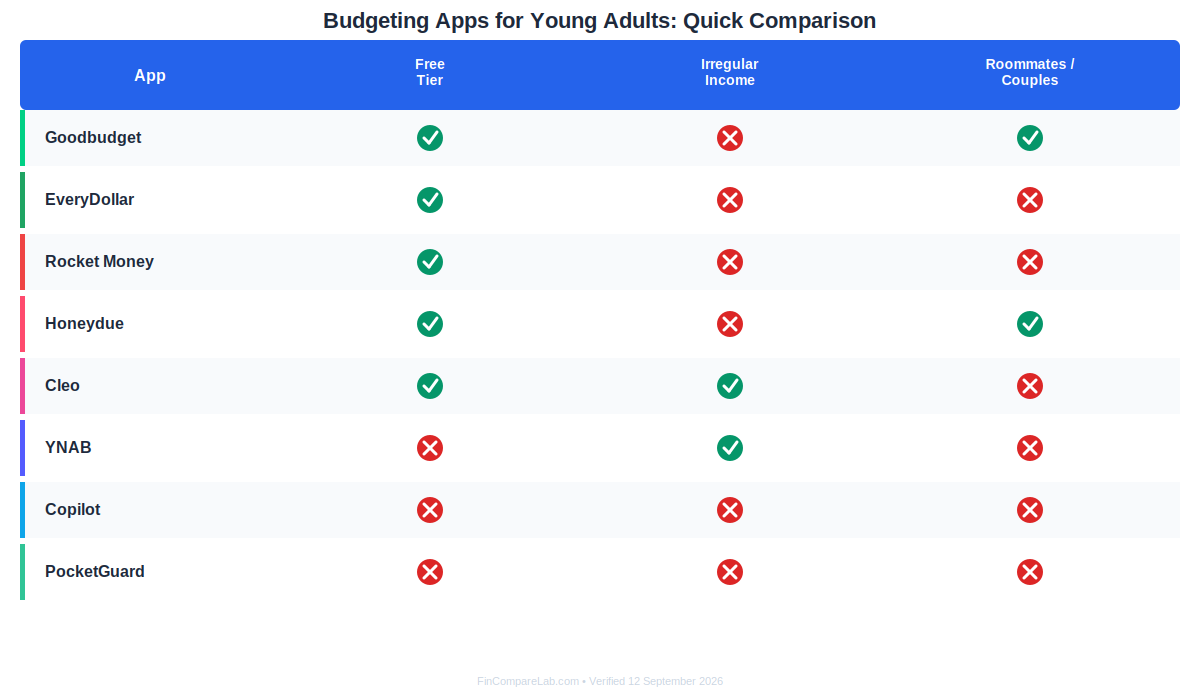
A side-by-side look at which budgeting apps for young adults are genuinely free, which handle irregular income well, and which have real bank-sync complaints on record.
Five of the eight are genuinely free budgeting apps for young adults with a permanent free tier you can use indefinitely, not a disguised trial. The other three only offer a time-limited trial, which matters if you’re on a tight budget and don’t want a surprise charge to hit a debit card that’s already stretched thin.
Which Budgeting Apps Are Completely Free for Young Adults?
Free budgeting apps for young adults don’t have to mean stripped-down or limited, and the five below prove it: Goodbudget, EveryDollar, Rocket Money, Honeydue, and Cleo’s core app all work indefinitely without a subscription. None of them are demos, each one is a genuinely usable, permanent free product, though every one of them holds something back for a paid tier.
Goodbudget: Best for splitting rent with a roommate on a real envelope system
Goodbudget’s free plan gives you 10 regular envelopes plus 10 more for annual or goal-based savings, one account, two devices, and a year of history. That’s genuinely enough to run a full paycheck-to-paycheck budget if you’re comfortable entering transactions by hand, and the two-device sync means a roommate can see the same shared envelopes from their own phone without you texting them screenshots.
Among free budgeting apps for young adults, Goodbudget’s envelope system is the closest thing to a real zero-based method that costs nothing to start. Premium runs $10/month or $80/year and adds automatic bank sync, confirmed US-banks-only on Goodbudget’s own signup page, unlimited envelopes, five devices, and seven years of history.
The honest trade-off: the free tier has no bank sync at all, so every transaction is manual. That’s exactly why it works for a first shared budget, you can’t forget to categorize a purchase you had to type in yourself, but it’s real friction if you’re used to a bank app pushing transactions to you automatically.
Read the full Goodbudget review or the complete Goodbudget pricing breakdown before you commit. Try Goodbudget.
That combination of cost and shared visibility is a big part of why Goodbudget shows up on almost every list of budgeting apps for young adults.
EveryDollar: Best for a debt payoff plan when you’re starting from zero
Among budgeting apps for young adults working through a payoff plan, EveryDollar’s free version is fully manual zero-based budgeting: every dollar gets assigned a job before the month starts, which is the same method behind the debt-payoff advice you’ve probably already heard if you’ve looked into paying down student loans or a first credit card.
The paid tier is $79.99/year ($6.67/month) or $17.99/month and adds automatic bank connections through Mastercard Connect and Plaid, plus two-person household sharing.
One real limitation worth knowing before you sign up: EveryDollar can’t link an Apple Card at all, and Amex connections reportedly break more often than other cards. If most of your spending runs through either one, budget for extra manual entry.
Also worth flagging, everydollar.com no longer resolves on its own; it now redirects to Ramsey Solutions’ site directly, which is a normal part of the brand’s transition rather than a sign anything’s wrong with the product.
See the EveryDollar review and EveryDollar pricing guide, or start with our debt payoff walkthrough if that’s the actual goal. Try EveryDollar.
It’s one of the more debt-focused free budgeting apps for young adults, especially if a payoff plan is the actual priority.
Rocket Money: Best for canceling the subscriptions you forgot about
As a budget app for young adults juggling subscriptions inherited from old roommates or a streaming trial nobody canceled, Rocket Money is one of the most complete free budgeting apps for young adults available right now, and its strongest feature isn’t the budgeting tool itself, it’s the automatic subscription finder.
If you’ve had a bank account for more than a year or two, there’s a real chance a streaming trial or a gym membership auto-renewed somewhere you stopped checking.
Premium runs $7–$14/month (you pick the price) and adds bill negotiation and a concierge subscription-cancellation service. A new Premium+ tier at $15/month adds an AI assistant called Rowan and zero-fee bill negotiation, though it’s still on a limited, waitlisted rollout as of this writing.
One thing worth flagging honestly: Rocket Money’s own site is internally inconsistent about the free tier’s category-budget limit, the pricing table says “up to 3,” the FAQ copy says “two.” Neither figure is confirmed as the final word, so don’t be surprised if what you see in the app doesn’t match what you read on the marketing page.
Full details in the Rocket Money review and Rocket Money pricing guide. If you’re canceling instead of signing up, here’s how to cancel a Rocket Money subscription. Try Rocket Money.
Few free budgeting apps for young adults pair a subscription-canceling tool with an actual budget this well.
Honeydue: Best for couples or roommates splitting every bill
Among budgeting apps for young adults sharing a lease, Honeydue solves a problem most single-user apps ignore entirely. It’s free forever with no paid tier at all, which is unusual on this list, and it’s built specifically around two people sharing visibility into money without merging every account.
You can see a partner’s or roommate’s balances and flag individual transactions with an emoji reaction instead of a full conversation about every purchase, a small feature that matters more than it sounds like for a shared living situation you’re still getting used to.
Its real weakness is reliability: bank sync failures are a recurring, documented complaint, and a debit card feature the app used to offer was discontinued in 2023. Android performance also lags noticeably behind iOS in user ratings. It’s a strong pick specifically for the bill-splitting use case, not a general-purpose budgeting replacement.
Read the full Honeydue review or see how it stacks up in Honeydue vs. Monarch Money. For a broader shared-finances roundup, see the best budgeting apps for couples. Try Honeydue.
As a budget app for young adults specifically built around two people, it has no real direct competitor on this list.
Cleo: Best for a conversational way to actually look at your spending
Few budgeting apps for young adults lean this hard into personality, and that’s deliberate. Cleo’s core app, spending tracking, categorization, and its signature roast-you-a-little AI chat personality, is free, and you can request a Cash Advance without ever paying for a subscription, contrary to what a lot of older coverage assumes.
Paid tiers start at Plus ($5.99/month) for credit-building tools and larger advances, Pro ($8.99/month) adds high-yield savings, and Builder ($14.99/month) adds a secured credit-building card and up to two days of early paycheck access.
Among money management apps for young adults, this cash-advance-without-subscription detail is a genuine differentiator most competitors don’t offer. Cash advance amounts for Plus/Pro run $20–$250 for existing users but only $20–$100 the first time, capped at $170 disbursed per day.
One unresolved discrepancy worth knowing about upfront: Cleo’s own official pricing page lists express-transfer fees at $4.49–$14.99, while its App Store and Google Play listings say $3.99–$14.99, we’re keeping both figures on record rather than picking one, since neither source has corrected the other.
See the full Cleo review, Cleo pricing guide, and how it compares in Cleo vs. Rocket Money. Try Cleo.
Among money management apps for young adults, Cleo’s personality-driven approach is the most distinct on this list.
Which Paid Budgeting Apps Are Actually Worth the Cost?
None of the three apps below have a real free tier, just a time-limited trial, so paying for one only makes sense once free tools have already shown you where the friction actually is for you. All three earn their place among the best budgeting apps for young adults willing to pay for extra automation, each in a different way.
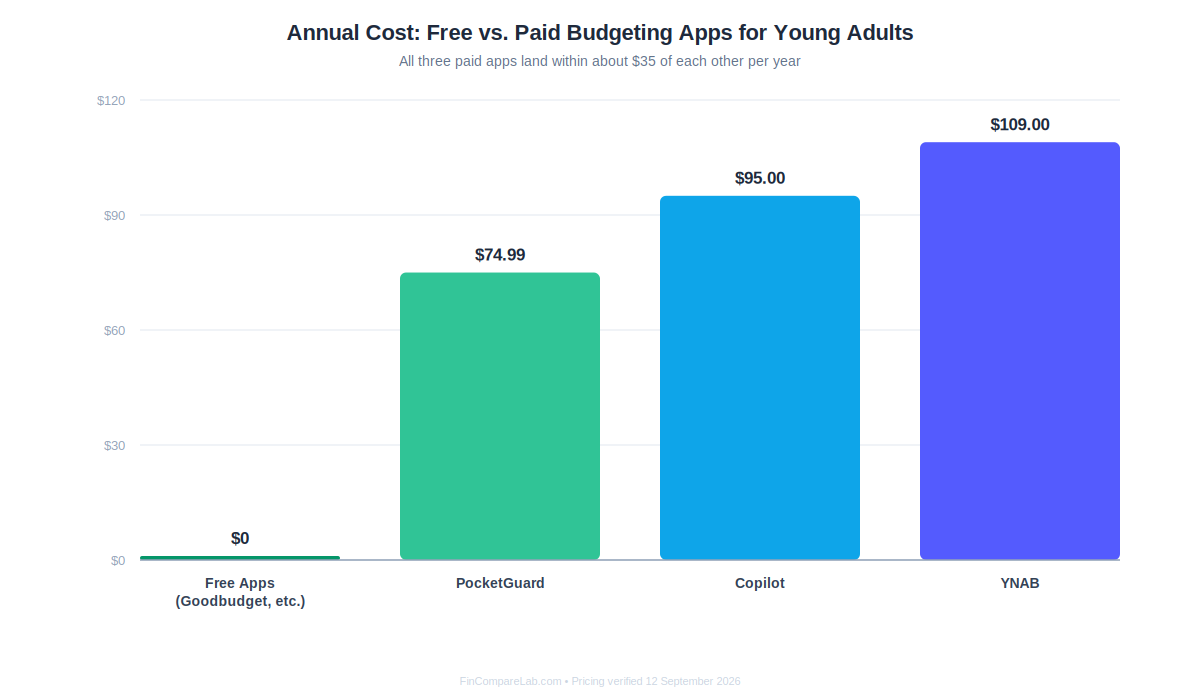
YNAB, Copilot, and PocketGuard all land within about $35 of each other annually, the real deciding factor is method and platform, not price.
YNAB: Best for breaking the paycheck-to-paycheck cycle
Of every budgeting app for young adults on this list, YNAB asks for the most active involvement, and that’s exactly the point for people trying to break a paycheck-to-paycheck habit. It costs $109/year ($9.08/month effective) or $14.99/month, with a 34-day free trial that doesn’t require a card.
It runs on zero-based, give-every-dollar-a-job budgeting, which is the same category as EveryDollar and Goodbudget philosophically, but with a more built-out debt payoff calculator and multi-currency support. College students can get a full free year through YNAB’s own program with a valid .edu email and proof of enrollment.
Is YNAB Worth It for a College Student?
Yes, largely because it’s free for a full year through YNAB’s own student verification program, which removes the cost objection entirely for that first year.
The bigger question is whether the method fits. YNAB’s zero-based system asks you to actively reallocate money between categories as spending happens, which some users on r/personalfinance describe finding useful for building intentionality, and others describe as more manual upkeep than they wanted from an app that was supposed to save them time.
If you want to track spending passively instead of actively planning it, that friction is worth testing during the free trial before you rely on it.
See the full YNAB review, the YNAB pricing guide, our dedicated YNAB for students guide, and YNAB for beginners if the method itself is new to you. Try YNAB.
It remains one of the most recommended budgeting apps for young adults in r/personalfinance threads, price aside.
Copilot: Best for near-automatic tracking if you’re on an iPhone
For budgeting apps for young adults who live entirely inside Apple’s ecosystem, Copilot’s automation is hard to beat. It costs $95/year ($7.92/month) or $13/month, with a short free trial before you connect any accounts. Its AI-driven auto-categorization is genuinely closer to hands-off than YNAB’s method, which suits someone who wants a budget to exist without spending much time maintaining it.
The real limitation is platform: it’s iPhone, iPad, and Mac only, with no Android app at all, and if you and a partner or roommate both want accounts, that’s two separate $95/year subscriptions rather than one shared plan.
Full breakdown in the Copilot Money review and Copilot pricing guide, or compare it directly in YNAB vs. Copilot. Try Copilot.
For an iPhone-only budget app for young adults, the automation is the entire selling point.
PocketGuard: Best for a single “leftover” number and nothing else to think about
If a single-number budget app for young adults is what you actually want, PocketGuard delivers exactly that. It runs $74.99/year ($6.25/month), $12.99/month billed monthly, or $149.99 as a one-time lifetime purchase, with a 7-day free trial.
Its core idea is a single “In My Pocket” figure, what’s actually safe to spend after bills and savings goals are accounted for, which is a simpler mental model than either YNAB’s category-by-category planning or Copilot’s dashboard-heavy view.
The trade-off: PocketGuard’s free tier is confirmed gone from the live pricing page entirely, so there’s no permanent no-cost option here at all, only the trial. The “leftover” number can also mislead anyone with irregular income, since it assumes a fairly predictable monthly cash flow to calculate against.
See the full PocketGuard review and PocketGuard pricing guide, or compare it against a free option in YNAB vs. PocketGuard and Goodbudget vs. PocketGuard. Try PocketGuard.
It’s a simple budget app for young adults who just want one number to check before spending.
How Do You Pick the Right App for Irregular Income or a First Job?
The right budget app for young adults with unpredictable pay looks different from one built for a salaried worker. Most budgeting apps quietly assume a steady paycheck landing on the same one or two dates every month, and that assumption breaks immediately for a lot of young adults working part-time shifts, freelancing, or waiting on a financial aid disbursement that doesn’t arrive like clockwork.
Do Budgeting Apps Work If You Don’t Have a Steady Paycheck?
Yes, but not all of them handle it equally well. The apps that work best let you log income manually as it actually arrives rather than forcing it into a fixed biweekly template, YNAB and Cleo both do this reasonably well, since neither one requires you to predefine a pay schedule before the app becomes useful.
A recurring theme in r/personalfinance threads from people budgeting around alternating pay weeks is frustration with apps that expect a fixed allocation model instead of letting you pre-assign an amount per category and simply watch it deduct as charges land, worth testing directly during a free trial rather than assuming any one app’s marketing copy describes your actual pay pattern.
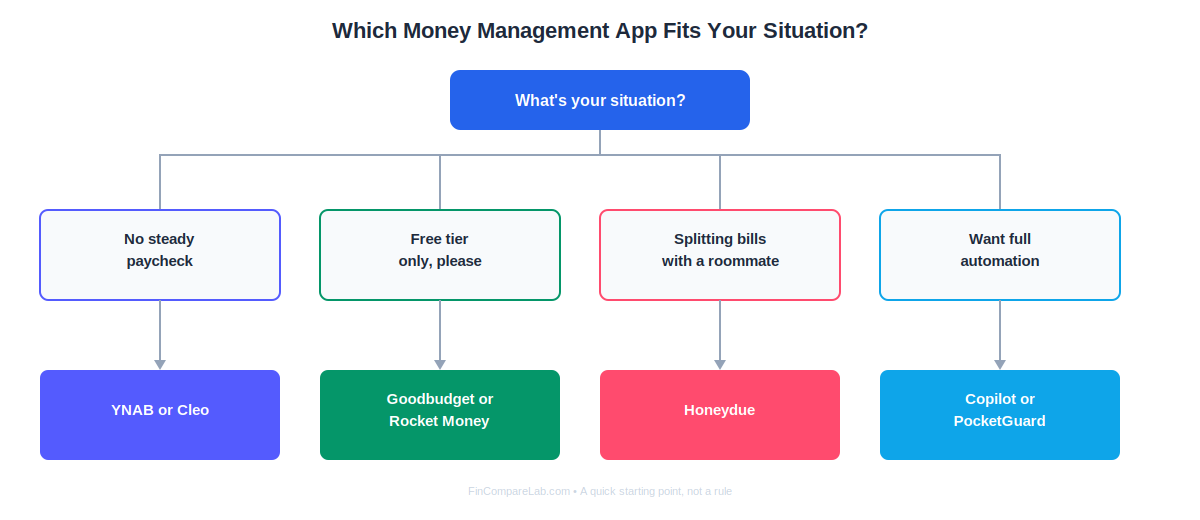
A quick decision path based on income pattern and living situation, rather than a generic feature checklist.
For more depth on managing a budget when your income isn’t fixed, see the full guide to budgeting with irregular income.
Should You Start With a Spreadsheet Instead of an App?
It’s a fair question, and the honest answer is: for a genuinely first budget, maybe. Money management apps for young adults aren’t the only option.
A real, recurring pattern in r/personalfinance threads from young adults asking for app recommendations is other commenters redirecting them to a free spreadsheet first, on the reasoning that an app’s generic category suggestions can let you skip the part where you actually learn your own numbers.
That advice shows up specifically for people who’ve never tracked spending in any form before, not as a blanket case against every app on this list.
Should You Link Your Bank Account Right Away?
Not necessarily, and this is one place where budgeting apps for young adults genuinely diverge from advice written for an older audience.
Several apps here, including Goodbudget, are built entirely around manual entry with no bank connection at all, and starting that way for a month or two builds a level of spending awareness that automatic syncing can actually short-circuit. If a bank feed categorizes everything for you from day one, it’s easy to stop paying attention to what’s actually happening.
Once you have a baseline, switching to a synced app (or turning sync on within the same app) is a much more informed decision.
If a spreadsheet genuinely fits your first attempt better than any app on this list, our sister project has a dedicated breakdown comparing a Google Sheets budget tracker against paid apps that’s worth reading before you commit either way.
Can You Use More Than One Budgeting App at the Same Time?
Yes, and a lot of young adults end up doing exactly this without necessarily planning to. A common combination is Rocket Money running in the background purely to catch forgotten subscriptions, paired with a more hands-on budget app for young adults like YNAB, Goodbudget, or EveryDollar for the actual monthly plan.
The real cost is duplicate data entry and two places to check instead of one, so this setup works better once you already know which single app you’d keep if you had to pick just one. Whatever combination you land on, the real goal with any roundup of budgeting apps for young adults is matching the tool to your actual paycheck pattern, not the other way around.
If your method leans toward the envelope system specifically, our best envelope budgeting apps roundup and best zero-based budgeting apps roundup go deeper into that specific comparison than this general list does.
Either roundup narrows the field further for budgeting apps for young adults who already know their preferred method.
Whichever combination you land on, the point of any list of budgeting apps for young adults is reducing friction, not adding another chore to your week. Four of the free budgeting apps for young adults covered here, Goodbudget, EveryDollar, Rocket Money, and Cleo, cost nothing to try, so there’s rarely a reason to pay before you’ve confirmed a free option genuinely can’t do the job.
What Do Young Adults Ask Most About Budgeting Apps?
These are the questions that come up most often once someone has narrowed the list down to one or two apps and wants a straight answer before signing up.
What is the best budgeting app for a first job?
The best budgeting apps for young adults with a brand-new job are usually the free ones, not the paid ones: Goodbudget or Rocket Money are the easiest starting points, since both are genuinely free and don’t require committing to a method before you’ve had a chance to see your first few paychecks land.
Once you have a few months of real numbers, it’s much easier to tell whether a zero-based system like YNAB or a passive money management app like Copilot actually fits how you think about money.
Are budgeting apps safe to link to a bank account?
Most money management apps for young adults use established account-aggregation providers, Plaid, Finicity, or Salt Edge, depending on the app, the same infrastructure used across most major banking and finance apps, rather than storing your bank login directly. That said, “safe” doesn’t mean “flawless”: Honeydue and Rocket Money both have documented sync-reliability complaints, so a failed connection is more likely to be an inconvenience than a security event.
Do any of these apps give a student discount?
Not really, mostly because so many free budgeting apps for young adults already exist that a discount code isn’t the industry’s main lever. YNAB is the clearest example, a full free year through direct student verification with a .edu email, not a discount code. None of the other seven apps here currently offer a confirmed, published student rate as of this writing.
What’s the easiest budgeting app if I’ve never made a budget before?
Among all the budgeting apps for young adults covered here, Goodbudget’s envelope method is arguably the easiest to understand conceptually, you’re just deciding how much goes into each labeled bucket before you spend it, while EveryDollar’s zero-based system is a close second if a debt payoff plan is part of your goal from the start.
Can a budgeting app help with student loan payments?
Indirectly, but a student loan showing up for the first time is one of the most common reasons people start searching for budgeting apps for young adults in the first place.
None of these apps negotiate or manage loan servicing directly, but treating a loan payment as its own fixed category, in Goodbudget, EveryDollar, or YNAB alike, makes it much harder to accidentally treat that money as available to spend before the due date arrives.
What happens if I stop paying for a premium budgeting app?
This is worth checking before you pick a paid budget app for young adults over a free one. It varies by app and is worth checking directly before you subscribe: PocketGuard’s own terms guarantee a 21-day grace period of basic access after cancellation before a full downgrade, while other apps on this list downgrade to a free tier (or lock features entirely) immediately at the end of a billing cycle.
Are money management apps for young adults worth it compared to a bank’s built-in budgeting tools?
Sometimes not. Many banking apps already include basic categorization and low-balance alerts at no extra cost, so a dedicated money management app is only worth adding if you specifically need cross-account visibility, envelope-style planning, or subscription tracking that your bank simply doesn’t offer.
📚 Read Next
