
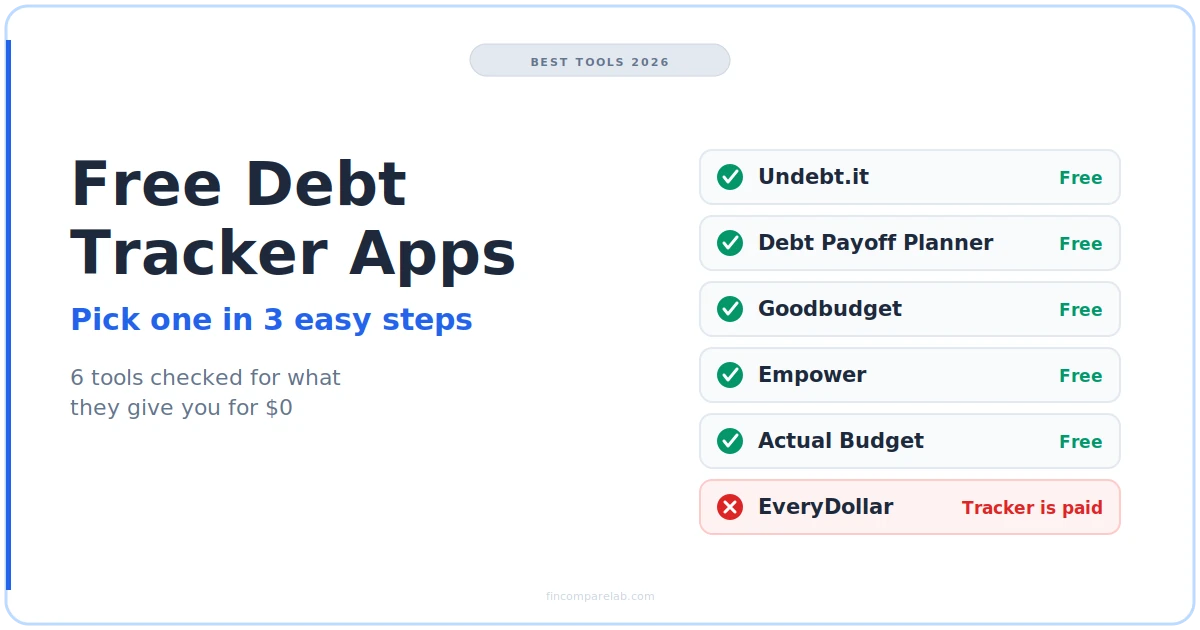
A free debt tracker should do three things without charging you: hold every balance you owe, show a payoff date, and let you log payments as you make them. Six tools pass that test in 2026, and one popular budgeting app fails it in a way most roundups never mention.
⚡ Quick Verdict
Undebt.it is the strongest free debt tracker if you’re fine typing balances in yourself: unlimited debts, 8 payoff methods and no card needed to sign up. Debt Payoff Planner is the faster debt tracker app on a phone. Skip EveryDollar if free tracking is the goal, because its debt payoff tracker sits behind the $79.99/yr Premium plan.
How We Review Apps, Pricing verified from official app sites and the US App Store — 25 September 2026
Table of Contents
- What is the best free debt tracker in 2026?
- How do you pick a free debt tracker in 3 easy steps?
- Which free debt tracker apps are worth using?
- Should your debt snowball app use snowball or avalanche?
- Why does a manual debt payoff tracker drift from your statement?
- Which popular apps didn’t make the list, and why?
- When is a paid tracker like YNAB worth it?
- What else do people ask about free debt trackers?
What is the best free debt tracker in 2026?
Undebt.it is the best free debt tracker for most people in 2026. Its free tier covers unlimited debts, a month-by-month payoff schedule, 8 payoff methods including snowball and avalanche, and Excel export, with no credit card needed to sign up. Debt Payoff Planner is the better pick if you’ll mostly log payments from a phone.
The table below is about what each tool gives you for $0, not what it advertises. That distinction matters more here than in most app categories, because several budgeting apps list debt tracking as a feature and then lock the useful part behind a subscription.
| Tool | Free debt features | Paid upgrade | The catch |
|---|---|---|---|
| Undebt.it | ✅ Unlimited debts, 8 methods, schedule, Excel export | Undebt.it+ $10/yr | ⚠️ Browser-based, manual entry on the free tier |
| Debt Payoff Planner | ✅ Snowball, avalanche, snowflake, custom order | $6.99/mo or $27.99/yr | ⚠️ Manual entry, look-alike apps share its name |
| Goodbudget | ✅ Debt tracking included on Free | Premium $80/yr | ⚠️ Debt Accounts live on the web version |
| Empower | ✅ Debt Paydown tool, synced balances | None for the dashboard | ⚠️ Tool is being moved into Savings Planner |
| Actual Budget | ✅ Card debt tracked inside a real budget | None (open source) | ❌ No payoff calculator, hosting is on you |
| EveryDollar | ⚠️ Manual budget lines only | $79.99/yr or $17.99/mo | ❌ The debt payoff tracker is Premium-only |
Pricing verified from official websites and the US App Store, September 2026.
How do you pick a free debt tracker in 3 easy steps?
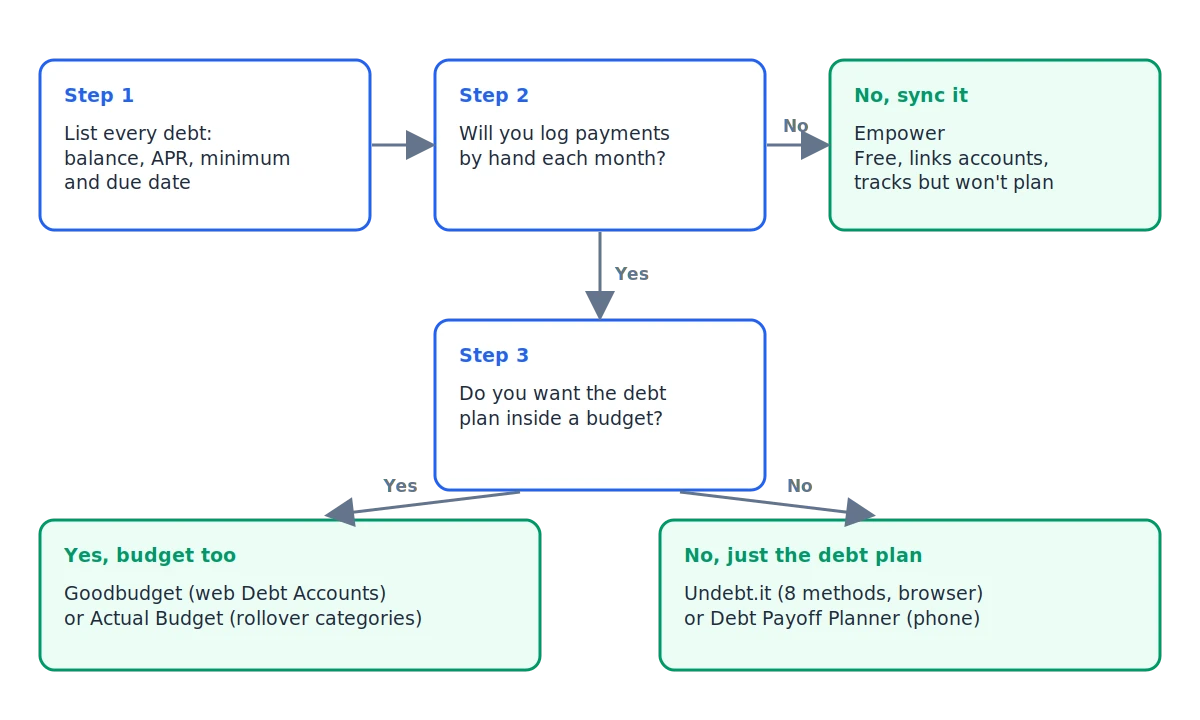
Pick a free debt tracker by answering three questions in order: what kinds of debt you have, whether you’ll log payments by hand, and which payoff method you’ll actually stick with. Each answer rules out at least one tool, and most people land on a clear choice by step two.
Step 1: Which kinds of debt are you tracking?
Write down every balance with four numbers next to it: current balance, APR, minimum payment and due date. Those four fields are all any tool on this list asks for, and having them ready turns setup into a 15-minute job instead of an evening.
Then sort the list into revolving debt (credit cards, store cards, lines of credit) and installment debt (car loans, student loans, personal loans). The split matters because tools handle them differently. YNAB, for example, tells you to track credit card debt with its credit card account type rather than its loan account type, so its Loan Planner never touches card balances.
If most of what you owe sits on cards, you want a credit card debt tracker that handles changing balances well. Undebt.it and Actual Budget both do, and Empower is the easiest credit card debt tracker if you’d rather link accounts. If it’s mostly one or two fixed loans, almost any tool works, and the simpler the better.
Step 2: Will you log payments by hand?
This is the question that decides it. Every fully free option except Empower needs you to type in payments yourself, and that’s either a feature or a dealbreaker depending on how you’re wired.
Manual entry has one real upside. You look at every balance at least once a month, which is the whole point of tracking debt in the first place. The downside is maintenance. Miss two months of logging and the payoff date on screen is fiction.
If you already know you won’t log anything, go with Empower, which pulls balances from linked accounts for free. If you’re fine with a few minutes a month, Undebt.it or Debt Payoff Planner will give you a better plan than any synced dashboard.
Step 3: Which payoff method will you actually stick with?
Snowball (smallest balance first) and avalanche (highest APR first) are both supported by the two dedicated trackers here. The better method is the one you won’t abandon in month four, and the worked example further down shows exactly what that trade-off costs in dollars.
If you want your debt plan inside a full budget instead of a separate app, that points to Goodbudget or Actual Budget. You’ll trade the automatic payoff math for having every dollar in one place. For the bigger picture on attacking the balances themselves, the guide to getting out of debt fast covers the strategy side.
Which free debt tracker apps are worth using?
Six tools track debt for free in a way that holds up past the first week: Undebt.it, Debt Payoff Planner, Goodbudget, Empower, Actual Budget and, with a big caveat, EveryDollar. Here’s what each one does well, where it falls short, and who it fits.
None of these apps are ones I’ve used personally. My own hands-on history is 15 years of YNAB and my switch to Monarch Money this year. Everything below comes from each company’s official pages, the US App Store, and recurring themes in user reviews.
Is Undebt.it the best free debt payoff tracker?
Undebt.it is the best free debt payoff tracker if you want planning depth without paying. The free tier includes the calculator, the payoff schedule, unlimited debts and Excel export. According to Undebt.it’s pricing page, those features have always been free.
The 8 payoff methods are the standout. You can run snowball and avalanche side by side, or build a custom order, before committing to one. That comparison is the single most useful thing a debt payoff tracker can show you, and most free tools only offer one or two methods.
The limits are real, though. There’s no native app store app, just a website you can pin to your home screen. The free tier has no bank connection, so you enter balances and log payments yourself. Undebt.it+ costs $10 a year with a 30-day trial that doesn’t ask for a card.
One discrepancy worth knowing about: Undebt.it’s homepage now says Plus members get bank sync through SimpleFIN, while its pricing page still described that sync as coming soon when I checked on 25 September 2026. If automatic balances are why you’d upgrade, confirm it inside the Plus trial first.
Is Debt Payoff Planner the best debt tracker app for your phone?
Debt Payoff Planner is the best debt tracker app for people who’ll log payments from a phone. It’s free to download, rated 4.7/5 from 7,300 ratings on the US App Store, and supports snowball, avalanche, one-time “snowflake” extra payments and a custom order.
As a debt tracker app, logging works the way the listing describes: you type the amount and the date the payment posted, and the payoff date updates. Paid plans are $6.99/mo, $13.99 for 3 months or $27.99/yr, plus a Friends and Family option at $41.99/yr. The listing doesn’t spell out what Pro adds over free, so treat the free version as the product and Pro as optional.
Two cautions. First, several unrelated App Store apps use nearly identical names, including one that also tracks money friends owe you. The one covered here is by OxbowSoft LLC, so check the developer name before downloading. Second, a 2021 update note says ads were removed for all users, but the current listing still carries a “Contains Advertising” label.
A recurring complaint in long-time user reviews is that recording an extra payment takes more taps than it should. If you throw random extra cash at debt often, that friction adds up. If you pay on a fixed schedule, you’ll rarely notice it, and it’s still the most polished free debt tracker built for mobile.
Does Goodbudget work as a free debt tracker?
Yes. Goodbudget includes debt tracking on its free plan, which makes it the only envelope budgeting app on this list where the debt feature isn’t paywalled. The Goodbudget signup page lists it on both Free and Premium.
The free plan’s limits are the thing to plan around: 10 regular envelopes, 10 more for annual or goal spending, 1 account, 2 devices and 1 year of history. That’s workable for a single person paying down two or three debts. It gets tight fast for a household.
The other catch is where the feature lives. Goodbudget’s Debt Accounts are a web feature, so set them up on a laptop even if you plan to budget on your phone. Premium is $80/yr or $10/mo and adds bank sync for US banks. The full breakdown is in the Goodbudget review and the Goodbudget pricing guide.
Is Empower a good credit card debt tracker?
Empower is a good credit card debt tracker if you’d rather link accounts than type balances. Its dashboard and tools cost nothing, including a Debt Paydown tool that shows everything you owe in one place. This is Empower the wealth-management company at empower.com, not the cash-advance app now called Tilt.
Because balances sync, Empower is the one free option here that stays accurate without logging, which is what most people actually want from a credit card debt tracker. The trade-off is that it’s a tracker, not a planner. It shows the balances going down, but it won’t build a snowball or avalanche schedule the way Undebt.it does.
There’s also a transition to watch. Empower’s own FAQ says its Budgeting, Emergency Fund and Debt Paydown tools are being folded into Savings Planner, and that Debt Paydown has to be set up again. Empower makes its money from wealth management at 0.49% to 0.89% of assets, so expect the app to promote that. See the Empower review for the full picture.
Can Actual Budget track debt for free?
Actual Budget can track debt for free, but as part of a budget, not as a standalone payoff planner. It’s open source under the MIT license, so the software itself costs nothing. You’ll pay for hosting if you run your own server.
Its documentation gives an exact setup for card debt you’re carrying. Create a Credit Card Debt category group, add one category per card, and set each category to Rollover Overspending. Then enter each card’s starting balance as the full amount owed. The carrying-debt guide walks through it step by step.
Actual won’t tell you a payoff date or compare methods. The practical fix is pairing it with Undebt.it or the free debt payoff calculator on this site, then using Actual to budget the monthly amount. If you are weighing it against a paid budget, Actual Budget vs YNAB lays out the differences, and there is more detail in the Actual Budget review.
Is EveryDollar a free debt snowball app?
No. EveryDollar has a free version, but its debt payoff tracker is a Premium feature, so it doesn’t work as a free debt snowball app. That’s straight from Ramsey Solutions’ own EveryDollar FAQ, which lists the tracker under Premium.
The free version still has value for debt payoff. You get unlimited budget categories, manual transactions, sinking funds and bill due dates, so you can budget a line for each debt payment. You just won’t get the snowball tracking, the progress view or the recommended new payment amount when you fall behind.
Premium costs $79.99/yr ($6.67/mo) or $17.99/mo after a 14-day trial for new users. Since Undebt.it’s snowball plan is free, paying $80 just for EveryDollar’s tracker is hard to justify unless you want its coaching and bank connect too. The EveryDollar review and EveryDollar pricing guide cover the rest, and EveryDollar vs YNAB compares the two budgets.
Should your debt snowball app use snowball or avalanche?
Use avalanche if you want the lowest total interest, and snowball if you need an early win to keep going. On a typical three-debt example, avalanche saves about $143 and one month. But the snowball clears its first debt in month 6, while avalanche makes you wait until month 19.
Here’s the example, run as a month-by-month simulation rather than a rule of thumb. Three debts, $645 a month total ($445 in minimums plus $200 extra):
- Store card: $1,200 at 19.99% APR, $40 minimum
- Visa: $4,800 at 27.99% APR, $120 minimum
- Car loan: $9,500 at 7.5% APR, $285 minimum
Paying only the minimums takes 50 months and costs $6,371 in interest. Snowball finishes in 29 months with $2,702 of interest. Avalanche finishes in 28 months with $2,559.
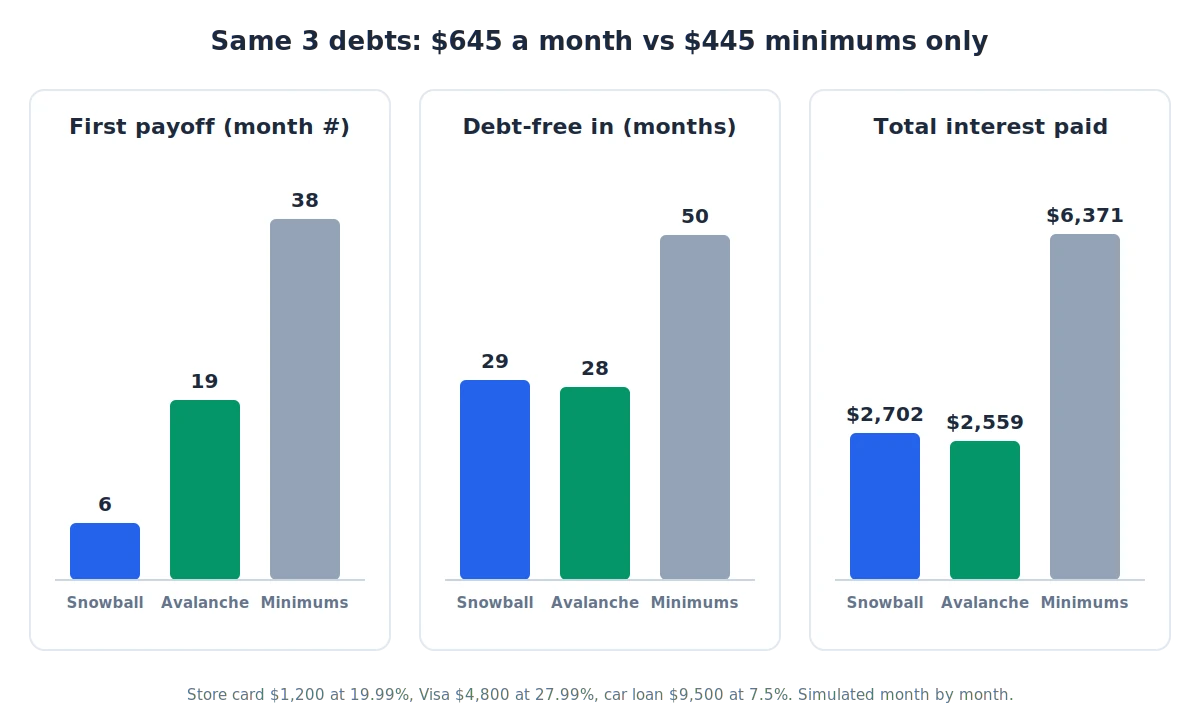
The $143 gap is real money, but look at the 13 months between the two first payoffs. That’s over a year of avalanche payments with no account closed. People quit debt plans in exactly that stretch, which is why a good debt snowball app shows you both timelines before you commit.
The gap grows when your highest-APR debt is also your biggest one, and it shrinks to zero when your smallest debt also has the highest rate. Plug your own numbers into the debt payoff estimator to see which case you’re in. The broader method debate lives in the debt snowball vs avalanche section of the get-out-of-debt guide.
Why does a manual debt payoff tracker drift from your statement?
A manual debt payoff tracker drifts because it estimates interest as balance times APR divided by 12, while most card issuers charge interest daily on your average balance. New purchases, payment timing and fees widen the gap, so after a few months the app’s balance can be noticeably off from your statement.
This is the edge case most roundups skip, and it’s the main reason people stop trusting their tracker. The fix is a monthly reset, not better data entry.
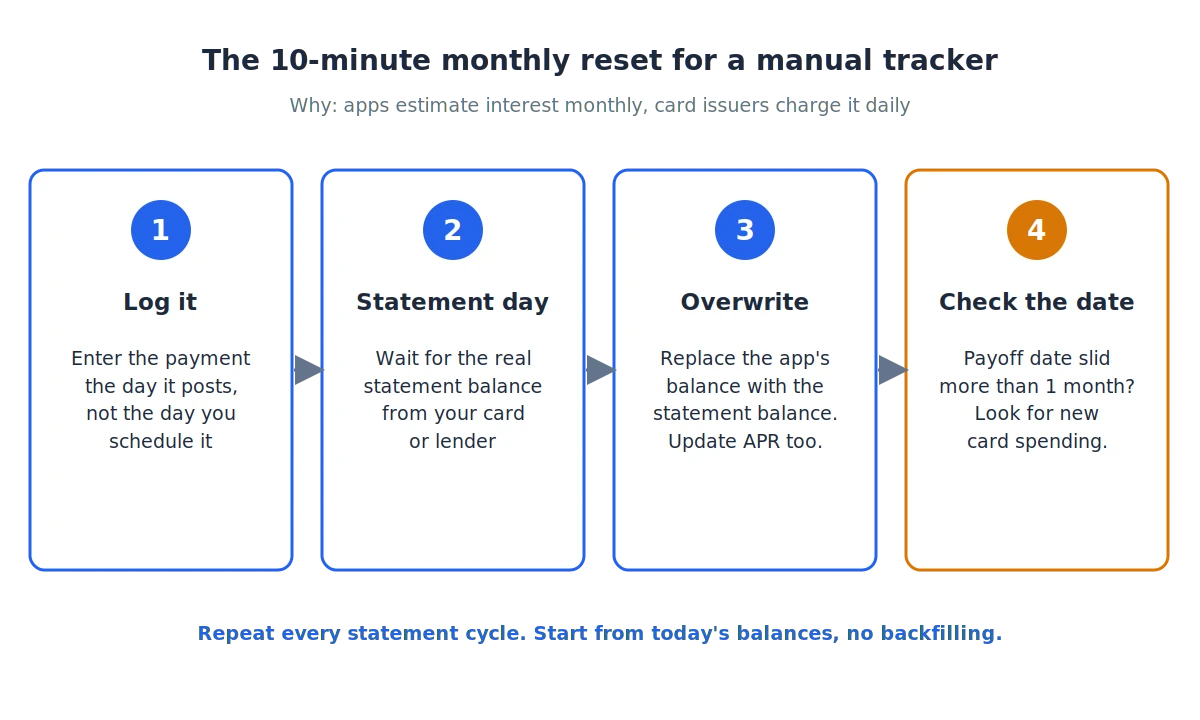
- Log each payment on the day it posts, not the day you schedule it.
- When the statement arrives, overwrite the tracker’s balance with the statement balance.
- If the APR changed (promo ending, penalty rate), update that field too.
- Check whether the payoff date moved more than one month. If it did, the cause is usually new card spending, not the math.
Step 4 is the useful one. A payoff date that keeps sliding on a card you’re “paying down” is often the first sign you’re still using the card. That’s worth knowing early, and a synced tool like Empower won’t flag it the same way, because it just shows the new balance.
One more setup tip from my own experience. When I moved from YNAB to Monarch Money this year, I deliberately didn’t import years of old history and started from current balances only. The same logic applies here. Enter today’s balances and start logging from now, because backfilling old payments adds hours of work and doesn’t change your payoff date.
Which popular apps didn’t make the list, and why?
Several well-known apps show up on other “best debt tracker” lists but didn’t qualify here, because their debt features aren’t free or they’re a different kind of tool. If the useful part of debt tracking needs a subscription, it’s out.
Rocket Money is out because net worth tracking, where debt balances appear, is Premium-only according to Rocket Money’s FAQ. Free members get a basic credit score snapshot and no payoff tool. The Rocket Money review has the tier details.
PocketGuard is out because its live pricing page no longer shows a free tier, just a 7-day trial of Plus. The PocketGuard pricing guide has the current plans.
IOU and “who owes me” apps are out for a different reason. Many apps called “debt tracker” are built for money lent between friends. They track who owes whom, not APRs and payoff dates, so they’re the wrong tool for paying down cards and loans.
If you want a budget first and a debt tool second, the best free budgeting apps roundup and the best envelope budgeting apps list cover that side. For apps that combine both with bank sync, the best debt payoff apps guide compares paid options.
When is a paid tracker like YNAB worth it?
A paid tracker is worth it when the problem isn’t tracking the debt but stopping new debt from appearing. That’s where YNAB earns its $109 a year ($9.08/mo). It’s a budgeting system first, with a loan calculator attached, and it costs $14.99 if you pay monthly.
I used YNAB for 15 years, from 2011 until earlier this year. What it does that none of the free tools above do is make you fund a card payment the moment you spend on the card. Carrying a balance becomes visible every single day, which is uncomfortable in a useful way.
It’s also why I eventually left. Once my finances stabilized, the daily reconciling and the month-end “YNAB dance” to cover small overspending started to feel like busywork.
That’s the honest trade-off. If you still need the discipline, the upkeep is the point. If you don’t, a free debt tracker plus a lighter budget may fit better.
YNAB’s trial is 34 days when you sign up directly, with no charge unless you subscribe. Its Loan Planner covers loans only, since YNAB’s loan account guide says to use the credit card account type for card debt.
You can check whether the math works for you with the Is YNAB worth it calculator, read the YNAB review, or compare it with YNAB vs Goodbudget. Students can start with YNAB’s free year for college students.
What else do people ask about free debt trackers?
These are the questions that come up most in search and in app reviews once people start comparing free tools. Each answer starts with the short version.
Is there a completely free app to track debt?
Yes. Undebt.it, Goodbudget’s free plan, Empower and Actual Budget all track debt without a subscription, and Debt Payoff Planner’s core features are free. Watch for apps like EveryDollar and Rocket Money that are free to download but charge for the debt features themselves.
Is it safe to link credit cards to a debt tracker app?
Linking is generally read-only, but it does mean trusting a third party with account access. If that bothers you, pick a tool that never asks for it. Undebt.it’s free tier and Debt Payoff Planner both work with balances you type in yourself.
If you do link accounts, use a unique password and turn on two-factor authentication for the tracker. Check the app’s privacy policy for whether it sells or shares data. Undebt.it, for instance, states that member information is never sold. For more on how linked finance apps protect data, see is Monarch Money safe.
Is a debt tracker app better than a spreadsheet?
A debt tracker app is better if you want the payoff schedule recalculated for you every time you log a payment. A spreadsheet is better if you want full control over the formulas and don’t mind updating them yourself.
Many people start with a spreadsheet and switch to a debt tracker app once they have more than three debts, because re-sorting a snowball by hand gets tedious. If you’d rather stay in Google Sheets, a debt payoff calculator template for Google Sheets is a solid starting point.
Does using a debt tracker affect your credit score?
No. Entering balances into a tracker doesn’t report anything to the credit bureaus, so the tracker itself has no effect on your score. What changes your score is what the tracker helps you do. That means paying on time and bringing card balances down relative to your limits.
The free tools are good enough now that the real cost of tracking debt is ten minutes a month, not a subscription. Pick one this week, enter today’s balances, and the first number worth watching is the payoff date on your next statement day.
📚 Read Next
