
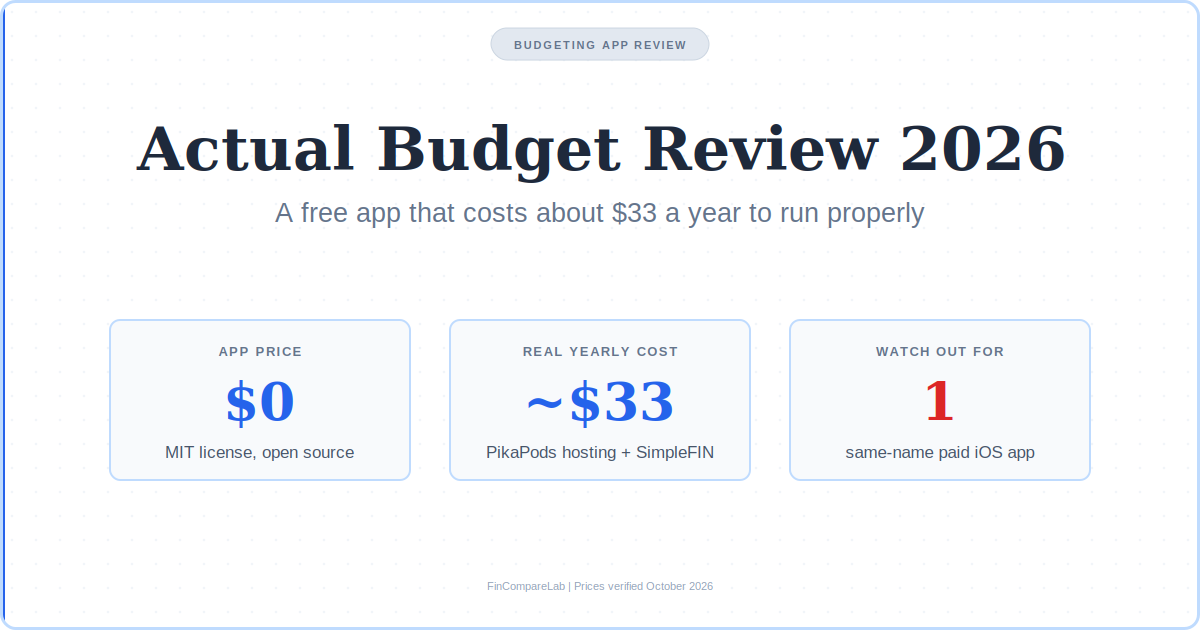
Actual Budget review for 2026: the app costs $0, running it with hosting and US bank sync costs about $33 a year, and the paid iPhone app with the same name in the App Store is a different product.
⚡ Quick Verdict
Actual Budget is an open-source envelope budgeting app, and the core software is free forever. The catch is setup. Syncing devices needs a server, and US bank sync needs a paid SimpleFIN account that fetches transactions only when you ask. This actual budget review rates it 4.6/5 for people who want YNAB-style control of their data, and lower for anyone who wants zero setup.
Price: $0 app, about $33/yr hosted with US bank sync
Trial: None needed, free forever
Platform: Web (installable), Windows, Mac, Linux
How We Review Apps, Pricing verified from actualbudget.org and beta-bridge.simplefin.org — 1 October 2026
What’s in this Actual Budget review?
- What is Actual Budget?
- Is Actual Budget really free?
- How much does Actual Budget cost to run in 2026?
- Is Actual Budget safe?
- What can the Actual Budget app do?
- Is there an official Actual Budget iOS app?
- Is the App Store app named Actual Budget the real one?
- What does Actual Budget Reddit and forum chatter say?
- How hard is an Actual Budget self hosted setup?
- What are the real drawbacks of Actual Budget?
- Who keeps Actual Budget updated?
- Should you pick Actual Budget or YNAB?
- What else do people ask about Actual Budget?
What is Actual Budget?
Actual Budget is a free, open-source envelope budgeting app that keeps your data on your own device or server instead of a company cloud. It uses the same give-every-dollar-a-job method YNAB made popular, ships under the MIT license, and has no paid tier.
The project’s own FAQ says the hosted subscription service shut down in 2024, so today everything is the community-built version you download or host yourself. The code is public on GitHub, which means anyone can read what the app does with your numbers.
Is Actual Budget really free?
Yes. The Actual Budget app has no subscription, no premium tier, and no locked feature, and every report and import option is open to everyone under the MIT license.
Free software and free setup are different things, though. The desktop app gives you every budgeting feature on its own. A server only enters the picture when you want your budget synced across devices or pulled from your bank, and that server is where the money goes.
How much does Actual Budget cost to run in 2026?
The app is $0, and a realistic hosted setup with US bank sync runs about $33 a year. That is roughly $2.75 a month, about $76 less than YNAB’s $109 a year.
| Cost item | What it does | Annual cost |
|---|---|---|
| Actual Budget app | The budgeting software itself | $0 |
| Desktop app, no server | All budgeting features on one computer | $0 |
| PikaPods hosting | Managed server so your budget syncs across devices | About $18 ($1.50/mo) |
| Own hardware or free-tier server | Same sync, but you manage the server | $0 hosting |
| SimpleFIN Bridge | US and Canada bank sync | $15 plus tax |
| Realistic total | Hosted, synced, bank-connected | About $33 |
Pricing verified from actualbudget.org and beta-bridge.simplefin.org, October 2026.
The PikaPods figure comes from Actual’s own install guide, which dates it to November 2025, so check PikaPods before you commit. New accounts there get a $5 credit, which covers roughly three months.
SimpleFIN’s own page lists $1.50 a month or $15 a year plus tax for up to 25 institutions and 25 apps. One of the other actual budget reviews I checked still quotes $45 a year, so treat older figures with suspicion.
Run the Actual Budget app on a spare computer or a free server and the hosting line drops to $0, which leaves only the $15 for US bank sync. Skip bank sync and import files by hand, and the whole setup costs nothing. That is the number this actual budget review keeps coming back to.
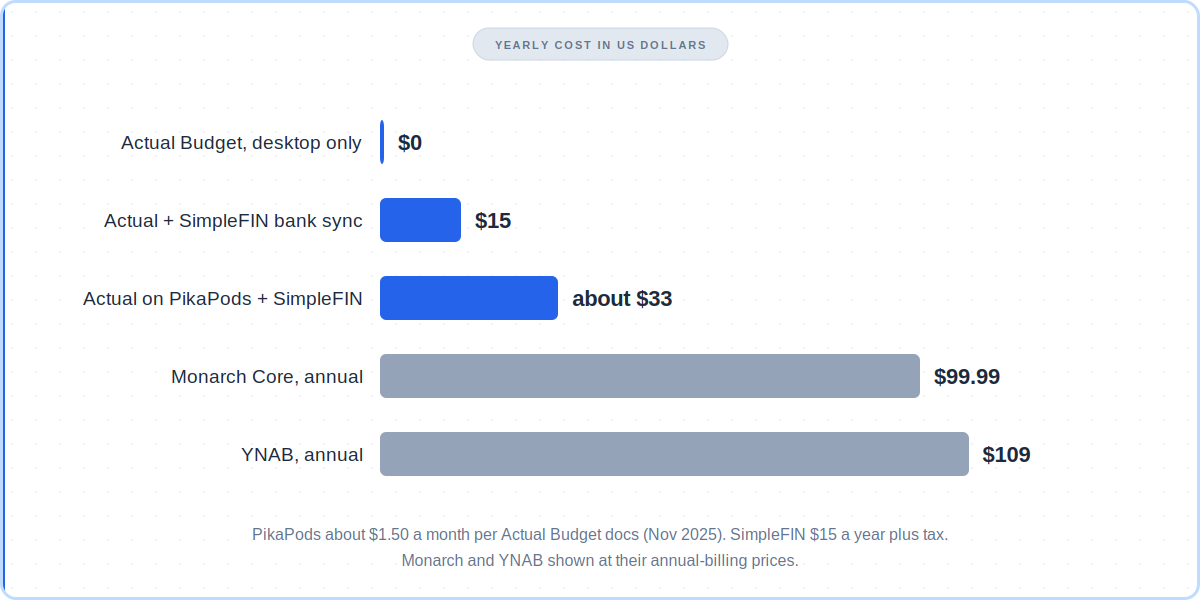
Yearly cost of each setup in this actual budget review, next to the two paid apps I get asked about most, Monarch and YNAB.
Is Actual Budget safe?
Yes, for the open-source app from actualbudget.org. Your data stays on your device or your own server by default, and optional end-to-end encryption keeps synced data unreadable even to the server.
People also ask, is Actual Budget safe to self-host on a home server? Yes, if you keep the server updated. The MIT-licensed code is public, so anyone can audit it. That is a different privacy model from Monarch or Rocket Money, where a company holds your data on its own infrastructure.
The encryption has a gap. Actual’s bank sync docs say end-to-end encryption covers your budget data only. Bank sync keys and tokens sit on the server, where anyone with database access, including a managed host, can read them. Actual suggests self-hosting if that bothers you.
Bank sync also routes through a third party. SimpleFIN describes itself as a way to share transaction data with apps, and you supply your own credentials rather than using a shared integration. Every automatic bank sync makes a similar trade.
Self-hosting adds chores for the Actual Budget app too. Backups and updates are yours, though Actual publishes a new Docker image with each release and PikaPods refreshes about a week after one. The same-name iPhone app covered below is a separate product from a separate developer, so its privacy practices have nothing to do with the project’s.
What can the Actual Budget app do?
The Actual Budget app runs on envelope budgeting, where you assign only money you have on hand, and it also has a tracking mode for people who want spending reports without envelopes. Multi-device sync, optional end-to-end encryption, and undo and redo come built in.
Reports include net worth and cash flow, plus a custom report engine. Imports accept QIF, OFX, QFX, CAMT.053, and CSV files, and built-in YNAB4 and nYNAB importers keep your full history. Rules, schedules, tags, and split transactions cover the daily work.
Developers get an API, with a catch. It is an npm package that drives the app in headless mode against your local data, not a REST API with endpoints you can call, according to the FAQ.
None of it sits behind a paywall, and a fair actual budget review has to say so. If you are weighing the envelope method itself, my zero-based budgeting guide explains it, and net worth tracking apps are worth a look if reports matter most to you.
Is there an official Actual Budget iOS app?
No. The project has no official Actual Budget iOS app today. Actual’s FAQ says its official mobile apps are deprecated, and the web version is a responsive Progressive Web App you add to your home screen. The community maintains unofficial native clients, which the project does not run.
On an iPhone, open your Actual server in Safari, tap Share, and choose Add to Home Screen. The Actual Budget mobile app experience then behaves like a native app, and the budget keeps working without a network connection because the data is local.
Bank sync on a phone needs a manual pull-to-refresh on your account list. Pulling down on the Budget screen syncs the budget with your server but does not fetch new bank transactions, per the docs. Android works the same way.
Is the App Store app named Actual Budget the real one?
No. The listing called Actual Budget Spendıng Tracker, spelled with a dotless ı, is a separate paid app from an independent developer, not the open-source project. The official Actual Budget has no iOS app at all, so any Actual Budget iOS app you see in the store is someone else’s.
⚠️ Beware: the App Store’s Actual Budget is not the free project
The listing is free to download, but it states a purchase is required to use the app. Listed in-app purchases run from a $3.99 weekly plan to a $199.99 lifetime unlock, with a $69.99 Life Time Plan and a yearly plan that starts with a free trial.
Its rating is about 4.5 from roughly 85 ratings. In public replies, the developer says the app is independent, has no sign-up, no AI, and no bank login, and that its maker never claimed any link to the open-source project.
One reviewer called it a scam for trading on the project’s name. The developer disputes the impersonation label, so this review treats it as a confusingly named product, not a proven scam.
Whatever the intent, the practical rule is simple. If something called Actual Budget asks for payment, it is not the project this actual budget review covers, and anyone who searches the App Store for Actual Budget is likely to land on it first. The real app costs nothing and lives at actualbudget.org.
Four checks separate them fast. The address is actualbudget.org, nothing is for sale, the code is MIT-licensed on GitHub, and no native iPhone app exists. Anyone who wants Actual Budget on a phone should use the installable web app instead.
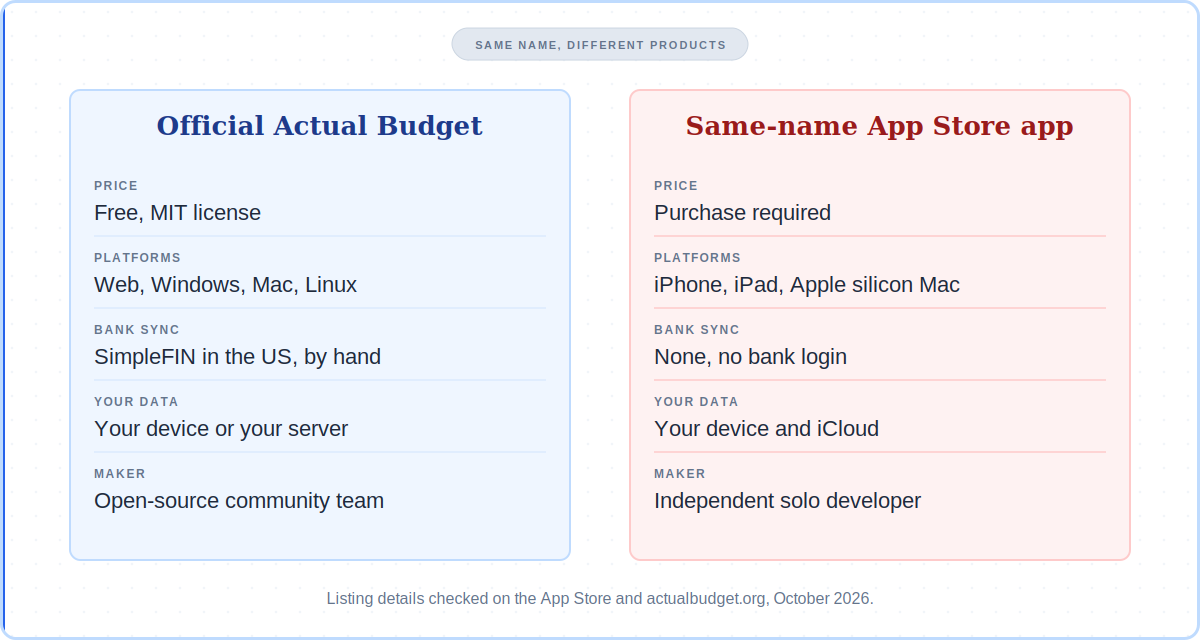
The Actual Budget iOS app in the App Store and the open-source project differ on price, platforms, and bank sync. An actual budget app review that skips this difference is incomplete.
What does Actual Budget Reddit and forum chatter say?
People who use it describe a fast, private YNAB replacement that asks for patience during setup. Self-hosting, SimpleFIN bank sync, and switching from YNAB come up most.
Searches for actual budget reddit threads surface plenty of chatter, but the community sentiment verified for this post comes from a Bogleheads forum thread and Hacker News comments collected on SaaSHub.
One long-time user there moved from YNAB4 to Actual after a bank dropped Quicken exports, self-hosts it, and syncs through SimpleFIN. Another switched from YNAB after two years. A common habit is a weekly sit-down to import transactions and assign categories. Treat any secondhand actual budget reddit quote with care, since threads age fast.
The complaint that stood out is that bill payments credit back into the budget, which muddles the spending charts. It is a small quirk, but it shows the envelope model has sharp edges when you leave YNAB’s rules behind.
How hard is an Actual Budget self hosted setup?
Actual’s docs list five server routes: PikaPods, Fly.io, the server CLI, Docker, and building from source. PikaPods is the shortest, and the homepage button promises a setup in about two minutes.
A Docker install pulls the official image and keeps your data on a persistent volume. Actual publishes an updated image with each release, so updating means pulling the new one.
No server is also an option. The Actual Budget app on Windows, Mac, or Linux runs the whole budget locally, and you can add a server later for sync or bank sync.
The Docker route has extra work. Updates, backups, and a reverse proxy for access outside your home are yours to manage. Upload limits trip people up too, since the default is 20 MB per file and the FAQ explains how to raise it.
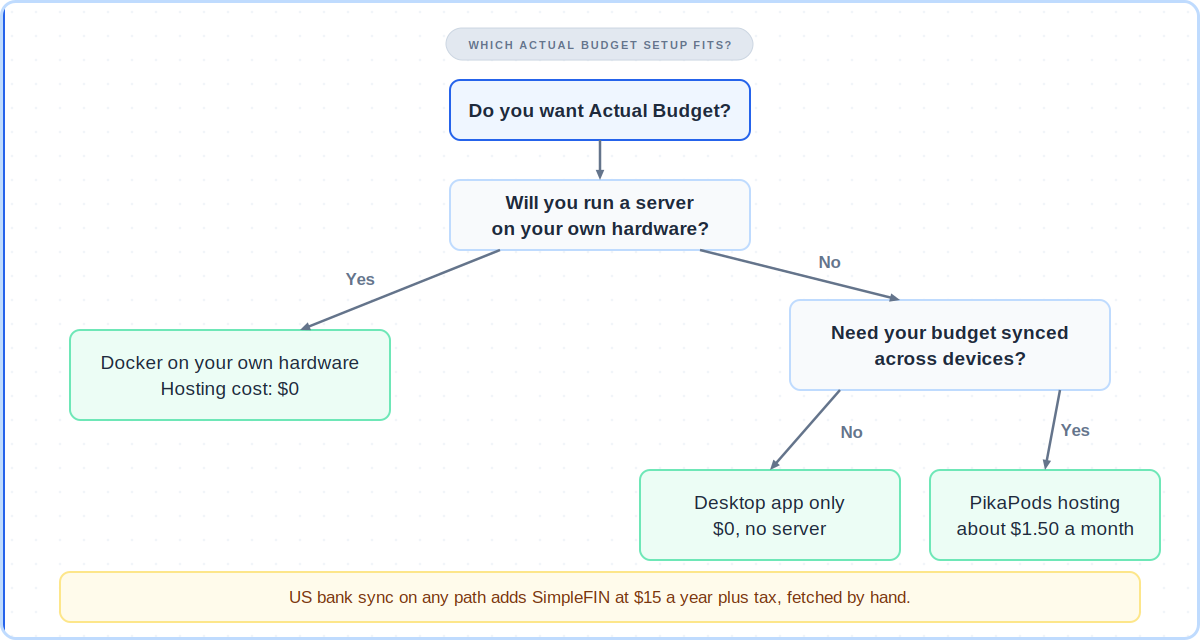
Pick the Actual Budget Docker route only if you already run something at home. If a server sounds like a chore, my best free budgeting apps roundup has easier options.
What are the real drawbacks of Actual Budget?
No honest actual budget review skips this part. Four drawbacks matter most: support through community channels only, no official mobile app, bank sync you trigger by hand, and thin investment tracking. Help comes from the community Discord and GitHub, not a ticket line.
Actual does not sync bank data on its own. You click Bank Sync on desktop or pull to refresh on mobile each time you want new transactions. In Europe, GoCardless no longer accepts new accounts per Actual’s docs, and Enable Banking is listed instead, so older guides that call GoCardless free are out of date.
Credit cards work differently from nYNAB. The Actual Budget app treats a card as an account holding negative dollars and assumes you can pay it off in full, so carrying a balance means parking some money in a category.
Investment tracking is thin. A reviewer comparing it to Quicken notes it will not automatically price a portfolio, so Empower fits better for that job. Setup also spans several accounts, which is more steps than signing up for YNAB.
Who keeps Actual Budget updated?
A community team maintains it, with releases roughly monthly and a public GitHub repository. There is no company behind it now that the hosted service has closed.
Money comes from donations on Open Collective and from PikaPods, which gives 20 percent of the fees its Actual customers pay to the project. Actual discloses that relationship on its homepage, so weigh the PikaPods suggestion with it in mind.
An active release cadence and a public repository are the signals to watch before you commit years of budgets to the Actual Budget app. If either goes quiet, a free tool with no company behind it is a risk worth pricing in.
Should you pick Actual Budget or YNAB?
This actual budget review ends with one question. Pick Actual Budget if you want to spend almost nothing and control your data. Pick YNAB if you want a managed app with native mobile apps and no server. For the feature-by-feature version, read my Actual Budget vs YNAB comparison.
I used YNAB for 15 years, from 2011 until earlier this year, before moving to Monarch Money. When I switched, I skipped importing years of YNAB CSV files and started from the previous month’s balances, because old credit-card transfers would have skewed the new reports.
Actual’s built-in nYNAB importer keeps your full history instead, which is a real difference if you want years of trends. Whether that helps depends on how clean your old data is. My YNAB review and YNAB ROI calculator can help you price the alternative.
Try Actual Budget if the free route fits, or try YNAB’s 34-day trial if you would rather pay to skip the setup. Other free and paid picks sit in my YNAB alternatives and envelope budgeting apps roundups.
What else do people ask about Actual Budget?
Short answers to the questions readers send most often.
Is Actual Budget good for beginners?
It suits motivated beginners but assumes more setup comfort than YNAB or EveryDollar. The desktop app alone is simple, while sync and bank connections take extra accounts and steps. See my beginner budgeting apps list for gentler starts.
Does Actual Budget work on Android phones?
Not through an official app. The same installable web app that works on iPhone works on Android, and the community maintains unofficial native clients listed on Actual’s community projects page.
Can I import my YNAB data into Actual Budget?
Yes. Actual has built-in YNAB4 and nYNAB importers that keep your full history, and it accepts QIF, OFX, QFX, CAMT.053, and CSV files for everything else.
Bank sync providers and the App Store app’s pricing tiers keep changing, so recheck Actual’s docs and the listing before you pay anyone. I will update this actual budget review when either moves again.
📚 Read Next
Full disclosure →
