
The lunch money app takes a different approach to budgeting than most of the tools on this site — it’s built by a small, independent team, prices itself in an unusual way, and asks you to do more of the categorizing yourself. Here’s what that actually means before you sign up.
⚡ Quick Verdict
Lunch Money is a solid pick if you want multi-currency support, a developer API, and a company that funds itself entirely through subscriptions instead of ads or data sales. It’s a weaker pick if you want a polished, full-featured mobile app — the companion app is limited, and this is fundamentally a web-first product.
How We Review Apps · Pricing verified from lunchmoney.app — 30 July 2026
Table of Contents
- What Is the Lunch Money App?
- How Does Lunch Money Handle Bank Syncing and Multiple Currencies?
- How Much Does the Lunch Money App Cost?
- Is There a Lunch Money Mobile App?
- Who Is the Lunch Money App Actually For?
- How Does Lunch Money Compare to YNAB?
- How Does Lunch Money Compare to Monarch Money?
- What Do Lunch Money Users Say in the Community?
- How Secure Is the Lunch Money App?
- How Do You Get Started with the Lunch Money App?
- Is the Lunch Money App Worth It?
- What Questions Do People Ask About the Lunch Money App?
What Is the Lunch Money App?
Lunch Money is a web-first personal finance and budgeting tool built by Lunchbag Labs, a small Canadian software company that’s been running the product since 2019. Instead of the automated, AI-assisted dashboards that dominate this category now, it leans into a simpler, more manual style of budgeting — you import or sync your transactions, then categorize and review them yourself.
The standout feature is genuine multi-currency support, which most mainstream US budgeting apps treat as an afterthought or skip entirely. Lunch Money also ships a developer API, letting technically inclined users automate their own categorization rules or pull their data into custom tools — something none of the apps in FinCompareLab’s usual lineup offer.
It’s a small operation by design. The company funds itself entirely through subscriptions, not ads or data sales, and it’s been public about reaching profitability without outside investors. That independence shows up in a few unusual choices — including how it prices itself, which I’ll get into next.
How Does Lunch Money Handle Bank Syncing and Multiple Currencies?
Lunch Money supports direct bank imports, manual CSV uploads, and — for technically inclined users — automated imports through its own developer API. That third option is unusual in this category; most budgeting apps don’t expose a public API at all, let alone document one for personal use.
Multi-currency support runs through the entire product rather than being bolted on as a separate feature. You can hold accounts in different currencies, tag transactions across them, and see totals converted consistently — which matters if you’re a digital nomad, an expat, or anyone managing money on both sides of a border. That’s the single feature FinCompareLab’s other reviewed apps handle most inconsistently, if they handle it at all.
How Much Does the Lunch Money App Cost?
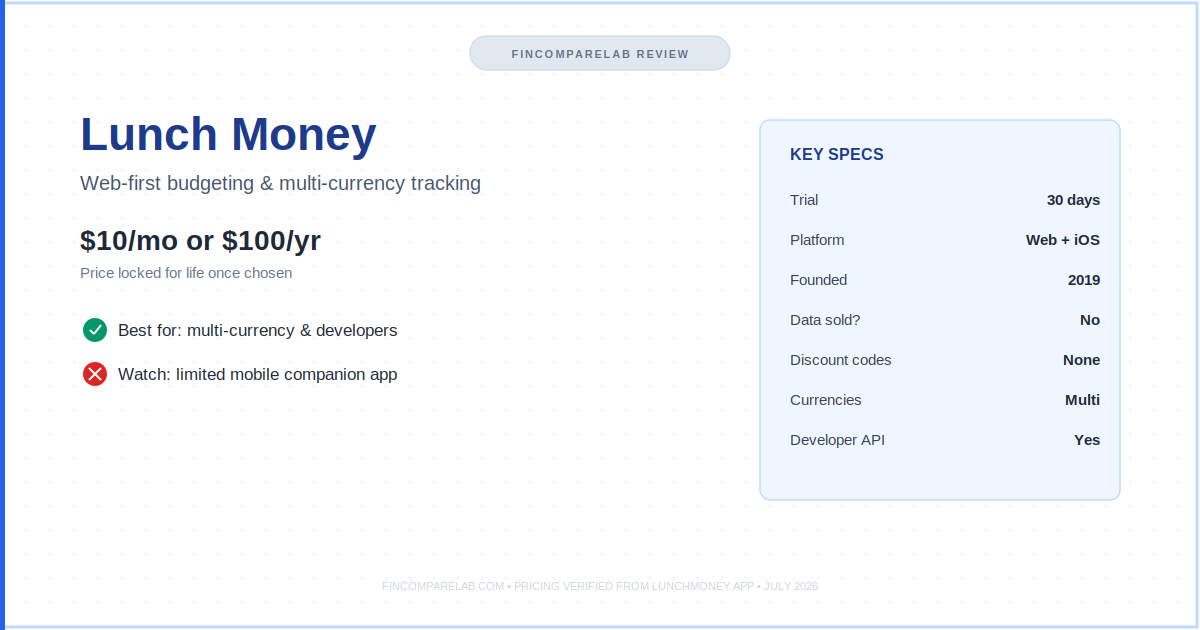
This lunch money review starts with pricing because it’s genuinely different from anything else on this site. Lunch money pricing costs $10 per month on the monthly plan, verified directly from the official Lunch Money pricing page.
The annual plan uses a “set your own price” model, currently displayed starting at $100 per year. Lunch Money doesn’t publish the full adjustable range on its pricing page, so treat $100/year as the reference point rather than a fixed floor or ceiling.
Total lunch money cost stays predictable no matter which plan you pick, thanks to the price-lock guarantee covered below — there’s no surprise renewal jump waiting for you in year two, which is a real departure from how most subscription software in this space operates.
Every plan includes a 30-day free trial with no credit card required, and every plan unlocks the full feature set — there’s no separate “premium” tier gatekeeping features behind a higher price. Lunch Money also discontinued coupon codes, so any “discount code” you find for it on a coupon site should be treated as unverified.
The most distinctive part of Lunch Money’s pricing is its price-lock guarantee: whatever rate you sign up at — or whatever you later choose to pay on the annual plan — stays locked in for as long as you remain a subscriber, even if list prices rise for new customers later.
| Plan | Price | Notes |
|---|---|---|
| Monthly | $10/mo | ✅ Full features, 30-day trial |
| Annual | From $100/yr (set your own price) | ✅ Price locked for life once chosen |
Pricing verified from lunchmoney.app — July 2026.
Is There a Lunch Money Mobile App?
Yes, but it’s a companion app, not a standalone replacement for the web product. Lunch Money’s own iOS listing describes it as the “official free companion app for the Lunch Money web app” and notes it’s only usable by existing registered users — you can’t sign up for Lunch Money from the app itself.
As of this review, the companion app hasn’t collected enough App Store ratings to display an average score, which tells you something about how lightly it’s used relative to the web experience. If you want an app you’ll mostly manage from your phone, this is the biggest practical caveat before you switch — apps like YNAB and Monarch Money were built mobile-first, and it shows.
Who Is the Lunch Money App Actually For?
The lunch money app fits a narrower audience than most apps on this site, and it’s upfront about that. Its own marketing lists digital nomads, cross-border banking users, engineers, designers, and startup founders as core users — people who value multi-currency accuracy and a developer-friendly product over a slick mobile app or AI assistant.
A few concrete examples make this clearer. A freelancer billing clients in both USD and EUR would struggle to track true spending in YNAB or Monarch without manual currency conversions — the lunch money app handles that natively.
A software developer who wants to build a custom spending dashboard, rather than rely on whatever charts a budgeting app ships with, can pull raw data through the API instead of exporting CSVs by hand every month.
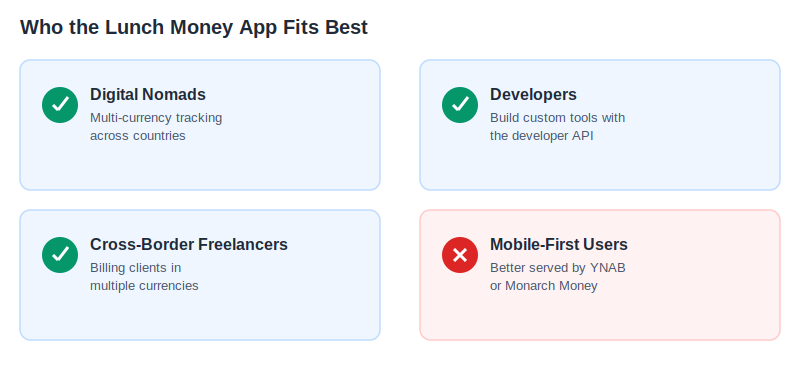
If you manage money across two countries, freelance internationally, or just want more manual control over categorization than fully automated apps allow, it’s a genuinely good fit. As a lunch money budgeting app, it prioritizes accuracy and flexibility over hand-holding — there’s no built-in method telling you how to allocate every dollar, so you’ll want at least some budgeting experience already.
If you want a “set it and forget it” dashboard experience with net worth tracking and investment syncing built in, Monarch Money or Empower will likely serve you better. And if you’re brand new to budgeting entirely, a more structured app like YNAB or EveryDollar will probably get you results faster than Lunch Money’s more open-ended approach.
How Does Lunch Money Compare to YNAB?
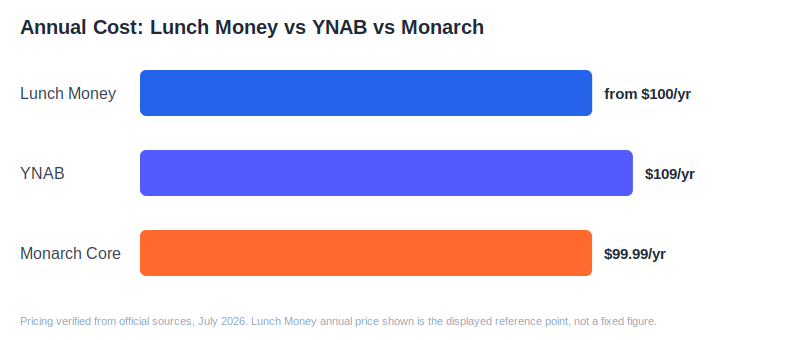
A quick lunch money vs ynab summary: YNAB costs $109/year ($14.99/month) with a 34-day free trial, while Lunch Money runs $10/month or from $100/year. On sticker price alone, the two land in a similar range — the real difference is philosophy, not cost.
YNAB is built entirely around its zero-based budgeting method: every dollar gets assigned a job the moment it arrives. Lunch Money doesn’t enforce any single budgeting philosophy — it gives you transaction tracking, categorization, and budgets, but leaves the method up to you.
If you want a structured system that tells you how to budget, YNAB is the stronger choice. If you want flexible tools and multi-currency support without being locked into one method, Lunch Money fits better.
Lunch Money even publishes its own YNAB comparison page, which is worth a look if you want their side of this comparison directly. For a full breakdown of YNAB’s own pricing quirks, see my YNAB pricing guide.
How Does Lunch Money Compare to Monarch Money?
For lunch money vs monarch, the price gap is small but the feature gap is large. Monarch Money costs $99.99/year (Core) or $14.99/month, with a 7-day trial that now requires a card upfront.
Monarch is built for automated, all-in-one tracking — net worth, investments, couples access, and an AI assistant layered on top of budgeting.
Lunch Money doesn’t attempt to compete on that front. It has no investment-account syncing to speak of and no AI assistant — its strength is manual control, multi-currency accuracy, and a developer API. If you want one dashboard that shows your full financial picture automatically, Monarch is the better fit. If you specifically need multi-currency budgeting or want to build your own automations against your data, Lunch Money pulls ahead.
Couples sharing a household budget should also weigh Monarch’s dedicated shared-access features against Lunch Money’s more basic collaboration tools before deciding — this is one area where Monarch’s mobile-first design gives it a clear edge for joint finances.
See my full Monarch Money review for the complete pricing and feature breakdown.
One more distinction worth flagging: Monarch’s trial now requires a payment method upfront, while Lunch Money’s 30-day trial doesn’t. If you’re the type who forgets to cancel trials before billing starts, that difference alone might tip the decision — Lunch Money gives you a full month to test the product risk-free, with nothing charged unless you actively choose a plan afterward.
What Do Lunch Money Users Say in the Community?
Lunch Money runs an active Discord community and its own subreddit, r/lunchmoney, both linked directly from the company’s own site — a level of direct community access that’s unusual among the apps FinCompareLab typically reviews.
Community consensus generally echoes what shows up in third-party coverage: people switching from Mint or Personal Capital tend to appreciate the simplicity, while people expecting a fully automated, mobile-first experience are more likely to bounce off it.
Because Lunch Money is run by a small team, support requests and feature discussions tend to happen directly in these community channels rather than through a large support ticketing system — worth knowing if you value fast, personal responses over enterprise-style support infrastructure.
How Secure Is the Lunch Money App?
Lunch Money encrypts data at rest using AES-256 encryption, which it describes as “bank-level security” on its own site. That’s the same encryption standard used by most mainstream budgeting apps in this category, including YNAB and Monarch Money, so it’s a baseline expectation rather than a standout differentiator.
Where Lunch Money does differentiate is on data monetization. The company states directly that it doesn’t sell user data to third parties, and frames this as a natural consequence of its subscription-only revenue model — there’s no advertising business to fund, so there’s no financial incentive to monetize your spending data the way some free or ad-supported finance apps might.
If bank-connection security specifically is a priority, it’s worth checking Lunch Money’s own security documentation directly before connecting accounts, since the exact bank-linking infrastructure and third-party partners involved aren’t detailed in the marketing pages reviewed for this post.
How Do You Get Started with the Lunch Money App?
Signing up starts with the 30-day free trial, which requires an email address but no credit card. From there, you can connect bank accounts directly, upload transactions via CSV, or — for more technical users — pull data in through the developer API rather than relying on standard bank syncing at all.
Because Lunch Money doesn’t enforce a specific budgeting method, initial setup involves more configuration than a prescriptive app like YNAB or EveryDollar. You’ll be creating your own categories, tags, and budget periods from scratch rather than following a built-in framework — which is either a feature or a drawback depending on how much structure you want handed to you on day one.
New users can also join the Discord community during the trial period, which is a practical way to get setup questions answered quickly given the company’s small support team. Given the trial requires no payment method upfront, there’s little downside to testing it against your actual spending data before deciding whether to subscribe.
Is the Lunch Money App Worth It?
The lunch money app is worth it for a specific kind of user: someone who spends or earns across multiple currencies, wants developer-level control over their financial data, or simply prefers supporting a small, ad-free, subscription-funded company over a venture-backed one. For that person, $10/month buys a genuinely different product than the mainstream budgeting apps.
It’s a weaker fit if your priority is a beautiful, fully-featured mobile app, automated investment tracking, or a built-in budgeting method that tells you exactly what to do. In those cases, the apps compared above will likely serve you better.
The short version: the lunch money app rewards people who already know roughly how they want to budget and just need flexible, accurate tools to do it — and it asks more patience of people who want an app to teach them a system from scratch.
What Questions Do People Ask About the Lunch Money App?
Does the Lunch Money App Have a Free Trial?
Yes. Lunch Money offers a 30-day free trial on both the monthly and annual plans, and no credit card is required to start.
Can You Cancel the Lunch Money App Anytime?
Lunch Money doesn’t publish a specific cancellation-fee or lock-in policy on its pricing page beyond the trial terms. If cancellation terms matter to your decision, verify directly with Lunch Money’s support team before subscribing.
Does the Lunch Money App Sell Your Data?
Lunch Money states on its own pricing and security pages that it doesn’t sell user data to third parties, and that its subscription revenue is the sole way it funds the company — a common selling point among smaller, independent finance apps.
Is There a Lunch Money Discount Code?
No. Lunch Money discontinued coupon codes as part of simplifying its billing. Any “discount code” advertised on a third-party coupon site should be treated as unverified.
Is Lunch Money Good for Budgeting Beginners?
Not especially. Lunch Money doesn’t enforce a budgeting method the way YNAB or EveryDollar do, so first-time budgeters may find it less guided than a more structured app. It works best for people who already have a budgeting approach in mind and want flexible tools to support it.
Does Lunch Money Support Investment Tracking?
Not in the way Monarch Money or Empower do. Lunch Money focuses on day-to-day transaction tracking, categorization, and budgeting rather than investment-account syncing or portfolio analysis — if investment tracking is a priority, pair it with a dedicated tool or choose an app built around that feature instead.
Does the Lunch Money App Work Outside the US?
Yes. Lunch Money markets itself as trusted across 30+ countries and is specifically built for multi-currency use, which makes it a stronger international option than most US-focused budgeting apps covered on this site, including YNAB and Monarch Money.
Can You Use Lunch Money Without Connecting a Bank Account?
Yes. Lunch Money supports manual CSV uploads in addition to direct bank syncing, so it’s usable by anyone who prefers not to link accounts directly — a meaningful option for privacy-conscious users or anyone whose bank isn’t supported.
If Lunch Money’s pricing or mobile-app tradeoffs still leave you unsure, the free 30-day trial is the lowest-risk way to find out — connect a real account, run your actual numbers for a few weeks, and see whether the manual-control approach fits how you actually manage money before committing to either plan.
