
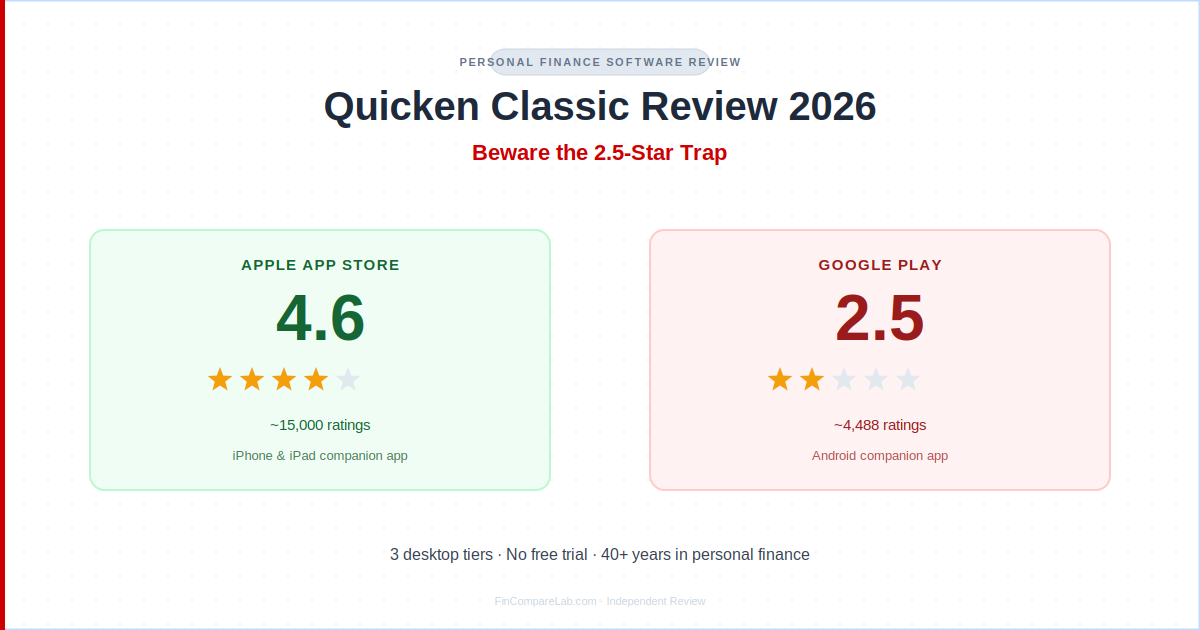
This Quicken Classic review covers the 2026 tier lineup, the wide gap between its App Store and Google Play ratings, and whether the current pricing still makes sense against modern apps like Monarch Money and YNAB.
⚡ Quick Verdict
This quicken classic review found real strengths for investors, landlords, and anyone who wants deep tax reporting on desktop software. The real trap in 2026 is not pricing (Deluxe now has no first-year promo at all, and Premier and Business & Personal only step up 12 to 14 percent at renewal) but the mobile companion app, which rates 2.5 out of 5 on Google Play against 4.6 on the App Store. If you just want simple budgeting on your phone, a modern app will likely serve you better.
How We Review Apps · Pricing verified from quicken.com — 20 September 2026
In this review:
- What is Quicken Classic and how does it work?
- How much does Quicken Classic cost in 2026?
- Is Quicken Classic worth it in 2026?
- Why do Quicken Classic’s App Store and Google Play ratings differ so much?
- Quicken Classic vs Simplifi: what’s the difference?
- Who should use Quicken Classic instead of a modern budgeting app?
- How do you avoid Quicken’s renewal price increase?
- How do you cancel a Quicken Classic subscription?
- What do long-time Quicken users actually say?
- How does Quicken Classic’s cost compare over 3 years?
- Final Quicken Classic review verdict: buy or skip in 2026?
- What do people ask about Quicken Classic?
What Is Quicken Classic and How Does It Work?
Quicken Classic is desktop personal finance software for Windows and Mac covering budgeting, bill tracking, investments, and tax reporting, backed by 40-plus years and roughly 20 million customers. It now ships in three tiers (Deluxe, Premier, Business & Personal), down from the four-tier lineup earlier versions of this quicken classic review covered, and connects to over 14,000 financial institutions.
Unlike cloud-first budgeting apps, your financial data lives locally on your computer, with an optional cloud backup and a companion mobile app for checking balances on the go. Quicken is a registered trademark of Rocket Mortgage, LLC, licensed to Quicken Inc., the company that actually builds and sells this software, which is worth knowing before you search for reviews and land on pages about the mortgage lender by mistake.
Each tier builds on the one below it. Deluxe covers everyday budgeting, debt payoff planning, and net worth tracking. Premier adds advanced investment analysis, BillPay, and priority support. Business & Personal is the only tier that separates rental-property and small-business accounting from your personal finances inside a single file, which is why it carries the highest price.
Understanding these three tiers is the real starting point for any quicken classic review, since the right pick depends entirely on how complex your finances are.
How Much Does Quicken Classic Cost in 2026?
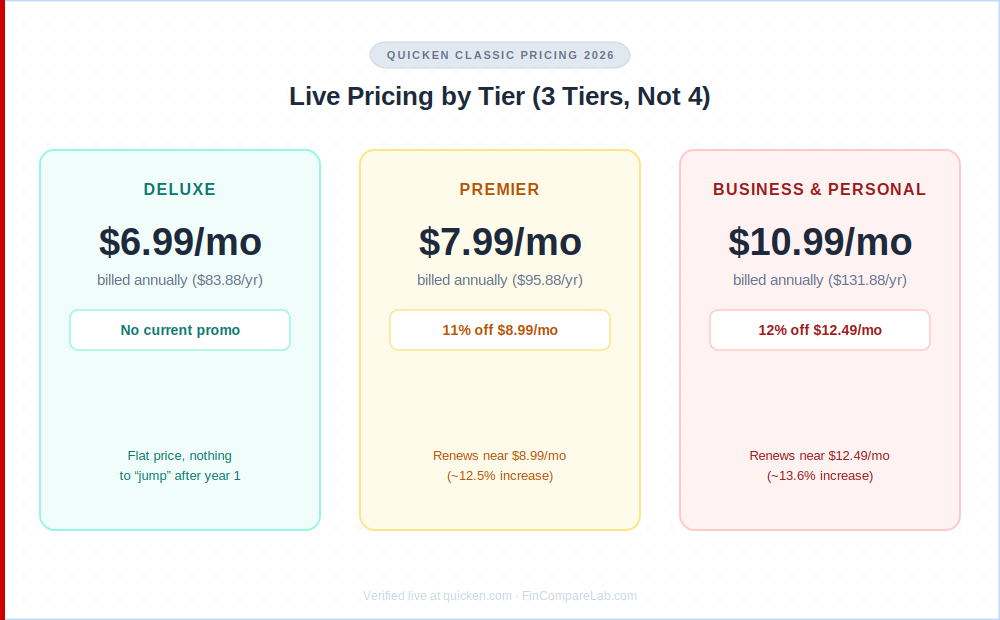
Quicken classic pricing runs $6.99 to $10.99 per month depending on tier, billed annually, with Deluxe currently carrying no first-year discount at all while Premier and Business & Personal get a modest 11 to 12 percent introductory rate. That is a real shift from earlier in 2026, when a deeper promotional discount led to a much larger jump at renewal, and it’s the detail most competing quicken classic review pages still get wrong.
| Tier | Current Price | Standard Rate | Renewal Increase |
|---|---|---|---|
| Deluxe | $6.99/mo ($83.88/yr) | Same, no promo active | 0% (flat) |
| Premier | $7.99/mo ($95.88/yr) | $8.99/mo ($107.88/yr) | ~12.5% |
| Business & Personal | $10.99/mo ($131.88/yr) | $12.49/mo ($149.88/yr) | ~13.6% |
Pricing verified live for this quicken classic review from quicken.com (20 September 2026). First-year offers apply to new memberships ordered directly from Quicken and expire on a rolling monthly date. They do not stack with other offers.
Quicken Classic Starter still exists, but it no longer appears among the main quicken classic tiers on the standard pricing comparison page. It is a separate, more limited product sold to first-time subscribers only, distributed through Quicken’s own site footer and select retail partners like B&H Photo and Sam’s Club rather than the standard signup flow. If you let a Starter subscription lapse, your file becomes read-only instead of keeping full edit access, which is not the case for Deluxe and higher tiers.
For a focused quicken business and personal review angle specifically: this is the only tier that bundles Schedule C, E, and F tax reports with personal accounts in one file, a feature none of the cloud-first competitors like Monarch Money or Copilot currently offer at any price.
Is Quicken Classic Worth It in 2026?
Quicken Classic is worth it in 2026 for investors, landlords, and self-employed users who need tax-schedule depth no modern app matches, but the math is closer than it used to be for everyday budgeters. Deluxe’s flat $83.88 a year now sits within striking distance of Monarch Money‘s $99.99 a year and YNAB‘s $109 a year, rather than undercutting them by a wide margin.
That narrower price gap changes the calculation. A few years ago, Quicken Classic’s promotional pricing made it an obvious budget pick even for people who didn’t need its investment depth. In 2026, you’re paying nearly the same amount as Monarch or YNAB either way, so is quicken classic worth it comes down to whether you actually want desktop software with local data storage over a cloud-first mobile app.
Quicken’s own site lists CNBC’s World’s Top 250 Fintech Companies, Engadget’s Best Mint Alternative, and PCMag’s Best Overall for Personal Finance Software among its accolades, and Capterra’s user base still rates the underlying software 3.9 out of 5 across 461 verified reviews, feedback that spans everyday Deluxe users and the small-business owners this quicken business and personal review has focused on. This quicken classic review’s take: if you need investment and tax depth that a modern app doesn’t offer, the current price is easy to justify. If not, it’s a harder case to make than it was a year ago.
Why Do Quicken Classic’s App Store and Google Play Ratings Differ So Much?
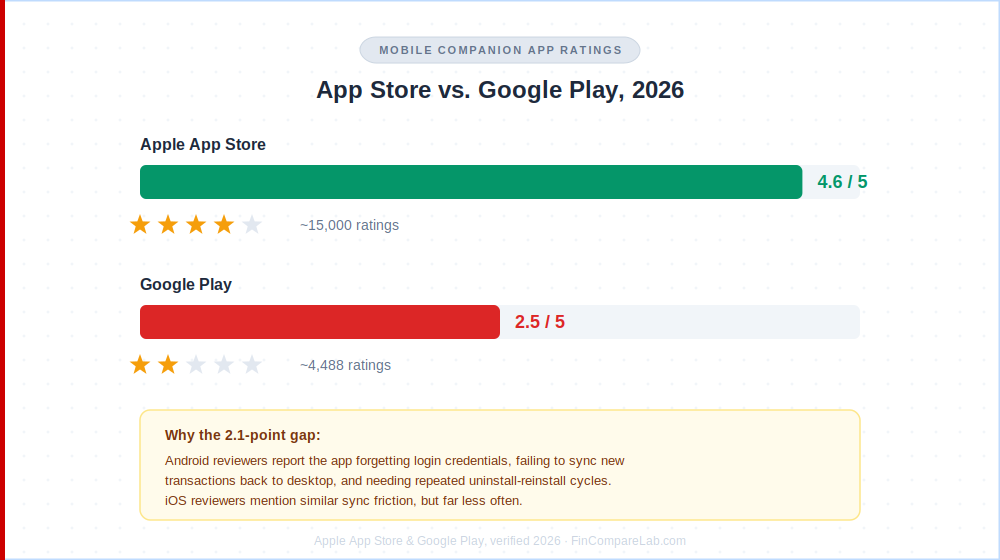
This quicken classic review found one of the widest iOS-versus-Android rating gaps in the entire budgeting app category. Quicken Classic’s companion mobile app rates 4.6 out of 5 on the Apple App Store (about 15,000 ratings) but only 2.5 out of 5 on Google Play (about 4,488 ratings), a 2.1-point gap. Recent Google Play reviews describe the app forgetting login credentials, failing to sync new transactions back to the desktop program, and requiring repeated uninstall-and-reinstall cycles to function normally.
App Store reviews mention similar sync friction but far less often, and iOS reviewers are more likely to describe the app as improved over earlier versions. Complaints about the quicken classic app center almost entirely on Android sync reliability, not core functionality. Worth noting: this rating covers the mobile companion app only, not the desktop software itself. Quicken Classic’s core functionality lives on your computer, and the mobile app is meant for quick balance checks rather than daily use, so a low Android score says more about the companion app’s engineering priority than the product as a whole.
Does Quicken Classic Show CC-501 or CC-502 Errors?
Yes, CC-501 and CC-502 are Quicken’s own error codes for when the software can’t connect to a financial institution or can’t retrieve new transactions from it. Community threads and review platforms describe these as a recurring friction point across both Windows and Mac, with some users reporting the errors clear within 24 hours and others facing repeated failures across multiple accounts on the same day.
These errors are not unique to Quicken Classic. Every budgeting app that connects to banks through an aggregator layer runs into occasional sync failures, but Quicken’s decades-old direct bank relationships mean it touches more institutions (over 14,000) than most competitors, which also means more surface area for a connection to briefly break. This quicken classic review treats that trade-off as a fair one, given how few competitors match Quicken’s bank coverage at all.
Quicken Classic vs Simplifi: What’s the Difference?
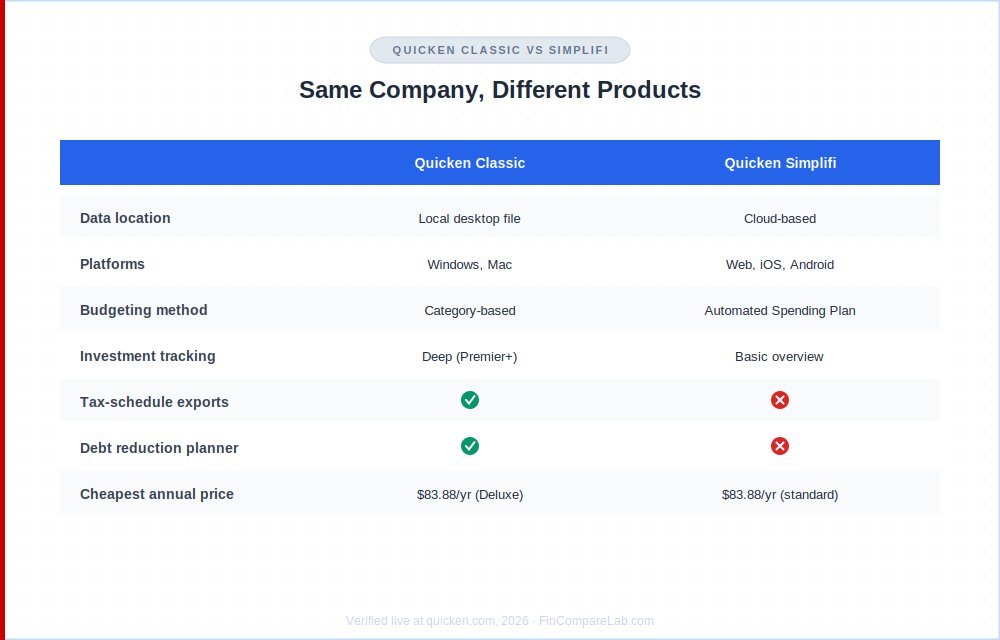
Quicken Classic and Quicken Simplifi are separate products from the same company, and the quicken classic vs simplifi question is one of the most common points of confusion for new subscribers. Quicken Classic installs locally on your computer and uses traditional category-based budgeting, while Simplifi is fully cloud-based and uses an automated Spending Plan built from your recurring income and bills instead of manual categories.
Classic offers deeper investment tracking, tax-schedule exports, and a debt reduction planner that Simplifi doesn’t match. Simplifi is easier to use day-to-day and works across more devices, and as of this review, its standard renewal rate ($83.88 a year) now lands at almost the exact same price as Classic Deluxe, a real change from the pricing gap that used to favor Deluxe more clearly. Anyone weighing quicken classic vs simplifi purely on price in 2026 will find the two nearly tied.
Quicken Classic for Windows still edges ahead on reporting depth and BillPay integration, while Quicken Classic for Mac has closed most of the historical feature gap but still lacks the Lifetime Planner retirement tool available on Windows. If your workflow depends on that retirement forecasting specifically, Quicken Classic for Windows remains the safer pick over Quicken Classic for Mac. Your data file can’t be transferred between Classic and Simplifi either way, so switching from one to the other means starting fresh with new accounts, not migrating existing history.
Who Should Use Quicken Classic Instead of a Modern Budgeting App?
Quicken Classic makes the most sense if your finances have real complexity: rental properties, a small business alongside personal accounts, or an investment portfolio where you need capital gains estimates and Schedule A, B, or D exports at tax time. The quicken classic vs simplifi decision above tends to favor Classic for exactly this reason, since Simplifi doesn’t offer the same tax-schedule depth at any tier. Anyone drawn here by a quicken business and personal review search is almost certainly in this exact category.
If you’re mainly trying to build a simple monthly budget, split expenses with a partner, or track spending on your phone, a cloud-first app will likely fit better given the 2.5-star Android experience covered above. My Monarch Money alternatives guide and YNAB review cover the two most-recommended replacements for everyday budgeters, and my Empower review covers the strongest free option for investment tracking specifically. For a wider view of the field, my best personal finance software roundup and best net worth tracking apps guide both cover where Quicken Classic sits against the rest of the market.
If your needs are genuinely simple and you don’t want to pay for software at all, a free net worth tracker built in Google Sheets covers the same basic net-worth math that Deluxe handles, without the sync errors or the subscription. It won’t connect to your bank automatically, but for someone who updates balances once a month, that’s a real trade worth considering before you commit to any paid tier.
How Do You Avoid Quicken’s Renewal Price Increase?
Every quicken classic review should flag this clearly: turning off auto-renewal right after you subscribe, from My Account on quicken.com, is the single most effective way to control your quicken classic subscription cost long term. It forces you to actively decide whether to pay the standard rate instead of being charged automatically when your term ends. This matters most for Premier and Business & Personal, where the current first-year promo reverts to a 12 to 14 percent higher rate. Deluxe has no promo to revert from in 2026, so there’s no jump to plan around on that tier specifically.
A second option worth checking every time your renewal approaches: third-party retailers including Sam’s Club, Costco, and Newegg periodically sell Quicken renewal codes below Quicken’s direct rate, and these work for existing subscribers as well as new ones on most listings. You activate these the same way as a fresh purchase, through the Manage Subscription screen inside the desktop program, and long-time users on Quicken’s own community forum report this is the most consistent way to keep the effective annual cost down.
How Do You Cancel a Quicken Classic Subscription?
A big part of any quicken classic review is making sure you know exactly how to cancel before you’re charged the renewal rate. Cancel from My Account on quicken.com under Manage Subscription, or by phone during Quicken’s support hours. Canceling stops future billing but doesn’t delete your local data file, which stays on your computer either way thanks to Quicken’s Data Access Guarantee for Deluxe and higher tiers.
That guarantee has one exception worth knowing before you buy, and it applies just as much to a quicken business and personal review reader managing rental properties as to a solo Deluxe user: per Quicken’s own discontinuation policy, the Data Access Guarantee applies to Deluxe and higher, but a lapsed Starter subscription becomes read-only rather than keeping full edit access. If you subscribed through a retailer like Best Buy or Amazon rather than directly through Quicken, check that account’s subscription settings instead, since Quicken’s own cancellation page may not show a purchase made elsewhere.
If you cancel within 30 days of your original purchase, Quicken’s money-back guarantee applies to a full refund. After 30 days, you can still cancel anytime, but you won’t get a prorated refund for the remaining subscription period.
What Do Long-Time Quicken Users Actually Say?
The clearest pattern across App Store, Google Play, and retailer reviews is loyalty mixed with real frustration, and it’s a theme this quicken classic review sees repeated in nearly every long-term thread. Many reviewers mention using Quicken for 20, 25, even 30 years and say no other tool fully replaces what they’ve built, while the subscription model and the CC-501 and CC-502 sync errors covered earlier remain the most recurring complaints.
Community forum threads consistently mention two coping strategies: turning off auto-renewal so a price increase never happens without warning, and buying renewal codes from third-party retailers instead of quicken.com directly. Several long-time users say they’ve contacted Quicken’s support chat directly about a renewal price and received a manual discount on the spot, though this isn’t a guaranteed or advertised policy.
This is a genuinely different sentiment profile than newer apps like Monarch Money or YNAB, where reviews skew toward first impressions rather than decades of accumulated history, which is worth keeping in mind when weighing star ratings directly against each other.
How Does Quicken Classic’s Cost Compare Over 3 Years?
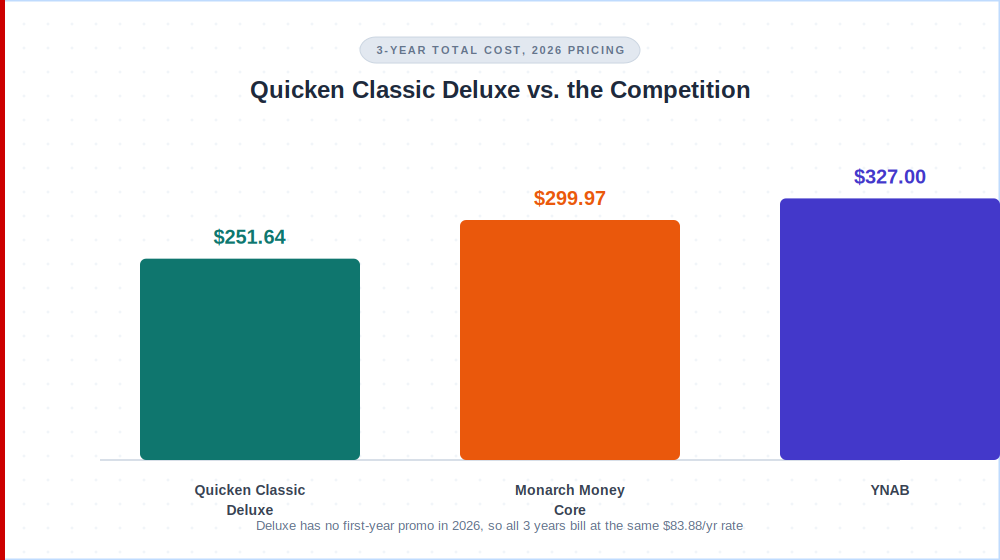
Renewal pricing is what actually matters for a multi-year commitment, and it’s the calculation this quicken classic review leans on most heavily. With Deluxe’s promo gone in 2026, that comparison is simpler than it used to be: the price you pay today is the price you’ll pay in year two and year three as well, assuming no further increase.
| App / Tier | Annual Rate | 3-Year Total |
|---|---|---|
| Quicken Classic Deluxe | $83.88/yr (flat, no promo) | $251.64 |
| Monarch Money Core | $99.99/yr | $299.97 |
| YNAB | $109/yr | $327.00 |
Monarch Money and YNAB pricing verified from monarch.com and ynab.com. Quicken Simplifi’s standard rate ($83.88/yr) now matches Classic Deluxe almost exactly, so it isn’t a separate row here.
Quicken Classic Deluxe still costs about 16 to 23 percent less than Monarch or YNAB over three years, but that’s a much smaller edge than the near-half-price gap the old promotional structure used to create, a point worth repeating in any quicken classic review that still cites the old numbers. Monarch and YNAB both include unlimited household sharing and a genuinely well-rated mobile app in that price. Quicken Classic’s mobile companion app is the weaker part of its package, especially on Android, so the smaller price advantage buys less cushion than it used to if the mobile experience matters to you.
Final Quicken Classic Review Verdict: Buy or Skip in 2026?
Buy Quicken Classic if you specifically need desktop-based investment tracking, rental property management, or combined business-and-personal finances, since its 40-year head start still shows in those areas and no cloud-first competitor matches its tax-schedule depth. Skip it if you want simple day-to-day budgeting on your phone. The pricing is no longer the clear win it once was, and the 2.5-star Android experience is a real cost most reviews don’t emphasize enough.
This quicken classic review comes down to fit rather than a flat better-or-worse verdict. It’s still one of the few tools built specifically for people who need investment and tax depth on desktop, and that niche hasn’t been fully replaced yet. Check your use case against the tier breakdown above before you commit to a full year of billing, since the money-back window is only 30 days.
What Do People Ask About Quicken Classic?
Here are direct answers to the questions that come up most in any quicken classic review, before someone signs up.
Does Quicken Classic have a free trial?
No, and this is one of the most searched facts in any quicken classic review. Quicken Classic doesn’t offer a free trial, instead coming with a 30-day money-back guarantee so you can request a full refund if you cancel within 30 days of purchase. This applies across all three quicken classic tiers, so budget your first month to test the software seriously with your real accounts connected.
Is Quicken Classic the same company as Quicken Loans or Rocket Mortgage?
No, they’re different companies that happen to share a licensed name. Quicken is a registered trademark of Rocket Mortgage, LLC (formerly Quicken Loans), but the personal finance software itself is built and sold by Quicken Inc., a separate company that split off years ago and has no connection to mortgage lending.
What happened to Quicken Classic Starter?
Starter still exists, but it’s no longer part of Quicken’s main three-tier comparison of Deluxe, Premier, and Business & Personal. It’s now sold as a separate, first-time-subscriber-only product through Quicken’s site footer and select retail partners, and unlike Deluxe and higher, a lapsed Starter subscription becomes read-only rather than keeping full edit access.
Can I use Quicken Classic on my phone?
Yes, but only as a companion to the desktop software. The Quicken Classic mobile app syncs with your desktop data file for checking balances and entering transactions on the go, and it isn’t a standalone product since you can’t set up an account through the mobile app alone.
Is Quicken Classic the same as Quicken Simplifi?
No. They’re separate products from the same company with incompatible data files, which is the short version of the quicken classic vs simplifi answer. Quicken Classic is desktop software with traditional budgeting, while Quicken Simplifi is a cloud-based app with an automated Spending Plan, and the comparison above covers the full breakdown.
Why did my Quicken Classic renewal price go up?
If you’re on Premier or Business & Personal, your first-year promotional pricing (currently 11 to 12 percent off) only applies to year one, and renewals bill at the standard rate shown on quicken.com. If you’re on Deluxe, there’s currently no promo active at all, so your price should stay flat unless Quicken changes its standard rate.
Can I import my old Quicken data into a new version?
Yes, for Windows: Quicken imports data from Quicken for Windows 2010 or newer, a common question for anyone moving from an older quicken classic for windows install. On Mac, Quicken imports from Quicken for Windows 2010 or newer, Quicken for Mac 2015 or newer, Quicken for Mac 2007, Quicken Essentials for Mac, and Banktivity, which covers most quicken classic for mac upgrade paths too.
Does Quicken Classic work outside the US?
No. Quicken products are not designed to function outside the United States and Canada.
Is Quicken Classic safe to link to my bank accounts?
Yes. Quicken uses 256-bit encryption and offers passcode protection on the mobile companion app, and your core data file is stored locally on your own computer rather than solely in the cloud, which some users consider an added layer of control.
Does Quicken Classic sync with all banks?
Quicken Classic connects to more than 14,000 financial institutions, covering the vast majority of US banks and credit unions. That said, this quicken classic review’s research found recurring user complaints about CC-501 and CC-502 sync errors with certain smaller credit unions, a known friction point worth testing with your specific bank during the 30-day refund window before committing long-term.
📚 Read Next
