
⚡ Quick Answer
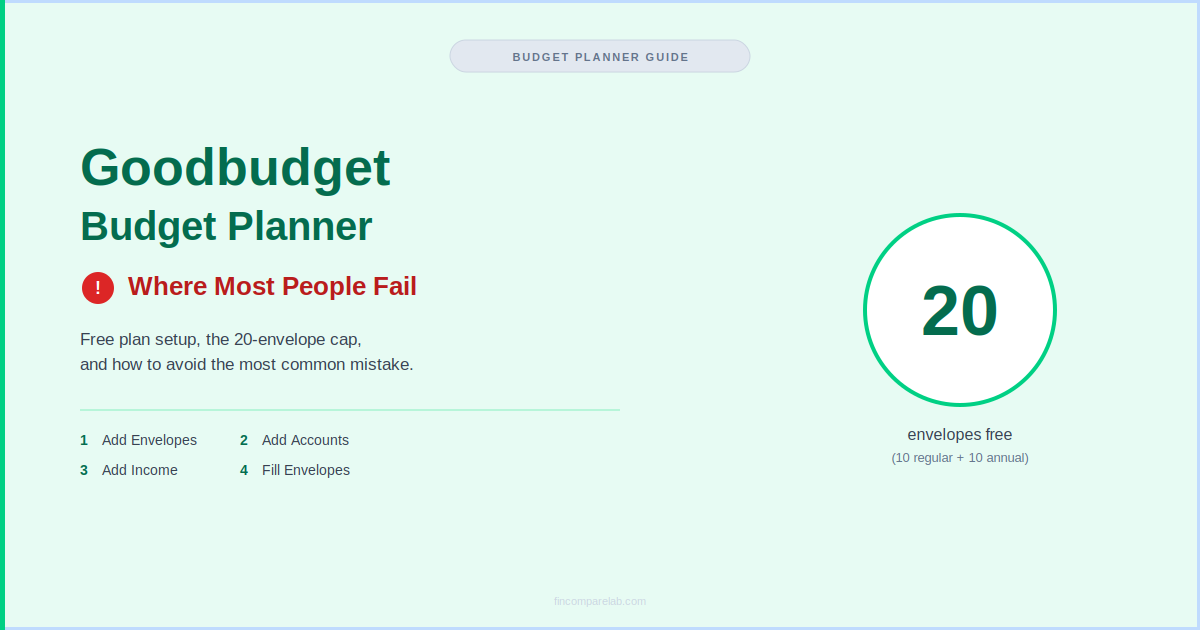
The Goodbudget budget planner uses digital envelopes to split your income into spending categories. Setup takes about 15–20 minutes, but the free plan caps out at 20 total envelopes (10 regular + 10 annual/goal), and building your first budget without knowing that limit is where most people go wrong.
How We Review Apps
In this guide:
- What Is the Goodbudget Budget Planner?
- How to Use Goodbudget for Your First Budget Setup?
- What’s the Biggest Mistake Most People Make When Setting Up Goodbudget?
- How Many Envelopes Does Goodbudget’s Free Plan Actually Allow?
- How Does Goodbudget Envelope Budgeting Work Day to Day?
- Is Goodbudget an Envelope Budgeting App or a Spreadsheet Replacement?
- What Makes an Envelope Budget System App Different From Other Budgeting Apps?
- Does Goodbudget Work for Dave Ramsey’s Envelope System?
- Can Couples Share One Goodbudget Account?
- What Do People Usually Ask About Goodbudget?
What Is the Goodbudget Budget Planner?
The Goodbudget budget planner is a home budgeting app built on the envelope system — you split your paycheck into virtual “envelopes” for things like rent, groceries, and fun money, then only spend what’s left in each one. It’s designed for people who want a hands-on, proven method without carrying physical cash.
Building a working Goodbudget budget planner around that century-old idea is simpler than it sounds. Goodbudget’s own team traces the envelope method back to households that literally stuffed cash into paper envelopes labeled by category, then stopped spending once an envelope ran dry.
Goodbudget digitizes that exact discipline: instead of paper, you get virtual envelopes that sync across your phone and the web, without needing to carry cash or hunt down exact change at checkout.
The name itself is a small piece of positioning worth knowing: Goodbudget was previously known as Easy Envelope Budget Aid, or EEBA, before rebranding. Long-time envelope-method communities online sometimes still reference the older name, though the app and company are the same one you’d find under Goodbudget today.
I’ve worked through the full setup flow directly against Goodbudget’s own getting-started documentation and its current App Store listing, and the core idea hasn’t changed since the app launched: give every dollar a job before you spend it. Where people get tripped up isn’t the concept — it’s the free plan’s envelope ceiling, which I’ll walk through in detail below.
Part of what makes a Goodbudget budget planner practical for real households is that it syncs across the web, iPhone, and Android, so a couple or a family can share one budget from separate phones.
That’s a real strength — it’s one of the few envelope apps that doesn’t lock sharing behind a paid tier entirely, though the free version does cap how many devices can stay in sync at once.
Unlike apps that connect directly to your bank and auto-categorize every purchase, Goodbudget’s free plan expects you to enter transactions by hand. Some people find that tedious. Others find it’s exactly what makes the method work — you can’t overspend an envelope you’re actively watching every day.
Goodbudget envelope budgeting tends to suit people who’ve tried a fully automated tracking app before and found themselves ignoring the notifications, or who’ve struggled to stick with a spreadsheet because nothing forced them to check it.
Learning how to use Goodbudget tends to suit people less well if the main thing they want is a completely hands-off, connect-once-and-forget budgeting experience — for that, an automated tool with bank sync built into every tier is usually a better starting point.
How to Use Goodbudget for Your First Budget Setup?
If you’re still figuring out how to use Goodbudget, here’s the exact setup flow, based on its own getting-started documentation, from a blank account to a working budget.
- Add your envelopes. Start with 8–10 categories that match your real spending — rent, groceries, gas, subscriptions. Resist the urge to build 25 envelopes on day one; you can always add more later once you know your actual spending pattern.
- Add your accounts. Accounts track your real bank balances; envelopes track your spending plan. They’re kept separate on purpose, so you always know both your bank balance and how much of it is actually still available to spend.
- Add your income. Whether you’re paid weekly, biweekly, monthly, or irregularly, you’ll assign incoming money across your envelopes here. Freelancers and gig workers can split a single deposit across multiple envelopes in one pass.
- Fill your envelopes. This is where your income actually gets distributed into each category, on the web, iPhone, or Android — you can do this the moment a paycheck lands, or on a set schedule like the 1st and 15th.
- Record your expenses. Every purchase gets logged against an envelope so you can see, in real time, what’s left to spend before you swipe a card or hand over cash.
None of this requires a credit card up front, and you can complete your entire Goodbudget budget planner setup on the free plan. A first-time setup usually takes 15 to 20 minutes if you already know roughly what you spend each month; it takes longer if you’re figuring out your categories from scratch, which is normal and worth doing carefully.
One thing that trips people up when learning how to use Goodbudget: a naming tip that saves confusion later — keep envelope names short and specific rather than vague. “Groceries” and “Dining Out” work better than a single “Food” envelope if you actually want to see where your money leans.
If you’re paid weekly, fill your envelopes every payday; if you’re on a biweekly or twice-monthly schedule, many people fill halfway through the month and true up any shortfall on the second check. Irregular earners — freelancers, contractors, commission-based work — can fill envelopes in smaller, more frequent passes as deposits land, rather than trying to predict a full month at once.
The catch shows up a little later — which is exactly the mistake covered next.
What’s the Biggest Mistake Most People Make When Setting Up Goodbudget?
The most common misstep is building out envelopes for every possible category before checking the free plan’s limit — and hitting a hard wall before the first paycheck even lands.
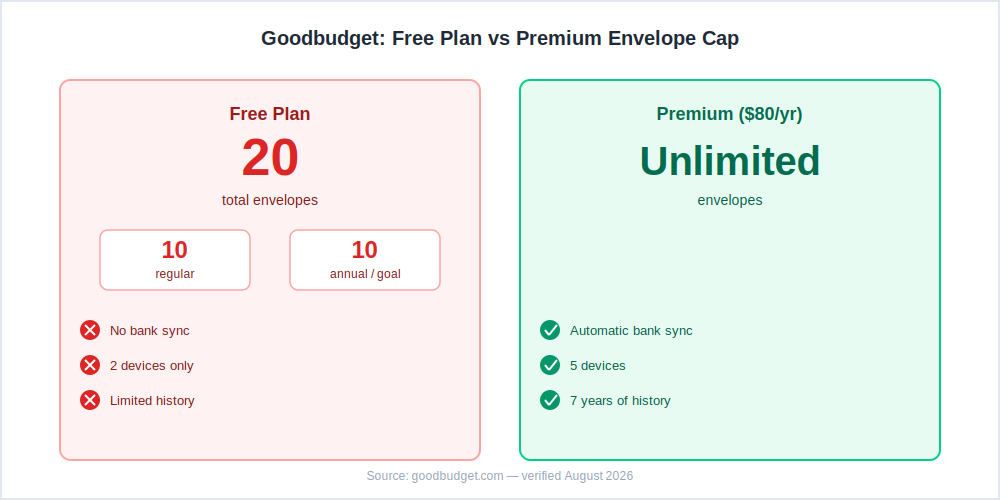
Goodbudget’s free, ad-free plan caps out at 20 total envelopes: 10 regular (day-to-day categories) and 10 annual or goal envelopes (irregular bills, savings targets).
If you’re the type who likes a dedicated envelope for every subscription, every family member’s allowance, and every sinking fund, you’ll blow past 20 fast — and then you’re stuck choosing what to cut or upgrading to Premium at $80 a year sooner than you actually planned to.
Here’s a realistic example of how fast a Goodbudget budget planner can hit that ceiling. Say you set up: rent, groceries, gas, electric, water, internet, phone, streaming, gym, pet care, clothing, gifts, dining out, and a “misc” catch-all — that’s already 14 regular envelopes before you’ve touched a single annual or savings goal.
Add car insurance, holiday spending, an emergency fund, and a vacation fund, and you’ve used all 10 annual slots too. There’s no room left for anything else.
The fix is simple: group similar categories together before you start. One “subscriptions” envelope can absorb streaming, phone, and gym instead of three separate ones. One “home” envelope can cover electric, water, and internet together if you don’t need to track them individually. Treat the free plan’s 20-envelope cap as a design constraint from the very beginning, not a surprise you discover halfway through your first month.
Before you start goodbudget envelope budgeting for real, a useful exercise is to write out your last two months of real spending categories on paper first, then count them. If you land at 14 or fewer combined regular-plus-annual categories, you’ll comfortably fit the free plan.
If you’re closer to 25 or more, decide now whether you’d rather consolidate a few categories or budget for the $80-a-year Premium upgrade from the start, instead of discovering the wall mid-setup and feeling like you have to rush a decision.
How Many Envelopes Does Goodbudget’s Free Plan Actually Allow?
A free Goodbudget budget planner allows exactly 20 envelopes total — 10 regular and 10 annual/goal — shared across 2 devices, with no bank sync and no automatic transaction import.
| Free | Premium ($80/yr) | |
|---|---|---|
| Total envelopes | 20 (10 regular + 10 annual) | Unlimited |
| Devices | 2 | 5 |
| Bank sync | ❌ | ✅ |
| Transaction history | Limited | 7 years |
| Email support | ❌ | ✅ |
Pricing verified from goodbudget.com — August 2026.
For anyone comparing envelope budget system app options, twenty envelopes sounds generous until you’re actually budgeting for a real household with kids, pets, a car, and a mortgage. It’s worth comparing against how other apps structure their free tiers before you commit fully to this one.
My full Goodbudget review breaks down the free-vs-Premium decision in more depth, and the Goodbudget pricing guide has the current $80-a-year figure verified straight from the source. Premium doesn’t unlock a different budgeting method, either — it’s the same envelope system with the ceiling removed, so upgrading never means relearning how the app works.
How Does Goodbudget Envelope Budgeting Work Day to Day?
Goodbudget envelope budgeting works the same way a physical cash-envelope system does, just digitized: money goes into envelopes, spending comes out of envelopes, and you can see your remaining balance in each one at a glance, on any synced device.
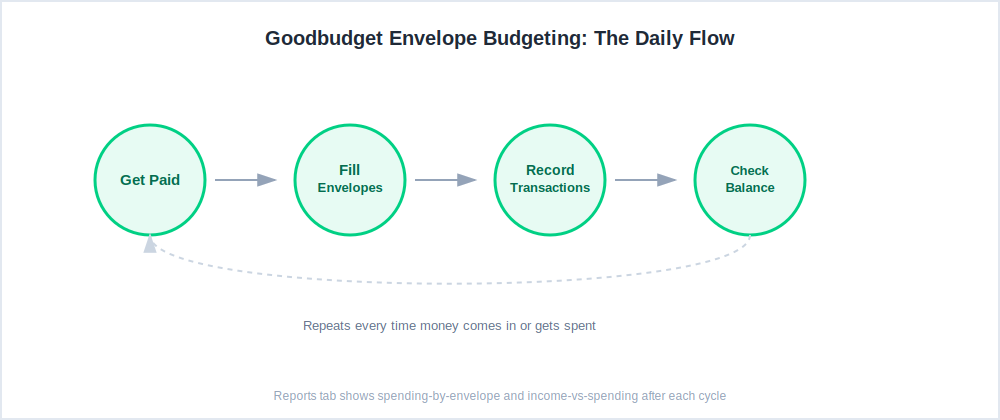
Day to day, that looks like this: you get paid, you “fill” your envelopes according to your plan, and every time you spend money you record it against the matching envelope right from your phone. Goodbudget’s reports tab shows spending-by-envelope as a pie chart and an income-vs-spending view over time, so you can catch overspending before it snowballs into next month’s budget.
If an envelope runs low before the month ends, you have two honest choices: stop spending in that category, or manually move money over from an envelope with room to spare. Goodbudget doesn’t hide this trade-off from you the way an auto-categorized tracking app might — you feel the constraint in real time, which is the entire point of the method.
Inside any Goodbudget budget planner, the Reports tab is where this becomes genuinely useful rather than just a spending log. The spending-by-envelope pie chart shows which categories are eating the biggest share of your paycheck at a glance, month over month, so patterns that are easy to miss transaction-by-transaction become obvious once they’re visualized.
The income-vs-spending report answers a simpler but more important question: are you actually living within what you bring in, or slowly drifting into a deficit? For anyone tracking debt payoff at the same time, the debt progress report adds a third view — a running balance that drops with every debt-payment transaction, separate from your regular spending envelopes.
Goodbudget envelope budgeting also supports dedicated debt envelopes if you’re paying down debt at the same time, that track payoff progress separately from regular spending, using debt-payment and charge transactions to show your balance shrinking over time. Our debt payoff guide and free debt payoff estimator pair well with this approach if debt is part of your budget picture right now.
Is Goodbudget an Envelope Budgeting App or a Spreadsheet Replacement?
As an envelope budgeting app, Goodbudget is purpose-built around the envelope method, not free-form rows, columns, and formulas — that’s the core difference from a spreadsheet.
That’s a meaningful distinction for anyone deciding whether a Goodbudget budget planner or a spreadsheet is the right fit, especially if you’ve been using Google Sheets or a downloaded template to budget until now. A spreadsheet gives you total flexibility but zero built-in structure — you have to design and maintain your own categories, formulas, and running totals by hand.
An app like Goodbudget gives you that structure already built, at the cost of some flexibility, since you’re working within its envelope model rather than free-form cells you can bend to anything.
If you’re coming from a completely manual setup and want to compare Goodbudget against other envelope budgeting app options, our best budgeting apps for beginners roundup is a good next stop. If a totally free option matters most to you, our free budgeting apps guide covers exactly where Goodbudget’s free tier lands against the rest of the field.
The practical test I’d suggest before committing to any envelope budgeting app: try recreating last month’s actual spending inside Goodbudget for a single week. If the envelope structure feels like it’s helping you make faster decisions at checkout — should I buy this, do I have room — it’s doing its job.
If you find yourself fighting the categories or wishing for a blank cell to just type a number into, a spreadsheet or a more flexible tracking app may genuinely suit you better, and that’s a fair conclusion to reach.
What Makes an Envelope Budget System App Different From Other Budgeting Apps?
Calling Goodbudget an envelope budget system app isn’t wrong, but an envelope budget system app and a regular budgeting app aren’t always the same thing. Both terms get used loosely online, but Goodbudget specifically enforces hard spending limits per category rather than just logging what you’ve already spent — that’s the real difference worth caring about.
Some people use “system” to emphasize the underlying method itself (the century-old budgeting system), while “app” emphasizes the software actually doing the work day to day. What matters more than the terminology, though, is whether a given tool enforces hard spending limits per category — true envelope behavior — or simply tracks what you’ve spent after the fact.
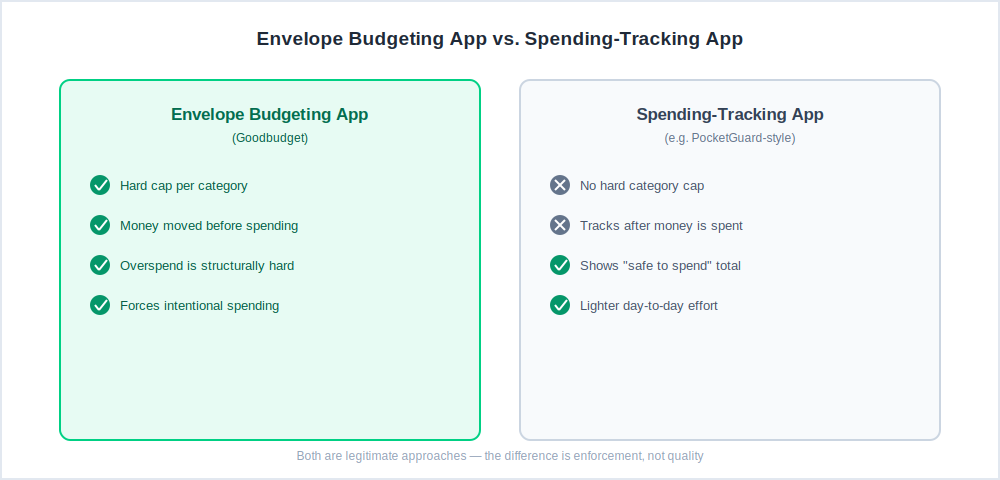
As an envelope budgeting app, Goodbudget compares directly against something like PocketGuard, which shows you “safe to spend” money after bills are covered rather than hard per-category caps, Goodbudget’s approach is stricter by design. That stricter design tends to suit people who’ve overspent using a looser tracking tool before, since Goodbudget makes it structurally harder to dip into next week’s grocery money without noticing.
Our Goodbudget vs PocketGuard comparison goes deeper on this exact distinction if you’re deciding between a true envelope system and a softer spend-tracking approach.
Does Goodbudget Work for Dave Ramsey’s Envelope System?
Goodbudget works fine as a digital version of Dave Ramsey’s cash-envelope method, though it isn’t officially affiliated with Ramsey Solutions the way EveryDollar is.
If Baby Steps and zero-based budgeting are specifically your framework, our EveryDollar review and EveryDollar pricing guide cover Ramsey’s own official app, which mirrors a lot of Goodbudget’s envelope logic but is built around his specific debt-snowball terminology and Baby Steps progress tracking.
Either app can run the underlying method effectively — the choice mostly comes down to whether the official Ramsey branding matters to you, or whether you’d rather have Goodbudget’s slightly more flexible, non-prescriptive envelope structure.
One practical difference: EveryDollar’s free tier is built around manual zero-based budgeting each month with less emphasis on multi-device sharing, while Goodbudget’s free tier leans harder into the envelope-cap tradeoff already covered above.
If you’re specifically working the debt snowball step by step, either app’s debt-tracking features will get the job done — the deciding factor tends to be which interface feels more natural to stick with long-term, since consistency matters more than which app you pick.
Can Couples Share One Goodbudget Account?
Yes — a Goodbudget budget planner is built for sharing a single budget across up to 2 devices on the free plan, or 5 devices on Premium, so couples and families can stay on the same page without both people logging into the same phone.
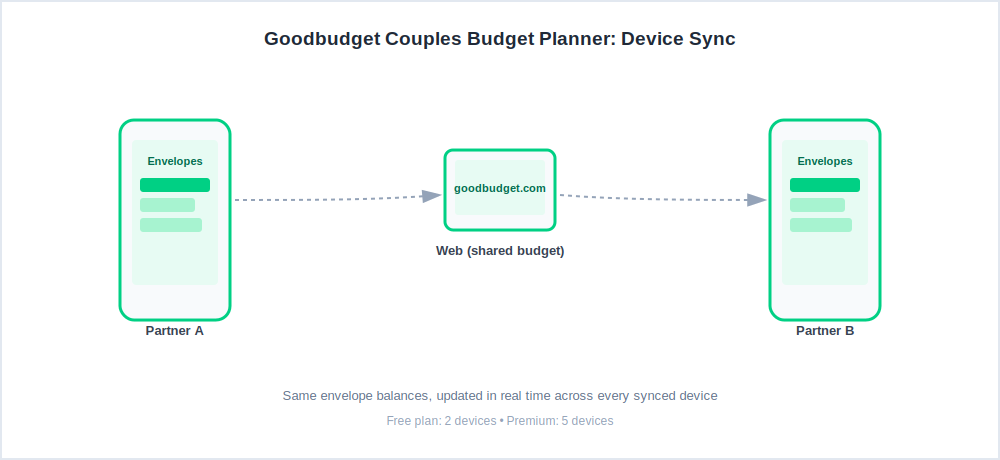
Both partners see the same envelope balances update in real time, whether one person pays the rent and the other buys groceries that same afternoon. Data backs up automatically to Goodbudget’s website, so nobody’s stuck being the sole keeper of the household budget on a single device.
In practice, this matters most in the first few weeks of a shared budget, when both people are still building the habit of recording transactions immediately rather than at the end of the day. A quick sync check — opening the app right after a purchase to confirm the envelope balance dropped — helps catch any missed entries before they pile up into a confusing weekend reconciliation session.
Couples who’ve used Goodbudget for a while often settle into an informal split: one person owns groceries and household envelopes, the other owns bills and subscriptions, simply because it’s easier to remember your own categories.
A short weekly check-in — five minutes, same day each week — tends to catch small discrepancies long before they become a bigger disagreement about where the money actually went.
If couples budgeting is the main reason you’re shopping for an app at all, our best budgeting apps for couples roundup compares Goodbudget against a few other shared-budget options side by side, including apps that lean more on automatic bank syncing than manual entry.
What Do People Usually Ask About Goodbudget?
Is Goodbudget Good for Beginners?
Yes — Goodbudget is one of the more approachable options for people who’ve never budgeted before, since the envelope method is simple to explain and there’s no bank-linking step required to get started. Most beginners can grasp the core idea within their first week, which is faster than most spreadsheet-based approaches take to click.
The tradeoff is that you do have to enter transactions manually, which takes a bit more discipline than an auto-synced app. If you want a broader look at beginner-friendly options, our beginner budgeting apps guide covers where it ranks against alternatives.
How Do You Get Started With Goodbudget?
Download the app, create a free account, add your first 8 to 10 envelopes based on your real spending categories, connect your income, and start recording transactions. No credit card is required for the free plan, and the whole process usually takes about 15 to 20 minutes once you know your rough monthly numbers.
Is the Goodbudget Budget Planner Free to Use?
Yes, Goodbudget has a genuinely usable free plan with 20 total envelopes and 2-device sync. It’s free forever, not a time-limited trial — you only need Premium at $80 a year if you outgrow the 20-envelope cap, need more devices, or want automatic bank sync.
What Happens If You Go Over Your Goodbudget Envelope Limit?
You won’t lose any existing data, but you won’t be able to create a new envelope past 20 on the free plan until you either delete or merge an existing one, or upgrade to Premium for unlimited envelopes.
Many users solve this by consolidating similar categories rather than paying immediately — combining two or three narrow envelopes into one broader one usually frees up enough room without losing real visibility into spending.
Can You Use Goodbudget Without Linking a Bank Account?
Yes — Goodbudget’s free plan is fully manual by design, and even Premium’s bank sync is optional rather than mandatory. Plenty of long-time users prefer entering transactions by hand since it forces more intentional, in-the-moment spending awareness than an automated feed.
How Is Goodbudget Different From a Spreadsheet Budget?
Any envelope budget system app trades spreadsheet-style flexibility for structure. A spreadsheet gives you unlimited flexibility but no built-in structure, no mobile-friendly transaction entry, and no automatic syncing between household members. Goodbudget trades some of that raw flexibility for a ready-made envelope structure and shared, real-time mobile access.
If you’ve ever abandoned a budgeting spreadsheet after a few weeks because updating it felt like a chore, that’s usually a sign the structure — not the discipline — was the missing piece.
Does Goodbudget Sync Automatically With My Bank?
Only on the Premium plan. The free plan is manual-entry only, which is worth knowing before you commit if automatic bank sync is a must-have feature for you rather than a nice-to-have.
Some users run a hybrid approach — checking their bank app once a day and logging transactions into Goodbudget in a batch — which cuts down on manual-entry friction without needing Premium. Our personal finance software roundup covers a few apps built specifically around automatic syncing if that’s the priority for you instead.
Setting up your Goodbudget budget planner the right way from the start — envelopes grouped sensibly, free-tier limits factored in before you build — means you won’t hit that 20-envelope wall halfway through your first month.
From here, the Goodbudget pricing guide is the natural next stop if you’re deciding whether Premium is worth it yet, or the irregular income guide if your paycheck timing is the bigger challenge you’re solving for right now.
