
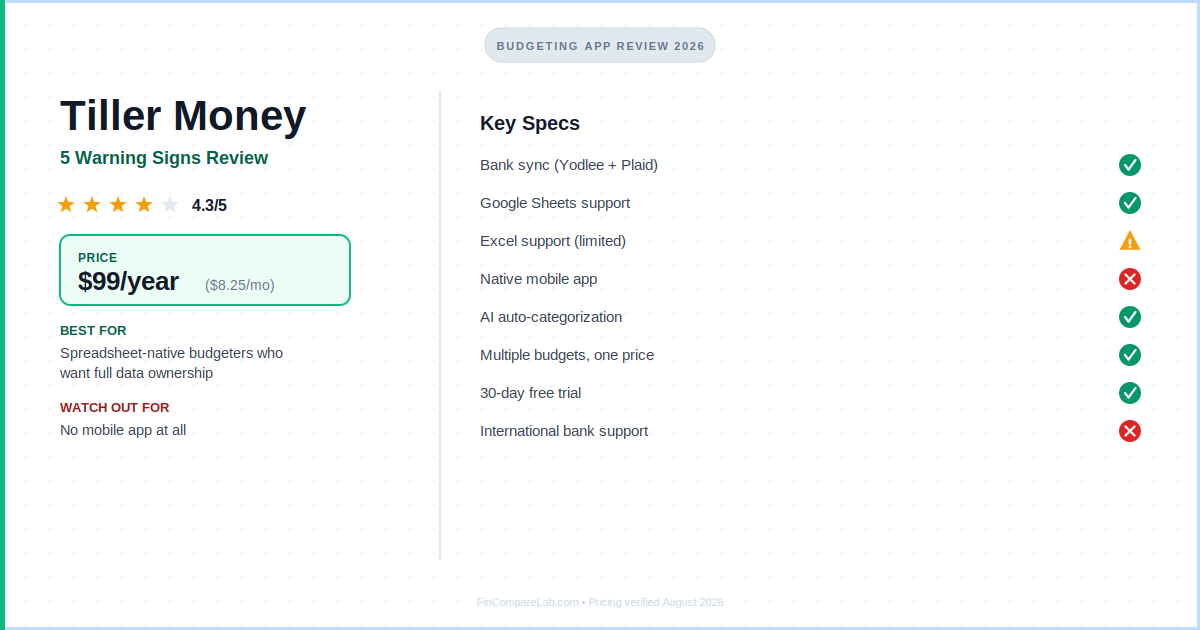
This Tiller Money review covers everything you need to know before signing up: pricing, features, real user complaints, and exactly who it’s built for.
⚡ Quick Verdict
Tiller Money is the only budgeting tool that automatically feeds your real bank transactions into Google Sheets or Excel every day. At $99/year, it’s a few dollars cheaper than the app-based competition, but it’s built for spreadsheet people. If you hate spreadsheets, stop reading now. If you love them, you’ll wonder how you survived without it.
Price: $99/year ($8.25/mo)
Trial: 30 days (card required)
Platform: Google Sheets + Excel (no mobile app)
Try Tiller Money Free for 30 Days →
How We Review Apps · Pricing verified from tiller.com, 15 August 2026
Table of Contents
- What is Tiller Money?
- How does Tiller Money work?
- How much does Tiller Money cost?
- What features does Tiller Money include?
- What does Tiller Money do better than other budgeting apps?
- What are the 5 warning signs before you pay for Tiller Money?
- How does Tiller compare to YNAB and Monarch?
- Is Tiller Money safe?
- What does Reddit say about Tiller?
- Who should use Tiller Money?
- What are the most common questions about Tiller Money?
What is Tiller Money, and is it actually a budgeting app?
Tiller Money is a personal finance service that automatically syncs your bank transactions into a Google Sheet or Microsoft Excel spreadsheet, every single day. No manual entry. No CSV exports. No logging into four different apps.
Founded in Seattle in 2015 by Peter Polson, Tiller sits in a category of its own. It’s not a budgeting app in the traditional sense. Think of it as the connective tissue between your bank and your spreadsheet. You bring the spreadsheet skill; Tiller brings the automation.
That positioning is the key thing to understand in any Tiller Money review. Every other budgeting app locks you into their interface, their categories, their charts. Tiller hands the data to you and gets out of the way. That’s either liberating or terrifying, depending on who you are.
You’ll sometimes see the company referred to as TillerHQ or just Tiller.com, same product, same team, just different branding you’ll bump into across their site and support docs. Under any name, the pitch behind tiller budgeting stays the same: automation without giving up control of your own numbers.
How does Tiller Money work?
The core mechanic is simple. You connect your bank accounts through Tiller’s console. From there it pulls data via Yodlee and Plaid from over 21,000 US financial institutions. Once connected, Tiller imports your transactions and account balances into your chosen spreadsheet once per day.
You install the Tiller Money Feeds add-on in Google Sheets or Excel. From there, you either use Tiller’s pre-built Foundation Template (a full budget dashboard out of the box) or power your own custom sheet. The Foundation Template includes tabs for monthly budget, yearly budget, balances, and spending reports, all populated automatically.
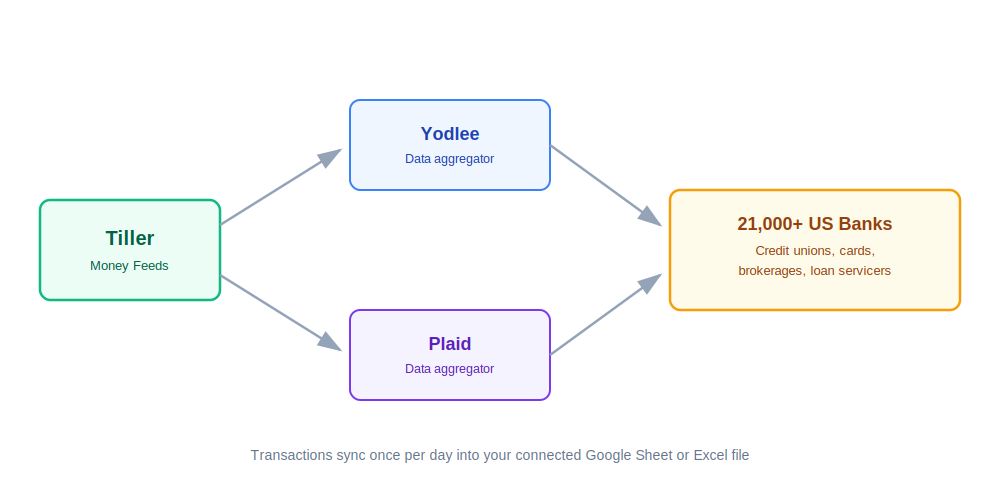
Tiller pulls your transactions through two separate data aggregators, Yodlee and Plaid, then drops them straight into whichever spreadsheet you’ve connected.
Need something more specific? Tiller’s free Community Solutions library has dozens of add-on templates built by users: debt snowball calculators, quarterly tax trackers, net worth dashboards, even a simple business P&L sheet. If debt payoff is your main goal, I’ve also put together a full guide to getting out of debt fast that pairs well with Tiller’s debt planner template.
How much does Tiller Money cost?
Tiller has one plan, one price: $99/year (that’s $8.25/month). No monthly billing option. No tiers. No upsells.
The 30-day free trial requires a credit card, but you won’t be charged until after the trial ends. You can cancel anytime. Tiller also offers a full refund if you contact support, they stand behind it with a satisfaction guarantee.
Students get Tiller free for one full year. Fill out the student form on their website with your .edu email. Same deal as YNAB’s student offer, a genuine perk, not a watered-down version.
I’ve broken down every plan detail, the trial fine print, and how the student offer actually works in a separate Tiller Money pricing guide, if you want the full picture before you commit a card number.
| App | Annual Cost | Monthly Cost | Free Trial |
|---|---|---|---|
| Tiller Money | $99/yr | $8.25 | 30 days |
| YNAB | $109/yr | $14.99 | 34 days |
| Monarch Money | $99.99/yr | $14.99 | 7 days |
| Quicken Simplifi | $47.88/yr (promo) | $3.99 | 7 days |
Pricing verified from official websites, August 2026.
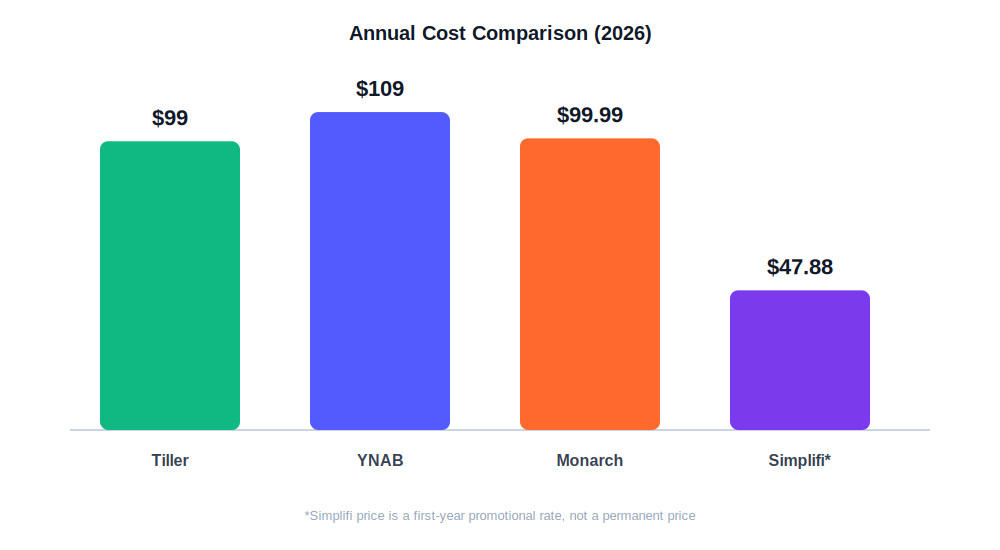
Line the three up and the gap that used to matter has mostly closed, Tiller and Monarch now sit within a dollar of each other.
Here’s the thing worth being upfront about: Tiller’s price advantage isn’t what it used to be. At $99/year it’s only $10 cheaper than YNAB, and it’s now basically tied with Monarch Money at $99.99/year. A 99-cent difference doesn’t move anyone’s decision. Simplifi’s promo rate still undercuts everyone, but that’s a first-year-only price, not a permanent one. If you’re choosing Tiller for the savings alone, do the math first. If you’re choosing it for what it actually does differently, the price barely factors in.
What features does Tiller Money include?
Tiller’s feature set is smaller on paper than a typical budgeting app, but everything it does have is built around one job: keeping your spreadsheet current without you touching it.
How does Tiller’s automated bank feed work?
Tiller connects to 21,000+ US banks, credit card accounts, brokerages, and loan servicers via Yodlee and Plaid. If your bank is supported by either aggregator, which covers the vast majority of US institutions, then it works with Tiller. Transactions land in your sheet once per day, or you can force a manual refresh anytime from the Tiller console.
What is the Tiller Foundation Template?
This is the starting point for most users. It’s a pre-built Google Sheet with tabs for monthly budgets, yearly budgets, account balances, and a visual spending dashboard. It looks genuinely polished, not like a janky personal spreadsheet.
One important note: the Foundation Template is Google Sheets only. The Excel version is more limited and has fewer templates available. If you’re an Excel-first person, expect a slightly rougher experience.
What is AutoCat and how does it categorize transactions?
AutoCat lets you build custom rules to auto-categorize transactions. “If description contains ‘Trader Joe’s’ → Groceries.” You build the rules once; the system applies them forever. It’s fully customizable. You can get granular or keep it simple.
Does Tiller Money use AI to categorize transactions?
This is a big deal. Tiller rolled out AI-powered transaction categorization in late 2024 using a large language model. It learns from your past categorizations and gets smarter over time. For Google Sheets users, this addresses the most common historical complaint about Tiller: manual categorization was tedious.
AI Suggest is currently Google Sheets only. Excel users still rely on AutoCat rules.
What templates does the Tiller Community Solutions library include?
A free gallery of user-built templates you can install directly into your Tiller sheet: debt payoff planners, net worth trackers, quarterly tax estimators, business P&L sheets, and more. This is genuinely one of Tiller’s strongest assets. It extends the platform’s power significantly without adding cost. If tracking your overall net worth is the goal rather than day-to-day spending, it’s worth comparing Tiller’s approach against the dedicated options in my best net worth tracking apps roundup.
Does Tiller Money send daily spending alerts?
Each morning, Tiller sends a summary email with your recent transactions and account balances. It’s a lightweight way to stay aware of your finances without opening a spreadsheet every day.
Can you run multiple budgets under one Tiller subscription?
Unlike most budgeting apps, Tiller lets you run multiple budgets simultaneously. Freelancers and side-hustle people love this. You can track personal finances and a small business in completely separate sheets under one $99/year subscription.
What does Tiller Money do better than other budgeting apps?
Tiller’s real strengths have nothing to do with price anymore. They’re about control, ownership, and flexibility that no app-based competitor offers.
- Total customization. Your budget, your rules, your structure. No budgeting app philosophy forced on you. Want 150 spending categories? Done. Want to track biweekly instead of monthly? Easy.
- You own your data. Transactions live in your Google Drive or OneDrive, not on Tiller’s servers. Cancel tomorrow and every row of data stays yours forever. No vendor lock-in.
- Slightly cheaper, but that’s not really the point anymore. At $99/year it undercuts YNAB by $10 and sits almost exactly level with Monarch. The real case for Tiller isn’t the price tag. It’s what you get for it.
- Google Sheets collaboration. Shared access is built in. Couples can both view and edit the same sheet in real time with zero extra cost. No second subscription needed. If shared budgeting is the priority, my best budgeting apps for couples roundup shows how this stacks up against dedicated couples features elsewhere.
- Multiple budgets, one subscription. Run personal and business finances in separate sheets. Perfect for freelancers, landlords, or anyone with side income.
- AI Suggest genuinely helps. The 2024 AI categorization update fixed the biggest historical pain point. It’s not perfect but it’s a massive time saver.
- Strong support and community. US-based customer support plus an active community forum full of power users who’ve solved every problem you’ll encounter.
What are the 5 warning signs before you pay for Tiller Money?
Tiller earns its loyal following honestly, but there are five things I’d want to know before handing over a card number.
- The price advantage you’re expecting isn’t really there anymore. Tiller used to undercut Monarch Money by over $20 a year. Now it’s a 99-cent gap. If cost was your main reason for considering Tiller over an app-based competitor, that reason has mostly disappeared. You’re choosing it for customization and data ownership now, not savings.
- No native mobile app, at all. If you searched for a tiller money app to check your balance from your phone, I have bad news: there isn’t one. You can access your sheet through the Google Sheets or Excel mobile apps, but scrolling through rows of transactions on a small screen is genuinely painful. If you track spending on the go, Tiller will frustrate you.
- The learning curve is real, and it’s rougher if you’ve never budgeted before. The Foundation Template is polished, but setting up AutoCat rules, understanding the sheet structure, and customizing it to your needs takes real time. If you’re new to budgeting entirely, there’s no built-in methodology like YNAB’s 4 Rules or EveryDollar’s Baby Steps to guide you. You’re on your own to figure out what “good” looks like.
- Excel users get the worse version of the product. The Foundation Template is Google Sheets only, and so is AI Suggest. Excel gets fewer templates and manual AutoCat rules only. If you’re a Windows/Excel person, you’re paying the same $99 for a noticeably thinner experience.
- Bank sync can still break. Tiller uses both Yodlee and Plaid for bank connections. Plaid was added as a second aggregator in May 2026, which improved reliability. But connections still drop occasionally for some banks, requiring a manual reconnect. Not a daily problem, but worth knowing going in.
How does Tiller compare to YNAB and Monarch?
Tiller wins on customization and data ownership; YNAB and Monarch win on mobile access and a guided experience out of the box. Price barely enters the decision at all now.
| Tiller Money | YNAB | Monarch Money | |
|---|---|---|---|
| Annual price | $99 | $109 | $99.99 |
| Mobile app | ❌ None | ✅ iOS + Android | ✅ iOS + Android |
| Customization | ✅ Unlimited | ⚠️ Limited | ⚠️ Moderate |
| Data ownership | ✅ Your Google Drive | ❌ YNAB servers | ❌ Monarch servers |
| Couples sharing | ✅ Free (Google Sheets) | ✅ 1 sub (up to 6) | ✅ Partner access |
| Budgeting method | Your choice | Zero-based (4 Rules) | Flexible tracking |
| Investment tracking | ✅ Basic (via feeds) | ⚠️ Limited | ✅ Strong |
| Student discount | ✅ 1 year free | ✅ 1 year free | ❌ None |
| Learning curve | ⚠️ Moderate-High | ⚠️ Moderate | ✅ Low |
Pricing verified from official websites, August 2026.
The headline difference isn’t price anymore. It’s mobile access versus customization. For someone who lives in spreadsheets, Tiller’s data ownership angle is genuinely meaningful, especially if you’ve ever lost your Mint history to a shutdown. For a full side-by-side breakdown against YNAB specifically, see my YNAB vs Tiller comparison.
Is Tiller Money safe?
Yes, and this is actually one of Tiller’s stronger selling points versus the competition.
Tiller uses bank-grade 256-bit AES encryption and never stores your bank login credentials. Your transaction data doesn’t live on Tiller’s servers. It lives in your personal Google Drive or Microsoft OneDrive. That means Tiller employees cannot see your financial data.
Two-factor authentication (2FA) is supported at the Google account level. Chase and Citi customers can connect via direct open banking, with no third-party aggregator needed for those banks, which further reduces security exposure.
Tiller also has a strict no-ads, no-data-selling policy. They make money from the $99 subscription and nothing else.
What does Reddit say about Tiller?
The Reddit personal finance community has a consistent opinion on Tiller: it’s exceptional for the right person, but it’s very easy to buy it for the wrong reasons.
“Let’s be honest… spreadsheets are built for finances. Nothing is more flexible. Budgeting apps are frustrating because every one has something it just doesn’t do. That’s where Tiller comes in.”
By Ben Parkes, Google Marketplace Review, Nov 2025
“I love how it pulls all my accounts into one place automatically, no more manual copying and pasting from Quicken into spreadsheets. Now it all flows automatically.”
By Kevin Ball, Microsoft AppSource Review, Dec 2025
“Tiller, I mean, I love a good spreadsheet, but it’s a little too much DIY for me. And there’s no mobile app.”
By Community review via Reddit/budgeting, 2025
“The support is next-level. I love their company values and feel safe using their service. Highly recommend plunging in if you’re on the fence!”
By Sasha Wooldridge, Google Marketplace Review, March 2026
The pattern is clear. Spreadsheet-native users are genuinely enthusiastic, often describing it as the tool they didn’t know existed. People expecting a regular app experience leave disappointed. The no-mobile-app complaint comes up constantly, but established users treat it as a non-issue because they do their budget review at a desk anyway.
One nuance that comes up in r/personalfinance threads: Tiller is especially popular with Mint refugees who had built complex custom spreadsheets and wanted automation without sacrificing control. That audience is a perfect fit.
Who should use Tiller Money?
Given the five warning signs above, Tiller isn’t the right fit for everyone, but for a specific kind of user, it’s genuinely hard to beat.
Use Tiller Money if:
- You already live in Google Sheets or Excel and want your bank data pulled in automatically
- You track finances at a desk, not on your phone
- You want total control over categories, reports, and structure, with no app philosophy imposed on you
- You’re a freelancer, landlord, or side-hustler who needs to run multiple budgets under one subscription
- You’re a couple who wants shared budget access without paying for two accounts
- You came from Mint and had custom spreadsheet workflows you want to automate
Look elsewhere if:
- You need a mobile app to log transactions on the go. Try Monarch Money or Copilot instead
- You’re a complete budgeting beginner who needs a guided methodology. YNAB is far better for this
- You’re on a tight budget and want something free. Check out Goodbudget
- You prefer Android and need a first-rate app experience. Tiller simply doesn’t compete on mobile
- You’re not comfortable with spreadsheets and don’t plan to become comfortable with them
What are the most common questions about Tiller Money?
Here are the questions that come up most in every Tiller Money review’s comment section, based on Reddit threads and reader emails I get after publishing pieces like this one.
Does Tiller Money have a mobile app?
No. Tiller has no native mobile app. You can access your spreadsheet through the Google Sheets or Microsoft Excel mobile apps, but there’s no dedicated Tiller interface on your phone. This is the single biggest dealbreaker for most users considering Tiller.
Is Tiller Money worth it?
Yes, if you’re a spreadsheet person, and if you’re going in for the customization and data ownership rather than the price. At $99/year ($8.25/month), it’s no longer meaningfully cheaper than Monarch Money, so the “worth it” case now rests on what Tiller does differently, not on saving money. If you’re not a spreadsheet person, it’s not worth the setup time regardless of price.
How much does Tiller Money cost?
Tiller Money costs $99/year ($8.25/month), one plan, no monthly billing option, no upsells. A 30-day free trial is available with a credit card. Students with a valid .edu email get the full product free for one year. At $99/year, Tiller is $10 cheaper than YNAB and roughly a dollar cheaper than Monarch Money. That’s a gap small enough that it shouldn’t be your main reason to choose it.
Does Tiller Money work with Excel?
Yes, but with caveats. Tiller supports Microsoft Excel, but the Excel experience is noticeably limited compared to Google Sheets. The Foundation Template and AI Suggest feature are Google Sheets-only. Excel users get fewer templates and rely on AutoCat rules for categorization.
What banks does Tiller connect to?
Over 21,000 US financial institutions via Yodlee and Plaid, major banks, credit unions, credit cards, brokerages, and loan servicers. Chase and Citi users can connect via direct open banking without sharing credentials.
Does Tiller Money work outside the US?
No. Tiller is US-only. There’s no support for international banks through either Yodlee or Plaid, and the Foundation Template and community resources all assume US-based accounts. If your bank isn’t US-based, Tiller won’t work for you, full stop.
How does Tiller compare to YNAB?
Tiller is cheaper by $10 a year and more customizable, but YNAB has a much better mobile app, a proven budgeting methodology (the 4 Rules), and stronger beginner support. Choose Tiller if you love spreadsheets; choose YNAB if you want a complete budgeting system with guidance. For a full side-by-side breakdown, see my YNAB vs Tiller comparison.
Is there a Tiller Money student discount?
Yes. Students with a valid .edu email can use Tiller free for one year. It’s the same offer YNAB runs. Fill out the student form on tiller.com. No promo code needed.
Is Tiller Money safe to use?
Yes. Tiller uses 256-bit AES encryption and never stores your bank login credentials. Your transaction data lives in your own Google Drive or OneDrive, not on Tiller’s servers, meaning Tiller employees can’t see your financial data. Tiller has a strict no-ads, no-data-selling policy and makes money solely from the $99 subscription.
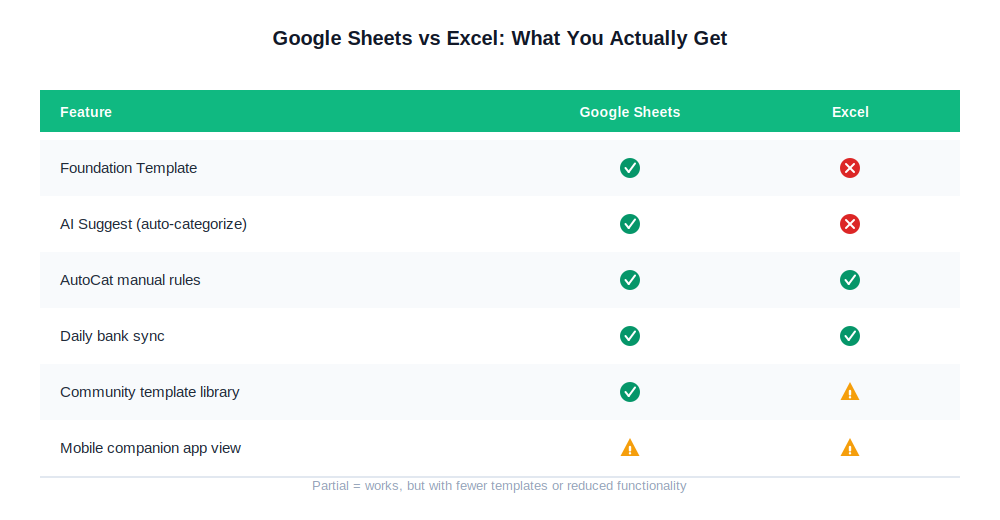
If you’re choosing between spreadsheet platforms specifically for Tiller, Google Sheets is the clear pick. Excel users lose the Foundation Template and AI Suggest.
Read Next
- YNAB Review 2026: Is It Worth $109/Year?
- Monarch Money Review 2026: Best Mint Replacement?
- YNAB vs Monarch Money 2026: Which Is Right for You?
- Tiller Money Pricing 2026: Full Plan Breakdown
- Best Budgeting Apps for Beginners 2026
- Best Free Budgeting Apps 2026
- YNAB vs Tiller 2026: $109 App vs $99 Spreadsheet
- Quicken Simplifi Review 2026: Is $48/Year Worth It?
