
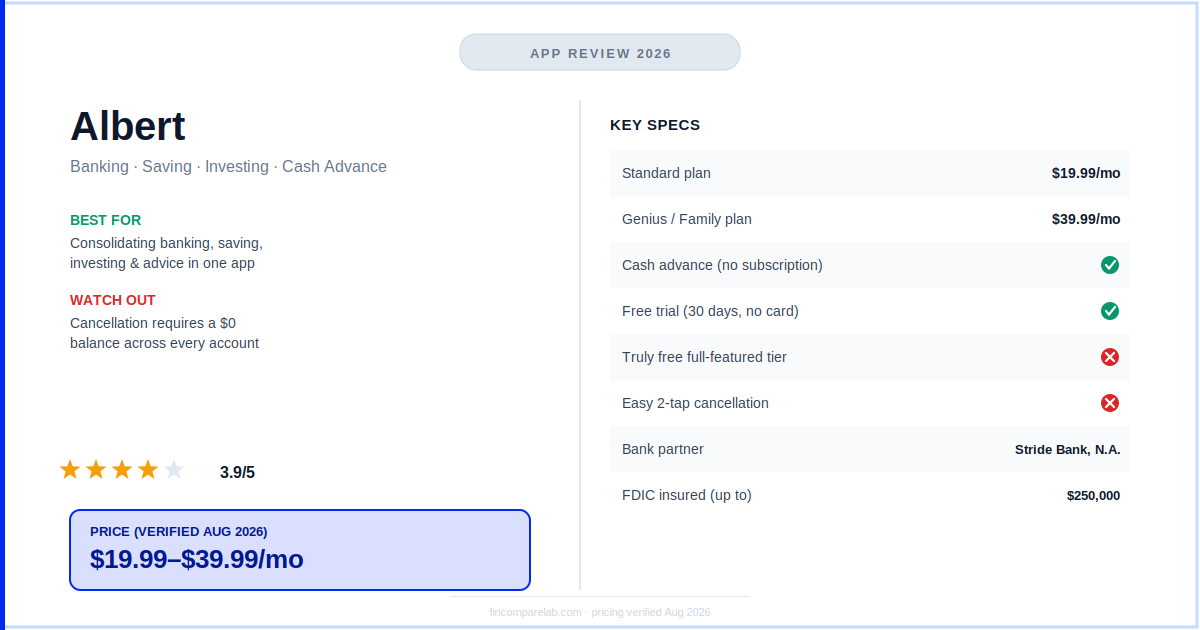
This Albert review breaks down what the Albert app actually costs in 2026, whether Albert Genius pricing is worth it, and what happens when you try to cancel — because a lot of what’s currently online about Albert is out of date.
⚡ Quick Verdict
Albert is a legitimate all-in-one finance app — banking, automated saving, investing, and human advisors in one place — but it’s not cheap anymore. I checked it against the current official pricing and found most competing reviews are quoting a price that no longer exists.
How We Review Apps · Pricing verified from albert.com — 3 August 2026
What will this Albert review cover?
Here’s exactly what’s ahead, in the order it’s answered:
- What does this Albert review actually find in 2026?
- What is Albert and who is it actually for?
- What does Albert Genius pricing actually cost in 2026?
- Is the Albert cash advance really free to use?
- Is Albert app legit and safe to use?
- What is it actually like to cancel Albert?
- What do real Albert users say in reviews?
- How does Albert compare to Dave, EarnIn, and MoneyLion?
- Can you use Albert for free?
- What does the budgeting community say about Albert?
- Who should actually get Albert in 2026?
- What do people still ask about the Albert app?
What does this Albert review actually find in 2026?
Albert is a legitimate all-in-one finance app combining banking, automated saving, investing, and human financial advisors. But its Genius subscription now costs $19.99–$39.99 a month — far more than the $14.99 figure still quoted across most Albert reviews.
The cash advance itself no longer requires a subscription at all.
That gap matters, and it’s the main reason I wrote this Albert review now rather than pointing you to an older post. If you’ve already read another Albert app review this year, there’s a good chance it’s still citing that old $14.99 number.
If you’re comparing Albert to a $14.99 competitor using a review published even a few months ago, you’re not comparing what you’ll actually be charged. I pulled the current numbers directly from Albert’s own help center and its live App Store and Google Play listings, both of which confirm the same $19.99–$39.99 range as of this writing.
I’ll walk through exactly what each tier includes, whether the cash advance is worth chasing on its own, and the one recurring complaint that shows up more than any other across real, dated user reviews: getting out.
What is Albert and who is it actually for?
Albert positions itself as a single app for everything — a checking account, a savings account that moves money for you automatically, commission-free investing, fee-free cash advances up to $1,000, and text-based access to human financial “Geniuses” who’ll answer real questions about your money.
That’s a genuinely different pitch than a single-purpose budgeting app like YNAB or a single-purpose cash-advance app like EarnIn. If you’re 25–34, dual-income, and tired of juggling four separate apps for banking, saving, and investing, Albert’s consolidation is the actual appeal.
If you just want a fast, cheap cash advance before payday, or a lean budgeting tool without the extras, Albert is probably more app — and more cost — than you need.
Picture the difference with a real scenario: someone splitting rent for the first time, still building an emergency fund, and dabbling in their first index fund purchase gets genuine value out of having all three sitting inside one login with a real person to text when a question comes up. If tracking that combined net worth picture is the main draw for you, my best net worth tracking apps roundup shows how Albert stacks up against dashboard-only tools built specifically for that job.
Someone who just needs $150 to cover groceries until Friday is better served by a free, tip-based advance app — Albert’s broader toolkit isn’t the problem there, the $19.99–$39.99 monthly floor is. That distinction is really the spine of this Albert review: Albert isn’t overpriced for what it does, it’s just priced for people using more of what it does.
If Albert’s toolkit sounds broader than you need, my Albert alternatives roundup breaks down cheaper single-purpose options.
What does Albert Genius pricing actually cost in 2026?
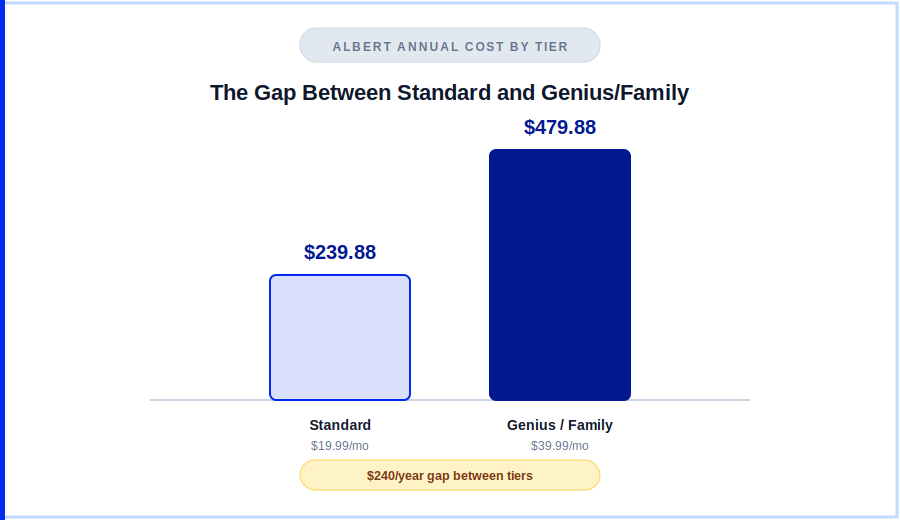
Here’s the full breakdown of Albert Genius pricing, confirmed directly from Albert’s help center and matched on its live App Store and Google Play listings — the same figures I keep updated in my dedicated Albert pricing guide:
| Plan | Price | What’s included |
|---|---|---|
| Standard | $19.99/mo | Investing, identity protection, credit monitoring, debit cash back, fee-free in-network ATMs |
| Genius | $39.99/mo | Everything in Standard, plus the AI/human financial assistant |
| Family | $39.99/mo | Standard + Genius benefits for up to 4 family members |
Pricing verified from Albert’s help center and live App Store/Google Play listings — August 2026.
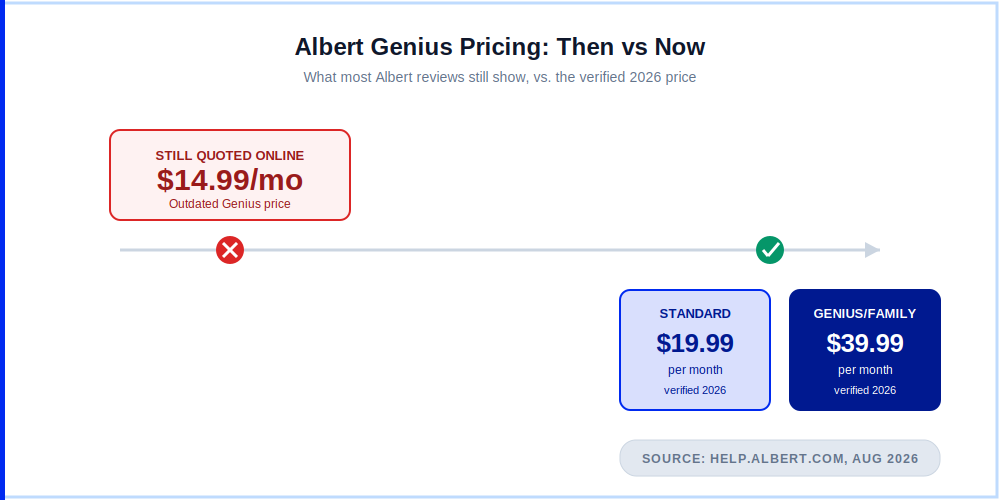
Run the math on Albert Genius pricing and you’re at roughly $480 a year for the top tier — about $1.30 a day, or a small coffee’s worth. That’s a fair price if you’re actually using the advisor chat, the investing account, and the cash-back perks every month. It’s a bad deal if you signed up for one feature and forgot to check what else you’re paying for.
Every plan comes with a 30-day free trial and no card is required to start browsing, though you’ll need to link a bank account to unlock most features. Subscriptions auto-renew until you cancel — more on how that actually goes in a minute.
It’s also worth being specific about why this Albert Genius pricing update matters for anyone comparison-shopping right now: a $14.99/mo figure and a $39.99/mo figure aren’t a rounding error, they’re a $300-a-year difference. If you’re weighing Albert against a flat-fee budgeting app like YNAB ($109/yr) or a tip-based advance app like EarnIn, using the wrong Albert number skews the whole comparison in Albert’s favor.
Anchor your decision to the $19.99–$39.99 range confirmed directly from Albert’s own help center and live store listings, not to whatever number an older post happens to still be running. For a closer look at how that gap plays out against apps already in our own roster, see Albert vs Cleo and Albert vs Rocket Money.
Is the Albert cash advance really free to use?
Albert’s Instant advance now works without a paid subscription at all — a genuine change from Albert’s older setup, where you needed Genius just to qualify. Advances range from $25 to $1,000, though the algorithm that sets your limit is conservative: most users start closer to $25–$50 and work up over months of consistent account activity, not the headline $1,000.
Standard delivery (2–3 business days) is free. Instant delivery to your bank costs a small express fee, waived if you’re willing to wait. There’s no credit check — not even a soft pull — because Albert isn’t looking at your credit, it’s looking at your deposit and spending history.
If your only reason for downloading Albert is the advance, you can now do that without paying a monthly fee. That wasn’t true a year or two ago, and it still isn’t reflected in a lot of the review content ranking for “Albert app” today.
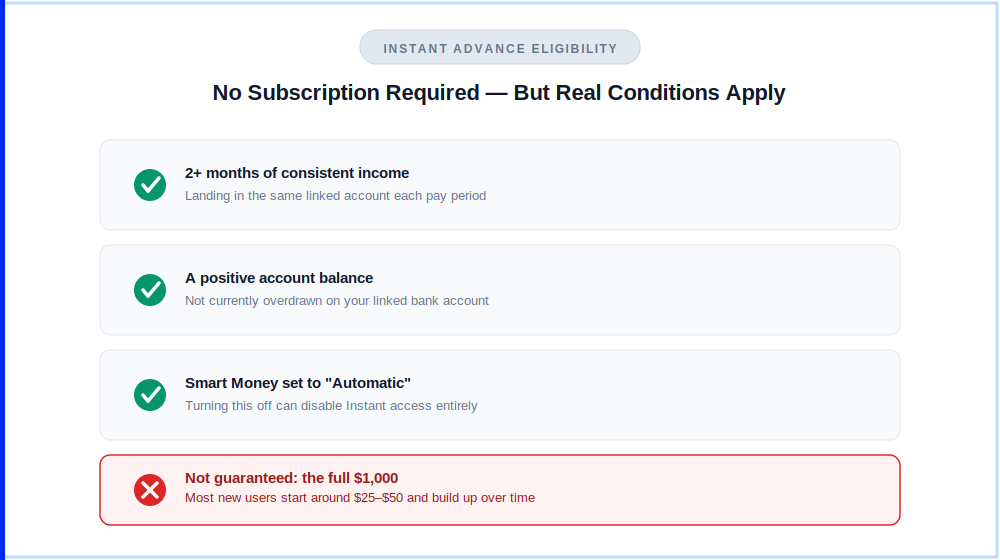
Eligibility does come with real conditions worth knowing before you connect a bank account: you’ll generally need at least two months of consistent income landing in the same linked account, a positive balance rather than an overdraft, and Smart Money — Albert’s automated savings feature — set to its “Automatic” schedule.
Turn that off and Instant access goes with it, which is a detail that trips up a fair number of users who only wanted the advance and didn’t realize the two were linked. None of this affects Albert Genius pricing directly, since Instant now sits outside the paid tiers entirely — but it does mean “no subscription required” isn’t the same thing as “no strings attached.”
Is Albert app legit and safe to use?
If you searched is Albert legit before landing here, the short answer is yes — the harder question is whether it’s worth the price, not whether it’s trustworthy.
Is Albert app legit enough to trust with your paycheck? Yes. Albert isn’t a bank itself, but its cash and savings accounts are held through Stride Bank, N.A., FDIC-insured up to $250,000.
Investing is handled through Albert Securities, a FINRA/SIPC member, so brokerage assets carry standard investor protections rather than FDIC coverage. The app uses encryption in line with what you’d expect from any mainstream fintech, and neither the cash advance nor the checking account requires a credit check that would show up on your report.
Worth flagging: several older reviews still describe Albert’s banking partner as Sutton Bank. Albert’s current live app store listings name Stride Bank, N.A. instead — another detail that’s shifted since most of the existing Albert content was written, and one more reason the “is Albert app legit” question deserves a fresh answer rather than a recycled one.
The Albert Genius AI assistant is also worth a specific safety note: Albert’s own disclosures state it can make mistakes, and its recommendations should be treated as research rather than formal financial advice.
That’s a reasonable caveat for any AI-assisted feature in 2026. But it’s worth knowing going in if you’re leaning on Genius for decisions with real money attached — cross-check anything significant against a second source first.
If legitimacy is your main concern rather than price, my is Monarch Money safe guide walks through the same kind of due-diligence checklist for a pure budgeting-dashboard alternative.
What is it actually like to cancel Albert?
This is the complaint that shows up more than any other in this Albert review’s research, and it’s not a fringe issue. It’s the single most common theme across dated, verified App Store and Google Play reviews, several with over 1,000 people marking them as helpful.
The pattern is consistent: users report the cancel option is buried several menus deep inside the help center rather than sitting in account settings, that account balances have to hit exactly zero before deactivation will process, and that it can take multiple attempts — and in some cases an extra billing cycle — before charges actually stop.
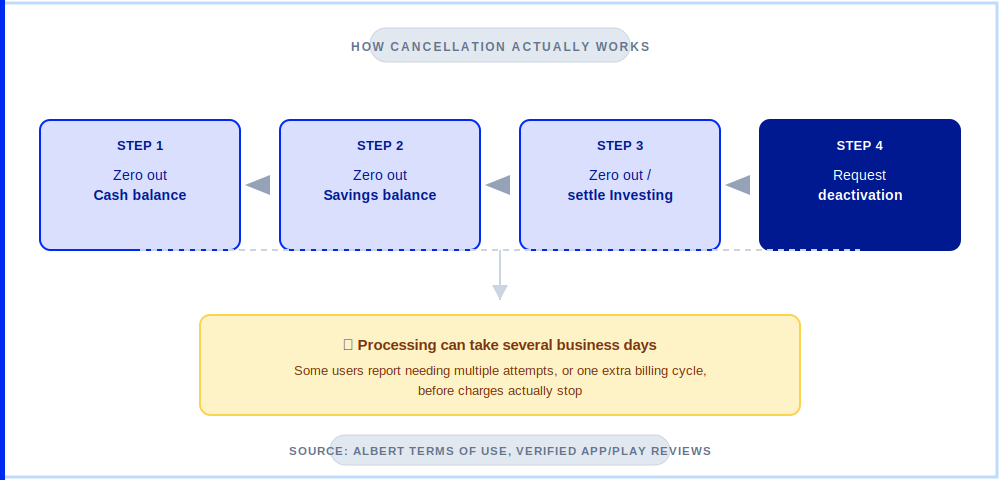
⚠️ Watch out: before you subscribe, know that cancelling means zeroing out every linked Albert account first — savings, investing, and Cash balance — which can itself take several business days. Budget that time in before your next renewal date, not after.
If you’ve already decided Albert isn’t for you, I’ve laid out the exact step-by-step process — including how to avoid getting hit with an extra billing cycle — in my how to cancel Albert subscription guide.
To Albert’s credit, its support team does respond to these complaints in public reviews and generally resolves them. But “generally resolves it eventually” is a different experience than “cancel in two taps,” and it’s worth going in with that expectation set correctly.
Rocket Money’s cancellation flow is worth a look for comparison if this is a dealbreaker for you — see my Rocket Money review for how it handles the same process.
What do real Albert users say in reviews?
Pulling from current, dated App Store and Google Play reviews rather than marketing copy, sentiment splits fairly cleanly along one line: people who use several of Albert’s features regularly tend to be satisfied, and people who signed up for one feature — usually the advance or the automated savings — are more likely to feel like they’re paying for a subscription they don’t need.
On the positive side, users consistently mention that customer support resolved billing mistakes quickly when contacted directly, and that the automated savings feature genuinely helps people who struggle to save manually — several long-term reviewers (some citing four-plus years with the app) point to the consolidated view of checking, savings, and investing as the main reason they’ve stuck around, even when they flag smaller frustrations like slow transfer processing.
On the negative side, beyond cancellation, the most common complaints are transfer delays that run longer than the stated window, confusion over which features actually require which subscription tier, and — in a smaller but recurring set of reviews — frustration with dispute resolution when a transaction needs to be contested, since Albert has no phone line and routes everything through text or email support.
How does Albert compare to Dave, EarnIn, and MoneyLion?
Albert sits in a slightly different lane than most pure cash-advance apps, because it isn’t really competing on the advance alone — a point worth repeating from earlier in this Albert review.
| Albert | EarnIn | Dave / MoneyLion | |
|---|---|---|---|
| Advance limit | ✅ Up to $1,000 | ✅ Up to $750 | ⚠️ $500 (Dave) / $500 (MoneyLion) |
| Subscription required for advance | ✅ No | ✅ No | ✅ No |
| Investing included | ✅ Yes | ❌ No | ⚠️ MoneyLion only |
| Human advisor access | ✅ Yes (Genius) | ❌ No | ❌ No |
| Top-tier monthly cost | ⚠️ $39.99 | ✅ Tip-based | ✅ ~$1–14 |
Pricing verified from official apps and websites — August 2026.
If your need is strictly “get me $200 before Friday,” EarnIn’s tip-based model will almost always be cheaper. If you want the advance plus banking, saving, and investing under one login, Albert’s higher ceiling buys you a broader tool — you’re just paying a real subscription for it instead of an optional tip.
Can you use Albert for free?
Partly. The Instant cash advance and the base Albert Cash checking account don’t require a paid plan. Everything else — investing, identity protection, credit monitoring, cash back, and Genius advisor access — sits behind the Standard or Genius subscription.
There’s no truly free full-featured tier the way there is with, say, Empower or Honeydue, so budget for the $19.99–$39.99 range if you want more than the advance. My best free budgeting apps roundup covers more no-cost options if that’s the priority.
What does the budgeting community say about Albert?
Community sentiment around Albert lines up closely with what shows up in dated app store reviews: people who use it for its full feature set — advisor chat, investing, automated saving — tend to report it’s worth the Albert Genius pricing. People who downloaded it purely for the cash advance are more likely to talk about the subscription as an unnecessary add-on they didn’t fully understand going in.
Cancellation friction comes up often enough in these discussions to be treated as a real, current pattern rather than a one-off complaint.
Who should actually get Albert in 2026?
Here’s the short version of this Albert review, based on everything above: Albert earns its cost when you’re genuinely using more than one of its features, and it stops making sense the moment you’re paying for a subscription tier you signed up for and forgot about.
Get Albert if: you want banking, automated saving, investing, and human financial advice consolidated into one subscription, and you’ll realistically use more than one of those features monthly.
Skip Albert if: you only want an occasional cash advance (EarnIn is cheaper), you already have a budgeting app you like, or you’re not confident you’ll remember to cancel before a trial converts. My Albert alternatives guide covers exactly this scenario, including apps that don’t carry the $480/year ceiling.
For a straight head-to-head if YNAB is the other app on your shortlist, see YNAB vs Albert.
What do people still ask about the Albert app?
These are the questions I see most often from readers deciding whether Albert is worth downloading in 2026, answered directly using the current, verified figures from earlier in this Albert review.
Does Albert require a subscription for cash advances?
No. As of 2026, Albert’s Instant cash advance — up to $1,000, subject to eligibility — works without a paid Standard or Genius subscription. This is a change from Albert’s earlier structure, which required Genius to qualify.
How much does Albert Genius actually cost per month?
Albert Genius pricing is $39.99 per month as of 2026, up from the $14.99 figure many older reviews still list. Standard, the lower tier, is $19.99 per month.
Can I cancel Albert without being charged again?
Yes, but plan ahead. You’ll need to bring every linked Albert balance — Cash, Savings, and Investing — to zero before deactivation processes, which itself can take several business days. Starting the process well before your renewal date avoids an extra charge.
Is Albert the same as Albert Genius?
No. Albert is the overall app and free-to-download platform; Genius is its top paid subscription tier, currently $39.99/mo, that unlocks the AI/human financial assistant on top of Standard-tier features.
What bank does Albert actually use in 2026?
Albert’s cash and savings accounts are currently held through Stride Bank, N.A., FDIC-insured up to $250,000. Some older reviews still list Sutton Bank as the partner, which is outdated.
Is Albert legit in 2026?
Yes. Albert’s cash and savings accounts are FDIC-insured through Stride Bank, N.A., and investing is handled through a FINRA/SIPC member. Legitimacy isn’t the concern with Albert — the current $19.99–$39.99 monthly price is the detail most worth double-checking before you sign up.
Why do most Albert app review posts show the wrong price?
Albert repriced its subscription tiers, and a large share of existing Albert review content online was published before that change and never updated. This review uses the current $19.99–$39.99 range, verified directly from Albert’s help center and its live App Store and Google Play listings rather than an older cached figure.
Read Next
Albert Pricing Guide · How to Cancel Albert Subscription · Best Albert Alternatives 2026 · Albert vs Cleo · Albert vs Rocket Money · Best Free Budgeting Apps 2026
