

⚡ Quick Verdict
YNAB is a complete budgeting system with a proven method, a polished mobile app, and a passionate community. Tiller is a bank-to-spreadsheet automation service that gives you raw transaction data and total freedom to build whatever you want. The $10/year price gap matters far less than which philosophy actually fits how you think about money — get that part wrong and you’ve wasted the whole subscription, not just $10.
How We Review Apps · Pricing verified from ynab.com and tiller.com — 13 August 2026
Table of Contents
- What is the real difference between YNAB and Tiller?
- How does YNAB work — and who is it actually for?
- How does Tiller work — and who is it actually for?
- Tiller vs YNAB: which one actually costs less in 2026?
- Which app has better features for budgeting?
- Which is better for couples?
- Which is better for debt payoff?
- Can you use YNAB and Tiller together?
- What’s the $10 mistake most people make in the YNAB vs Tiller decision?
- What does Reddit say about YNAB vs Tiller?
- Is Tiller Money vs YNAB really about data ownership?
- What are the most common questions about YNAB vs Tiller?
What is the real difference between YNAB and Tiller?
YNAB is a complete zero-based budgeting app; Tiller is a bank-to-spreadsheet automation service for Google Sheets and Excel. YNAB hands you a finished system. Tiller hands you a data feed and lets you build your own. That distinction, not the $10 price gap, is what actually decides which one fits you.
Both tools connect to your bank accounts, but they solve different problems from there. YNAB enforces a specific way of thinking about money — every dollar gets a job before you spend it. Tiller stays neutral: it feeds your transactions into a spreadsheet you own, and what you do with that data is entirely up to you.
Most people searching “ynab vs tiller” are really trying to figure out which of those two camps they belong to, and this comparison is built to answer that in a few minutes rather than a few hours of research. Once you know your camp, the rest of the ynab vs tiller decision mostly answers itself.
How does YNAB work — and who is it actually for?
YNAB is built around four rules that form a complete philosophy about money: give every dollar a job, embrace your true expenses, roll with the punches, and age your money. You don’t track spending after the fact — you decide where every dollar goes before it leaves your account. My full YNAB 4 Rules guide breaks each rule down individually if you want the deeper explanation.
Practically, the daily workflow is simple. Transactions import automatically, you assign them to categories, and the budget view shows exactly where you stand. The app is polished across iOS, Android, and web — you can log a coffee purchase in ten seconds while standing in line. Most people take two to four weeks to fully click with the method, and my YNAB for beginners guide walks through that ramp-up period in more detail.
YNAB is the right call if you:
- Want a proven method handed to you — not something you build from scratch
- Need a strong mobile app — logging transactions on the go is core to how YNAB works
- Are new to intentional budgeting — the 4 Rules give you rails to follow
- Are paying off debt — envelope budgeting forces prioritisation naturally
- Hate spreadsheets — this is a genuinely useful filter, not a joke
The tradeoff is that YNAB’s structure is also its constraint. You can rename categories and set goal types, but you can’t add formulas, build custom dashboards, or export your data into a format you fully own. You work inside YNAB’s walls, and for many people that’s exactly the point.
If you’re unsure whether the $109/year is worth it for you specifically, my YNAB pricing guide breaks down every plan and trial detail. If you want a wider lineup before deciding, my YNAB alternatives roundup covers apps built on the same zero-based idea.
How does Tiller work — and who is it actually for?
Tiller isn’t a budgeting app in the traditional sense — the spreadsheet-budgeting community calls it a “data pipe.” Connect your accounts, and Tiller pulls your transactions and balances into a Google Sheet, or Microsoft Excel, every single day. What you do with that data afterward is entirely up to you.
Every subscriber starts with the Foundation Template, a pre-built spreadsheet with tabs for monthly budget, yearly budget, account balances, and a spending dashboard. It’s genuinely polished, not a janky personal spreadsheet someone cobbled together. From there, Tiller’s community library adds dozens of free templates: debt snowball calculators, net worth dashboards, quarterly tax trackers, freelance income sheets. If Google Sheets can do it, your Tiller data can power it.
AutoCat is the feature that saves the most time. Set a rule once — any transaction from Whole Foods goes to Groceries — and Tiller categorises future transactions automatically, with AI-assisted suggestions for new merchants it hasn’t seen before. For anyone serious about spreadsheet budgeting, AutoCat alone justifies most of the $99/year.
Tiller is the right call if you:
- Live in Google Sheets or Excel — this is the single biggest qualifier
- Want full data ownership — your transactions live in your own Google Drive, even if you cancel
- Have complex finances — freelance income, side businesses, multiple properties, investment tracking
- Hate being locked into someone else’s interface — Tiller has no walls
- Are a Mint refugee with custom spreadsheet habits you want to automate again
The dealbreaker to be honest about: Tiller has no mobile app. You access your budget through the Google Sheets or Excel mobile app, which works but isn’t a purpose-built experience. If you want to log a transaction in a parking lot, Tiller is the wrong tool for that moment. My full Tiller Money review covers the setup process and templates in more depth, and the Tiller pricing guide has the full plan breakdown if you want it before the decision boxes further down.
Tiller vs YNAB: which one actually costs less in 2026?
YNAB costs $109/year or $14.99/month. Tiller costs $99/year with no monthly option. In the tiller vs ynab price comparison, that’s a real but modest $10 annual gap — genuinely too small to be the deciding factor on its own.
Over five years the gap only compounds to $50, which is worth knowing but shouldn’t outweigh which philosophy fits how you actually manage money. Most tiller vs ynab searches lead with this number, but it’s genuinely the least interesting part of the decision.
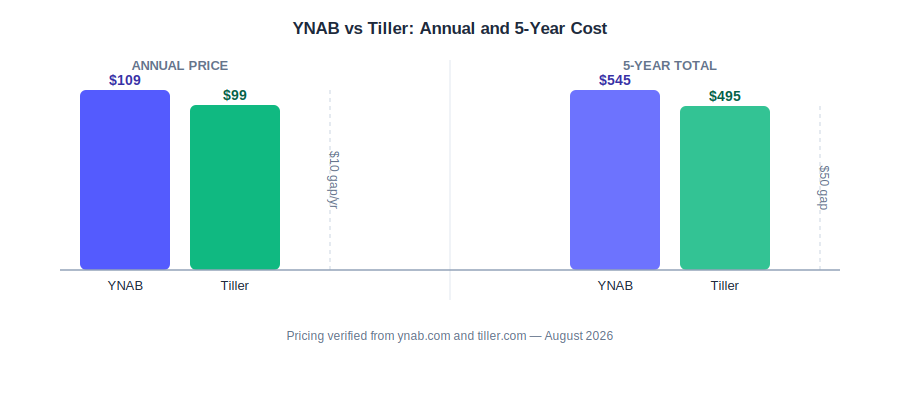
YNAB vs Tiller: the actual price gap is $10/year, or $50 over five years — smaller than most people assume.
| YNAB | Tiller | |
|---|---|---|
| Annual price | $109/yr | $99/yr |
| Monthly billing | $14.99/mo | Annual only |
| Free trial | 34 days, no card required | 30 days, card required |
| Student offer | Free 1 year (ynab.com/college) | Free 1 year (.edu email) |
| Refund policy | No formal policy — contact support | Satisfaction guarantee — contact support |
| 5-year cost | $545 | $495 |
Pricing verified from official websites — 13 August 2026.
One nuance worth flagging: YNAB’s 34-day trial requires no credit card, while Tiller’s 30-day trial does — you won’t be charged until day 31, but you need to remember to cancel if it’s not for you. On pure cost alone, tiller vs ynab tilts slightly toward Tiller, but only slightly.
Both student offers are legitimate full-access subscriptions, and if spreadsheet budgeting is your approach, Tiller’s student deal is exceptional value. If you want to see whether YNAB’s $109 clears its own break-even point for your situation, my YNAB ROI calculator runs the numbers based on what you’d otherwise overspend without a budget.
Which app has better features for budgeting?
YNAB has better built-in budgeting structure. Tiller has the higher customisation ceiling for spreadsheet budgeting. On features, tiller vs ynab isn’t close in either direction — each wins decisively on its own turf. Here’s the honest head-to-head on the features that actually matter day to day.
| Feature | YNAB | Tiller |
|---|---|---|
| Budgeting method | Zero-based (enforced) | Any method you build |
| Mobile app | Yes — iOS, Android, Web | No — Google Sheets app only |
| Bank sync | Plaid | Yodlee + Plaid |
| Customisation | Within YNAB’s framework | Unlimited — full spreadsheet access |
| Collaboration | Up to 6 users, one account | Google Sheets real-time sharing |
| Learning curve | 2–4 weeks | Setup time — spreadsheet comfort required |
Pricing verified from official websites — 13 August 2026.
One update worth noting on bank sync: Tiller now runs Plaid alongside its original Yodlee connection, so if one aggregator struggles with your bank, the other is available as a fallback. YNAB uses Plaid only. In practice, both sync reliably for most US banks, with occasional reconnection needed on either side.
If you’re evaluating Tiller specifically for spreadsheet budgeting workflows, the customisation row is where it separates itself completely. Pivot tables, conditional formatting, cross-sheet references, custom macros — anything Google Sheets can do, your Tiller data can power.
Which is better for couples?
Both tools support couples, but in very different ways. YNAB allows up to six users on a single subscription at no extra cost — you and your partner share the same budget, same categories, same view, with no setup complexity.
Tiller leans on Google Sheets’ native collaboration instead. Share the spreadsheet with your partner and you both get real-time access, with edits appearing instantly for both of you. No second subscription needed, but both partners need to be comfortable in Google Sheets, or one person ends up doing all the maintenance while the other just views.
For most couples, YNAB is the easier pick — the shared budget view is purpose-built for two people working toward common goals. Tiller’s collaboration is technically more flexible, especially if one partner already spreadsheet-budgets, but it asks more of both people upfront. For couples specifically, tiller vs ynab usually comes down to whether both partners, not just one, are comfortable in a spreadsheet. See my best budgeting apps for couples roundup for more options beyond these two.
Which is better for debt payoff?
YNAB has the edge here for most people. The envelope method naturally forces prioritisation — when every dollar gets a job, debt payments become a category you fund before discretionary spending. YNAB’s goal-setting features let you set a target payoff date and track progress visually, and the r/ynab community is heavily debt-payoff focused, which means built-in support and accountability.
Tiller’s community library includes a solid debt snowball template tracking multiple debts, minimum payments, and payoff order — fully customisable in a way YNAB simply can’t replicate. For modelling complex payoff strategies across several debts with different interest rates, Tiller’s flexibility wins. For just wanting to stop overspending and start throwing money at debt, YNAB’s enforced structure wins. For debt payoff specifically, tiller money vs ynab isn’t really a fair fight — YNAB’s guardrails do more of the work for less effort.
For strategies that apply no matter which tool you land on, see my how to get out of debt fast guide, and my debt payoff estimator can show roughly how fast either approach gets you to zero once you plug in your numbers.
Can you use YNAB and Tiller together?
Yes, and Tiller even acknowledges it. Their own FAQ notes that many subscribers run both tools at once, using a CSV importer to pull YNAB transaction history directly into a Tiller spreadsheet. This combo is popular among people who treat spreadsheet budgeting as a hobby as much as a habit.
The use case is niche but real: power users who love YNAB’s 4 Rules for day-to-day budgeting, but want Tiller’s spreadsheet flexibility for custom reporting, net worth tracking, or tax analysis. You live in YNAB’s interface for budgeting decisions, then export data into Tiller for the analysis YNAB’s own reports can’t replicate.
The honest take on running both: $109 + $99 = $208/year is a real commitment. It makes sense for finance-obsessed users with complex reporting needs — freelancers, landlords, small business owners. For most people budgeting a household income, running both is overkill. Pick one, get good at it, and revisit later if you genuinely outgrow it.
What’s the $10 mistake most people make in the YNAB vs Tiller decision?
The $10/year price gap between YNAB and Tiller is small enough that it shouldn’t be the deciding factor — but it’s the first thing most people compare, and that’s the actual mistake. Choosing the cheaper option and then never building the system you paid for wastes the whole subscription, not just $10.
Here’s how it plays out in practice. Someone picks Tiller because it’s $10 cheaper, then never sets up AutoCat rules or customises the Foundation Template — so they’re paying $99/year for a spreadsheet that just sits there. Someone else picks YNAB because it’s the “proven” choice, then never opens the app on their phone during the two-to-four-week adjustment window, so the $109/year structure never actually sticks.
In both cases, the real cost isn’t the $10 gap — it’s the full price of a tool you don’t use. This is the single most common way the ynab vs tiller decision goes wrong.

Tiller vs YNAB, settled in one question — skip the price comparison and start here instead.
The fix is simple: decide based on whether you already live in spreadsheets, not on which app costs $10 less. If Google Sheets is where you naturally track things anyway, that $99 will get used. If the thought of building your own budget system from a blank template sounds like a chore, YNAB’s structure is worth the extra $10 to have it handed to you.
What does Reddit say about YNAB vs Tiller?
The r/personalfinance and r/ynab communities have a consistent read on this comparison: it’s not about which app is objectively better, it’s about which type of person you are.
Spreadsheet-native users — people who already build their own trackers, work in finance or engineering, or just enjoy tinkering with formulas — tend to gravitate to Tiller and rarely look back. The recurring theme in these threads is that Tiller’s lack of a mobile app bothers people for the first week or two, then stops mattering once they settle into a habit of reviewing their sheet at a desk. In most tiller vs ynab threads, this is the single complaint that comes up before anything else.
People who tried spreadsheet budgeting first and found it didn’t stick tend to credit YNAB’s enforced structure as the thing that finally made budgeting click for them, especially the “give every dollar a job” rule.
A theme that shows up specifically in Mint-shutdown migration threads: people who had built custom categories and formulas in Mint-adjacent spreadsheets found Tiller was the closest thing to picking that workflow back up, since their existing spreadsheet habits carried over directly. Both camps are right for their own context — if you’re weighing other premium options beyond just these two, my YNAB vs Monarch Money comparison covers another common decision point people land on after this one.
Trust questions come up often in these threads too — variations of “is tiller safe” and “is tillerhq safe” (Tiller’s original company name) surface regularly from people who’ve never heard of the company before. Both get a straightforward answer in the FAQ section below.
Is Tiller Money vs YNAB really about data ownership?
In the tiller money vs ynab debate, data ownership is one of the most underrated differences — and it matters most at the moment you cancel. With Tiller, your spreadsheet lives in your own Google Drive or OneDrive permanently. Cancel the subscription and the daily bank feed stops, but every transaction, formula, and chart you’ve built stays exactly where it was. Nothing gets deleted or locked behind a paywall.
With YNAB, your budget lives on YNAB’s own servers while you’re subscribed. You can export a CSV of your transaction history at any time, but you lose access to the interface, the reports, and the running category history the moment you cancel — you’re left with raw rows of data, not the budget itself. Mint shutting down in 2024 is a useful reminder that even well-established services can disappear, though YNAB’s own longevity and export option make this a smaller risk than it was with Mint.

Data ownership only really shows its value the day you decide to cancel one of these apps.
Neither approach is wrong, but they reward different priorities. If owning your financial history forever, independent of any single company’s uptime, matters more to you than a polished interface, that’s a point in Tiller’s favour that the price comparison alone doesn’t capture. Strip away the marketing and tiller money vs ynab really is a permanence-versus-polish tradeoff, not a quality gap.
What are the most common questions about YNAB vs Tiller?
Is Tiller better than YNAB?
In the ynab vs tiller matchup, neither is objectively better — they serve different users. Tiller is better if you’re comfortable in spreadsheets and want total customisation and permanent data ownership. YNAB is better if you want a proven budgeting method with a polished mobile app and structured guidance. The $10/year price gap in Tiller’s favour is real but secondary to the philosophy and mobile-access question.
Is Tiller Money worth it?
Tiller is worth it at $99/year if you’re already comfortable in Google Sheets or Excel and want automated bank syncing without giving up control of your data. For anyone drawn to spreadsheet budgeting, it’s genuinely the best tool available at this price. It’s not worth it if you need a mobile app, hate spreadsheets, or want a structured budgeting method built in — the 30-day trial is the right way to find out before committing.
Is Tiller Safe to Use With My Bank?
Is tiller safe for real bank credentials? Yes. Tiller connects to your bank through Yodlee and Plaid, the same read-only aggregators used by most mainstream budgeting apps, so it never gets your login credentials directly and can’t move money.
Your transaction data flows one-way into a spreadsheet you control, which is arguably a safer long-term storage model than data trapped inside a single company’s app — if anything, slightly safer by design than a typical banking-linked app.
Is TillerHQ Safe? What Happened to the Old Brand Name?
Is tillerhq safe, or is it a sign something changed for the worse? Neither — TillerHQ is Tiller’s original company name, and you’ll still see it in older reviews, community threads, and some support email addresses. It’s the same company, not a separate or defunct entity — there’s no indication it’s unsafe or unrelated to the current Tiller product. If you want to verify legitimacy directly, tiller.com is the current, actively maintained domain to check.
Does Tiller Money have a mobile app?
No. Tiller has no dedicated mobile app. You access your budget via Google Sheets or Excel on your phone, which is functional but not purpose-built. If on-the-go transaction logging matters to you, YNAB is the better choice.
Can you switch from YNAB to Tiller?
Yes, and it’s straightforward. Export your YNAB transactions as a CSV file, then use Tiller’s CSV Line Item Importer to bring your transaction history into your Foundation Template. Your category structure carries over conceptually, but you’ll need to recreate it inside the Tiller sheet — most people complete the migration in under two hours. The one thing you lose: YNAB’s interface, methodology enforcement, and mobile app, so make sure you’re ready to build your own system before making the switch.
Choose YNAB if…
- You want a proven method, not a blank canvas
- You check your budget on your phone daily
- You’re new to intentional budgeting
- You’re actively paying off debt and need guardrails
- Spreadsheets feel like work, not fun
Choose Tiller if…
- You live in Google Sheets or Excel already
- You want to own your data, not rent access to it
- You have complex finances — freelance, side income, investments
- You do your budget review at a desk, not on your phone
- You came from Mint and had custom spreadsheet workflows
Whichever one you land on, the $10/year price gap shouldn’t be what tips the decision — how you already relate to spreadsheets should. Pick the one that matches your habits today, not the one that’s marginally cheaper, and you’ll actually still be using it a year from now. That’s the whole ynab vs tiller decision, once you strip away the $10 distraction.
📚 Read Next
- YNAB Review 2026 — Is It Worth $109/Year?
- Tiller Money Review 2026 — Powerful But Not for Everyone
- YNAB Pricing 2026 — Full Plan Breakdown
- Tiller Money Pricing 2026 — What You Actually Pay
- YNAB 4 Rules Explained — The Method Behind the App
- YNAB for Beginners — Getting Through the First Month
- Best YNAB Alternatives 2026
- YNAB vs Monarch Money 2026
- How to Get Out of Debt Fast — Strategies That Work
- Best Budgeting Apps for Couples 2026
